



Pulse-Eight USB CEC Adapter Review
by Ganesh T S on January 24, 2012 7:45 PM EST- Posted in
- Home Theater
- HDMI
- Pulse-Eight
- CEC
Pulse-Eight traces its roots to XBMC and concentrates on hardware products (such as pre-built XBMC-based HTPCs and HTPC accessories). One of their most attractive products is the USB CEC adapter, aimed at providing PCs with HDMI CEC functionality. While almost all HTPC oriented GPU cards have HDMI outputs, none of them have CEC functionality. There are a number of CEC solutions for PCs, but none of them are as affordable as the Pulse-Eight USB CEC Adapter that we will be talking about.
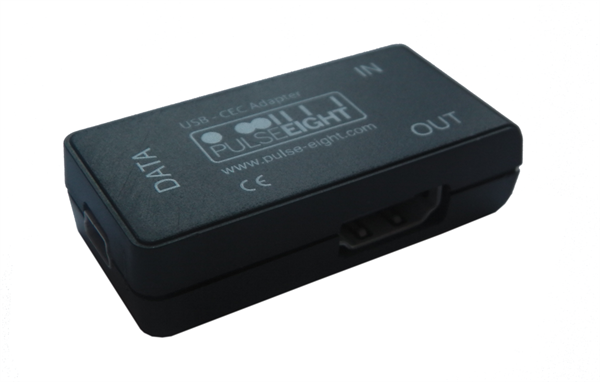
Before going into the details, let us have a small detour to talk about HDMI's CEC feature.
HDMI CEC - A Primer
CEC stands for Consumer Electronics Control. It is implemented as a single wire bus in the HDMI connector (pin 13). It allows various HDMI-enabled products to connect and communicate with each other. The intent is to enable one remote control to interface with all the A/V components. Before we go into further details, let us get the Wikipedia link out of the way. It provides a very high level view of what CEC can do for the end user, and the various names under which it is advertised by the TV manufacturers. Various message opcodes can be exchanged between the connected systems in order to do device specific actions (like recording on a STB/DVR) or get general information across (like transferring remote control key press details).
In any HDMI setup, the display is considered to be the root, and gets allocated two special tags, a physical address of 0.0.0.0 and a logical address of 0. In any given system, all CEC enabled devices have both physical and logical addresses, while the non-CEC devices have only physical addresses. Physical addresses are taken up based on the position of the device with respect to the root. For example, if an A/V receiver's output is connected to HDMI1 of the TV, it gets the physical address 1.0.0.0. A device connected to the first HDMI input port of the A/V receiver would get the address 1.1.0.0, while one connected to the second HDMI port would get 1.2.0.0. Logical addresses are taken on by the devices depending on their functionality (as mandated by the CEC specifications document). When the HDMI device menu is brought up on the display (On a Sony KDL46EX720, this is achieved by pressing the Sync Menu button), the display sends a broadcast over the CEC wire to all the downstream devices. It then collects the responses arriving over the CEC wire and presents the user with a list of CEC enabled devices. Choosing one of them ensures that future remote key presses are transferred by the TV to that particular address.
If you are interested in learning about the bus protocol and a bit more in-depth overview, I suggest taking a look at QuantumData's excellent CEC whitepaper (PDF). For more details on the various messages which can be exchanged between the devices, the full CEC specifications from the official HDMI documentation may be perused (PDF).
CEC Solutions for HTPCs
CEC is more popular in consumer electronics equipment compared to HTPCs. As of December 2011, none of the video cards with HDMI output support it. The closest we have come to a big vendor officially supporting HDMI CEC is the Intel DH61AG mini-ITX board with its HTPC header, but it still requires a third party board (something that is not available in the market yet). The HTPC header provides a number of useful features such as a recording LED pin and a CEC pin which can be used by third party boards to implement CEC functionality. You can find out more about the DH61AG itself on MissingRemote.
CEC functionality has been an oft-requested feature from home automation solution developers as well. The first step towards getting CEC functionality in PCs involved some hardware mods as described in this link. A few companies built upon this solution and offered plug-and-play gadgets currently priced around $75. RCAware and RainShadow Tech are the players in that price range. Kwikwai's HDMI CEC-Ethernet-USB-Serial bridge is for high end home automation and is appropriately priced around $370. Kwikwai also runs the CEC-O-Matic website, which helps developers in decoding and creating CEC frames for communication. For the general user, it also gives an idea as to what can be achieved in a home automation system using CEC.
Pulse-Eight's solution, coming in at $48 is the cheapest and most recent option to come up. Since Pulse-Eight works closely with XBMC, support for the CEC adapter comes built into XBMC Eden. In the remainder of the review, we will take a look at the USB CEC adapter package, a description of our testbed, and how we went about installing the drivers. Following this, we take a look at how the adapter works in conjunction with XBMC Eden. In the final section, we will see what lies ahead for Pulse-Eight and its CEC initiative.


 Facebook
 Twitter
 RSS
RSS


22 Comments
View All Comments
NickB. - Tuesday, January 24, 2012 - link
Really appreciate the love and attention for the HTPC and XBMC world.shadowarachh - Tuesday, January 24, 2012 - link
it's mini USB.just sayin...
ganeshts - Tuesday, January 24, 2012 - link
oops! sorry, corrected nowr3loaded - Wednesday, January 25, 2012 - link
Why is this tech not integrated into any graphics cards (whether that be Intel/AMD/Nvidia)? It's so useful, a box like this shouldn't have been necessary in the first place.Malard - Wednesday, January 25, 2012 - link
lots of various reasons, mainly support, there are so many variants of the CEC implementation that it is not financially viable for all the vendors to re-roll the CEC library required each time, on top of that, then needing to expose it at the driver level.If they advertise that their GFX card supports CEC and it doesnt work with that particular TV as expected then the customer will return it, despite the graphics card being fine. Resulting in an expensive lost sale
mckirkus - Wednesday, January 25, 2012 - link
Hence "This is an unsupported beta feature"Malard - Wednesday, January 25, 2012 - link
Well, its not unsupported in our adapter, but GFX card vendors stay clear etcMobiusStrip - Saturday, April 7, 2012 - link
What percentage of TVs support CEC? And how is that distributed across models from the last few years? How new does a TV have to be for there to be a reasonable chance of it supporting CEC?Jsw98765 - Wednesday, January 25, 2012 - link
Im really hoping ivy bridge motherboards start including the htpc header. Ivy bridge sounds like a htpc wet dream. I'd love to get rid of the extra wires that my harmony rf extender brings into the picture.Growing up I was promised a future of flying cars and hover boards, but I'll settle out of court right now for the removal of wires. Induction power, and everything else communicating wireless. Maybe someday, but the cec stuff does sound pretty awesome until then.
nubie - Thursday, January 26, 2012 - link
If I read this correctly, all one needs to do is solder a single wire on the HDMI port to enable this on any motherboard or graphics card?Sign me up, I have plenty of re-work style wrapping wire. I don't need a lousy "htpc" header.
If the internal style would plug directly into the usb header and then I solder 1 wire, I would be completely set.
I don't own an HDMI TV unfortunately, but the day will come, and I will be ready.