



Dell U2713HM - Unbeatable performance out of the box
by Chris Heinonen on October 4, 2012 12:00 AM ESTDell U2713HM Color Quality
When testing the Dell U2713HM my standard way, using a 2010 Macbook Air, my initial performance numbers were not very good at all. Some investigation found that on the MacBook Air when using DisplayPort sends YCbCr color information instead of RGB color information, and so I was getting worse results. Using a StarTech MiniDP to DVI adapter let me drive the Dell at full resolution but in the RGB colorspace. This issue didn’t happen with an ATI or NVIDIA card, so I have to think it was something specific to the MacBook. When using this display, make sure to check the video signal format, as it handles RGB much better.
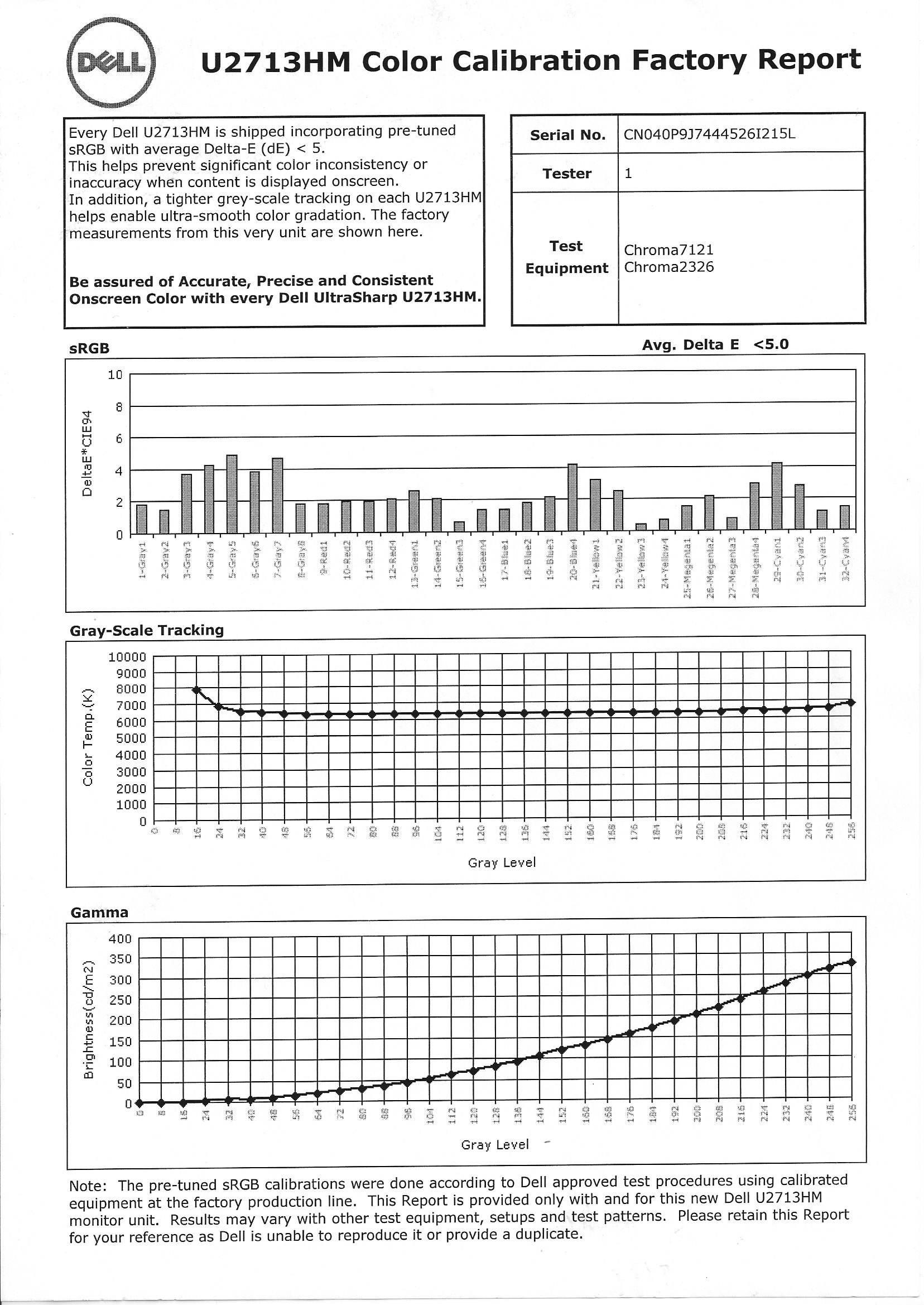
Dell includes a report for how the monitor should perform, and unlike other vendors that promise a certain dE, Dell shows what they tested and what the results are. These only apply to the included sRGB mode in the display, so you should make sure to use that, and reset your video card LUT, to achieve these results.
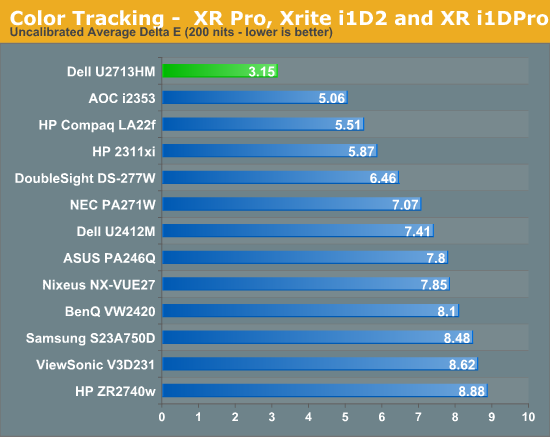
Our targets for calibration are D65 for the white point, 200 nits of light output, a gamma of 2.2, and a minimum black level. Once set up correctly, using the included profile and sRGB mode, the Dell provides the best out-of-box performance that I’ve measured so far. The average dE is only 3.15 and the maximum value is only 5.75, which is lower than the average of most displays. Dell includes a calibration report in the box and in this case it really seems to have paid off. For most people, this will likely be good enough performance as it is quite accurate and the errors should be mostly invisible to the naked eye.

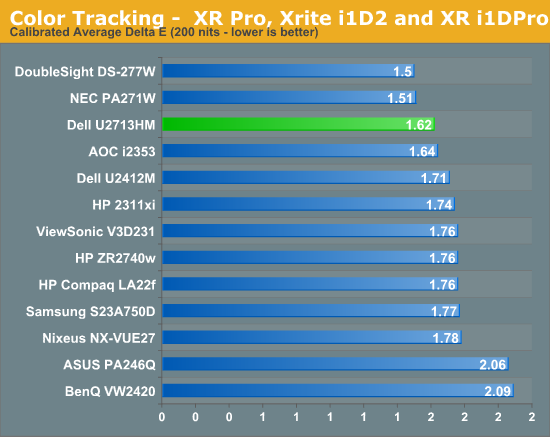
With such stellar out-of-the-box numbers I had really high hopes for how the Dell would perform after a calibration. For reference, in YCbCr mode I only managed to calibrate to a dE of around 3, which is far worse than the 1.62 from RGB mode. This outperforms almost all of the 27” displays seen to this point, and those that do out-perform it cost significantly more. There are no issues with the grayscale or anything else after calibration, and you wind up with a very nice, accurate image. It is significantly better than the pre-calibration one, but many users will be fine without the extra step.
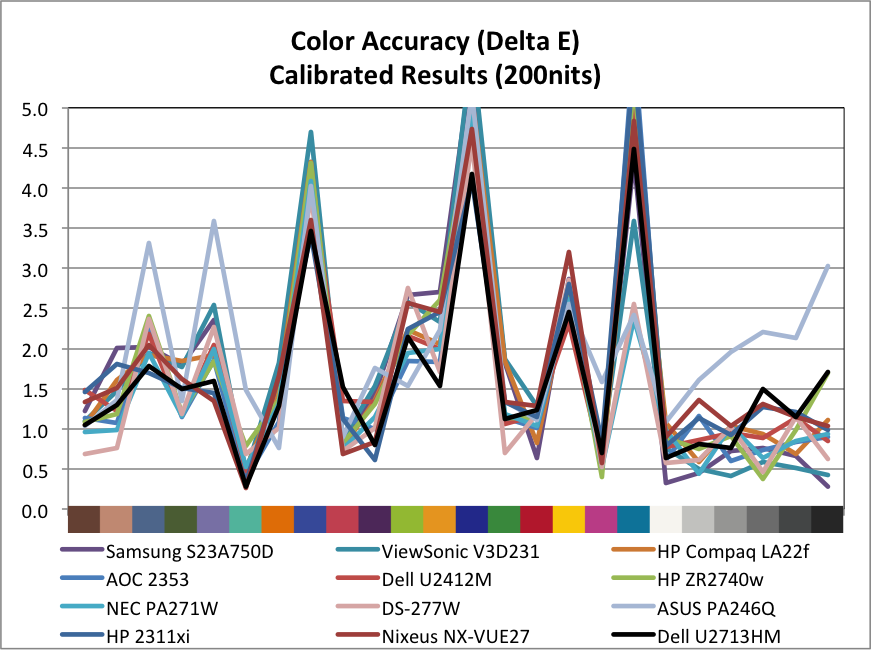
When targeting 100 nits of light output for print work, we see a dE of 1.85, which is good but not as excellent as the 200 nits numbers are. On this test the best monitors manage to do much better with those tricky shades of blue than the Dell does, but this doesn’t really worry me that much. Blue is the color we are least sensitive to, so errors in blue are more acceptable than errors in greens or reds. The Dell produces very accurate shades of green and well-rendered skin tones, making it a good choice for more color sensitive work. It isn’t as excellent as the NEC is, but it is around half the price.
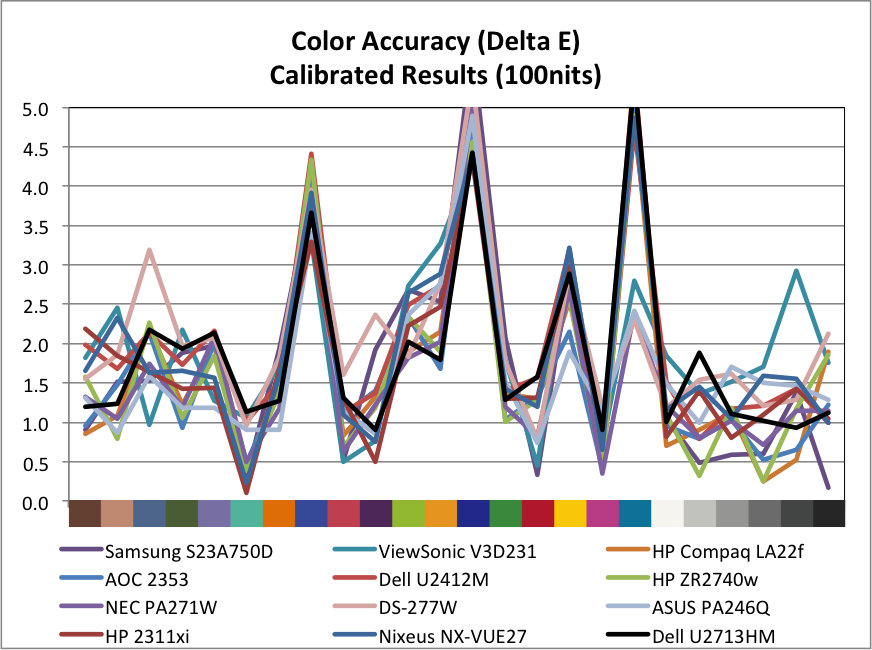
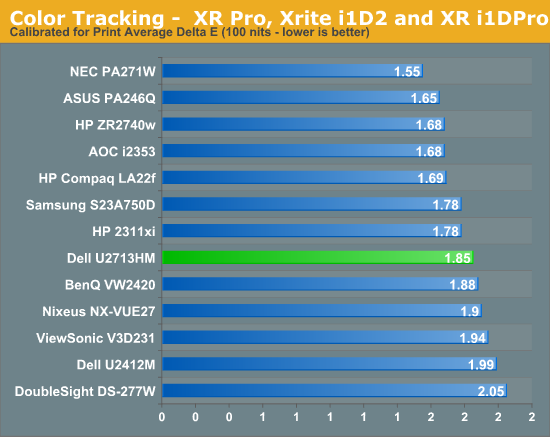
Overall the Dell has very good results on the calibrated results, and the best results that I have seen by far on the pre-calibration numbers. If you want accurate color but don’t own equipment to do the calibration yourself, Dell provides results better than anything else I have seen and the included calibration report and testing hopefully means this isn’t just a random sample that happens to be excellent.
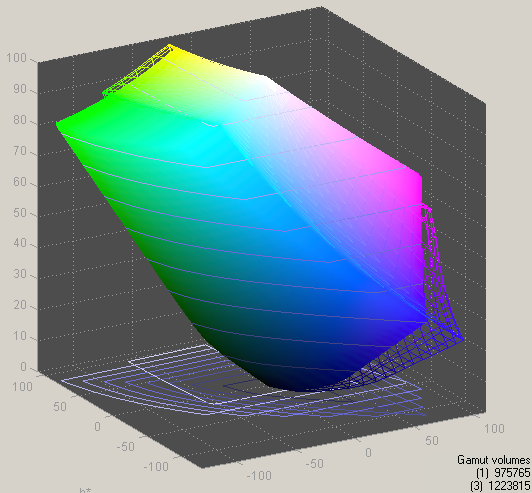
As with all the LED backlit 27” IPS displays, we see the sRGB gamut being covered but not AdobeRGB gamut coverage. The Dell manages to cover over 79% of the AdobeRGB gamut, which is pretty good for a panel without special backlighting, so for normal sRGB work it should do a very good job.
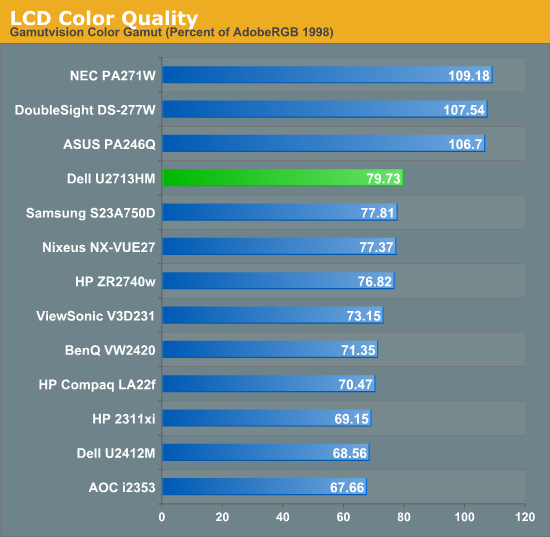


 Facebook
 Twitter
 RSS
RSS


101 Comments
View All Comments
blackmagnum - Thursday, October 4, 2012 - link
I find Dell's monitors have good price/ performance ratio. They might not be as cheap as the Koreans, but last a while longer and have better support. When will they have 4K monitors...p05esto - Thursday, October 4, 2012 - link
Agreed, if you are doing professional work and using the monitor day in and day out what's a couple hundred extra dollars? For gaming and casual stuff, then sure....take a chance.rs2 - Thursday, October 4, 2012 - link
A couple hundred? Probably nothing. But when you can get a roughly equivalent monitor from Korea for ~$320, the extra $380 dollars is enough to buy a second 2560x1440 display and run them in a dual-monitor setup.hrrmph - Saturday, October 6, 2012 - link
First 27" with an all-USB 3.0 Hub. That alone is worth something.Amazon has them available for pre-order at $705:
http://www.amazon.com/Dell-U2713HM-CVN85-27-Inch-L...
I've got one on order and I hope these are going to last as long as the several HP LP2465 monitors that I've been using for most of a decade. The USB hubs in those were incredibly reliably as well, and I'm hoping that the all-USB 3.0 hub in this Dell 27" model is up to the task.
As far as value goes, sure the Korean models might be good for a second or third monitor, but with the Dell you *should* get grade A quality (at least for an enthusiast, if not for the professional), under a fairly full kit of options and functionality.
For something that I'm hoping might last 10 or 15 years, like my other monitors, the probable annual amortized cost difference is fairly negligible.
Too bad they had to drop to 24-bit (from 30-bit) to get the cost under control. Still, if the USB 3.0 hub can handle everything I throw at it and the monitor can still offer up better resolution than my existing 1920 x 1200 monitors, then its a great value.
-
sonny73n - Sunday, October 7, 2012 - link
The Korean monitors (Achieva, Yamasaki... just to name a few) you're talking about use LG eIPS display. Actually those LG displays are rejects or did not meet quality requirements for Dell or HP. You'll probably get at least a couple dead pixels on those Korean monitors. Who knows what other defects they might have. That's why they're much cheaper.Ever heard of Dell Zero dead pixel policy?
Stealth Pyro - Tuesday, August 13, 2013 - link
Not accurate it in the slightest. A lot of them actually have perfect pixels without you even buying into the perfect pixel markup scam. When Dell/HP/etc. reject the displays, it doesn't at all mean that they had dead pixels. There might have been other defects with DELL'S PCB's or other internal components, and then these Korean manufacturers buy all those monitors deemed as defective and pull the panels (that are just fine) to put into their own monitors.TheJian - Monday, October 8, 2012 - link
ROFL@anyone willing to give their CC# to a Korean company from ebay etc. Even the ones on Amazon have 1 review, a Gmail address for returns/help, no about page, a blank faq page, no phone# to call etc. How dumb can you be to buy one of these? If you don't even own a domain I can't be bothered to even think about your company as relevant to my purchases...LOL.The only way this would be an option is if I WAS IN KOREA and down the street from your company :)
Dell is the wiser choice here (or any other US based company with an actual website and a phone#).
Stealth Pyro - Tuesday, August 13, 2013 - link
-_- eBay sellers don't get your credit card number when you buy from them. Money is transferred via PayPal.Deo Domuique - Thursday, October 4, 2012 - link
How do you know the Dell lasts a while longer? Like we know everything about the Korean monitors.It's double price. If it was 100 or 150$ more, we could talk, but double price? Certainly I'd prefer a Korean monitor, but unfortunately a little hard to find in my country, yet...
Stealth Pyro - Tuesday, August 13, 2013 - link
Doesn't last shit longer. I've had my Crossover going just fine for over a year and I don't even turn it off (something a lot of paranoid owners do to increase its lifespan).