



Alienware X51: The Xbox With Teeth
by Dustin Sklavos on February 17, 2012 12:00 AM ESTIntroducing the Alienware X51
While Alienware isn't openly inviting comparisons to Microsoft's Xbox 360 with their brand new X51 gaming desktop, it's hard not to see the resemblance, at least in form factor. But where Microsoft's aging console continues trudging away with generations old hardware, Alienware has produced an authentic Windows 7 gaming PC in a shell roughly the same size. Not just that, but they're introducing it at one of the lowest prices we've ever seen for what's ordinarily a very premium brand. Was Alienware able to cram a fully-powered machine in this tiny chassis, or were too many sacrifices made?
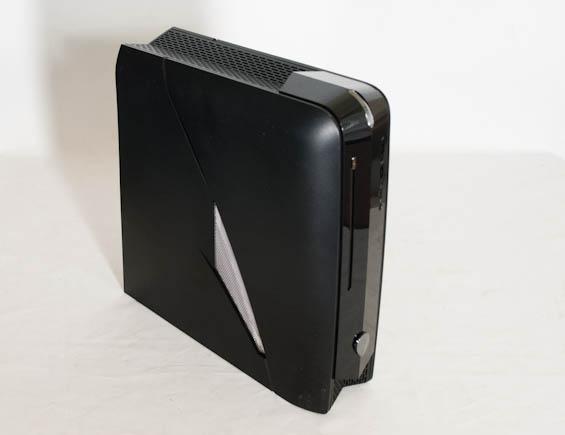
The X51 is basically the size of an Xbox 360, but the insides are pure PC: Alienware employs a Mini-ITX motherboard, desktop-level Sandy Bridge Intel processors, and a full-sized double-slot graphics card (rotated ninety degrees and connected via a riser card to the PCIe 2.1 x16 slot).
The component options available are listed below, and we've bolded the items from our review unit where applicable. Alienware currently has four models listed, with slightly varying specs. Our unit is the $949 model with an upgrade to 8GB RAM, though it's of course possible to upgrade other areas on your own.
| Alienware X51 Specifications | |
| Chassis | Custom Alienware X51 |
| Processor |
Intel i7-2600 (4x3.4GHz, Hyper-Threading, Turbo to 3.8GHz, 32nm, 8MB L3, 95W) Intel Core i5-2320 (4x3GHz, No Hyper-Threading, Turbo to 3.3GHz, 32nm, 6MB L3, 95W) Intel i3-2120 (2x3.3GHz, Hyper-Threading, No Turbo, 32nm, 3MB L3, 65W) |
| Motherboard | Custom H61 Chipset Board |
| Memory |
2x4GB Hynix DDR3-1333 2x2GB DDR3-1333 |
| Graphics |
NVIDIA GeForce GTX 555 1GB GDDR5 (OEM) (288 CUDA Cores, 736/1472/3828MHz core/shaders/RAM, 192-bit memory bus) NVIDIA GeForce GT 545 1GB GDDR5 (OEM) (144 CUDA Cores, 870/1740/3996MHz core/shaders/RAM, 128-bit memory bus) Intel HD 2000 IGP (6 EUs, 1100MHz core clock) |
| Hard Drive(s) | Seagate Barracuda 7200.12 1TB 7200RPM SATA 6Gbps HDD |
| Optical Drive(s) |
HL-DT-ST DVD+/-RW GA31N slot-loading drive Blu-ray/DVDRW Combo slot-loading drive |
| Power Supply |
330W Custom 240W Custom |
| Networking |
Dell Wireless 1502 802.11b/g/n (150Mbps 2.4GHz) Realtek PCIe Gigabit Ethernet |
| Audio |
Realtek ALC892 Speaker, mic/line-in, surround jacks, optical out and S/PDIF for 7.1 sound |
| Front Side |
Optical drive 2x USB 2.0 Headphone and mic jacks |
| Top | - |
| Back Side |
Optical and S/PDIF HDMI (IGP) 4x USB 2.0 Ethernet 2x USB 3.0 Speaker, mic/line-in, surround jacks 2x DVI-D (GeForce) 1x Mini-HDMI (GeForce) |
| Operating System | Windows 7 Home Premium 64-bit SP1 |
| Dimensions |
12.54"-13.5" (back-front) x 12.52" x 3.74" (318.5-343mm x 318mm x 95mm) |
| Weight | 12.1 lbs. (5.49kg) |
| Extras |
External PSU Integrated 802.11b/g/n User-configurable external lighting NVIDIA Optimus |
| Warranty | 1-year parts, labor, and support |
| Pricing |
Starts at $699 Review system configured at $999 |
Alienware keeps the configuration options for the X51 pretty lean, but they benefit tremendously from being a subdivision of Dell as opposed to a standalone boutique. The X51 enjoys a custom chassis design just like all of Alienware's hardware does, but they also have access to OEM only graphics hardware.
The entry level system offers Intel's Core i3-2120 dual-core processor, certainly plenty for gaming, and pairs it up with NVIDIA's GeForce GT 545. Our review unit steps each of these up to the next available part: the Intel Core i5-2320 and GeForce GTX 555. Unfortunately the X51 maxes out at the GTX 555 while the processor can be upgraded to a Core i7-2600 for users who want an extra 400MHz plus Hyper-Threading on the CPU.
The GT 545 and GTX 555 are odd birds in and of themselves, but the graphics card in the X51 is user upgradeable. So why these parts? The GT 545 is a touch above entry-level; it's a GDDR5-equipped part (OEM only as opposed to the DDR3-equipped retail parts) and sports a cut-down GF116 GPU, with 144 CUDA cores and a 128-bit memory bus hooked up to 1GB of GDDR5. The chip is clocked at 870MHz (putting the shaders at 1.7GHz) and the memory is clocked at an effective 4GHz.
More compelling is the GeForce GTX 555 that our review unit is equipped with. Due to limitations on the X51's external power supply, the X51 can't handle graphics cards rated for more than 150 watts. Thankfully the GTX 555 maximizes that power envelope; it employs a trimmed-down GF114 GPU with 288 CUDA cores enabled along with a 192-bit memory bus and 1GB of GDDR5. That's an asymmetrical memory configuration just like the desktop GTX 550 Ti has but on different silicon. The GPU itself is clocked at 736MHz (for 1472MHz on the shaders) and the memory runs at an effective 3.8GHz. Note also that models that ship with the upgraded GTX 555 GPU get the larger 330W external power brick, so if you're thinking about upgrading to a different GPU in the future you will most definitely want to go with the higher spec system.
The icing on the graphics cake is that the X51 is the first instance of desktop Optimus we've seen. That's right: you can actually plug your monitor into the IGP's HDMI port and the tower will power down the GPU when it's not in use. This implementation functions just like the notebook version does, and it's a welcome addition.
Where I think Alienware does lose a point is in the storage configuration. Understanding internal real estate is at a premium, the single 3.5" drive bay still hurts a little at a time when the ideal system configuration is an SSD for a system drive and a mechanical disk for storage. The 1TB Seagate Barracuda 7200.12 included isn't bad, but it will hurt the X51 in PCMark testing and detracts a little from the overall user experience. Given the sloped shape of the chassis, however, we would have preferred a modified design with space for a 2.5" SSD/HDD at the back. That said, the X51's motherboard has enough SATA ports for you to remove the 3.5" drive and replace it with a pair of 2.5" drives, so the enterprising end user can opt to install an SSD and notebook hard drive.
Finally, the X51 supports USB 3.0 on the back, has a slot-loading optical drive that can be upgraded to a Blu-ray reader, and has wireless networking included on a user-replaceable mini-PCIe card that's mounted to the motherboard.
The final price of $1000 for our review unit gets you a very interesting piece of hardware, though obviously there's a price premium for going with the custom Mini-ITX chassis, PSU, etc. You could put together a similar system in terms of performance with a Micro-ATX case/motherboard for under $800 quite easily, but if you want to go the Mini-ITX route things become a bit more difficult--both in terms of finding hardware that will all fit and work together well, plus the assembly process in ITX chassis generally requires more time and effort than mATX. Overall then, the price and specs are very reasonable, so let's see what this black beauty can do on the race track.


 Facebook
 Twitter
 RSS
RSS


59 Comments
View All Comments
jeremyshaw - Friday, February 17, 2012 - link
o.0 Well... that's a new one I didn't expect to ever see, lol.ViperV990 - Friday, February 17, 2012 - link
I'm a little surprised at the low power consumption at 172W under load.Have you tried, or will you consider trying to run a stronger card in the system? I'm very curious whether the system can handle a 6870, 6950, 560Ti, 560Ti448, or 570 with relatively little down side to the power supply's longevity.
KineticHummus - Friday, February 17, 2012 - link
It is limited to a gpu pulling 150 watts or less. to my knowledge, none of those cards would work, except MAYBE the 6870. not sure thoJarredWalton - Friday, February 17, 2012 - link
I'd think that unless you want to try the Molex-to-PEG adapter route, your biggest limit will be GPUs that can work off a single 6-pin PEG connection. Of the available GPUs right now, that eliminates anything above the HD 6850 (so no 6870 or 6950) on the AMD side. The HD 7770 would work, but that's actually slower than the 6850 in most games so let's not worry about that one. As for the NVIDIA side, the GTX 555 is actually pretty well specced, all told. The GTX 550 Ti is a step down from the GTX 555, while the GTX 560 uses two 6-pin PEG connectors.Of course, the 330W PSU is probably potent enough to actually power one of the moderate GPUs that use two 6-pin connectors. Looking at our power numbers here http://www.anandtech.com/show/5541/amd-radeon-hd-7... (which include a much beefier CPU that's running overclocked), you could "safely" go with something like the HD 6870 or the GTX 560. Those two GPUs trade blows in our gaming tests, and I'd probably give a slight edge to NVIDIA on performance, but the HD 6870 wins out with better overall power characteristics. If you're really daring, you could even try for an HD 6950 or HD 7950, but then you're really pushing the envelope (http://www.anandtech.com/show/5476/amd-radeon-7950...
My best recommendation however would be to wait and see what AMD can do with their Pitcairn GPU. I'd expect power to be in the <150W range on the HD 7850 and probably not much more than that on the 7870 (yeah, I'm taking a guess at the card names). Judging by the HD 7770 and HD 7950 results, performance should also be very good, assuming it lands about midway between those two. NVIDIA might also have some reasonable options with Kepler when that comes out (and you might be able to keep Optimus support). But I'm not going to recommend buying an X51 right now just to upgrade the GPU, no.
If you don't like the GTX 555 setup for $950, I think your best bet is to wait for the Ivy Bridge refresh in April -- probably May for Alienware/Dell to update the X51? Then you could probably get an equivalent IVB CPU that's somewhat faster than the i5-2320 and has better power characteristics, and you get HD 4000 graphics onboard as well (which will surely be better than HD 2000, even if they might not be awesome). What's more, there's a reasonable chance the next refresh will also have support for a mainstream Kepler card that should outperform the GTX 555.
All you have to do is wait a few months and something better will come along. Except, then there's another "something better" a few months after that. :-)
Calin - Friday, February 17, 2012 - link
There's always something better down the road.Great article, and that's a wonderful little system.
ViperV990 - Friday, February 17, 2012 - link
(replying to both Jarred and Roland)Given the X51's video card limitations, I wonder how it'd compare to a system built on the Shuttle H67 barebone, with or without the 500W first-party P/S upgrade.
Also, regarding desktop Optimus support, I seem to remember the Z68 supporting something similar, but with a performance hit. How exactly is desktop Optimus different?
extide - Friday, February 17, 2012 - link
Several of the Z68 boards support the Lucid Logix Virtu stuff, which is similar to Optimus.JarredWalton - Friday, February 17, 2012 - link
It's similar but only in the loosest sense. I don't know precisely how Lucid's tech works at a low level, but AFAIK it requires profiles for the games/apps to use the dedicated GPU, just like Optimus. Last I looked, the list of titles supported by Lucid was a lot shorter than the Optimus list.theclocker - Sunday, June 3, 2012 - link
Probably the best post I have seen about what the X51 in terms of what is has and what you can do as it is configured at the moment. I would add....The 7850 is a PCIx3.0 card, while the spec for 3.0 is backwards compatible, the specs given for the 7850 are in PCIx3.0. I don't own one, haven't tried this set up, but unless the motherboard in the X51 supports PCIx3.0 the 7850 probably won't run at full throttle as advertised. Let's assume this isn't the case for the next few paragraphs.
I at first wasn't sure about your advice you gave on certain cards, but rather than being a troll (hate it when people post without doing at least some research before posting) I did some looking into what you are saying. It appears with current die technology the AMD7850 is a step up and those who claim to have upgraded to the GTX560 have seen some improvements.
According to what wiki radeon7850 shows is : a GT rate of 55 and memory at 153 GB rate. Nvidia says the GTX560 comes in at (non OC keeping power usage down) GT rate of 45 and memory in 128 GB rate. All this compared to the standard best card offered GTX555 GT rate of 37 and memory at 92.
The 7850 comes in at 1.48x's the GT rate and 1.66x's GB rate higher and the GTX 560 gt rate1.2x's and 1.4x's GB rate, I couldn't agree more with your advise that your going to spend $1150 for X51 then shell out @150 for a GTX560 or @240 for a 7850. Although you could recoup a little back if you felt safe selling the GTX555, no thank you as you said.
The X51 is not all bad for what it is, most everyone is incorrectly comparing it to the normal tower PC. Anyone who has built that small home theater PC and what it lacks compared to a tower PC knows there are limitations as most of those mini boxes only have a few hundred watts to play with.
The X51will probably migrate to a better offering further down the road, as there are quite a few reviews mostly liking it, followed by a lot of haters in the comments. Never the less, you could read all day long and never hit the same website twice with all the buzz Alienware has created with the X51.
As a profession Electronic Technician for 28yrs and dealing with the design and repair of switching power supplies, I do like the external supply idea. It removes one of the more offending heat sources, but this has been somewhat alleviated with new designs in cases separating the area where the power supply resides from the motherboard area. However I would like to see some active cooling to these bricks as they probably will go higher than 330w. A sealed brick of this type of power (and higher if this idea flies), they tend to get quite warm.
Sufo - Friday, February 17, 2012 - link
Instead of upgrading, how about a hefty overclock? I know that the mobile 555 can achieve close to a 100% OC (not sure if the 2 cards have anything in common bar the name tho). Either way, there seems to be about 100W and 5-10C safe wiggle room for power and temp, you could squeeze another 40-50% out of that I bet.