



10G Ethernet: More Than a Big Pipe
by Johan De Gelas on November 24, 2010 2:34 PM EST- Posted in
- IT Computing
- Networking
- 10G Ethernet
I/O Consolidation
In our previous article, we showed that thanks to multi-queue technology, 10G Ethernet can deliver about 9 Gbit/s per second. We compared it with the typical link aggregated quad-port gigabit “NIC”. Quad-port link aggregation (IEEE 802.3 ad) is considered the “sweet spot”, both from a performance and an economic point of view. The results made 10G Ethernet really attractive: 10Gbit Ethernet actually consumed less CPU cycles than the quad-port link aggregated solution while delivering more than twice the bandwidth (9.5 Gbit/s vs 3.8 Gbit/s). It also features lower latency than quad-port NICs.
And 10G is hardly expensive: the least expensive dual 10G NICs cost about 50% ($600-700) more than the quad-port gigabit NICS ($400-450). Even the more expensive 10G cards (>$1000) offer a competitive bandwidth (2x 10G) per dollar ratio and offer a much better performance per watt ratio too. Typical power usage of dual 10G card is between 6W to 14W. The best quad gigabit NICs go as low as 4.3 W, although 8.4W is also possible.
10G Ethernet is much more than “a bigger pipe” for your (virtualized) network traffic. Let our knowledgeable IT professionals commenting on our last 10G Ethernet article enlighten you:
“In the market for a new SAN for a server in preparation for a consolidation/virtualization move, one of my RFP requirements was for 10GbE capabilities now. Some peers of mine have questioned this requirement stating there is enough bandwidth with etherchanneled 4Gb NICs and FC would be the better option if that is not enough. The biggest benefit for 10Gb is not bandwidth, it's port consolidation, thus reducing total cost.”
To understand this just look at the picture below.
A virtualized server might need I/O ports for:
- Console and management traffic (Ethernet)
- VM migration (Ethernet)
- VM Application network I/O (Ethernet)
- Block Storage I/O (Fibre Channel)
- File Storage I/O (Ethernet)
For speed and availability reasons, you quickly end up with two ports for each traffic flow, so you might end up with up to 10 ports coming out of one server. You might even need more: an IP based KVM to access the physical host and another port for server management interface (ILO, DRAC…).


 Facebook
 Twitter
 RSS
RSS


38 Comments
View All Comments
blosphere - Wednesday, November 24, 2010 - link
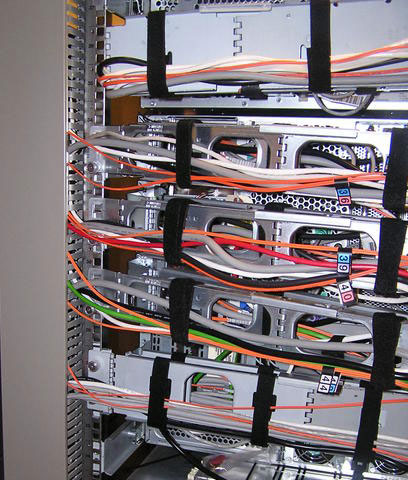
Oh my cable arms on the first page pic :(And about the consolidation, you don't want to do it that way. The proper way is to have two 1-port 10g cards or if you're counting every dollar, one 2-port card. Then you set the production traffic to active/standby config (different vlans of course) and when configuring the vmotion/vkernel port you go and override the port failover order to reverse the port priority from the production traffic (own vlans of course).
This way you utilise both ports on the cards and you have mediocre HA (not that vmware should be called a HA system in the first place) since the production would failover to the vmotion/vkernel port and vice versa.
All this stuff is in the vmware/cisco whitepaper. Deployed already a few years ago to our datacentres worldwide, around 100 esxi hosts and 3000+ vm guests, works like charm when things start going wrong. Of course vmware itself does cause some problems in a port loss situation but that's a different story.
mino - Wednesday, November 24, 2010 - link
Agreed, Agreed and again Agreed :).Dadofamunky - Thursday, November 25, 2010 - link
Two thumbs up for this.DukeN - Wednesday, November 24, 2010 - link
And what type of switch would actually have the switching capacity to push this type of traffic through in a dedicated manner? That is a cost to be considered.That being said, I think well priced FC might still be better from a CPU usage standpoint.
mino - Wednesday, November 24, 2010 - link
FC is better at everything! Problem being, it is a "bit" more expensive.So for an SMB or storage IO light apps? 10G all the way.
For an enterprise database stuff? Think about it very thouroughly before commiting to 10G. And even then,you better forget about iSCSI.
Consolidating everything-ethernet info 2*10G ? Great. Just do it!
But do not forget to get security boys on-board before making a proposal to your CIO :D
No, even Nexus 1000V would not help you ex-post ...
Inspector2211 - Wednesday, November 24, 2010 - link
Myricom was one of the 10G pioneers and now has a 2nd generation lineup of 10G NICs, with any phsyical connection option you can imagine (thick copper, thin copper, long range fiber, short range fiber).I picked up a pair of new first-gen Myricom NICs on eBay for $200 each and will conduct my own performance measurements soon (Linux box to Linux box).
iamkyle - Wednesday, November 24, 2010 - link
Last I checked, Myricom has no 10G over CAT5e/6 UTP product available.mianmian - Wednesday, November 24, 2010 - link
I guess the lightpeak products May first hit the 10G Ethernet market. it will greatly reduce the cost&energy for those servers.mino - Wednesday, November 24, 2010 - link
First:There is not mentioned in the article what kind of setup you are simulating.
Surely the network(HTTP ?) latency is not in tens of milliseconds, is it ?
Second:
Port consolidation? Yes, a great thing, but do not compare oranges to apples!
There is a huge difference in consolidating those 10+ Ethernet interfaces (easy) and joining in a previously FC SAN (VERY hard to do properly).
You are pretending that Ethernet (be it 1Gb or 10Gb) is in the performance class of even 4G FC SAN's is a BIG fail.
10Gb Ethernet SAN (dedicated!) is a great el-cheapo data streaming solution.
Rather try not hitting that with a write-through database.
If your 4G SAN utilization is in the <10% range and you have no storage-heavy apps, FCoE or even iSCSI is a very cost-effective proposition.
Yet even then it is prudent to go for a 2*10G + 2*10G arrangement of SAN + everything else.
I have yet to see a shaper who does not kill latency ...
Provided no test description was given, one has to assume you got ~4x the latency when shaping as well.
The article on itself was enlightening so keep up the good work!
Please, try not thinking purely SMB terms. There are MANY apps which would suffer tremendously going from FC latency to Ethernet latency.
FYI, One unnamed storage virtualization vendor has FC I/O operation pass-through-virtualization-box capability of well under 150us.
That same vendor has observed the best 1GbE solutions choke at <5k IOps, 10GbE at ~10k IOps while a basic 2G FC does ~20k IOps, 4G ~40k IOps and 8G up to ~70k IOps.
JohanAnandtech - Thursday, November 25, 2010 - link
I agree with you that consolidating storage en network traffic should not be done on heavy transaction databases that already require 50% of your 10 GbE pipe.However, this claim is a bit weird:
"That same vendor has observed the best 1GbE solutions choke at <5k IOps, 10GbE at ~10k IOps while a basic 2G FC does ~20k IOps, 4G ~40k IOps and 8G up to ~70k IOps."
Let us assume that the average block size is 16 KB. That is 5000x16 KB or 80 MB/s for the 1 G solution. I can perfectly live with that claim, it seems very close to what we measure. However, claiming that 10G ethernet can only do twice as much seems to indicate that the 10G solution was badly configured.
I agree that the latency of FC is quite a bit lower. But let us put this perspective: those FC HBA have been communicating with disk arrays that have several (in some cases >10) ms of latency in case of write-through database. So 150us or 600us latency in the HBA + cabling is not going to make the difference IMHO.
To illustrate my point: the latency of our mixed test (Iometer/IxChariot) is as follows: 2.1 ms for the disktest (Iometer 64 KB sequential), 330 us for the networktest (high performance script of IxChariot). I think that is very acceptable to any application.