



Apple's iPad Keyboard Dock Reviewed
by Anand Lal Shimpi on April 13, 2010 2:35 AM ESTRarely does Apple ever sell you an accessory that competes with a basic function of the device it's intended for. Apple believed in its virtual keyboard on the iPhone and thus you never got a physical alternative. So what makes the iPad so different that Apple would offer a $69 dock with a built in keyboard?
The iPad keyboard isn't really portable. It is from a size/weight standpoint, but its shape tells a different story. It's the dock part of the keyboard dock that really prevents this thing from being portable in any normal iPad case. It's because of this that I believe it turns the iPad into more of a desktop than a netbook/notebook.

And I think that's Apple's intent as well. In Apple's eyes, the iPad is already more than capable at the sort of casual web browsing/emailing that netbooks are designed for. The keyboard dock simply makes the iPad function as a light desktop when you're at home. It's not going to make the iPad any more appealing, but if the device was designed for you, it's going to make your life easier.
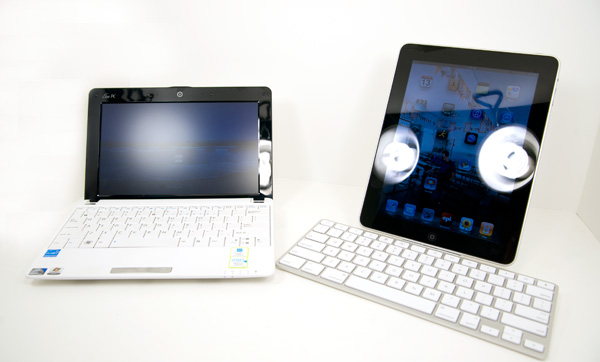
The iPad keyboard dock has made me understand the real focus of the iPad more than I did a week ago. This truly is a computing platform for people who don't really need a computer, at least not all of the power and capabilities of a full fledged computer. It's great for the basic things: typing, checking email, looking at photos, playing music, browsing the web. These are all things any computer can do, and a netbook can actually do them cheaper. The iPad just does them simpler. In achieving that simplicity you do lose out on some higher level functionality of course (e.g. not being able to open zip attachments in Mail), but for some that's a fair tradeoff.


Strange Behavior
The keyboard dock has three points of interface: the dock connector for the iPad, the dock connector for your power brick/computer, and a line out port for external speakers.
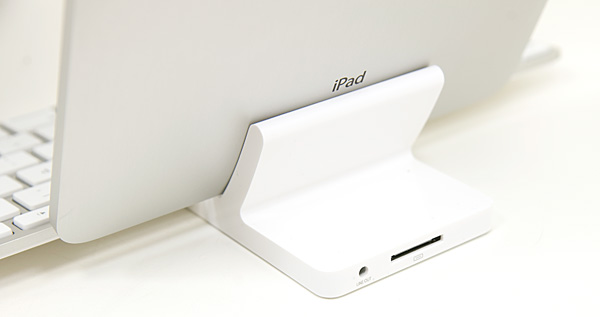
The iPad dock connector is a relatively snug fit, which unfortunately means you'll have to remove Apple's case before docking your iPad. The external dock connector works as advertised, although given that most PCs can't charge the iPad while connected you may find yourself switching dock cables quite a bit (unless the iPad is your primary computing device).
The line out port is the strangest of them all. When in use, you lose the ability to adjust volume on the iPad. Either via the volume rocker or the hotkeys on the keyboard, you can't adjust volume. It defaults to four bars and anything more you have to adjust on your speakers. You can still mute audio however.
I also found that I'd occasionally get a hissing sound out of my speakers occasionally when I'd launch certain apps or hit the lock button on the keyboard.


 Facebook
 Twitter
 RSS
RSS


67 Comments
View All Comments
AuDioFreaK39 - Tuesday, April 13, 2010 - link
Anand,Great review! Although you forgot to mention the most unfortunately difficult issue that the iPad dock keyboard misses. It is completely useless for using the device in landscape mode for widescreen text input and processing due to the nature of the first-generation iPad hardware lacking a 30-pin serial connector on the horizontal end of its frame.
This was one of my biggest gripes about the first-generation iPad and one of the main points I clearly stated to the press on launch day when they asked me why I wasn't going to purchase one.
It might be helpful to note that the Apple Wireless Keyboard for $69.99 should mitigate the problem, and I would sure hope that it can be used whilst the iPad is facing in landscape mode.
7Enigma - Tuesday, April 13, 2010 - link
Did you read the review? There's only 3 pages and he mentions the portrait-only mode on the second page."And you'll need that case because the iPad keyboard dock only works in portrait mode. If you want to watch a full screen video on the iPad, you'll need the foldable case so you can prop it up in landscape mode."
vol7ron - Tuesday, April 13, 2010 - link
I've made mention of this too. You might need a stand to WATCH movies in landscape mode? But unless you have the input port along the long side of the device, you won't be able to plug your keyboard in, in landscape mode -- stand or no stand.melgross - Tuesday, April 13, 2010 - link
And who are you ? Why would the press care about anything you have to say? Why should we?Stokestack - Tuesday, April 13, 2010 - link
There's no real Delete key. Apple's failure to recognize this defect on their laptop & small keyboards is just baffling, year after year. This keyboard has only a Backspace key (mislabeled "Delete"). Every other keyboard, even on the smallest netbook, has a legitimate Delete key.I looked at this one to see what they'd do with the obviously unnecessary Eject key. Did they finally use this real estate to provide a Delete key? NO! It's a key with a "lock" symbol on it.
Seriously, Apple, wake up. It's just embarrassing at this point.
QueBert - Sunday, April 25, 2010 - link
IMHO Apple is the only one who got it right, I press the key and it DELETES what's back one space. To me the left arrow is the "backspace" If I want to delete the previous character in a Word document I press the key which Windows people think of as the backspace. While it technically go back a space, it deletes the character.dworko - Thursday, May 6, 2010 - link
with the use of a ipad stand and if a dock to dock cable could be found, landscape mode could be used while still using the keyboard and charging. First step for me is to find the cable that has the dock connector on both ends :)damianrobertjones - Tuesday, April 13, 2010 - link
I now expect Anand to review all peripherals for all new tablets.Thank you for reviewing a 'dock'.
B3an - Tuesday, April 13, 2010 - link
He would never do that, sadly he's quite an apple fanboy. Even when he writes an article about something completely different he often cant go long before he mentions apple.I like your articles Anand, but getting tired of these^ sort of things.
jasperjones - Tuesday, April 13, 2010 - link
+1I'm starting to feel like I'm reading reviews by David Pogue here.