



Dell Studio XPS 16: the Eyes Have It
by Jarred Walton on April 2, 2009 6:00 PM EST- Posted in
- Laptops
Introduction
They say that beauty is in the eye of the beholder. The Dell Studio XPS 16 is certainly an attractive laptop - fingerprint collecting ability notwithstanding - but what will really catch your eye is the LCD. As mentioned in an earlier blog, the LCD on the Studio XPS 16 has the highest color gamut of any display that we have tested to date, and this is definitely something you notice when using the laptop.
If you've been looking for a laptop with a good LCD, you can probably stop reading this review right now. Yes, the display on the Studio XPS 16 is that good. Of course, we need to clarify that we are talking about the upgraded LCD and not the default 720p option. The upsell is a 1080p LCD with RGB LED backlighting, which tacks on a hefty $250 to the price. Is it worth the money? That depends on how much you use your laptop for graphics work, watching movies, etc. Keep in mind that you can find plenty of desktop LCDs that are larger and offer similar quality for not much more than $250. However, you can't really use that sort of display while you're on the road.
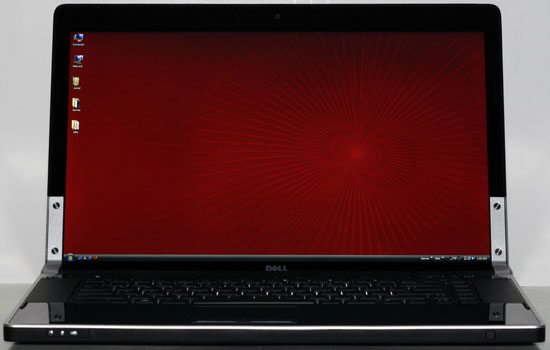
Before we get into the actual review, it might be good to review Dell's overall classification of the Studio XPS line. At the top of the performance and price spectrum, Dell caters to enthusiasts with their Alienware brand products. The XPS and Studio XPS offerings come next, targeting computer users interested in performance and features without breaking the bank. The remaining options come under a variety of names, with the Studio line focusing on consumers that are interested in styling. There are other consumer and corporate/business brands, but the main thing to keep in mind is that the XPS/Studio XPS products are upper midrange or high-end offerings.
So what does the Studio XPS 16 offer in terms of features and performance, and how much will set you back? Let's take a closer look.


 Facebook
 Twitter
 RSS
RSS


79 Comments
View All Comments
bowerfind - Thursday, September 10, 2009 - link
In your review of the Dell XPS16 Studio notebook, the RGB LED 1080p was highly recommended. Dell offers both a 15.6" and a 16.0" edge to edge glass screen. Dell assures me that both of these displays are of equal quality. Which of these 2 displays was examined in your review and do you agree that they are both of equal quality?JarredWalton - Thursday, September 10, 2009 - link
The display tested was a 1080p 16.0" model, so I don't know about the 15.6" LCD.arst - Saturday, August 1, 2009 - link
just want to know is there any gamut data between 13~14 inch display laptop? this article show only 15 inch upper laptops..tOM Trottier - Monday, August 3, 2009 - link
Alas, this doesn't cover the wide gamut laptop screens from Sony (on Vaio AW series) nor Lenovo (Thinkpads with "Flexview"). The Sony, in particular, is supposed to have about ~136% of Adobe RBG gamut.tOM
arst - Monday, August 3, 2009 - link
thx for replyalright, I think i should give up to choose 13~14 inch screen laptoop
does anyone know any good 15 inch one?
griddley - Sunday, July 12, 2009 - link
Hmmm.. looks like this thread could be dead. But thought I'd ask anyway: Anyone get this sxps 16 with the 1G GPU option? I am concerned about an increase in system noise over the 3670.I want to replace a first-gen xps whose fans run all. the. time. (and I clean them regularly!)
mlarma - Wednesday, April 22, 2009 - link
I got one from the Dell outlet store. Let me say that these things are hot tamales there and you'll need to keep tapping refresh or whatever on the filter for the laptop type and when you see one add it to the cart then decide if it is what you want. If not, remove it. Took me an hour of hitting refresh to get the following for $1269:Studio XPS 16
- T9550 (2.66GHz, 6MB Cache, 1067MHz)
- 4GB (2x2GB DDR3, 1067MHz)
- 500GB 7200RPM drive (with fall sensor)
- DVD-RW
- 1920x1080 screen (this of course was a must have)
- 5100 wifi card option
- Bluetooth
- 2.0MP Camera with facial recognition
- 6 cell battery
- Vista Ultimate 64-bit/SP1
- Standard 1 year warranty, on-site after on-phone diag
I'm super stoked. Plan on having dual boot with Linux and Vista. I've toyed with a few Linux flavors. Anyone with one of these laptops have a preference?
CStyles357 - Tuesday, April 21, 2009 - link
This should have been compared with the HP HDX 16-1140US Notebook PC - $1,149.99Intel Core 2 Duo P8600 2.4GHz Dual-Core X64-Bit Mobile Processor
4GB DDR2-800 (2x 2GB) PC2-6400 (400MHz) Cas 5 Latency, 5-5-5-15 Timing Memory Max up to 8GB
Seagate Momentus ST9500325AS 500GB, 5400RPM, 8MB Cache, SATA 3.0Gb/s
HardDrive w/HP ProtectSmart HD Protection
Sony NEC Optiarc AD-7543A LightScribe Super Multi 8X DVD+R/RW
w/Double Layer Support Multimedia Drive
Samsung 16.0" WSXGA + High-Definition HP Ultra BrightView Infinity Widescreen Display (1920x1080)
NVIDIA GeForce Go 9600M GT Graphics w/2302MB Shared Video Memory
(500MHz DDR2 GPU Clock, 512MB, 128Bit, 65nm), DirectX 10, HD Pure Video,
128bit FP – Graphics Processing Unit
Realtek RTL8168/8111 Integrated 10/100/1000Mbps BASE-T Ethernet LAN
Wireless 802.11a/b/g/n integrated WLAN
Intel WiFi Link 5100AGN w/Bluetooth 2.0 Wireless Technology
5-in-1 integrated Digital Media Reader
Altec Lansing Dolby Home Theater Speakers w/Sub-Woofer & Integrated Digital Microphone
HP Imprint Finish with Integrated 1.3 Megapixel Webcam & Fingerprint Reader
3 USB 2.0 ports + 1 eSATA/USB port
7Enigma - Tuesday, April 14, 2009 - link
Thanks again for including "lower/higher is better" in the display portion of the review. Makes browsing that section much easier for some of us.I did have a question as to why it seems the Apple products only show up in the benchmarks they do well at (typically the battery life). Where is the x264 benchmark and the rest? I know some of the benchmarks may not have Mac OS compatibility but is just seems like they are only in benchmarks they do well at.
JarredWalton - Thursday, April 16, 2009 - link
Well, I didn't test the MacBooks - that's Anand - and the different OS severely limits the amount of comparing we can do. Playing DVDs or surfing the 'net isn't all that different on OS X, Linux, etc. so we can compare that aspect. Worth note is that MacBook battery life under Vista drops in half... driver problem, or the underlying OS? You decide.