



Apple's Redesigned MacBook and MacBook Pro: Thoroughly Reviewed
by Anand Lal Shimpi on October 22, 2008 12:00 AM EST- Posted in
- Mac
Baby Steps: The New Trackpad
With the MacBook Air, Apple introduced its first oversized trackpad:
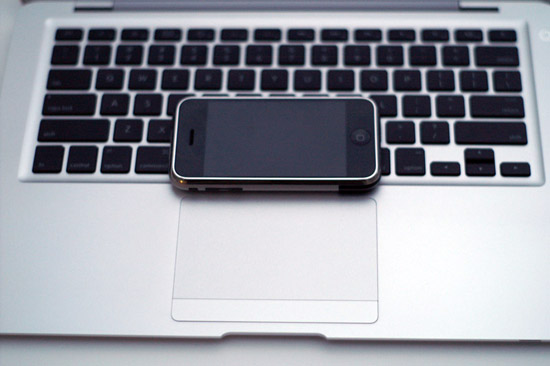
The MacBook Air's trackpad
The size was necessary to enable more complex gestures; you could now rotate pictures just using two fingers and the trackpad. Neat. The MacBook Pro got the same functionality with its update earlier this year, and now with this last redesign both the MacBook and MacBook Pro have support for even more gestures.
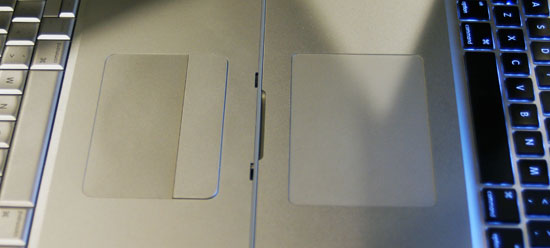
The old MBP trackpad (left) vs. the new MBP trackpad (right)
Slide four fingers from top to bottom and you'll activate Exposé, slide them from left to right and you can switch between apps. The gestures are nice but are still gimmicky in my opinion; they aren't integrated well enough into OS X as the OS wasn't designed with them in mind. The usage experience I'm looking for is more Star Trek tablet - or iPhone like if you want a more realistic reference. I think we're getting there, and Apple is planting the seeds for such a transition, especially if you look at the sort of trackpad used on the new notebooks.
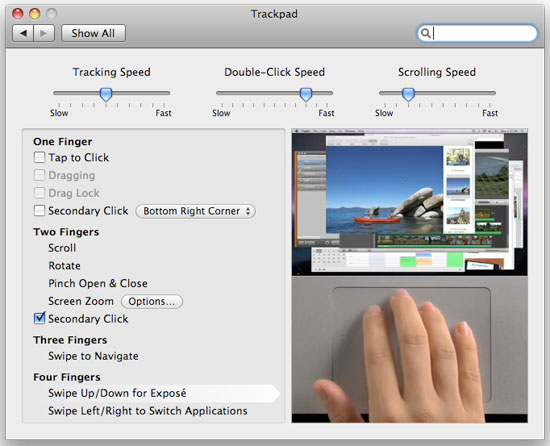
The new trackpad lacks any discrete buttons; instead, the entire pad can be depressed and acts as a physical mouse button. Keep one finger on the pad and push down on it for a single click, have two fingers on the pad and it's a right click. Scrolling is the best implementation I've seen on a trackpad; just take two fingers and move them up/down/left/right to scroll.
The pad is also covered with a thin piece of glass that makes gliding your finger on it much smoother, which is admittedly very nice. None of this is necessary for the current gestures but it gives us a good indication of where Apple is going with this. It won't be this year, it may not even be next year, but real multi-touch is coming to OS X. Wake me up when that day comes, because until then this bandaid of gestures isn't going to win me over.
While I wasn't won over by the gestures, I would be fine with the new trackpad if it didn't have so many problems. I have had some issues with clicks not registering; I'm not sure if this is a hardware problem or a software one. The trackpad would physically click but the click wouldn't register in OS X. This problem appeared more on the MacBook Pro than the MacBook, and it didn't matter where I clicked on the pad, it just wouldn't register. Eventually it would sort itself out and everything would be back to normal. It seems like other users are running into this same problem and Apple appears to be replacing notebooks, but there's no indication that it's actually a hardware issue. I'd suspect it's a software problem but it's honestly too early to tell. So far it seems like if you take your finger off of the pad before you click, then put it back on to click you're more likely to make the click register. Or simply enable tap-to-click and you'll avoid the problems altogether - not a real solution in my opinion but a workaround.
The trackpad is even worse under Windows for some reason. If you try pushing down on the pad to make it click under Windows, the cursor has a tendency to jump while it is very well behaved under OS X. Again, I have a feeling this is more of a software problem but who knows if/when it will be fixed.
Hooray for being an early adopter of Apple's finicky product.


 Facebook
 Twitter
 RSS
RSS


66 Comments
View All Comments
MacMatte - Sunday, June 21, 2009 - link
For those of you who insist that Apple brings back the matte screen option, please leave a comment at http://macmatte.wordpress.com">http://macmatte.wordpress.com - it's a website solely focused on the issue of bringing back the matte screen. See the number of pro-matte comments already at the MacMatte website.drbrady63 - Thursday, June 18, 2009 - link
I am trying to identify if a new macbook pro 13" would be adequate for editing with Final Cut Express, and for that matter, Final Cut Studio. Unfortunately, it has a 5400rpm hard drive and that is not good for editing. But, I wonder if an optional ssd would be fast enough??I would use the 13" for more mobile work and dock it with a larger monitor for more involved editing work.
Any thoughts on this would be appreciated.
Dan Brady
richmoffitt - Sunday, November 9, 2008 - link
This is an uneducated guess, but I'm pretty sure that Quartz works in ways similar to X11, where changing graphics drivers requires a restart of the window manager.You're right though -- this is only a software problem and can hopefully be fixed in the near future (if it's a big enough issue for their user base anyway).
scipi - Monday, October 27, 2008 - link
Hope the quality of the components is better than the first gen MacBook Pro's. Mine is on its second H/D, gone through 2 logic boards and now needs a third, this time outside of warranty. Wont be buying another Apple again which is a pity because OSX is great.Zebo - Saturday, October 25, 2008 - link
Vista is bloated resource hogging junk - You should have tried the OS many of use still use - Windows XP for battery life. I get over 4 hours on my R31 thinkpad with winxp pro.Ronbo13 - Saturday, October 25, 2008 - link
You photos comparing the glossiness and reflection on the screens was not fair, though. Please notice that the laptop on the right (the new MBP) is reflecting a portion of wall that has direct sunlight shining on it, and the laptop on the left is reflecting stuff that's in shadows. So even if the screens were equally reflective, the one on the right would show tons more reflections.Come on, people. Normally you guys pay more attention to details. That's just sloppy.
ioannis - Saturday, October 25, 2008 - link
nop, you are wrong. Both of them reflect stuff that have direct sunlight. Notice Anand's reflection for instance, or the wall on the left hand side of the old MB and the wall on the right hand side on the new one.I'm referring to this:
http://images.anandtech.com/reviews/mac/MacBookPro...">http://images.anandtech.com/reviews/mac/MacBookPro...
Enrox - Saturday, October 25, 2008 - link
Anand, why don't you test Vista installing it on the new MacBook Pro without using Bootcamp, you need to wipe out the drive and create a MBR partition and use Vista x64 SP1 (it supporta EFI), the only thing you need to know is that at startup you have to press the Alt key and manually select the Windows disk in order to boot from it, beside that everything else seems to work just fine with the Vista native installation (tested on a white MacBook Penryn 2.4 GHz 4GB ram).It would be very interesting to see if you get the same exact battery life numbers bypassing Bootcamp.
JonnyDough - Friday, October 24, 2008 - link
Until Apple stops being so shady, I won't have anything to do with them.aos007 - Friday, October 24, 2008 - link
I have brand new Vaio Z laptop and I can get 5 hours battery life IF I disable Vista sidebar. It does not matter whether there's no widgets running, it seems to use 10-15% of CPU time no matter what. This translates into a big loss of runtime - I'd get 3.5 hours versus 5. Unfortunately, I like Sidebar as there are some useful widgets, as well as for eye candy so I feel Vista is crippled without it.So the question is whether you disabled Sidebar during Vista testing? I am guessing not since it runs by default and if so, that may be part of your answer.