



The Intel SSD 320 Review: 25nm G3 is Finally Here
by Anand Lal Shimpi on March 28, 2011 11:08 AM EST- Posted in
- IT Computing
- Storage
- SSDs
- Intel
- Intel SSD 320
Random Read/Write Speed
The four corners of SSD performance are as follows: random read, random write, sequential read and sequential write speed. Random accesses are generally small in size, while sequential accesses tend to be larger and thus we have the four Iometer tests we use in all of our reviews.
Our first test writes 4KB in a completely random pattern over an 8GB space of the drive to simulate the sort of random access that you'd see on an OS drive (even this is more stressful than a normal desktop user would see). I perform three concurrent IOs and run the test for 3 minutes. The results reported are in average MB/s over the entire time. We use both standard pseudo randomly generated data for each write as well as fully random data to show you both the maximum and minimum performance offered by SandForce based drives in these tests. The average performance of SF drives will likely be somewhere in between the two values for each drive you see in the graphs. For an understanding of why this matters, read our original SandForce article.
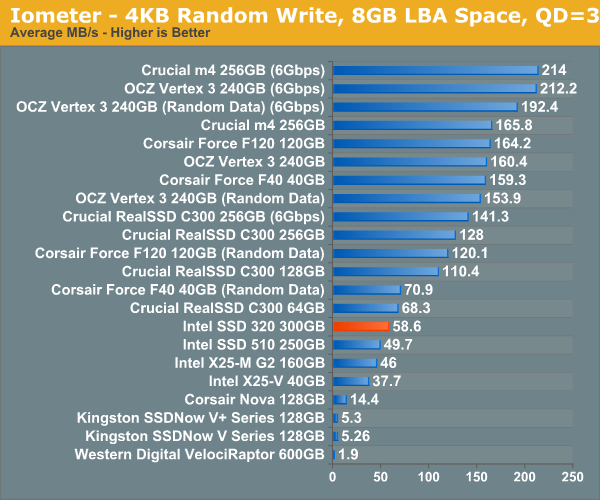
Random write speed is improved compared to the 510 thanks to Intel's controller, but we're only looking at a marginal improvement compared to the original X25-M G2.
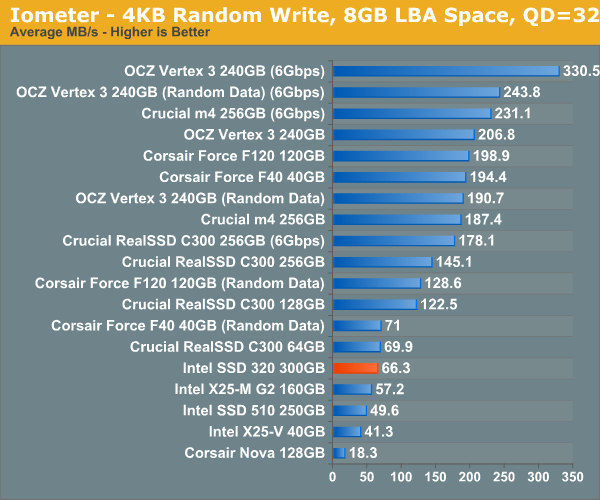
Many of you have asked for random write performance at higher queue depths. What I have below is our 4KB random write test performed at a queue depth of 32 instead of 3. While the vast majority of desktop usage models experience queue depths of 0 - 5, higher depths are possible in heavy I/O (and multi-user) workloads:
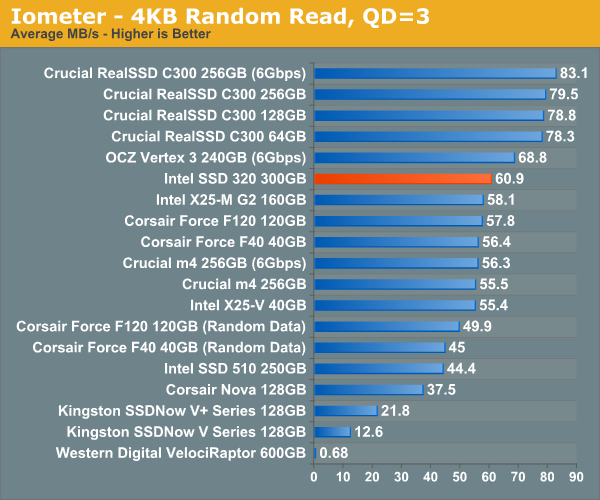
Random read performance has always been a strong point of Intel's controller and the 320 is no different. While we're not quite up to C300 levels, the 320 is definitely competitive here.
Sequential Read/Write Speed
To measure sequential performance I ran a 1 minute long 128KB sequential test over the entire span of the drive at a queue depth of 1. The results reported are in average MB/s over the entire test length.
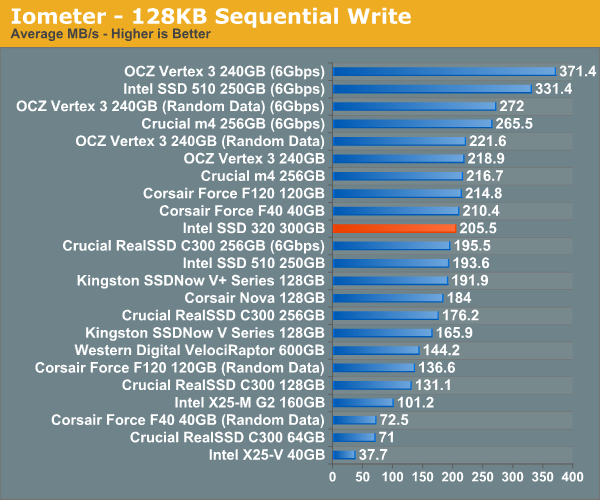
Without a 6Gbps interface the 320's performance is severely limited. Compared to other 3Gbps drives the 320 is quite good here though.
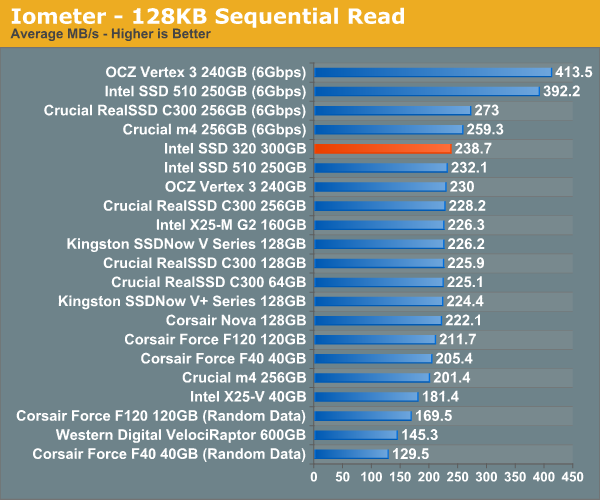
Read performance is at the top of the chart for 3Gbps drives. I wonder how far Intel would've been able to push things if the 320 had a 6Gbps controller.


 Facebook
 Twitter
 RSS
RSS


194 Comments
View All Comments
bji - Monday, March 28, 2011 - link
You're retarded. Their systems do 'just work' according to the promised features and reliability. Just because they don't promise TRIM support, and apparently don't require it to satisfy the performance that they promise, doesn't mean that their stuff doesn't 'just work'. The fact is that end users do not need to do any of those commands to use their SSD drives as they are intended to be used.Not that I should even have to say this, but I don't own a single piece of Apple hardware aside from an old iPod Touch. So please don't accuse me of being a fanboy just because I can't stand ridiculous criticisms like yours. I would defend any company against such drivel.
Vidmar - Monday, March 28, 2011 - link
Wait a minute..."Their systems do 'just work' according to the promised features and reliability."
and
"I don't own a single piece of Apple hardware aside from an old iPod Touch"
So how can you quantify the first statement if you don't own any?
bji - Monday, March 28, 2011 - link
So how many Apple devices do I have to own before I can say whether or not they 'just work'? 10? 100? A million? All of them?Obviously there is no answer to that question that makes any sense; because the question doesn't make any sense.
I was not talking about the actual fact of whether or not any particular Apple device 'just works', I was talking about the question of whether or not the claim that Apple products 'just work' is an any way refuted by the original poster's dumb post. I don't need to ever have touched an Apple product to be able to argue about how those comments did not refute any of the claims that Apple may make directly or indirectly about their products.
Here is a simplified example if this is too hard for you to follow:
Poster A: Look at these instructions on how to replace the heating elements of my toaster with a miniature nuclear reactor core! The are so long and complicated! I can't believe that my toaster manufacturer claimed that this toaster was easy to use!!!
Me: That's dumb, the manufacturer never claimed that installing aftermarket parts on your toaster would be easy; that has nothing to do with the ease-of-use of a toaster. By the way I do own an electric razor made by your toaster company but that doesn't mean I'm biased towards them.
You: How do you know whether or not his toaster is really easy to use if you don't own one?
B3an - Tuesday, March 29, 2011 - link
You call me a retard, yet you dont even have ANY first hand experience with OSX.I think you're the retard here.
It's not just about TRIM, it's with many things about Apple products. Hardware and software. All Apple do is falsely advertise and claim that everything they make just works, and is immune to viruses, even though OSX is the most unsecure major OS around.
It can also be argued that if Apple are going to use SSD's in there products, then they should atleast fully support TRIM, which is something that is needed for an SSD to perform at it's best.
sean.crees - Tuesday, March 29, 2011 - link
They do fully support TRIM. For SSD's that ship with their products. This isn't just an SSD thing though, they have always been this way with hardware, only fully supporting hardware that they personally sell. It does have it's advantages though. You may not personally like it, but Apples approach to hardware and software does have its advantages over the way it's done in the PC world.marraco - Tuesday, March 29, 2011 - link
Apple pretends to be user friendlier than Windows, yet each non basic troubleshooting ever takes a boatload of console commands, hex editors, rebooting into console mode, and crap like it.Brian Klug - Monday, March 28, 2011 - link
I've taken the plunge and am running TRIM (via the hex-edited kext) on my 2011 MBP with Vertex 2. If this drive randomly implodes, I'm sure someone will get a stern emailing about it ;)-Brian
Anand Lal Shimpi - Monday, March 28, 2011 - link
I think there's a lot of misunderstanding about what TRIM really does. TRIM simply passes information to the controller - it just says "hey controller, I don't need these LBAs anymore so you can do what you will with them".The controller then chooses what to do with those LBAs given its internal policies.
The alternative would be to use aggressive idle time garbage collection. I'm not personally a fan of this as it does burn up p/e cycles vs. more conservatively running through garbage collection routines when necessary.
TRIM really does help keep performance high. Until we get filesystems that are NAND-aware, it's the best option we have.
Take care,
Anand
bji - Monday, March 28, 2011 - link
What is a filesystem that is 'NAND-aware' other than one that knows how to tell the underlying device that it's done with a block, i.e., issue a TRIM command?jcompagner - Tuesday, March 29, 2011 - link
Then please tell me,if trim didn't tell the ssd that it doesn't need that block, what can garbage collect do then?
So i write the drive completely full. then i delete half of it without trim.
Now i don't do anything, what can then a GC do? Nothing.. because as far as the ssd concern everything is still valid real data.
Only when i then start writing on places where the ssd thought that was written it knows that it can write there again..
If you keep your trash out of the the garbage bin then you can empty your bin all the time you want but the garbage is not cleared.