
Motherboards Memory Storage Cases/Cooling/PSUs IT Computing Displays Mobile Mac CPUs & Chipsets Video Digital Cameras Linux Gadgets Systems Trade Shows Guides Home Increase Font Size Decrease Font Size Change Page Size
CeBIT 2009 - ASUS Marine Cool
Date: February 25th, 2009
Author: Gary Key
Buy the ASUS M4A79DELUXE Deluxe AMD
Blank
 Newegg $178.99
 ZipZoomFly $139.99
 Buy.com $163.99


CeBIT 2009 officially starts next Tuesday, but we already have some early coverage from cold and wet Hannover, Germany. ASUS has given us an early look at their Marine Cool design concept. Just like concept cars at the major automobile shows, this particular motherboard is meant to introduce new design ideas into a rather "me too" market.
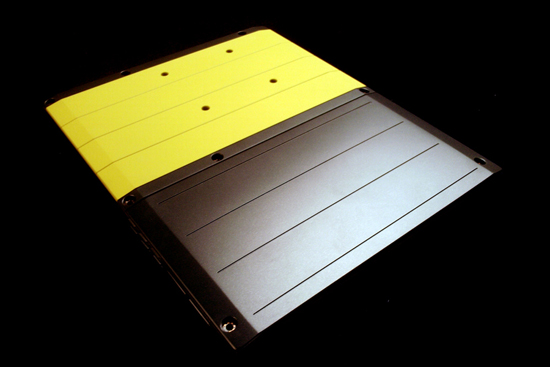


ASUS was rather coy about what design and layout aspects will eventually make their way into future motherboard products. However, one major design change we expect to see in upcoming boards is the new back plate that utilizes "micro-porous ceramic" technology to dissipate heat quicker and to provide structural integrity to the motherboard.
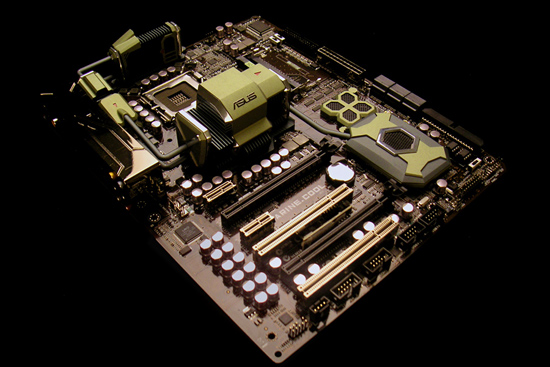
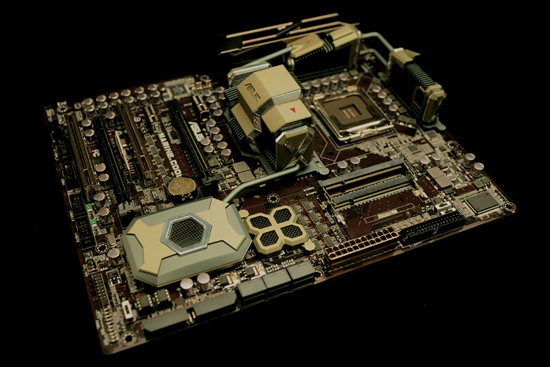


The new heatpipe system also improves chipset and PWM cooling compared to shipping products, while the layout receives a few tweaks for usability. We are not too wild about the SO-DIMM slots for a performance oriented system, but they do save real estate space and perform well on mainstream systems. The heatsink design and technology behind it (cannot comment further, yet) is certainly an item that we liked. In fact, the design reminded us of a few design elements from Space:1999 (yes, some of us are that old).

ASUS is interested in your opinions, so leave your thoughts in our comments section. In the meantime, we will have more information about the Marine Cool technology in upcoming coverage. auf Wiedersehen!

Updated Press Information from ASUS - "ASUS MARINE COOL Motherboard: Revolutionary Design and Advanced Innovations to Deliver the Ultimate in Stability and Durability - The ASUS MARINE COOL is a conceptual motherboard that addresses the most demanding of usage scenarios. The front features a metal heat-pipe module to provide exceptional heat transference and dissipation for core components. Set flush on the back of the PCB, the backplate makes full use of micro-porous ceramic technology to provide a larger surface area—facilitating heat away from the PCB for highly effective thermal dissipation. Together, these revolutionary designs improve heat dissipation by up to 2 fold. The ASUS MARINE COOL also features an on-board uninterruptible power supply (UPS)—a built-in polymer battery (gray portion of the backplate) that averts damage from unexpected blackouts. Furthermore, built-in server-standard Failover Memory (under the flower shaped object) guarantees system boot, regardless of incompatible or faulty memory."


27 Comments
Username:
Password:
SO-DIMM by kfour, 267 days ago
I love the backplate for functionality and the new heatsink looks. That SO-DIMM slot just wouldnt work for me at all though. Looking forward to the next design with more conventional desktop RAM

Reply
RE: SO-DIMM by blyndy, 267 days ago
"8 2gig sticks are cheaper than 4 4gig sticks"

Kingston 1x1GB DDR2-800 CAS-6 DIMM: $12.49
Kingston 1x2GB DDR2-800 CAS-6 DIMM: $23.99
Kingston 1x4GB DDR2-800 CAS-6 DIMM: $99.99
(@ Newegg)

True... Wow that premium is way bigger than I was expecting!

Although there are those of the opinion that more DIMMs = less stability. I don't know how true that is though.

On the other hand you could to quad-channel! (but defeat the space-savings)

I think it would be in the industries interest to see desktop mobos start to use SO-DIMM. Consolidation onto SO-DIMM would mean less product-lines, less manufacturing equipment, less cost per failed module and ultimately less costs.

Provided that there are no inherent performance disadvantages to SO-DIMM, I think that consolidating onto SO-DIMM would benefit everyone.

Reply
I like it by icingdeath88, 267 days ago
If it weren't for the fact that even if it were made, they'd take away a ton of the cool stuff that they put in the concept and make it ridiculously expensive, this is a really cool exercise.

Also, I don't see why so-dimms are lower performance by necessity. No one ever really tried to make em fast, just low-power for laptops/imbedded type stuff. Good idea try em out, sometimes it's good to be different just for the sake of being different. Plus, I mean, if we could fit 2x the dimms in the same area, that'd sure help to save money on ram, seeing as 8 2gig sticks are cheaper than 4 4gig sticks for example. sure would make getting that 16 gigs you could theoretically use cheaper, more attainable. doesn't help those of us who only use 2 of the 4 slots we have anyway, but you see what I'm sayin.

Reply
RE: I like it by JarredWalton, 267 days ago
There are two fundamental issues I see with the use of SO-DIMMs on this board:

1) Slightly lower performance (top SO-DIMMs are DDR2-800 and DDR3-1066 if I'm not mistaken, and latency is never as high as on desktop RAM). Honestly, this isn't a deal-breaker for me, but problem #2 is...

2) Only *two* SO-DIMM slots means you'll be stuck at a maximum of 2x2GB RAM for all intents and purposes. That's unacceptable, especially on a board that looks like it will probably retail for over $400. (Hopefully I'm wrong on that, but I somehow doubt it.)

Reply
RE: I like it by afkrotch, 267 days ago
As speeds increase, so does heat. How many SO-DIMMs you see with heatspreaders? Let alone a gap between slots to support it.

Also SO-DIMMs are more costly. Yes, they are still inexpensive, but you get same amount of memory, lower performance, while paying a higher cost. A less for more scenario.

I'm not a fan of these heatpipes connecting the mosfets, nb, and sb. I watercool and I end up having to cut these heatpipes.

The weird backplate might need to have a open spot under the processor area. For heatsinks/waterblocks that use their own backplate.


The motherboard would be fine for your random PC shops, like Northwest Falcon or something. Many of your home system builders will probably be fine with it too. Your enthusiasts probably wouldn't touch it with a 10 foot pole. I know I wouldn't.

Reply
RE: I like it by mmntech, 267 days ago
There are DDR3-1333 SO-DIMM chips. Prices and CAS latencies are the same as regular DIMMs, maybe slightly more expensive.

On the second point, I agree. For an HTPC maybe but not for something being marketed as a gaming system. Using laptop memory for a desktop board is a vary odd choice.

Reply
Layout... by tdktank59, 267 days ago
I don't get why they even bother putting things right below the PCI-E x16 / x8 slots... When most GPX Cards these days take 2 slots...Basically if you were to put in 2 2 slot cards for crossfire/sli you would be screwed if you needed more then 1 PCI-E x1 or a PCI slot... Basically that would be a sound card right there... without much room for breathing for the graphics card if PCI...

If I remember right most if not all boards are designed this way...

But on these Hi-End boards why bother... You know if the user can afford a $200+ board that these slots are just a waste or space and that means more complex wiring to get those integrated...

Im not saying get rid of the gap one but the one right below the PCI-E x16... The gap one allows for the breathing room needed for cooling.

Other than that SO-DIMM anything of a good size costs an arm and a leg... Go back to DDR2 or DDR3 for gods sake... Unless you can get those sodims down in cost to be comparable with ddr2 and at the 4GB mark...

Now if the price was comprable and they were in 4GB capacities then i can see why they would use them but come on... a 4GB so-dimm at a decent speed is going to run you a couple hundred at least...

Reply
Chocolate 1/2 Price! by Jynx980, 267 days ago
I know it's a very early build, but make sure you get some colors on that thing. It looks like it's made out of chocolate. Even though your in the land of chocolate. Mmmmm land of chocolate.

Reply
hm by punjabiplaya, 267 days ago
Interesting concept with the so-dimms. I'd love to see if there's a performance hit (I have no idea if there would be). However, whenever Asus makes a board like this, they are insanely expensive. Unless you Asus guys want to give me one at RogCon...

Reply
Nice looking, but... by velis, 267 days ago
Is it just me or are those expansion slots really moved too much into the interior? Just how am I supposed to plug a card into that?
And what's with all those capacitors in front of expansion slots?

Also the CPU area seems too cluttered. Not all heat sinks will fit in there.

Otherwise the board looks impressively classy, high quality and everything.

Reply
RE: Nice looking, but... by velis, 267 days ago
Eh, forgot a few things... (what's with Edit comment feature, btw?)
Since this is obviously a high-end VERY expensive MB, the main chipset cooling block should be modular as in allowing to replace with a waterblock.
And I'd also very much like them to finally move the connectivity brackets (internal USB, firewire, front panel connectors) to the front side (the one that has SATA, IDE and power connectors now. It's insanely hard to hide the cabling when connectors are at the bottom.

The power connector could also be moved to the top of the board as that's where the PSU usually is. Also I can't see the 4-pin power connector, but if it's there, it should be near the power connector as PSUs usually have these connectors "together"

Is that gray / yellow thing the box? It looks great, but in the end it will more or less just be tossed away, so why spend too much money on it?

Reply
RE: Nice looking, but... by strikeback03, 267 days ago
I'm pretty sure the gray/yellow thing is the ceramic cooling plate on the back of the motherboard that was mentioned. Looks like it has the right holes for mounting and holding a CPU cooler.

Reply
SO-DIMMs?? by npp, 267 days ago
I find the idea downright stupid... This board *IS* going to be insanely expensive (current ASUS high-end boards aren't cheap by any means to start with), and I can't imagine someone buying a product like this just to be stuck with paltry 800Mhz SO-DIMMs... Truth be told, s775 systems don't benefit that greatly from higher speed memory (nor do s1366 anyway, but they can't be ran with "slow" memory to show the difference :), but an overclocker doesn't care much about that. People want high frequencies, that's it.

As for the colors, cooling and that fancy backplate... I can imagine ASUS trumpeting how revolutionary they are, while in fact there's nothing so special about them anyway. Simply another way to shave off some $$ from eager enthusiasts - just like the "2 ounces of copper" b*s* from Gigabyte... Shiny polish here and there, but at the end of the day it's all the same stuff.

Reply
target market? by Sagath, 267 days ago
If this is ultra-high end, and I assume it is;

Why is it limited to ram that wont Overclock very well?
Why the 'expensive' NB/VRM/SB heatsinks that everyone will just remove for water setups?
Why the Battery UNDER the gfx card in slot one with no onboard reset option? Not very OC friendly
Why the legacy options like IDE? Please, this is 2009, not 1989. IMO its time to retire PS2 and IDE/Floppy connectors people, jesus.
On that same note; Hows the backpane? Is ASUS holding out or can we get a pic of that up too Gary?

Are those dip switches in the upper right next to the floppy connector, and bottom right (looks like it says CLRTC)? If they are pwr/reset, please ignore my comments about onboard reset and crappy battery location ;)

I mean, it seems like this board is more designed to be used 'as is' in a fancy ass case...Which is cool untill the $500 price tag is released. Also, as a previous poster was saying about the power connectors; Most high end cases now put the PSU on the bottom. This is a better place for so many reasons. I would imagine this is also why ASUS moved most of the PSU connectors (and rightfully so) to the bottom.

But, and I'll bite on this, it sure is purdy! ;)

Reply
Interesting by Burrich, 267 days ago
The backplate idea is very intriguing. Matched up with a modular power supply and an appropriate case it can bring another dimension to case modding. Most people would hide the backside of their motherboard but this could allow for users to have a very minimal motherboard try (like rails?) and have a window showing the backside.

I have to agree with others in the belief that this would be targeted at the higher tier of users and the amount of RAM slots would be an large disadvantage. I know the Gigabyte X58 board, the UD3R I believe, only has 4 slots memory slots. As a person in the process of building an i7 setup that currently has me looking at other boards. Make no bones about it, the market might disappear if there are only two SO-DIMM memory slots.

Reply
VERY interesting design choices. by zshift, 267 days ago
I don't know about the rest of you out there, but I love the colors, makes it seem like a real high end classy motherboard (not sure what a classy mobo is, but this sure feels like one). The heatsink design is cool too, but the southbridge area looks like it has 2 heatsinks, not sure whats up with that or whats under that behemoth of a heatsink. also, i agree with one of the other commenters that the pci slots and pci express slots seem way too far away from the edge of the mobo, bu that might just be an optical illusion with the capacitors there (really odd why those are there). And I have to disagree with the SO-DIMM, IDE, and Floppy. GET RID OF EM!. so-dimm has never been a performance part, and this with heatspreaders are always way too thick, they look like they would be touching the traces on this mobo. and only two slots when so-dimm is still relatively expensive for 4 gb compared to regular ddr2/3. seems like the smaller scondary heatsink near the southbridge area is blocking the use of regular ram modules.

overall the design looks great, but i wanna see a price tag on this. only 2 PCIex16 slots means its not a high end board, but this looks like its gonna cost a lot.

and btw, wheres the shot of the backplane ports? that would be a big indication of what this sucker has to offer.

Reply
DIMM arrangement by gomakeit, 267 days ago
I'm not sure the flattened configuration actually save real estate given the fact that the heat sinks of motherboard chips and cooler will more than likely be taller than regular memory modules. Plus it limits the number of DIMM slot a motherboard can have. So I'd have to vote a no on that DIMM slot configuration.

Other than that I really like the board. Given that enthusiasts are using larger and larger cooler for overclocking, a more rigid motherboard is definitely needed (think cooler master v10 and v12).

Any time frame that the concept will (if at all) hit the market?

Reply
Top Down Cooling by Casper42, 267 days ago
I'll break from the norm that seems to be occuring in the comments thus far and say that I am personally a little tired with top down cooling designs around the CPU.

Take this board as a perfect example.
Put a decent tower cooler on there that stands an inch off the board and tell me how useful all those heatsinks around the CPU become?

The SO-DIMMs are also arranged in such a way as the one closer to the CPU will cover the one behind it and even a top down cooler will not provide adequate airflow to that dimm socket, let alone a tower cooler.

Every custom case these days has a spot above the I/O shield that leaves enough room for an 80mm or higher exhaust fan.
Most if not all cases these days also have either the PSU Intake or a dedicated Exhaust Fan (for PSU at Bottom bases) sitting right above the CPU as well.
I have yet to see a Motherboard design that makes use of that cooling at all. They all seem to stick the NB below the CPU.
Even those with heatpipes that connect them to the caps? between the CPU and I/O shield, the heatsink in that spot usually is no taller than the I/O shield so it doesnt have a chance to get any of the airflow leaving the case via the fan above the shield.

All in all, it seems to be that they are focused on cooling, but spending their time cooling the wrong components.


PS: Why is it that a large number of OEM boards (Dell, HP, etc) put the CPU on the front edge of the Mobo with a fan pulling FRESH air right across the CPU, while Retail Mobos like this will eventually become always stick the CPU way in the back where it either gets "used" air or requires a side intake fan (which doesn't work with tower coolers).

I think the Mobo MFGs and Case MFGs need a little sit down discussion and need to try to design products that operate with cooling zones that dont require a $200+ case and $300+ motherboard.

Reply
Suggestions by Glenn, 267 days ago
Love the backplate idea and the looks of the board.(not to include the ugly colors). It needs desktop DDR3 memory slots.

I'm all for Asus innovations and I have used many of their products in years past. But all my builds are with Brand G boards right now and will be until Asus wakes up and puts some effort and $$ into a decent support site. Nothing is more frustrating to me than trying to get fresh drivers or bios midday from the slow as molassas Asus website. How big a company is Asus? How stupid is it with their resourses to have this happening for the past 10 years or so? Inexcusable!

My rant is over but I couldn't resist after I saw they would be reading this!

Reply
Space: 1999 by Guspaz, 266 days ago
I was a big fan of Space: 1999 growing up, and I was only born in 1985... Is that so wrong?

Reply
re-organising the layout and features by Aries1470, 266 days ago
Design optimisation recomendations:

Layout optimisation:
upper right, where the FDD socket is. Rotate by 90o the two switches, and put them closer to the so-dimm socket. Move the row of resistors further to the left, slightly closer to the so-domm socket, and the FDD too, and move the IDE to the FDD and have that still on a 90o angle. In the place that the IDE was, move the majority of connectors from the bottom to the place where the IDE socket was. This leaves free place if the last PCI socket is to be used,just leave one USB port for a rear bracket.

Power socket can be moved to the upper part of the board and put the IDE socket in its place as an alternative. or keep it where it is, so it can accomodate both top and bottom PSU location of cases.

One with two more so-dimm sockets would be better, as to give more options for memory, since they go on an angle, they require less of a footprint, but there will be issues with thermals (i.e. temperature) of the rams. unless they can go on a different angle, and be able to utilise so-dimm clip-on heatsinks.

Socket re-organisation of PCIe-16x.
Remove the 1st pci socket and the second PCIe- 1x. put the second PCIe- 16x in the place of the 1st PCI socket and in its place put a PCIe-4x. The second PCIe 1x can remain in its place as an option and the board can have 1 pci slot, or make the 1st PCIe 4x the second as it is, and swap the x16 with the PCI, and have two PCI slots at the lower end.

System advice:
Maybe add 2Gigabytes of Ram on board, close to the so-dimm's, so when some buys the board, they don't have to immediately worry about trying to get hold of so-dimms, since they are NOT always easily obtainable, and they would be able to get to work, and then later it can be used in conjuction with the added memory or disabled if there is a speed mis-match.

Add a miniture fan where the "X" is, with the pipe comming out where the block has the ASUS logo on it, to be facing the so-dimm's, since they do not come with heat-sinks yet, or include a 'generic" so-dimm clip-on heatsink in the package with instructions.

All these are just suggestions that I have at the moment. If any get implemented, please give me some credit ;-) or a MoBo, I wouldn't say no to either :-D

Reply
board by Hrel, 265 days ago
The board LOOKS awesome, and I really like the idea of using porous-ceramic to cool it. Including a UPS seems like a bit of a gimmick, I mean, if you're concerned with voltage stability get a good PSU, as most modern PSU's have some degree of surge protection built into them putting it in the motherboard is overkill; at the very most include a voltage stabilizer but now battery, it just costs too much.
As far as the SO-Dimm I guess anadtech will have to do a comparison to see how much of a performance hit you'll take for using SO-DIMM rather than desktop RAM, if any. As long as it's insignificant, like 2% or less, than ok. But notebook RAM is still more expensive than dektop RAM so I'd still prefer regular RAM slots, and I want 4 of them.
Basically, I like the cooling idea, and including voltage stability measures is always a good idea. I like the idea of being able to boot with any hardware set to any setting; so I can easily get into the BIOS and fine tune everything. However, if this type of Motherboard is based on P55, a P45 level chipset, then there's no way it can cost more than $200. Take out the battery for the UPS and it shouldn't cost more than $150. I mean, more than 200 for ANY component of a computer is kinda rediculous; monitor may be an exception in some cases.
Asus, do the best you can for $150 or less, preferably less. That's the only way it can compete in the main-stream.

Reply
RE: board by Hrel, 265 days ago
stabilizer but no battery, not "now battery" sorry.

Reply
@#!%$&! PCI slots by DragonMaster0, 265 days ago
Why can't any board makers replace these with PCI-Express 4x or 1x slots?!?

I mean, every, but every different expansion cards available today can be found in PCI-Express versions, be it SATA, IDE, SCSI, USB, serial port, parallel port, NIC, TV-tuner, sound card, PhysX, wireless NICs, and recent models are often in PCI-E only versions. I'm stuck using outdated PCI hardware because mainboard makers don't put enough PCI-Express slots on mainboards.

PCI slots have no use unless you want to install your rubbish Killer NIC, an old analog TV tuner, an old 802.11g wireless NIC, your old 3Com 3C905, your PCI X-Fi, etc. and pretty much all this hardware has no, or poor support for 64-bit Windows. Why don't they keep ISA slots? I mean, the bus is still there.

Reply
RE: @#!%$&! PCI slots by rudy, 263 days ago
I find the opposite problem I do not have 1 single item that is not a PCI card.

Reply
RE: @#!%$&! PCI slots by Nil Einne, 261 days ago
That's because you have old cards. If you're building a new comp with new cards, you'd be stupid to buy PCI. This is a concept mobo after all.

P.S. I somehow doubt you're using a PCI video card

Reply
Micro-porous ceramic? by Nil Einne, 261 days ago
Micro-porous ceramic to enhance cooling and provide structural strength? Does this sound awfully familiar to the 2 oz of copper ground plate a certain competitor of Asus's launched last year which is supposed to do the same two things? The same manufacturer who has a Dynamic Energy Saver technology like Asus has their EPU?

Perhaps the biggest flaw in this concept mobo is the 2 PCI with only 2 PCIe-1 (and 2 PCIe-16). Seriously WTF for? Most cards are now in PCIe variants finally, sound cards, TV tuners etc. For a concept mobo at most you should have is one PCI particularly if you're only going to have 2 PCIe-1. Even better improve your layout and add back that missing PCIe-1 (normal ATX should be able to fit 7 cards, most Gigabyte 2 PCIe-16 boards for example have 3 PCIe-1 and 2 PCI). Perhaps then you can afford to have one PCI.


Having said that, the mobo does have some interesting things. The RAM is potentially useful if it works well, e.g. if your ram is behaving oddly or is untested and you need a bios update. Or to help diagnosis particularly when you don't have a spare stick of RAM. Even better would be a integrate CPU so you can actually boot up and flash the bios when your CPU is unsupported but I that's obviously not going to happen.

Reply
Comments Page 1 of 1


AnandTech.com Blog Categories
All categories
Anand's Macdates
Anand's Theater Construction
Anand's Updates
Cases and Power Supplies
CeBIT 2008
CES 2008
Computex 2009
Derek Decanted
Eddie's Got Game
Gary's First Looks
IT Computing general
Jarred's Musings
Kris's Corner
Raja's Ramblings
Rob's Experiences...
Ryan's Ramblings
Virtualization
What's New with Wes
Blank
Blank

Blank

Latest news by
DailyTech

 November 20, 2009

Blank
Blank
Blank
Blank
Blank
Blank
Blank
Blank
Blank

 November 19, 2009

Blank
Blank
Blank
Blank
Blank
Blank
Blank
Blank


more Blogs Discussions


pipeboost
Copyright © 1997-2009 AnandTech, Inc. All rights reserved. Terms, Conditions and Privacy Information.
Click Here for Advertising Information