



ASUS Eee Box Preview & Intel's Atom Benchmarked
by Anand Lal Shimpi on June 3, 2008 12:00 AM EST- Posted in
- Systems
The Internet today is far more functional than it ever was and we’re finally at the point where being able to access the net in places like your living room, bathroom or kitchen is actually pretty useful. Recipes are no longer stored in cookbooks, they are in emails or websites. There’s a website or forum for virtually everything, not to mention the utility of sites like Wikipedia and imdb.
The problem is that a kitchen PC that could be used to check emails, look up recipes or chat with someone while cooking wasn’t really feasible when decent PCs would set you back at least $1500. As PC prices fell however, the possibility of putting a PC in nearly every room of your house increased tremendously. We’ve already established that there’s utility in such a PC-filled household, but what was left is someone to provide the hardware to make it happen.
When the One Laptop Per Child (OLPC) project was started it didn’t take long before regular computer users took notice and also wanted access to a $100 - $200 PC. It wasn’t just the end users that realized there was a need for such a machine, some of the manufacturers did too.
Before the release of the ASUS Eee PC I had dinner with ASUS’ CEO, Jonney Shih and we began talking about what was necessary to build a truly lightweight, yet functional PC. Jonney isn't your typical CEO, he's still quite an engineer at heart and enjoys discussing everything from market direction to the microprocessor architectures necessary to make that direction happen. The conversation started about the OLPC project but quickly lead to what it would take to build such a thing for the mainstream consumer market. We discussed what was possible, but little did I realize that ASUS had already begun working on such a thing.
The Eee PC was ASUS’ first attempt at a cheap machine for the masses, unfortunately as a notebook it’s a tough sell for most. The keyboard is cramped and the screen is too small to be productive on. People either loved or hated the Eee PC, but the system generated enough interest and was selling well enough that ASUS went ahead with plans to build a desktop equivalent.
Since they called the notebook the Eee PC, the desktop had to have a different name and thus it was called the Eee Box.
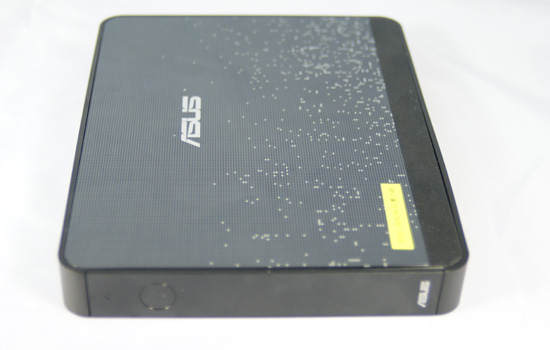
The Eee Box is effectively a headless notebook with no keyboard/mouse. In fact, the new version of the Eee PC features the exact same hardware configuration as the Eee Box - just in notebook form. Using notebook components in a “desktop” PC is nothing new, Apple does it all the time with the majority of its machines. The iMac uses a mobile CPU, as does the Apple TV, despite neither one being a notebook.
Stylistically, ASUS did a tremendous job with the Eee Box. The system we have here is an early prototype, the final version will be available with a solid white or black finish (the random pixel pattern on our system won’t make it to production). The machine is extremely sleek measuring 17.7 cm x 22.1 cm x 2.7 cm (6.97" x 8.7" x 1.06").
Without a keyboard or display to complain about and an even lower price tag ($269 or $299 depending on configuration), we set off to see if the Eee Box would have more universal appeal than the Eee PC.
The Configurations
There have been rumors a plenty about the standard configurations that the Eee Box would be available in and we’re finally able to give you the exact specs of the three North American models:
| OS | CPU | Memory | HDD | Price | |
| ASUS Eee Box | Linux | Intel Atom 1.6GHz | 1GB | 80GB 2.5" 5400RPM | $269 |
| ASUS Eee Box | Windows XP | Intel Atom 1.6GHz | 1GB | 80GB 2.5" 5400RPM | $299 |
| ASUS Eee Box | Linux | Intel Atom 1.6GHz | 2GB | 160GB 2.5" 5400RPM | $299 |
The base Eee Box configuration will retail for $269 and feature a 80GB SATA HDD, 1GB of memory and ship with Linux.
The same configuration with Windows XP will run you $299, or for the same amount of money you can purchase a 160GB/2GB system also with Linux. Microsoft won't allow PCs to be sold with > 80GB HDDs preloaded with Windows XP and thus the top end configuration is only available with Linux. Given our experience with the Eee Box under Vista vs. XP (which we'll get to shortly), we think that this is the perfect example of Microsoft dropping the ball and easily losing ground to open source solutions here.
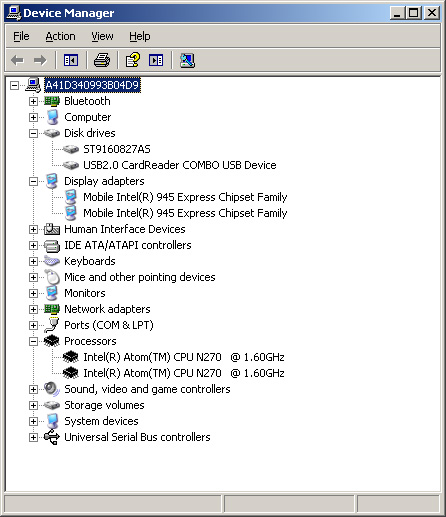
All three machines will ship with the same Intel Atom processor running at 1.60GHz on ASUS’ own 945G based motherboard.
Availability is planned for July in North America although machines will first be available in Asia before then.


 Facebook
 Twitter
 RSS
RSS


35 Comments
View All Comments
mauriceh - Monday, September 15, 2008 - link
I am at a ASUS dealer in Canada.So far all we have had available is the model with XP , 80Gb, 1GB RAM.
DEALER Wholesale on this unit is $349, and there is a kickback of $20 a unit if you buy 100 pieces.
Further ASUS can not tell us of ANY ETA for the Linux model.
It looks VERY much like M$ are throwing some weight against this.
yuhong - Sunday, June 15, 2008 - link
I wonder exactly what was the bottleneck that made Vista feel so slow on this system.Rza79 - Tuesday, June 3, 2008 - link
It would have been great if you would have included results without Hyperthreading. Then i can get a better understanding in how the Atom performs in single threaded applications and how efficient Hyperthreading is.It would be meaningful to include a Via C7 1.6Ghz because then i could know how the Atom performs compared to the C7 (and Nano since Via released comparisons between them).
hermunn - Tuesday, June 3, 2008 - link
I miss having a Linux / FreeBSD computer on my own, and I really want something like the EeeBox. I will use it for text editing (emacs + LaTeX), web and email. My girlfriend hogs my old TiBook, and I would love to restrict the use of Windows as much as possible. My current employer (college) use Office and has supplied me with a Windows XP computer. I do not enjoy it. A Linux computer will allow me to do research (emacs + LaTeX for the win) in a safe environment. It will also be the base configuration for my small (tiny) programming projects.Why something like an EeeBox? First of all, I want a Linux box that is quiet and cheap, and the EeeBox is more then powerful enough for my needs (LaTeX, web, email, Singular, ..). I will buy an EeeBox if they manage to make the final version quiet, and nothing clearly better is available.
I imagine a small but significant number of geeks who see one and two uses for the EeeBox as a third or fourth computer, and a horde of computer literates who see the EeeBox as a nice first Linux computer. The hardware is designed to be 100% compatible with Linux, and the distribution will be focused on usability. A less steep learning curve than most other ways into the Linux world.
pmonti80 - Tuesday, June 3, 2008 - link
Anand you say that EEE Box can't play better than 720p at 4.5mbps but wich codec where you using?. Core AVC codec is know to be very efficient and it would be interesting to know if buying this codec would be enough to make Atom a CPU to watch HD content.pmonti80 - Tuesday, June 3, 2008 - link
A benchmark of a 1.6Ghz VIA C7 would be interesting too.JimmiG - Tuesday, June 3, 2008 - link
I could easily find a third PC useful. I would set it up in the kitchen or living room or another convenient location, with a ~15" LCD and compact mouse and keyboard. It would be used for email, web browsing and maybe music (a simple analog cable to the amplifier aux in would be enough for me). However the next generation EeePC would also fill this function while taking up less space and being portable. Another option is the very stylish, but still somewhat overpriced (for the specs), Mac Mini. I think the Eee Box can be thought of as a cheaper Mini.With wireless networking, I could make the any one of those little machines access e.g. my mp3 or photo collection from the main rig.
For it to be useful, there are some requirements:
1. Fast boot times - if it takes minutes to boot, I might as well walk to my main PC or borrow my gf's.
2. Near-silent operation. One reason to use such a PC instead of my main rig when just browsing the net etc. would be noise levels. My main PC is not extremely noisy, but it's far from silent. I'd prefer a passively cooled mini-pc with a 16GB or bigger solid state drive, to be able to lazily browse the web in peace and quiet.
3. It needs wireless networking that works out of the box. It needs to be able to detect and use anything I might think of plugging into it, like cameras, mp3 players, input peripherals, printers (also networked) etc. There needs to be support for all the video formats and web functionality, and programs preinstalled for all common tasks.. and so on. It shouldn't feel like I'm using a PC.. It should be like using any other piece of consumer electronics.. turn it on and start using it.
In my experience, MacOS is most likely to accomplish this, followed by Linux, then XP/Vista. XP is pretty "bare bones" when it comes to such functionality, requiring drivers and third party apps to do anything useful.. Vista Basic isn't much better. Linux distros tend to come bundled with pretty much everything you need. But the OS also needs to be "polished" and "work".. Not like the latest version of Ubuntu for example.. Very user friendly and polished.. until it was time to try and get online using my USB wlan dongle...no amount of friendly dialog boxes or big helpfiles would allow me get online... How useful is a computer if you can't even get online? It was the usual Linux routine of reading "howto's" and forums, then entering cryptic commands and editing textfiles, most of the time not understanding a thing of what you're doing. For the hobbyist, that's OK - but on a PC bordering on “consumer electronics”, it's not acceptable and it's Linux distro needs to be more polished and refined than that.
Truxy - Tuesday, June 3, 2008 - link
A small office of 25 PCs I consult for has been waiting for something just like this to come along for a while now. There's a room so small that is intermittantly used all day, with 3 full sized PCs that take up too much of the available space and cause way too much heat. We dabbled in using some shuttle PCs but it didn't work out (power supplies were blowing too often).I'll be ordering two to test drive ASAP and hopefully order more soon after.
ATWindsor - Tuesday, June 3, 2008 - link
I guess this is a pretty stupid question, but how does the monitor-mount work? Does one have to remove sthe existing foot of the monitor? Or can one just attach the computer on the back of a normal monitor?And to bad its not fanless.
autoboy - Tuesday, June 3, 2008 - link
I'm still waiting on the results for mpeg2 1080i decoding...The 945 has hardware acceleration for mpeg2 (VLD + iDCT + MC) so it should be more capable as a slim player for people who use mpeg2 more often than h.264. I use an HDHR to record my programs and an R5000 so everything is in mpeg2 720p or 1080i (or 480i SD but we know that works fine. Any chance we can add that to the benchmarks?