



ASUS Eee PC: Laptop, UMPC, or Something Else?
by Jarred Walton on November 30, 2007 4:00 AM EST- Posted in
- Laptops
Introduction
Every now and again, a product comes out that defies easy categorization. The ASUS Eee PC is such a product. Is it a small laptop for children? Is it something that your grandma might like, or perhaps just a tchotchke that an enthusiast would enjoy as a secondary portable computer? ASUS seems to think that it's all of these things and more, and they're probably right. It's also less than the sum of its parts at times, for those that prefer to be a bit more pessimistic.
At its core, the Eee PC is simply a new take on old hardware. Flash back to the state-of-the-art in computer performance, around the time of the dreaded attack of the Y2K bug. Back then, a high-end desktop computer might come equipped with a Pentium III 800MHz chip (or Athlon 650), 512MB of RAM, a GeForce DDR graphics card, and a 15GB hard drive. Throw in the rest of the accessories, and you're talking about a computer that would have cost somewhere approximately $1500 for a midrange setup, and as much as $3,000 (or more) if you purchased bleeding-edge components.
Now squish all of that into a 7" ultraportable laptop chassis, cut the hard drive size down to 4GB, and sell it for $400. You also get wireless networking and a webcam, or you can ditch the webcam and save yourself $50. Almost eight years later, that's more or less what ASUS has done. Depending on your perspective, that sounds like either a great new product or a complete waste of time. There really is no easy way to say which opinion is correct, and not surprisingly user reviews popping up around the Internet show both sides of the coin.
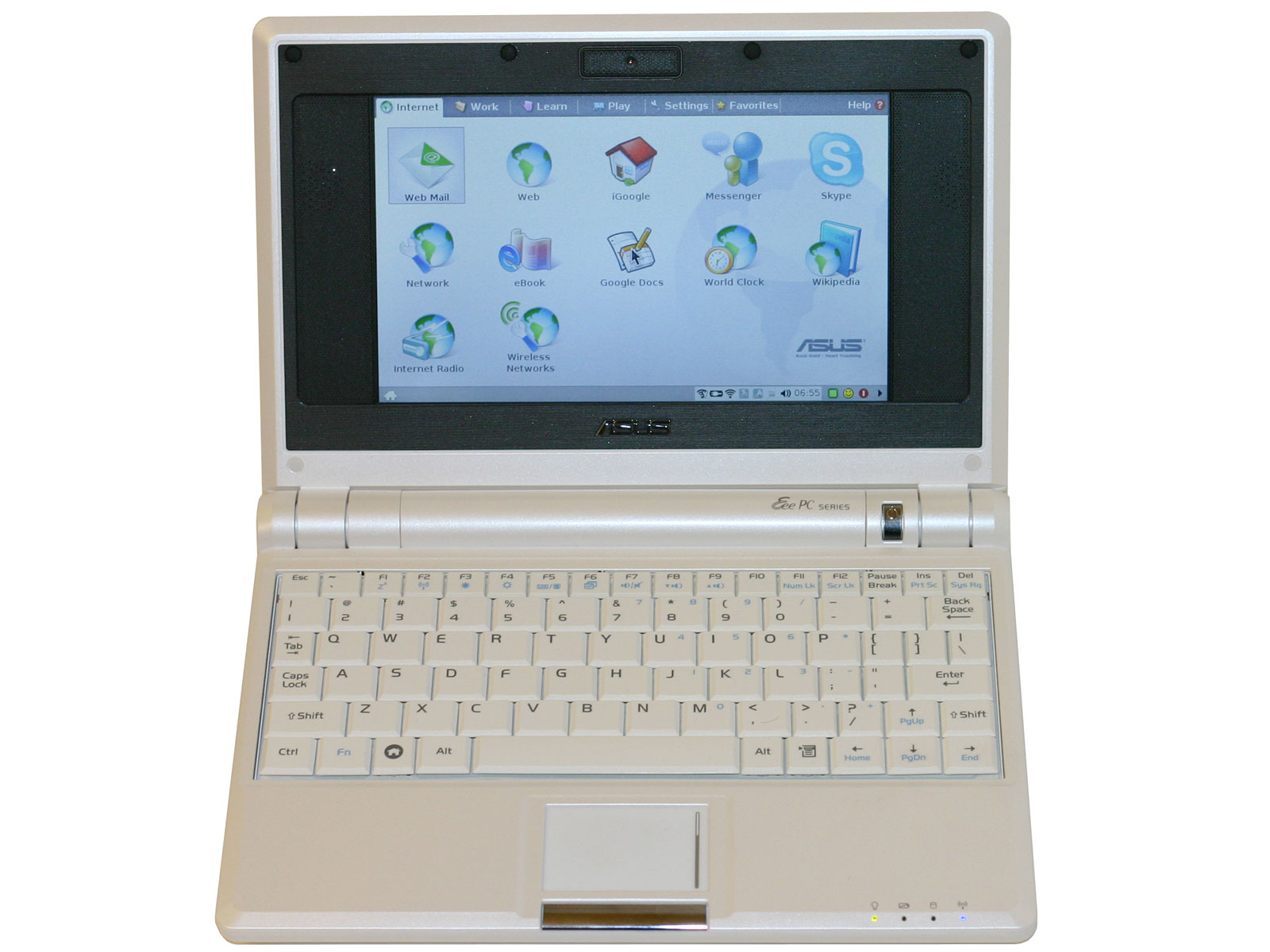 |
The "Eee" in Eee PC is an acronym of sorts, because computer people love those. "Easy to Learn, Easy to Work, Easy to Play"; "Excellent Internet Experience"; "Excellent On-the-Go". Look at the ASUS Eee webpages, and you will find a preponderance of the use of words starting with "E" used to describe the Eee PC. One acronym you won't see used is UMPC, but while the Eee PC is certainly different from your typical UMPC - it lacks the touch sensitive stylus interface and it runs Linux by default - it can certainly fulfill the same niche if necessary, with some caveats. Considering it costs half as much as the cheapest UMPCs, anyone looking for such a device should give the Eee PC some consideration.
What about grandma and grandpa who need an easy to use computer for Internet and email access, or little Billy who's in elementary school? Despite the low price, the Eee PC might not be the right choice for that sort of person. Grandma and grandpa will probably scream in pain as they try to type on the tiny keyboard with their arthritic fingers while squinting at the screen, and Billy is going to wonder why there aren't more games or other "cool stuff". That's not to say that these people can't use the Eee PC, but there are other options out there that might be a better fit.
Trying to put together a review of the Eee PC is actually quite difficult, so instead of our usual gauntlet of benchmark results, we're going to be giving more of a touchy-feely overview of what it's like to use the Eee PC. There are plenty of things to like, but we also encountered a fair share of irritation. If you tried to sell us on the idea of using the Eee PC as our only computer, we would balk and walk away quickly. As a secondary or tertiary computing device, however, it has a lot more potential. Join us as we run applications, write letters, surf the web, and dismantle the Eee PC.


 Facebook
 Twitter
 RSS
RSS


36 Comments
View All Comments
rhangman - Friday, December 14, 2007 - link
If you are going to compare, then surely a Via Nanobook based solution would be the way to go.http://www.via.com.tw/en/initiatives/spearhead/nan...">http://www.via.com.tw/en/initiatives/spearhead/nan...
Same sized screen/resolution.
Faster clocked chip.
Longer battery life.
Larger storage.
Lighter.
Very similar dimentions.
You also get MPEG-2, MPEG-4, WMV9 HD acceleration, although only with via's poorly implimented drivers and applications under Linux. Openchrome should at least add MPEG-2 support eventually though.
The Asus is I think better looking and cheaper though.
http://www.viagallery.com/index.php?option=com_fli...">http://www.viagallery.com/index.php?opt...s&Se...
Schugy - Monday, December 3, 2007 - link
I would by any other cheap subnotebook with an Athlon 64 2000+ (8W TDP), Radeon Xpress 1250 and a more open Ubuntu Mobile on it.PCTC2 - Monday, December 3, 2007 - link
1) You can modify the GUI to include a start button to access a lot more features on the EeePC by changing the file value of TaskBarShowStartMenu from 0 to 1 in the directory /etc/X11/icewm2) A 10" version with 16GB of SSD space is rumored to be in development for mid-late next year.
I say chuck Xandros and put Ubuntu on it.
PCTC2 - Monday, December 3, 2007 - link
Just kidding about the 10" version. Just a rumor that has now been proven to be false. My b.krwilsonn - Sunday, December 2, 2007 - link
What is the effect of web browsing on the device since I would imaging most webpages are designed for 800 x 600 or above? Also is the voting system removed from this comments section?JarredWalton - Monday, December 3, 2007 - link
Browsing is "okay" - much better than a PDA, but as you guessed there are sites designed for 1024x768 (and even 1280x1024). The vertical size isn't as much of a problem, and really you can deal with the 800 width. AnandTech, for example, you miss some of the right and left columns but can keep the main article content in view. Most sites are like that. But then, I'm spoiled by running at 30" LCD at 2560x1600. :)I don't know what happened to comment ratings - I guess we ditched that with the upgrade. Or maybe it's just not present for now. There are a few areas of the updated site that still appear to have some bugs to work out.
shadghost - Sunday, December 2, 2007 - link
I have been using one for a few days now, and on the first day i got out of "easy mode" and i must tell you it is easy to install new programs with out even going to a new OS, true, apt-get install does not have a lot of programs, but most sites are now putting out .deb, and i find these easier to install then a windows program. I think i am going to switch over to ubuntu, only partly because i feel the OS is crippled, but mainly i have a server hosting ubuntu on my local network. I must say, it is a good little computer, way better then my last laptop that was about 15 pounds to just go to class, now it is down to two pounds plus my backpack.me love the Eee
On the down side, i am downgrading from a 22 inch wide screen and a 17 inch 4:3 to the 7 inch... that is the hardest part.... and that it did not come with ssh server and client pre-installed
n0nsense - Sunday, December 2, 2007 - link
you can always add more repositories for additional software.Synaptic package manager will make it easy for newbies.
Ihlosi - Saturday, December 1, 2007 - link
... to me, it does have some minor issues that add up.1. Why 800x480 ? That's such a weird resolution. 800x600 would be almost infinitely preferable.
2. Leave out the crappy webcam and microphone.
3. Why no PCMCIA/CardBus ?
4. eSATA would be nice, but is probably asking too much.
mmntech - Saturday, December 1, 2007 - link
800x480 would qualify as WVGA. It's a 5:3 aspect ratio. It is a non standard aspect ratio though. Regular WVGA is 854x480.I have a lot of issues with the Eee PC. Namely price and lack of storage. It would be interesting to crack it open and tinker with it to see what it can do. I assume the hard drive is a standard 2.5'' laptop form factor. I'd be curious to see what would happen if someone tossed a mechanical drive in there. Flash drives offer higher seek time and lower power consumption but mechanical drives last longer and are still cheaper dollar per gigabyte.
It's a cute toy but the hardware is really far too antiquated, especially if you install XP on it and realize you can't run half of your programs. Dell had some 15'' Sempron 3600 laptops for $499 so if you want something cheap, that's the better buy. 12'' laptops aren't much of a burden and if you buy one that's a couple years old, they're the close in price to the Eee PC.