



A Month with Apple's Fusion Drive
by Anand Lal Shimpi on January 18, 2013 9:30 AM EST- Posted in
- Storage
- Mac
- SSDs
- Apple
- SSD Caching
- Fusion Drive
Management Granularity
Much of Apple’s marketing on Fusion Drive talks about moving data at the file and application level, but in reality data can be moved between the SSD and HDD portions in 128KB blocks.
Ars actually confirmed this a while ago, but I wanted to see for myself. Using fs_usage I got to see the inner workings of Apple's Fusion Drive. Data is moved between drives in 128KB blocks, likely determined by frequency of use of those blocks. Since client workloads tend to be fairly sequential (or pseudo-random at worst) in nature, it's a safe bet that if you're accessing a single LBA within a 128KB block that you're actually going to be accessing more LBAs in the same space. The migration process seems to happen mostly during idle periods, although I have seen some movement between drives during light IO.
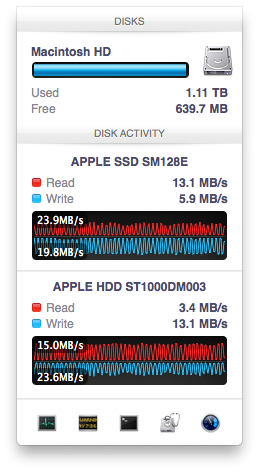
What’s very interesting is just how quickly the migration is triggered after a transfer occurs. As soon as file copy/creation, application launch or other IO activity completes, there’s immediate back and forth between the SSD and HDD. As you fill up the Fusion Drive, the amount of data moved between the SSD and HDD shrinks considerably. Over time I suspect this is what should happen. Infrequently accessed data should settle on the hard drive and what really matters will stay on the SSD. Apple being less aggressive about evicting data from the SSD as the Fusion Drive fills up makes sense.
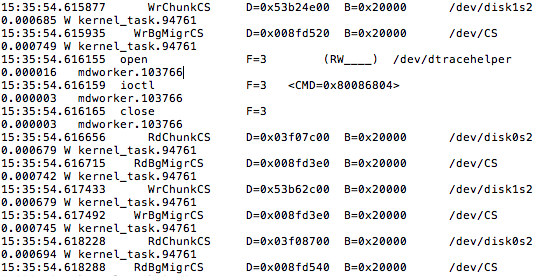
The migration process itself is pretty simple with data being marked for promotion/demotion, it being physically copied to the new storage device and only then is it moved. In the event of a power failure during migration there shouldn't be any data loss caused by the Fusion Drive, it looks like only after two copies of the 128KB block are in place is the source block removed. Apple told me as much last year, but it's good to see it for myself.
By moving data in 128KB blocks between the HDD and SSD, Apple enjoys the side benefit of partially defragmenting the SSD with all writes to it. Even though the Fusion Drive will prefer the SSD for all incoming writes (which can include smaller than 128KB, potentially random/pseudo-random writes), any migration from the HDD to the SSD happens as large block sequential writes, which will trigger a garbage collection/block recycling routine in cases of a heavily fragmented drive. Performance of the SSD can definitely degrade over time, but this helps keep it higher than it would otherwise given that the SSD is almost always running at full capacity and the recipient of all sorts of unrelated writes. As I mentioned earlier, I would’ve preferred a controller with more consistent IO latency or for Apple to set aside even more of the PM830’s NAND as spare area. I suspect cost was the deciding factor in sticking with the standard amount of overprovisioning.


 Facebook
 Twitter
 RSS
RSS


127 Comments
View All Comments
philipma1957 - Friday, January 18, 2013 - link
I purchased a mid range mini a Qaud 2.3 with just a 1tb hdd. I added a samsung 830 512gb ssd as the second drive. If you put the ssd in with no format and boot with an external drive you then go to disk utility the internal ssd and internal hdd are highlighted in red. The disk utility sees it as a broken fusion answer yes to fix it and in under a minute you have a 1.5tb fusion. then do an internet recovery to load mountain lion and you have a standalone mac mini with a killer 1.5tb fusion. Everything you mention in your tests(about the ssd being taxed) is less true basically because the ssd is huge and in a 1 to 2 ratio with the hdd. This is the closest I have come to a 1.5 tb ssd.I copied a 500gb eyetv folder with 30 18gb recordings easy peasy. So if you have a 2012 or even a 2011 mac mini and mountain lion just add a big ssd and fusion away.
hypopraxia - Friday, January 18, 2013 - link
I am with you on this one. Fusion drive with a higher SSD to HDD ratio nets huge gains in snappiness and overall SSD-ness of the fusion drive. I have only encountered IO slowdown once or maybe twice in the 2 months I've been running with Fusion.Munkyman42 - Tuesday, March 5, 2013 - link
eeep!I wonder if this'll work on my 2010 Mac Mini Server. If I can squeeze another year or two or performance with even a 64GB SSD upgrade my wallet would be thrilled!
Mr_SkoT_A - Tuesday, May 14, 2013 - link
I have done it on a late 2008 Unibody Macbook and an original Mini Server. Works like a charm!Hughmungalous - Friday, August 30, 2013 - link
I DID IT on a late 2008 macbbok ;-P 250GB Samsung 840 with a WD Blue 640GB HDD its been in a fusion for about 3 months now and runs beautifully... its basically a media server for me and my wife and it never slacks on its duties!!! its snappy switching profiles and logging in and out... wifey uses safari and flash games and what not and i never hear her complain anymore about her slack windows computer... i use it for heavy downloading light gaming and media server. Mr_SkoT_A Just installed i did the fusion setup which was fairly easy, except i used a specific number and got a 860GB drive instead of using a "100%" value to create the (correct amount) 890GB drive so i have 30GB of my drive in fusion limbo right now... all in all i love it the samsung drive was a smart buy i would love to hear from someone who runs with like a 60gb SSD and a 1TB HDD would be nice to know how much money i could have savedNans - Tuesday, December 30, 2014 - link
Did you fusion drive, from recovery Disk Utility as "I purchased a mid range mini a Qaud 2.3 with just a 1tb hdd. I added a samsung 830 512gb ssd as the second drive. If you put the ssd in with no format and boot with an external drive you then go to disk utility the internal ssd and internal hdd are highlighted in red. The disk utility sees it as a broken fusion answer yes to fix it and in under a minute you have a 1.5tb fusion. then do an internet recovery to load mountain lion and you have a standalone mac mini with a killer 1.5tb fusion. Everything you mention in your tests(about the ssd being taxed) is less true basically because the ssd is huge and in a 1 to 2 ratio with the hdd. This is the closest I have come to a 1.5 tb ssd." said in the previous comment, or did you do it by terminal? Because as far as i know, i can't seem to fusion without terminal in diskuttil?techdaddy1 - Wednesday, May 29, 2013 - link
Hello...can you please clarify regarding booking from an external drive? So you're saying you just installed a ssd you purchased into the machine in addition to the HDD that it came with and disk utility automatically created the fusion? did you need any extra parts to install the ssd? Anything you could tell me would be appreciated. I just purchased the Quad 2.3 Mini as well. Thank you for your time :-)niccopernicus - Sunday, November 3, 2013 - link
I just had my original iMac (recent (not the newest) model with a 2.93 GHz Core i7, now running Mavericks) hard drive replaced with a larger one. I had a 512 SSD installed at the same time, which was formatted and ready to use when i got it back. Is there a way to do the manuver you describe above with Disk Utility now that has already been formatted?Nans - Tuesday, December 30, 2014 - link
Hej, would this method work on a macbook pro 2011 version? Or is it only exclusive for Mac Mini? Because i can start a recovery HD from the internet, by holding option command and R, and how will i not format it ? IF it is already is formated The ssd how can not format it?hypopraxia - Friday, January 18, 2013 - link
So, after I read up on core storage, I rolled a fusion drive in my 2011 macbook pro 13", using a 240GB SSD (sand force controller) and the stock 320GB HDD. (I removed the optical drive. Stupid optical drive...) It honestly feels like a 550GB SSD. Then again, My ratio of SSD to HDD is 3:4, so as always, YMMV.