



Samsung SSD 840 (250GB) Review
by Kristian Vättö on October 8, 2012 12:14 PM EST- Posted in
- Storage
- SSDs
- Samsung
- TLC
- Samsung SSD 840
AS-SSD Incompressible Sequential Performance
The AS-SSD sequential benchmark uses incompressible data for all of its transfers. The result is a pretty big reduction in sequential write speed on SandForce based controllers, while other drives continue to work at roughly the same speed as with compressible data.
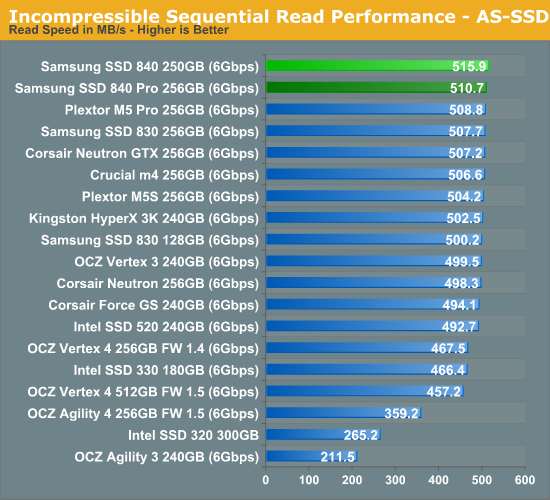
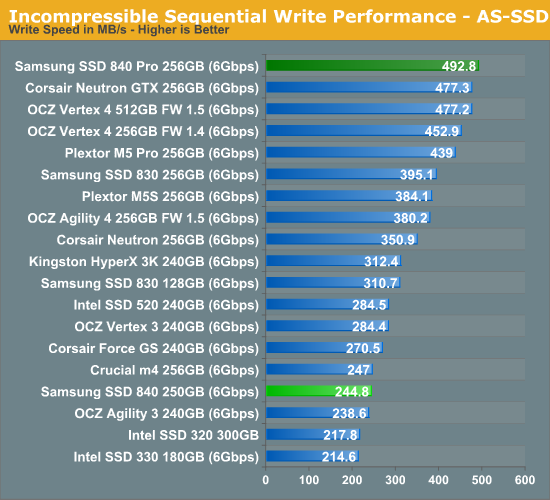
Incompressible sequential read/write speeds concur with our IOmeter tests: Read speed is great but write performance is distinctly previous gen.


 Facebook
 Twitter
 RSS
RSS


86 Comments
View All Comments
roedtogsvart - Monday, October 8, 2012 - link
Might have to finally replace my Intel 320 with this. Very nice review KristianOld_Fogie_Late_Bloomer - Monday, October 8, 2012 - link
Both the Intel 320 and the Samsung 840 Pro support encryption...does the non-Pro 840 offer it or not? I'm swinging back towards getting an 840 Pro for my laptop because of the lack of encryption in consumer 830 drives.On a side note, I was disappointed to discover recently that my current desktop motherboard doesn't support hard drive passwords, which is a shame given the fact that my system disk (an Intel 320) does...oh well.
ekon - Monday, October 8, 2012 - link
The ATA password-based encryption these drives use is beset with issues, flaky motherboard support being just one.http://communities.intel.com/thread/20537
On top of which, it's very poorly documented, and notice how reviews give it nothing more than a passing mention without testing the feature. A TrueCrypt/DiskCryptor alternative it is not :-/
Samus - Tuesday, October 9, 2012 - link
I've had my 320 for two years, no problems with encryption, ever.And I second roedtogsvart that I may FINALLY replace my aging SSD with one of these. I've been thinking Intel 520 for awhile but still don't trust Sandforce, even with Intel at the helm.
Samsung and Crucial are keeping the controllers simple, which is why they have the most reliable drives outside of Intel's original X25-M/320 SSD's.
Old_Fogie_Late_Bloomer - Tuesday, October 9, 2012 - link
When you say "these drives", do you mean the Intel 320, the Samsung 840 Pro, or both? My T430 supports hard drive passwords for the expressly-stated purpose of allowing for encrypted SSDs, which is why I'm looking at the 840 Pro in particular.It seems like the only downsides would be having to enter the password to use the computer, and having to use a motherboard that supports HD passwords to access the drive (so I couldn't just plug it into my current desktop if something were to happen to my laptop and it were off for repair or whatever).
ruberbacchus - Saturday, October 20, 2012 - link
On one hand, it seems to me that the potential gains performance-wise with hardware-based rather than software-based encryption are enormous; particularly so on older computers with slower processors. On the other hand, an encryption solution that is not properly documented as well as thoroughly verified and verifiable does simply not exist as a solution; confidence in the implementation is essential to the deployment of encryption. Unfortunately, it seems impossible to obtain clear references to how encryption works in this new class of SSD's. I read somewhere that it should conform to the OPAL standard, which mandates hardware-embedded keys. I am not sure this is such a great idea, for two reasons:- the keys will potentially be known to the manufacturer;
- the keys will be open to physical attacks on the chip controller.
With TrueCrypt e.g., the user himself generates the encryption keys, the master key used for encrypting the data as well as the header key used to wrap the master key. The latter is tied to the user's password. With hardware-based encryption, passwords may be used for authentication, but the keys will not necessarily be derived from the password. Unchangeable encryption keys weakens the security. In order for the system to be trustworthy, the user should be able to generate and re-generate at will their own encryption keys. At the moment it is not clear this is the case.
GreenReaper - Wednesday, August 8, 2018 - link
It's true. Although not necessarily the fault of the drives, either. My leased server was taken offline by the installation of SSDs which the hardware (or rather, its firmware) couldn't handle. I dumped the firmware logs and traced it to commands relating to ATA security. Don't know if it had been set by the previous users of the SSDs or whatever, but it managed to freeze up the entire controller.A5 - Monday, October 8, 2012 - link
I guess I'm old fashioned and don't throw away my laptop every 6 months, but a 3.5 year lifetime seems really really short.crimson117 - Monday, October 8, 2012 - link
Agreed; maybe for a video card, but I expect longer than 3.5 years out of my hard drives.repoman27 - Monday, October 8, 2012 - link
Really? I rarely expect a consumer grade HDD to last much longer than that these days. In fact, I've seen an alarming trend of drives failing just past the 2 year mark, and still within the 3 year warranty period. (RMA'd one last week even.)