



Western Digital Red Review: Are NAS-optimized HDDs Worth the Premium?
by Ganesh T S on August 17, 2012 4:20 PM EST- Posted in
- Storage
- NAS
- Western Digital
Stress Testing and Effects of Prolonged Usage
Readers of our other NAS reviews might be aware that we are in the process of building a NAS testbed capable of testing mult-client scenarios. While the details of the testbed will come in a separate piece next week, we will describe the relevant part of the system in this section. Since the Synology DS211+ performed the best amongst the three tested NAS systems and is also officially recommended by WD, we chose it for stress testing. The DS211+ was configured with 2 x 3TB WD Red drives in RAID-1 and connected to a Zyxel GS2200 switch. A dual Xeon workstation was set up to run 12 Windows 7 VMs (each with a dedicated physical disk and a dedicated GbE port connected to the switch). Scripts were set up to do a synchronized data copy from each VM to a Samba share on the DS211+. We paused the scripts after the NAS became 30%, 60% and 90% full to repeat our benchmarks from the previous section. Each 30% step took approximately 15 - 20 hours. A screenshot of the status of the Samba share after the process was completed (90% full) is shown below.
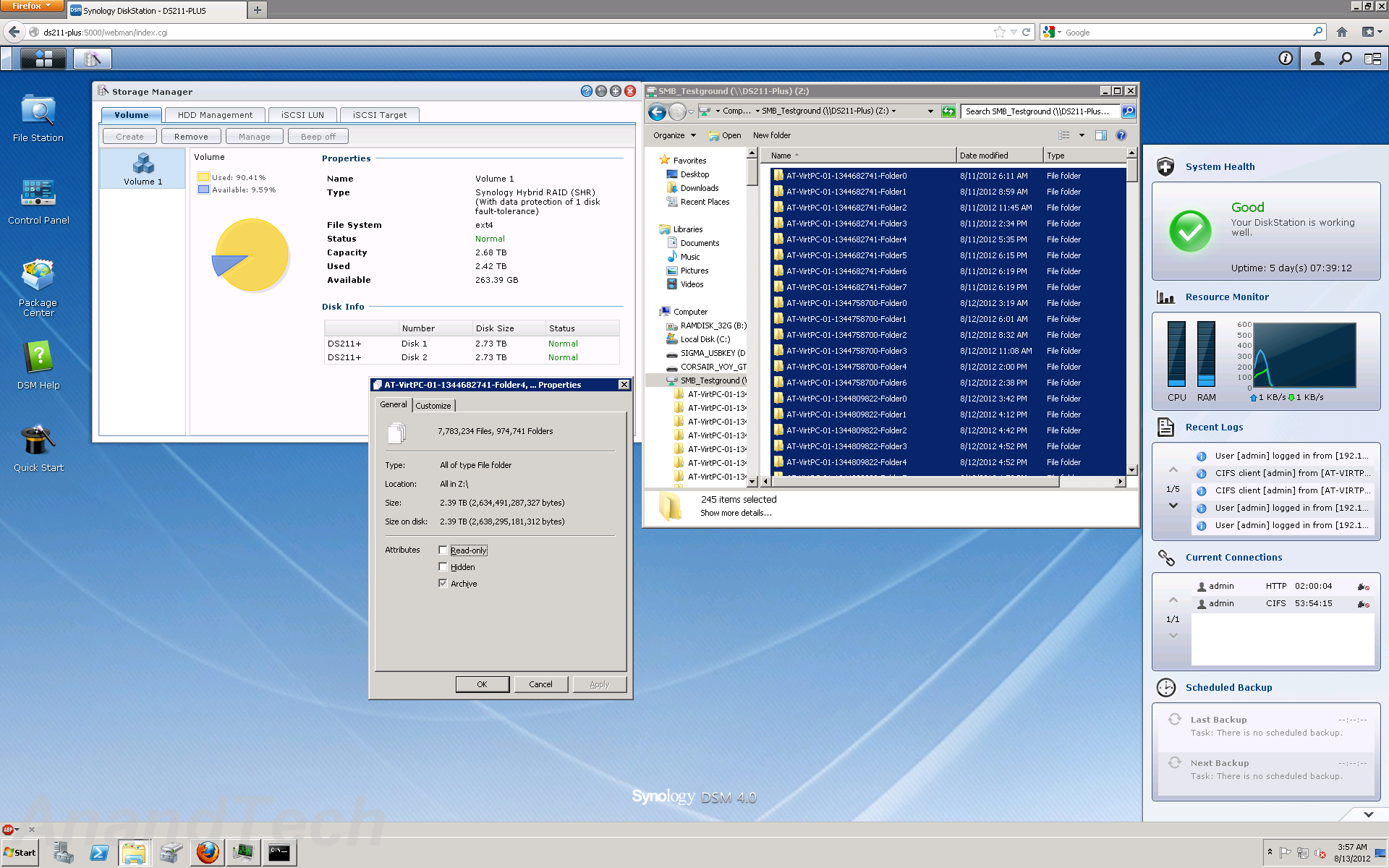
At 90% full, the NAS had more than 7 million files in almost a million folders. 95% of the files were between 0 and 512 KB in size. 1.8% were between 0.5 and 1 MB, 2.8% between 1 and 10 MB, 0.2% between 10 and 100 MB, 0.03% between 100 and 1024 MB, and 360 files were more than 1 GB in size.
The results of running the NASPT / robocopy benchmarks at each stage are provided in the graph below. Note that the NASPT tests were run from one of the VMs in the new testbed, and some of the results could be slightly different from what was obtained with our Summer 2012 NAS testbed.
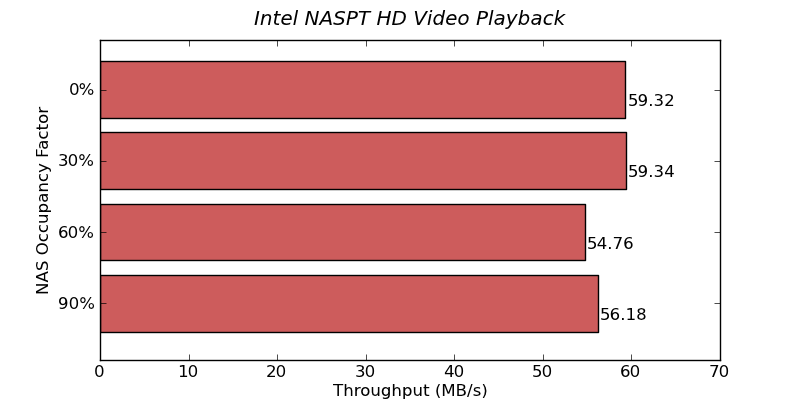

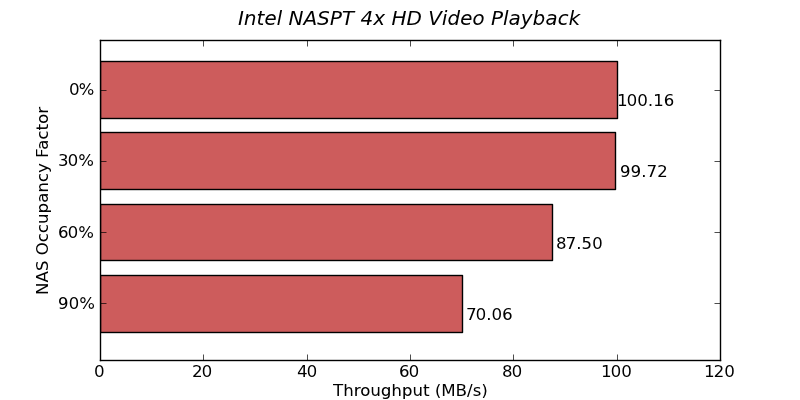
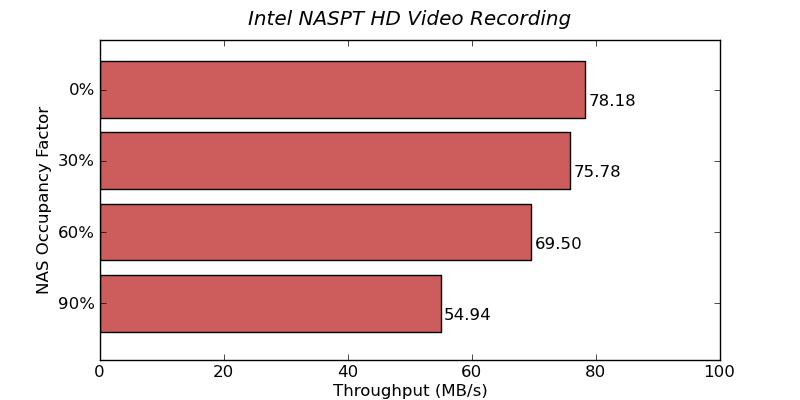
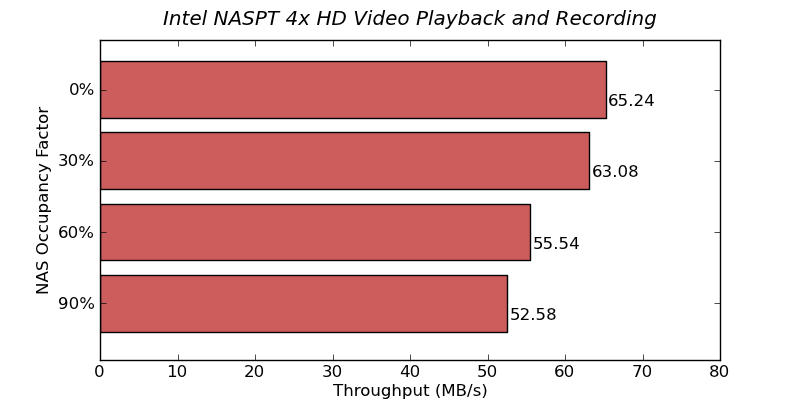
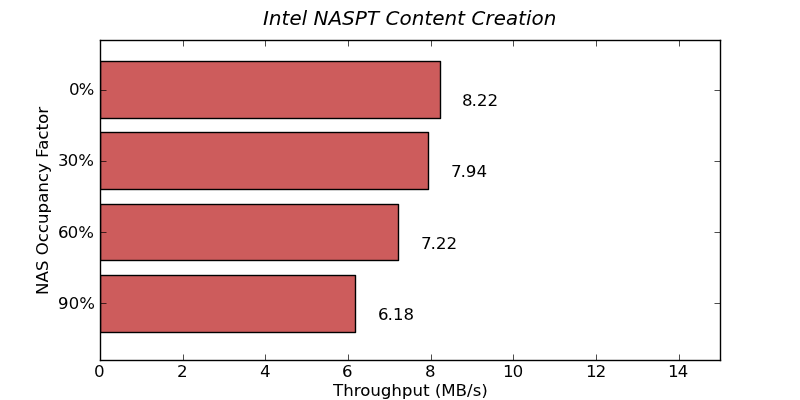
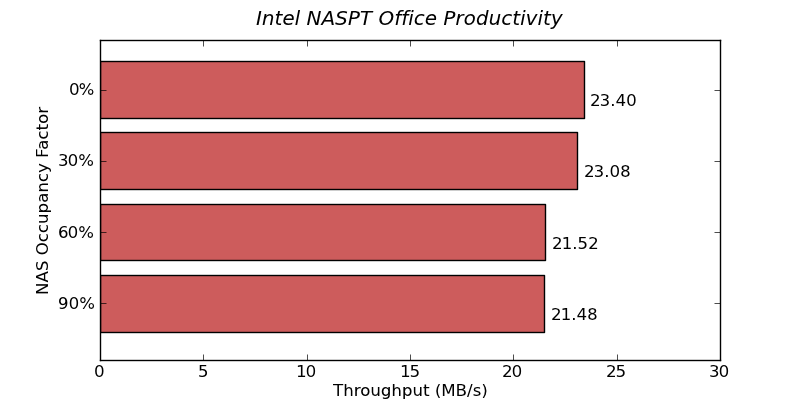

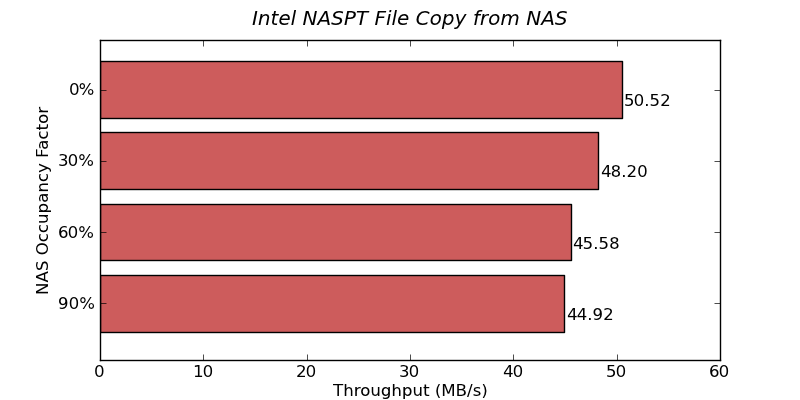
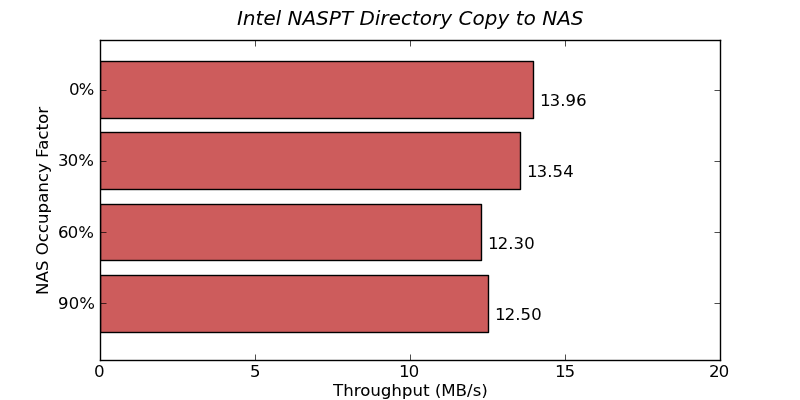

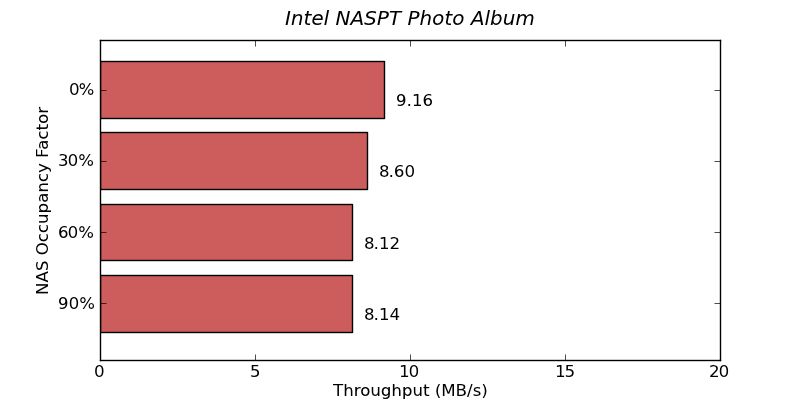
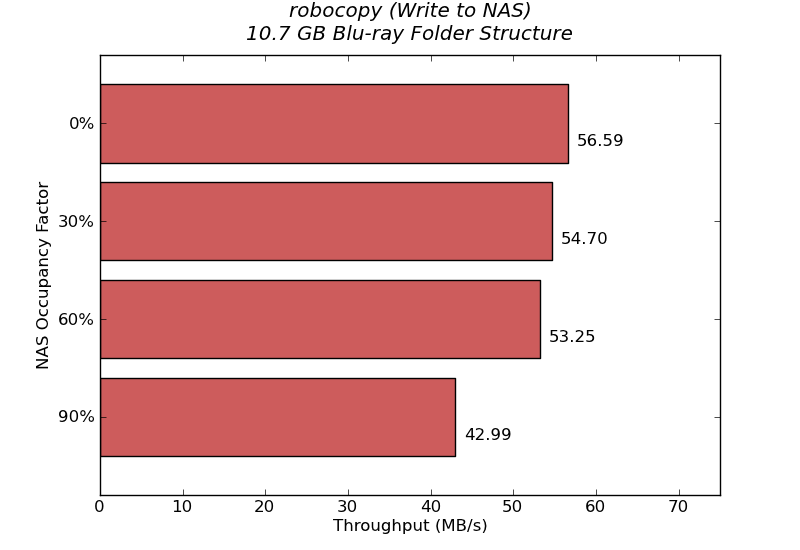
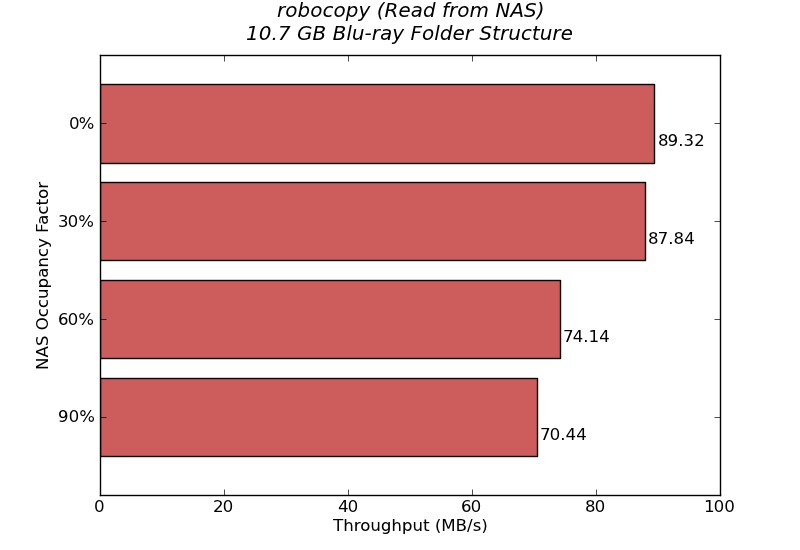
The above benchmarks show that the performance does degrade (particularly for write intensive benchmarks) as the NAS fills up. However, the big gap that we saw in the raw drive performance (in the HD Tune Pro benchmarks) doesn't seem to be as evident when the disk is being used inside a NAS. In any case, it is always advisable to run any NAS below 90% of the capacity.


 Facebook
 Twitter
 RSS
RSS


87 Comments
View All Comments
haukionkannel - Friday, August 17, 2012 - link
I supose that RED allso did run in cooler temperatures than the reference drives? It should have meaning when using NAS 14/7...Could you measure the temperature of drives and temperature of the air inside the NAS box. It would be interesting to read.
ganeshts - Friday, August 17, 2012 - link
The temperatures inside the NAS should be roughly proportional to the power consumed at the wall. I have the power tables in the review. WD consumes approx. 15W when the Seagate equipped units consume 21W -- so the temperatures should have a corresponding decrease. Obviously, it is possible that the fans inside the NAS would be working at higher speeds to cool down the interior ; Say, with the Seagates, the fan operates at 3000 rpm, they might need to operate at only 2000 rpm with the WDs to keep the interior at the same temperature. I believe these external factors may result in skewed results and not properly reflect the fact that the Red runs cooler.By the way, you might be interested in what WD claims as a cooler running drive in the marketing slide reproduced on this page : http://www.servethehome.com/western-digital-releas...
amikey - Friday, August 17, 2012 - link
FWIW, 2 3TB RED running in DS212J for the last couple weeks - 36/40C / 97/104FIs that hot ? In truth, where they are could be better ventilated - shared space with a PS3.
Image:
http://imgur.com/EJepQ
ganeshts - Friday, August 17, 2012 - link
If they hold stable at that temperature, you should not be worried. The usual 'cutoff' temperature is around 55C for most hard drives. If your HDD reports more than 50C itself, I would suggest taking steps to ventilate your setup better.Samus - Saturday, August 18, 2012 - link
I agree, anything under 45c is really good, anything over 50c I get worried.Zds - Monday, August 27, 2012 - link
Remember that per Google data, 37..46C is the optimal range; going either below or above lowers reliability: http://static.googleusercontent.com/external_conte...This means your drive is cooler a bit too well, if anything.
Konraden - Saturday, July 13, 2013 - link
That's not really accurate. Google mentions that temperature deltas "as low as 15C" affected drive reliablility.They apparently were more concerned with the change in temperature of the drives than the average operating temperature. If your drive is being shocked, booting in arctic and being set next to an open flame, you're going to have a lot more issues than if it ran all day at 45C.
[Per cited research]"One of our key findings has been the lack of a con-
sistent pattern of higher failure rates for higher temper-
ature drives or for those drives at higher utilization lev-
els. Such correlations have been repeatedly highlighted
by previous studies, but we are unable to confirm them
by observing our population. Although our data do not
allow us to conclude that there is no such correlation,
it provides strong evidence to suggest that other effects
may be more prominent in affecting disk drive reliabil-
ity in the context of a professionally managed data center
deployment."
Google's team goes on to say that drives showing SMART errors are very significantly more likely to fail, but most of their failed drives _did not_ show SMART errors prior to failing.
sparks.nl - Friday, August 17, 2012 - link
I just bought 4x3TB WD Red drives. It's just too bad that the 24/7 number (from the WD site) doesn't exit. Ican't even call the number to report a defective drive (living in the Netherlands).I would have thought that a big company had better support. What a bummer.
Mixers - Monday, August 20, 2012 - link
Had a look myself since I too live in the netherlands.Found this and hope it helps.
Netherlands, The
0080085584253
Monday-Thursday
Friday
9 am - 8 pm CET
9 am - 6 pm CET
This is the network support number however they will provide RED support.
I already had a go at them for not having a dutch number... They did say they were looking into it.
cknobman - Friday, August 17, 2012 - link
My current server has been running 2 X 2TB WD Green drives since 2009 24x7 without a problem.When one (or both) of those drives takes a dump I will definitely look at the Red line.