



Western Digital Red Review: Are NAS-optimized HDDs Worth the Premium?
by Ganesh T S on August 17, 2012 4:20 PM EST- Posted in
- Storage
- NAS
- Western Digital
Performance Metrics and Power Consumption
The performance evaluation reports are organized under two categories: Standalone and NAS-based. In the latter case, we have two NAS systems which are not in the officially sanctioned list (LaCie 2big NAS and Netgear NV+ v2) and one recommended by WD as definitely compatible (Synology DS211+). As mentioned earlier, we present the equivalent performance numbers for the 3 TB Seagate Barracuda 7200 rpm drives. We make use of the standard single-client NAS testing methodology using NASPT / robocopy.
First, let us take a look at the HD Tune Pro benchmarks on the standalone drive.


The sequential access speeds vary between 59 MBps and 148 MBps depending on whether the outer or inner parts of the platter are being accessed. 4KB random accesses aren't going to win any performance benchmarks (the numbers reported by HD Tune Pro above aren't directly comparable with what we have reported using IOMeter in other HDD reviews).
The following graphs summarize the results from our NAS testing. In all configurations, the drives were put in RAID-1.
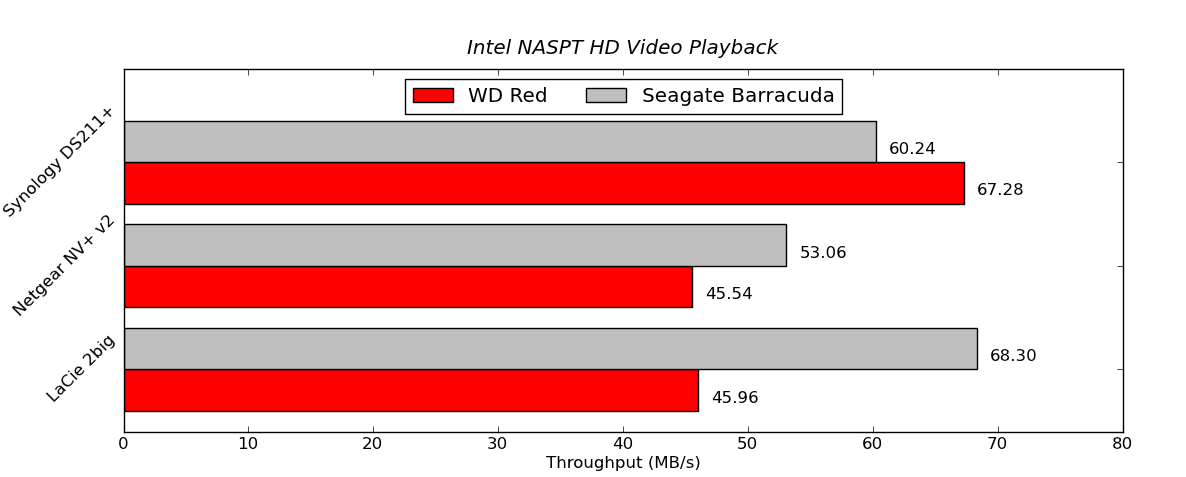

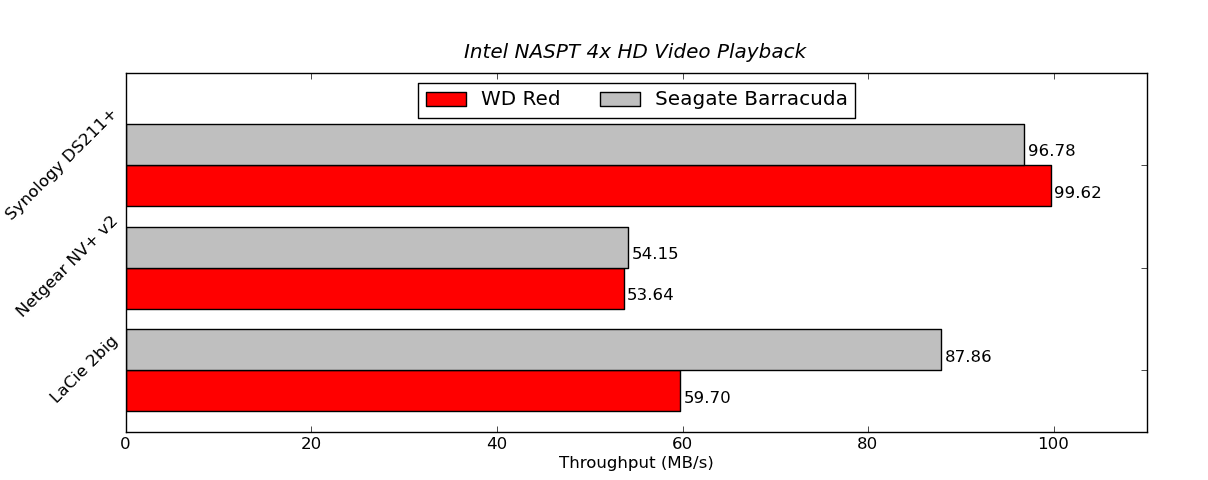
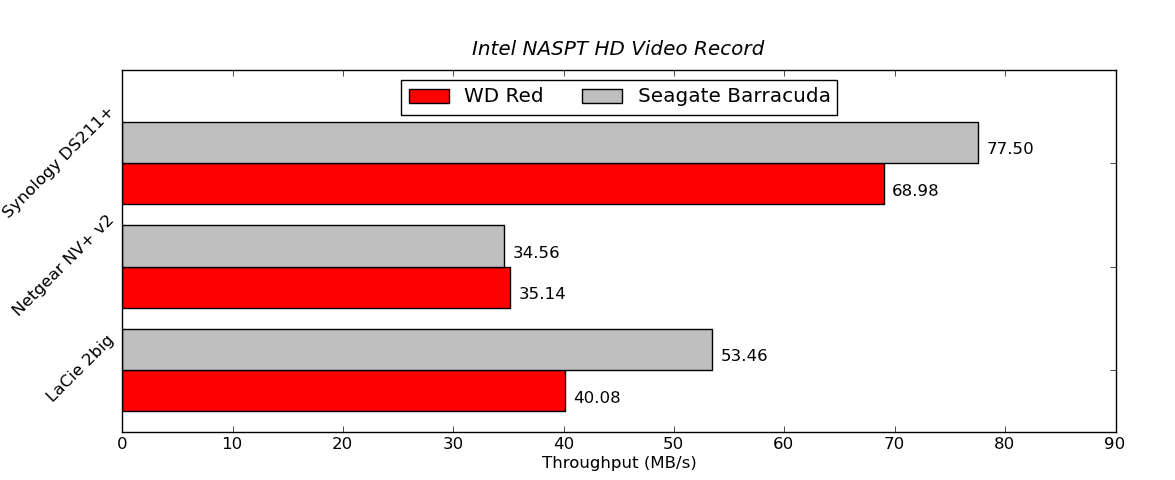

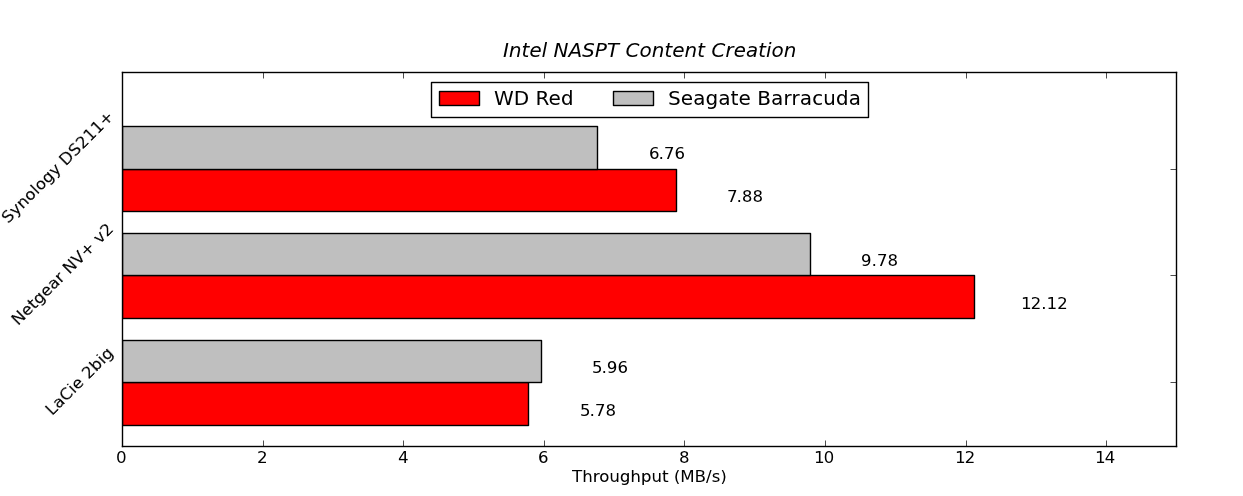
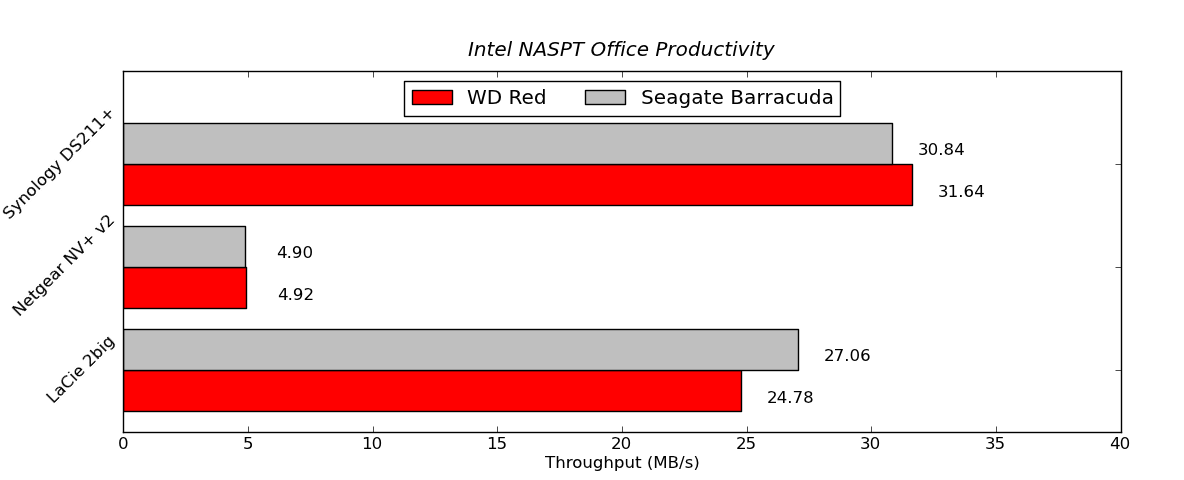

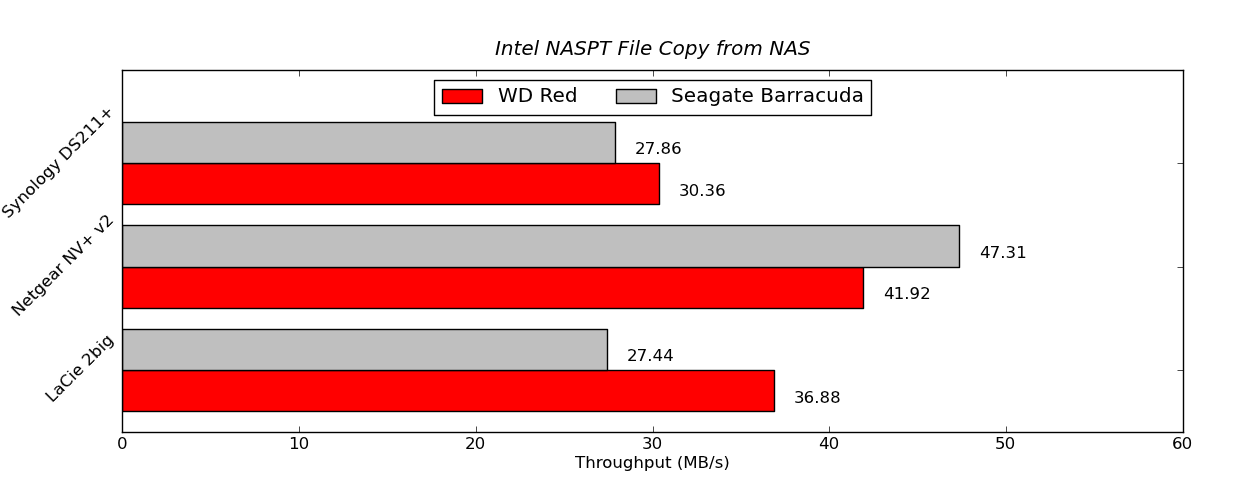
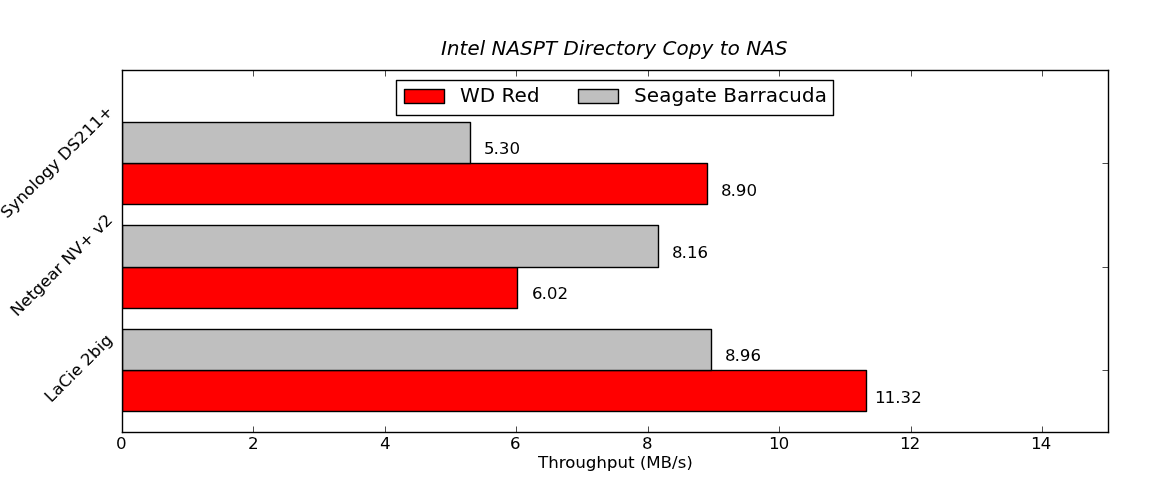
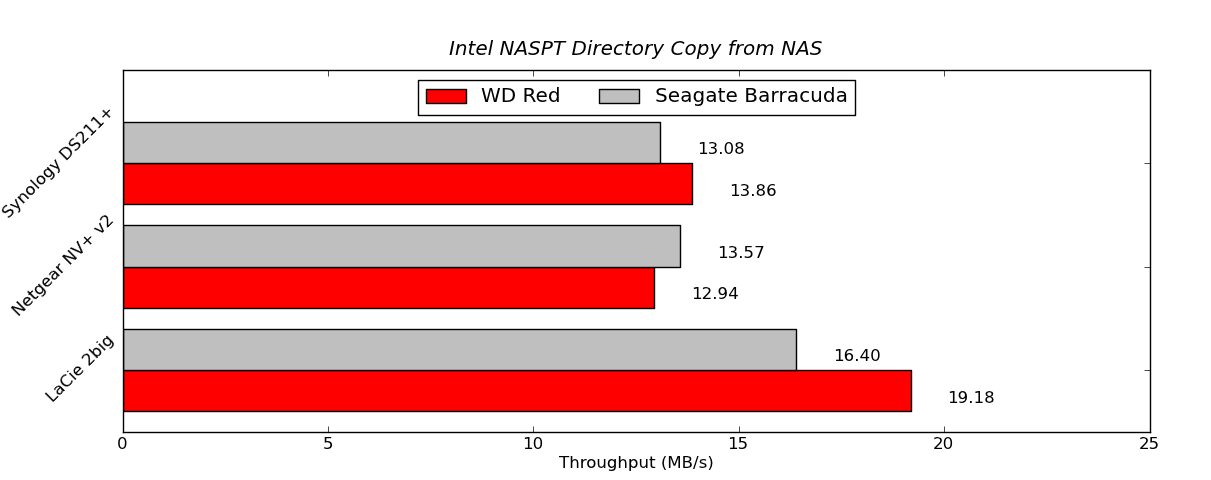

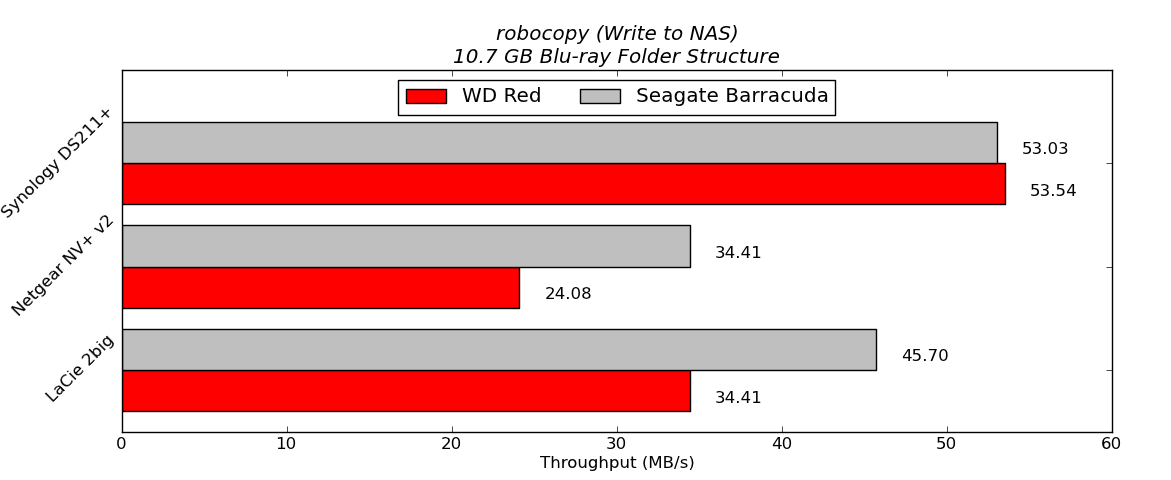
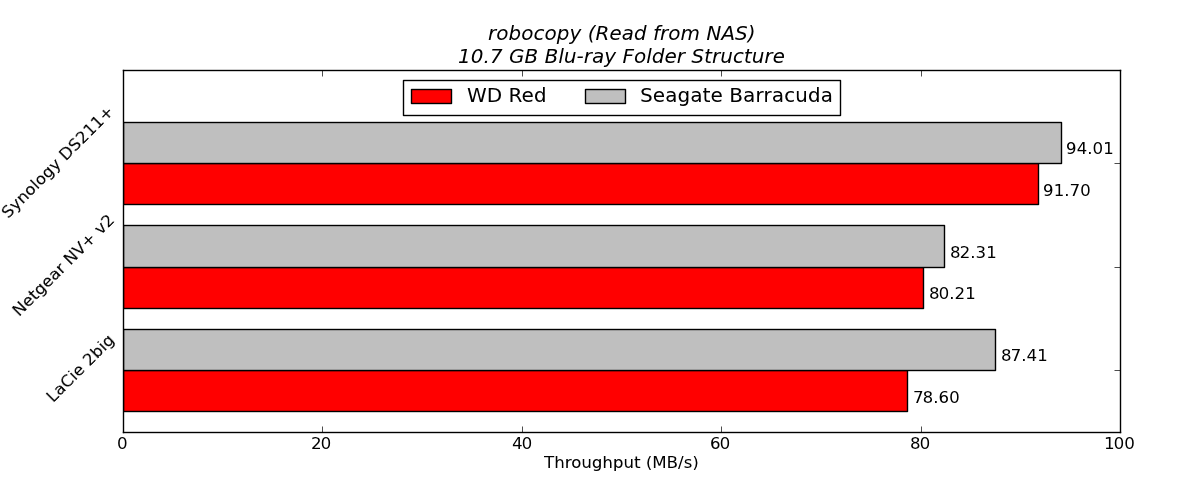
In order to put the final two graphs in perspective, we note that the standalone WD Red (freshly formatted) connected to a SATA 6 Gbps port of the Asus P8H77-M Pro delivered 130.07 MBps in the write test and 137.46 MBps in the read test. In the NAS systems, the WD Red performs quite well, particularly in the Synology DS211+. It does lose out to the Seagate 3TB hard drives under some circumstances. However, one can safely say that in 2 - 5 bay NAS systems based on ARM chipsets, it is unlikely that 7200 rpm drives are going to consistently deliver better performance than the 5400 rpm / IntelliPower drives.
In order to get an idea of how much power savings one can expect from using these drives, we took the LaCie 2big NAS and ran the disk performance bench using both the Seagate and WD drives in RAID-1 configuration. The following table summarizes the power consumption under various operating modes.
| LaCie 2big NAS Power Consumption | ||
| Mode | Seagate 3 TB | WD Red 3 TB |
| Sleep | 7.7 W | 7.7 W |
| 100% Read | 20.6 W | 14.8 W |
| 60% Rand, 65% Read | 21.2 W | 15.9 W |
| 50% Read | 20.9 W | 14.9 W |
| Rand 8K 70% Read | 20.6 W | 14.7 W |
It is interesting to see that the WD Reds consume just slightly more than two-thirds the power of the 7200 rpm drives when subject to similar accesses over the network. Of course, one might say that 7200 rpm drives such as the Seagate one we used above are not suitable for NAS applications at all. However, note that LaCie had in fact bundled them with their 2big NAS with the OS pre-installed.


 Facebook
 Twitter
 RSS
RSS


87 Comments
View All Comments
haukionkannel - Friday, August 17, 2012 - link
I supose that RED allso did run in cooler temperatures than the reference drives? It should have meaning when using NAS 14/7...Could you measure the temperature of drives and temperature of the air inside the NAS box. It would be interesting to read.
ganeshts - Friday, August 17, 2012 - link
The temperatures inside the NAS should be roughly proportional to the power consumed at the wall. I have the power tables in the review. WD consumes approx. 15W when the Seagate equipped units consume 21W -- so the temperatures should have a corresponding decrease. Obviously, it is possible that the fans inside the NAS would be working at higher speeds to cool down the interior ; Say, with the Seagates, the fan operates at 3000 rpm, they might need to operate at only 2000 rpm with the WDs to keep the interior at the same temperature. I believe these external factors may result in skewed results and not properly reflect the fact that the Red runs cooler.By the way, you might be interested in what WD claims as a cooler running drive in the marketing slide reproduced on this page : http://www.servethehome.com/western-digital-releas...
amikey - Friday, August 17, 2012 - link
FWIW, 2 3TB RED running in DS212J for the last couple weeks - 36/40C / 97/104FIs that hot ? In truth, where they are could be better ventilated - shared space with a PS3.
Image:
http://imgur.com/EJepQ
ganeshts - Friday, August 17, 2012 - link
If they hold stable at that temperature, you should not be worried. The usual 'cutoff' temperature is around 55C for most hard drives. If your HDD reports more than 50C itself, I would suggest taking steps to ventilate your setup better.Samus - Saturday, August 18, 2012 - link
I agree, anything under 45c is really good, anything over 50c I get worried.Zds - Monday, August 27, 2012 - link
Remember that per Google data, 37..46C is the optimal range; going either below or above lowers reliability: http://static.googleusercontent.com/external_conte...This means your drive is cooler a bit too well, if anything.
Konraden - Saturday, July 13, 2013 - link
That's not really accurate. Google mentions that temperature deltas "as low as 15C" affected drive reliablility.They apparently were more concerned with the change in temperature of the drives than the average operating temperature. If your drive is being shocked, booting in arctic and being set next to an open flame, you're going to have a lot more issues than if it ran all day at 45C.
[Per cited research]"One of our key findings has been the lack of a con-
sistent pattern of higher failure rates for higher temper-
ature drives or for those drives at higher utilization lev-
els. Such correlations have been repeatedly highlighted
by previous studies, but we are unable to confirm them
by observing our population. Although our data do not
allow us to conclude that there is no such correlation,
it provides strong evidence to suggest that other effects
may be more prominent in affecting disk drive reliabil-
ity in the context of a professionally managed data center
deployment."
Google's team goes on to say that drives showing SMART errors are very significantly more likely to fail, but most of their failed drives _did not_ show SMART errors prior to failing.
sparks.nl - Friday, August 17, 2012 - link
I just bought 4x3TB WD Red drives. It's just too bad that the 24/7 number (from the WD site) doesn't exit. Ican't even call the number to report a defective drive (living in the Netherlands).I would have thought that a big company had better support. What a bummer.
Mixers - Monday, August 20, 2012 - link
Had a look myself since I too live in the netherlands.Found this and hope it helps.
Netherlands, The
0080085584253
Monday-Thursday
Friday
9 am - 8 pm CET
9 am - 6 pm CET
This is the network support number however they will provide RED support.
I already had a go at them for not having a dutch number... They did say they were looking into it.
cknobman - Friday, August 17, 2012 - link
My current server has been running 2 X 2TB WD Green drives since 2009 24x7 without a problem.When one (or both) of those drives takes a dump I will definitely look at the Red line.