



Apple iPad 2 GPU Performance Explored: PowerVR SGX543MP2 Benchmarked
by Anand Lal Shimpi on March 12, 2011 3:04 PM EST- Posted in
- Smartphones
- Apple
- iPad
- GLBenchmark
- iPad 2
- Mobile
- Tablets
GLBenchmark 2.0
GLBenchmark 2.0—as its name implies—tests OpenGL ES 2.0 performance on compatible devices. The suite includes two long benchmarking scenarios with a demanding combination of OpenGL ES 2.0 effects - texture based and direct lighting, bump, environment, and radiance mapping, soft shadows, vertex shader based skinning, level of detail support, multi-pass deferred rendering, noise textures, and ETC1 texture compression.
GLBenchmark 2.0 is the best example of an even remotely current 3D game running on this class of hardware—and even then this is a stretch. If you want an idea of how the PowerVR SGX 543MP2 stacks up to the competition however, GLBenchmark 2.0 is probably going to be our best bet (at least until we get Epic to finally release an Unreal Engine benchmark).

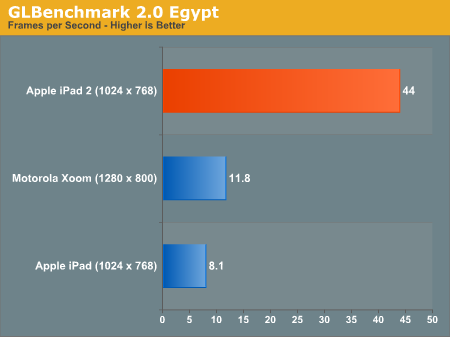
Without AA, the Egypt test runs at 5.4x the frame rate of the original iPad. It's even 3.7x the speed of the Tegra 2 in the Xoom running at 1280 x 800 (granted that's an iOS vs. Android comparison as well).
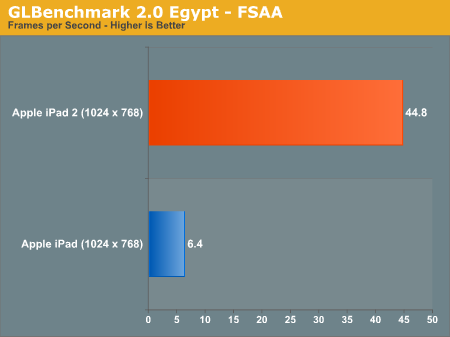
With AA enabled the iPad 2 advantage grows to 7x. In a game with the complexity of the Egypt test the original iPad wouldn't be remotely playable while the iPad 2 could run it smoothly.
The Pro test is a little more reasonable, showing a 3 - 4x increase in performance compared to the original iPad:
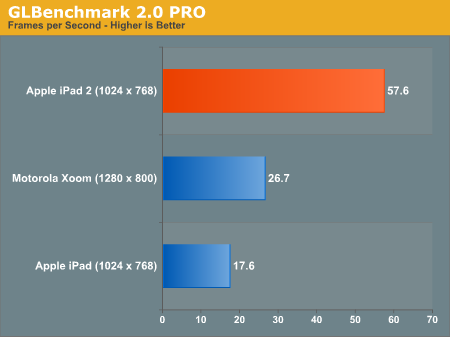
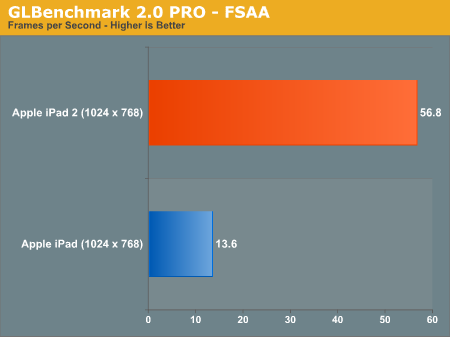
While we weren't able to reach the 9x figure claimed by Apple (I'm not sure that you'll ever see 9x running real game code), a range of 3 - 7x in GLBenchmark 2.0 is more reasonable. In practice I'd expect something less than 5x but that's nothing to complain about. We'll be doing power analysis over the weekend so expect more detail in our full review.
Putting the PowerVR SGX 543MP2 to Use: Infinity Blade
As we pointed out in our iPad 2 Preview, at least one developer already picked up on the amount of extra GPU horsepower in the new iPad 2. Epic put out an updated version of Infinity Blade with support for the iPad 2. Run it on an iPad and you'll get the same old Infinity Blade, but run it on an iPad 2 and you'll get more detail, higher resolution textures and anti-aliasing.
Remember that iPad and iPhone devices are more closed than your PC. There's no adjusting detail settings or resolution, so the target frame rate is usually what's fixed. Developers are simply able to deliver a better looking experience at roughly the same frame rate with upgraded hardware. In the case of Infinity Blade, load times are reduced thanks to the Cortex A9 CPU cores and there is some improvement in frame rate but the biggest impact comes from the improved visuals.
Below is the comparison beween Infinity Blade on the iPad and iPad 2 we ran in this morning's preview:

Mouse over to see Infinity Blade on the iPad 2
There's far more detail in the character models as well as the environment. Lighting looks improved and the AA is definitely appreciated.

Mouse over to see Infinity Blade on the iPad 2
The gallery below has a bunch of side by side shots showing the improvements made to Infinity Blade for the iPad 2 vs. what you get when you run the game on a first generation iPad.


To Be Concluded...
We're still hard at work on our full iPad 2 review. We've got no less than four units running through battery life tests right now and there's still more to talk about in the review. We'll keep you posted, thanks for reading!


 Facebook
 Twitter
 RSS
RSS


219 Comments
View All Comments
rish95 - Saturday, March 12, 2011 - link
I expected nothing less. I knew the SGX543MP2 could beat a Tegra, but never expected a margin like this.tipoo - Saturday, March 12, 2011 - link
My thoughts exactly. I was excited for Tegra 2 devices, but this MP2 beats it handily.vol7ron - Saturday, March 12, 2011 - link
I'm more impressed by the For Loop test. I think that's the biggest testament to the memory/processing improvements.Ringer9 - Saturday, March 12, 2011 - link
"I expected nothing less.... but never expected a margin like this." Are you a politician?Griswold - Sunday, March 13, 2011 - link
He sure sounds like one.nafhan - Saturday, March 12, 2011 - link
Considering how well the SGX540/Hummingbird did compared to the Tegra 2 in GPU bound situations, it's not that surprising. Plus, you've got to imagine that things may be more optimized on Apple's software side of things since they've only got a single GPU to work with (and one that's an evolutionary advancement from the old one, at that). Check out some of the Tegra 2 compared to Hummingbird benches that Anandtech has done in the past.Either way kudos to Apple for pushing the GPU side of things in the mobile space.
Ushio01 - Sunday, March 13, 2011 - link
"Either way kudos to Apple for pushing the GPU side of things in the mobile space."So using an off the shelf part is pushing things now?
Griswold - Sunday, March 13, 2011 - link
Apple invents, revolutionizes and amazes everything and -one.Focher - Monday, March 14, 2011 - link
It's integrated into the A5 SoC, so it's not a "part". And using the best technology is pushing things, because it puts pressure across the competitive landscape to ... compete.designerfx - Sunday, March 13, 2011 - link
Uh, did you forget about the resolution difference?This is like saying "wow! my graphics card runs 120FPS at 640x480 but yours runs it at 34 at 1440x900! My card is superior!"
It's not really better than tegra, the xoom is a horrible product and not at all optimized.
sheesh. Read carefully. Ipad 2 is an improvement, but there are already android phones that run the openGL ES 2.0 test at 45 FPS and that's smartphones, not ipads.