



MSI GX640: $1100 for a Speedy DX11 Laptop
by Jarred Walton on June 13, 2010 3:05 PM ESTMSI GX640 Design and Internals


Build quality on the GX640 is a step up from the last MSI G-series laptop we looked at, though a few weak spots remain. The chassis is essentially unchanged, consisting of a main cover and palm rest with a classy brushed aluminum finish, but the glossy plastic highlights detract from this somewhat. Considering the amount of performance packed into the chassis, the 6.3 pound weight and 1.2" uniform thickness are actually quite good. It's still heavier and will run hotter than less potent laptops, but it's small enough that using it on a plane is possible (albeit cramped).
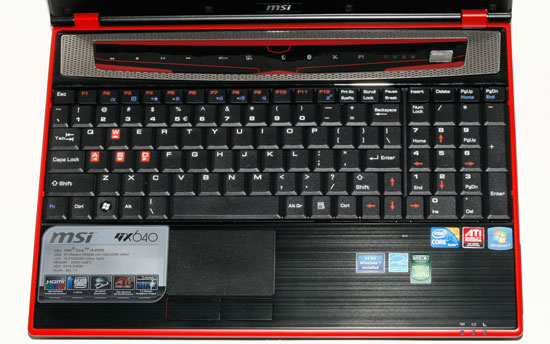
The keyboard continues to be the weakest link here, with an old-style design. We actually don't mind the shape of the keys, but the action is mushy and the keyboard exhibits a lot of flex. This has been a complaint we've leveled against several MSI laptops over the years, and yet we have to bring it up again. Really, fixing the keyboard should be very easy—just give it a stiffer backplate and we'd be happy. Other laptops also include LED backlighting on the keyboard, which is a nice feature and might make it more difficult for engineering to create a flimsy keyboard. Just a thought.
Other than the flex, the layout is generally good, and the number keypad has the correct oversize Enter and Plus keys on the right. However, there are a few areas where important keys require an Fn combination, specifically the Home and End keys. I can't tell you the last time I used the Pause/Break key or the Scroll Lock key on a computer, but I use End/Home all the time; there's really no need to waste space on keys no one uses with this size chassis. Finally, the Fn and Ctrl keys in the bottom-left have their locations reversed, at least relative to how I like them. Lenovo and some others provide a BIOS function to swap these keys, and we'd really like to see that feature on every laptop; it allows you to please all users in a simple fashion.
Above the keyboard are 10 multimedia/quick access keys that allow you to enable/disable WiFi, Bluetooth, and the webcam as well as controlling the "Eco" mode. In testing the Eco utility didn't help much unfortunately. We're missing the functionality of other laptops (i.e. ASUS) where you can have the system power off the optical drive and other features when they're not needed. Finally, the P1 key can be programmed to launch a favorite application if you're so inclined.
The touchpad works well, and we don't have any real complaints there. It supports multitouch and has two "separate" mouse buttons. We put that in quotes because the buttons are partially punched out of the aluminum palm rest. It's not the nicest set of buttons I've used, but I do appreciate the fact that they don't have a glossy rocker button that only serves to catch fingerprints. The Fn+F3 key combination gives you an easy way to disable the touchpad if you're typing fast and getting inadvertent "clicks"—or if you happen to connect an external mouse, which is still pretty much required for playing games.


Poking around inside the GX640 is pretty simple. There are two covers on the bottom, each secured by two screws. We're a little leery of the large cover and the potential for some of the plastic clasps to break if you open/close it regularly, but for infrequent access it should be fine. The smaller cover is for the hard drive, while the large panel gives you access to the RAM, CPU, GPU, mini-PCIe slots, and the entire heatsink/heatpipe assembly. Not surprisingly, judging by the size of the cooling plate and heatpipe, the GPU is capable of putting out quite a bit more heat than the CPU. In use, the system is always warm, and gets downright hot when playing games for extended periods. It's possible to swap out the CPU for something faster (we've seen resellers allow up to the top i7-920XM processor), but cooling might be a problem if you push things too far.
The GX640 is a decent laptop overall, with the biggest complaints involving the keyboard. Build quality is acceptable, and the aesthetic has improved since the last G-series we looked at. However, the biggest attraction remains the price, as $1100 (slightly less) for this much laptop is a great deal. It's the latest iteration of the midrange gaming notebook ideal that started with the Gateway P-6831 FX, and in many ways the design is similar—right down to the oversize battery jutting out the back. You can find faster laptops, or laptops that don't run quite as hot or loud, but the next step up is going to be the ASUS G73Jh (or MSI's own 17.3" GX740 with HD 5870), which means several hundred dollars more for a larger box and only a moderate bump in performance.


 Facebook
 Twitter
 RSS
RSS


28 Comments
View All Comments
Ben.' - Sunday, June 13, 2010 - link
In your tests, you are saying you use a 5850 but in specs it says 5870?Ben.' - Sunday, June 13, 2010 - link
never mind"For games that support DirectX 11, we also tested it on the 5850 and will highlight those results (or 4xAA) in gold."
tipoo - Sunday, June 13, 2010 - link
I really wish you guys included Windows laptop graphs in the Macbook Pro reviews, and Macbook Pro graphcs in Windows laptop reviews.Flunk - Sunday, June 13, 2010 - link
There really wouldn't be much point in this particular case because Apple doesn't make a laptop designed for gaming. The best GPU you can get in a Macbook Pro is the Geforce 330M which is not even close to being competitive with the GPUs included in these benchmarks.tipoo - Sunday, June 13, 2010 - link
True, but at least for the battery life comparisons for the Macbook Pro review.JarredWalton - Monday, June 14, 2010 - link
The battery life tests that Anand runs on the MacBook aren't quite the same as the tests I run on Windows. I run Idle (best-case), Internet only (just browsing web with Flash, but no music playing), and x264 720p playback. Anand does a light Internet surfing test while looping MP3s in iTunes, a Flash Internet test (but using different web pages than my Windows test), Xvid playback (720p? I don't know), and a torture test with Xvid + iTunes + Internet.Since they're not using the same testing scenarios, I'm hesitant to compare the two directly. In general, MacBooks seem to have better battery life than similarly specced Windows laptops under similar loads. So CULV on Windows can last 10 hours on a 63Wh battery... and Mac does the same thing with a regular Core 2 Duo processor on a 63Wh battery. Or looked at another way, the ASUS U30Jc manages similar battery life to a typical 13" MacBook, but it does it with an 84Wh battery.
Penti - Thursday, December 16, 2010 - link
Bootcamp?rwei - Sunday, June 13, 2010 - link
This laptop reminds me pretty heavily one of the HP Envy series - you mentioned the 15 but there are now also 17 and (soon) 14 models.Having just ordered a 17 for ~$1200 after coupon, I'm surprised that one week after they began shipping (and days after people started receiving them), there still isn't a single review for it anywhere.
It might make for an interesting comparison. How much does $300 (base price) net you in build quality, screen, speakers, keyboard, etc?
NecessaryEvil-BC - Sunday, June 13, 2010 - link
You need to update your review to correct your mistake.Incidentally, MSI's GE-600 comes in at $200 less, drops the 5850 for a 5730, drops the aluminum for glossy plastic, drops the 15.4" 1680x1050 for a 16" 1366x768, but does gain switchable video. It's too bad this feature was omitted here.
JarredWalton - Sunday, June 13, 2010 - link
Odd... I tried to put a USB connector in there, and the specs do not indicate it's a combo port, as they only list "2 x USB": http://www.msimobile.com/level3_productpage.aspx?c...However, I tried again after your comment, and it turns out the eSATA port is just a *very* tight fit with USB devices. So the review is updated.
Note that the GE600 GPU is a substantial step down; the 5730 is only slightly faster than the 5650 in the 5740G (about a 20% increase in core clock -- 650 vs. 550 -- but with the same memory bandwidth). I didn't test the two laptops at the same resolution, since the 5740G is a 1366x768 panel, but it looks like half the performance at the same resolution is going to be pretty accurate. It has half the SPs (at about the same clock speed), and about one fourth the memory bandwidth.
As regarding switchable graphics, I glossed over the topic in the review, but there's plenty more to say. While it's good for battery life, there are a lot of complications on high-end laptops. First, if you have a laptop that you want to support quad-core i7, you can't do switchable unless you build in support for doing discrete *and* switchable in the same chassis. No one does that yet, as it's a big cost, so I understand the lack of switching graphics on the GX640. Optimus doesn't get around the requirement either because it has to transfer data over the bus to the IGP, so if there's no IGP present you're out of luck. I suppose what we need is quad-core mobile CPUs with an IGP, or else you have to decide to limit a laptop to only dual-core Arrandale CPUs.