



ASUS M4A89GTD Pro - A Core Unlocking 890GX for $140
by Rajinder Gill on March 10, 2010 12:00 AM EST- Posted in
- Motherboards
The M4A89GTD Pro will set you back a cool $149 at various online retailers:
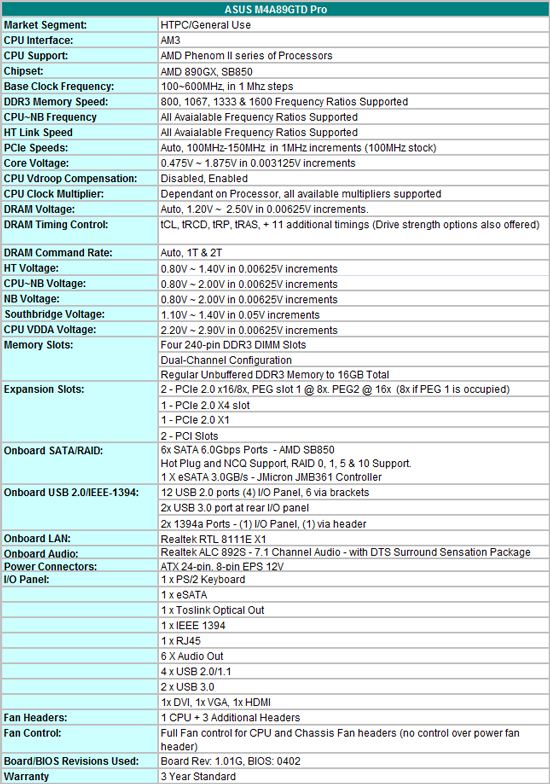
ASUS offers a full spread of components on the M4A89GTD Pro, you get Realtek’s 8111E LAN (PCIe), Realtek ALC 892S audio (complete with the DTS Surround Sensation package) and a couple of NEC fired USB 3.0 ports.
Included with the board you get the following items:
1 x User Guide
1x Support DVD
2x SATA 6Gb/s cables
2x SATA 3.0Gb/s cables
1x UDMA 133/100/66 cable
1x Rear I/O plate
1x VGA switch card
1x Front Panel quick connector
It’s an adequate bundle, but we’d like to have seen a USB bracket added to make use of the internal USB headers.
Software
On the bundled software side, all of the regular ASUS tools are supplied with the M4A89GTD Pro; Express Gate (Linux based OS), AI Suite (overclocking and fan control), PC Probe II (temperature and voltage monitoring) and ASUS Update (OS level BIOS flashing). We’re told ASUS is looking at combining some of these tools into a single package in the near future – it’s a change that’s long overdue.
Most of the software tools that manufacturers provide with boards these days are nothing more than bloatware that serve little purpose. In fact, we’d prefer it if vendors fed us less fluff and spent more R&D time on motherboard functionality rather than creating another source of potential problems.
There is one tool in the ASUS line-up that’s good though - its Turbo-V’s built in overclocking routine:
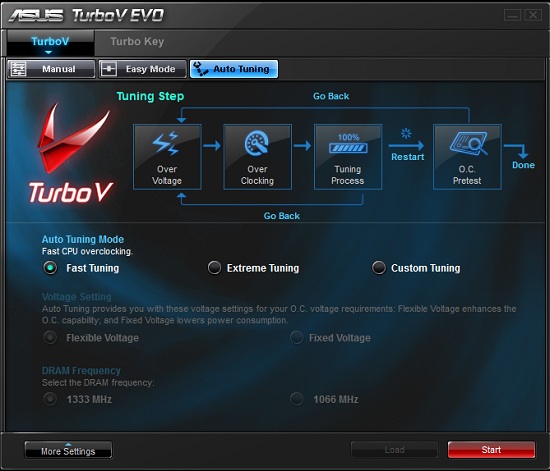
We were introduced to this tool earlier this year when we reviewed the P7H57D-V Evo, and we liked it a lot. You get the same thing here on ASUS’s AMD board, delivering no-fuss overclocking with a decent level of flexibility. Users can set tuning criteria to suit their system and will find the automated routines end up at bus frequencies that are well aligned for 24/7 use most of the time. There’s also the option to push further if you’re components/cooling allow by selecting the extreme preset. The software runs a quick stability preset, hikes the bus frequency by a few MHz and then prompts you for approval before continuing – the whole package is put together very well by ASUS.
BIOS
This is where ASUS get things spot-on for our liking, the BIOS is well laid out, easy to navigate and comes crammed with a multitude of performance options for every type of usage scenario. Voltage options for all primary rails are very granular and also allow direct-entry so you don’t have to scroll up and down through most of the voltage table to select the setting you want.
Another area where ASUS get it right is in the area of memory sub-timings and drive strengths, every option has its own AUTO setting allowing users to fall back on defaults when necessary.
The one area we’ve found to be a little wanting is overclock recovery, we had to switch off at the PSU quite often to encourage ‘safe mode’ to engage during overclocking. We’ve come to expect a little better from ASUS in this department over the years, but it looks like BIOSTAR have the upper-hand in this area at present on their boards.
BIOS flashing is made easy via a built-in routine that allows upgrading from a USB drive, HDD or DVD. ASUS have also gone to the length of ensuring that the BIOS flash software only runs if the system is at default settings and not overclocked, which should prevent a few corrupt BIOS flashes when users are a little careless.
We’re often asked by users to provide information about motherboard fan-control when we discuss board features. Its pleasing to report that ASUS offers very comprehensive fan speed control via BIOS for three onboard fan headers. Most boards at this price point struggle to provide you with anything more than control for the CPU fan header, so we have to commend ASUS on going a step further - we’d like to see more of this please!


 Facebook
 Twitter
 RSS
RSS


46 Comments
View All Comments
ReaM - Friday, March 26, 2010 - link
I don't know why you people say "I don't like AMD"Now tell me, have you ever been satisfied with intel's performance? I have never been. Since my 1400 thunderbird :P I am with AMD. Unlike the p4 3000 Northwood, it did not have fps drops in counter strike. I had to overclock the northwood to 3.4 to play it decently.
Then I had a Venice 3000+ that would run at 2.8ghz from 1.8 base. I still have it.
And still today, in games AMD beats the more expensive i5 750. How many of the market will use i5 750's benefits? Almost noone! People really need to look and see that the best bang for buck is AMD. Cheap Boards, Cheap CPUs, and in summer RAM prices are expected to drop. It will be a 200 dolla upgrade to a quadcore if you have PSU and a case already.
I have just bought i7 860 yesterday (i got it real cheap, I wanted the 920) with p55m ud2 Gigabyte and gskill 4gb 1600 cl7 ONLY because I need the render faster in Maya. I just have no choice here, because AMD does not seem to be the renderer's choice.
It is bad to have no choice, because there is not direct competition between the two, but often I do not understand why many mainstream people get i7 920 for gaming. Because they don't care how much they spend?
I am also forced to choose Quadro over FireGL, but that's another story. Radeon since 4xxx series is SICK!!! I love ATI and AMD.
You should not hate AMD, cmon
But for mainstream user, why i5? Way too expensive
butdoesitwork - Thursday, March 11, 2010 - link
Forget speed. Is it safe to be an early adopter?1. Does the Linux kernel support this chipset at all yet? Does it need any special boot parameters to work at all? e.g. Do I need to forcibly disable MSI again?
2. How _well_ does it work? If you copy files over these new-fangled SB850 SATA ports, does it get there correctly? e.g. can you do a linux "diff" to prove that it isn't broken? Are there any strange messages in /var/log/messages?
Been bitten by this too often in the past. Most recently the cheap JMicron SATA-to-USB bridges found in most external enclosures often caused bus resets and data corruption. May have just hit a similar problem with my board's JMicron eSATA port.
Taft12 - Thursday, March 11, 2010 - link
As a Linux user you should be well aware by now that it's never safe to be an early adopter.Check the changelogs of the newest kernels.
Rajinder Gill - Thursday, March 11, 2010 - link
I have not tested Linux on this platform yet - I find things need a while to settle before everything works properly (that goes for all operating systems). I might give things a whirl on our next review depending upon time constraints. For this article we tested platform compatibility with Windows 7 and found the big problem was with the Sharkoon QuickPort (LucidPort perhaps, although its still up in the air).Regards
Raja
AceKing - Wednesday, November 10, 2010 - link
So has anyone tested this with Linux yet? I'm curious to know if there has been any problems. I see the last post on this was in March, which was 7 months ago.bji - Friday, November 19, 2010 - link
I own one, and it works perfectly in Linux. Onboard video and audio are flawless and well supported in Xorg (no xorg.conf even needed) and ALSA (easy alsaconf setup). I use a Phenom II 1075T and man does it fly. I primarily do software development and 6 thread compiles are just so fast. Even faster than the much more expensive 4 core hyperthreaded Xeon that I have at work.The board does do this weird thing where if you power it off before the OS has shut it down completely, when you power it back on it thinks that you have an overclocking problem (probably detects an incomplete shutdown and assumes bad overclocking) and requires going into the BIOS and back out to continue the boot. And I don't have any overclocking enabled at all, I just manually set the timings for my memory because the defaults were not right.
I disable the JMicron SATA RAID and IDE controller though as I don't need them and I never trust anything that JMicron makes. Nor should you.
caraway - Tuesday, November 30, 2010 - link
Which kernel and distribution are you using?GeorgeH - Wednesday, March 10, 2010 - link
Measuring DC power consumption as opposed to AC is a very welcome improvement - hopefully this is Anandtech's new SOP for all reviews.The only question I think you should make clear (or clearer, with apologies if I missed it) is if you're measuring and summing the DC power across all of the rails or just on a select few; i.e. are you including HDD, ODD, GPU PCIE, and fan connections in the power consumption figures?
Rajinder Gill - Wednesday, March 10, 2010 - link
Hi,I'm not adding HDD's/DVD peripherals into the figures. The power figures shown are from all 4 rails - EPS 12V, ATX 12V, 5v and 3.3v. The CPU fan consumption is about 2w and left in. I can make things lot more granular than I have here - but I figure what we're providing at present is enough for reviews like this, unless concentrating on specific areas of consumption (which may be called for at some point).
regards
Raja
GeorgeH - Thursday, March 11, 2010 - link
I saw that in the 980X article - tell Anand you need a raise.