



NVIDIA's Next Generation ION Announced, Optimus + a 16-core Version
by Jarred Walton on March 2, 2010 12:01 AM ESTGetting Technical with Next Generation ION
Obviously, there are some changes to the core ION design, since the previous version was a chipset with integrated graphics while the new version only has to worry about GPU duties. The manufacturing technology for ION has also shifted from 55nm for the first generation to 40nm hardware; this results in a package size reduction from 35x35mm down to 23x23mm. Outside of clock speeds what we're looking at is essentially a netbook/nettop version of the GeForce G 210M (with half the SPs on certain models—see below), with full DirectX 10.1 support. The memory technology will continue to be DDR2, which comes from the Intel NM10 chipset.

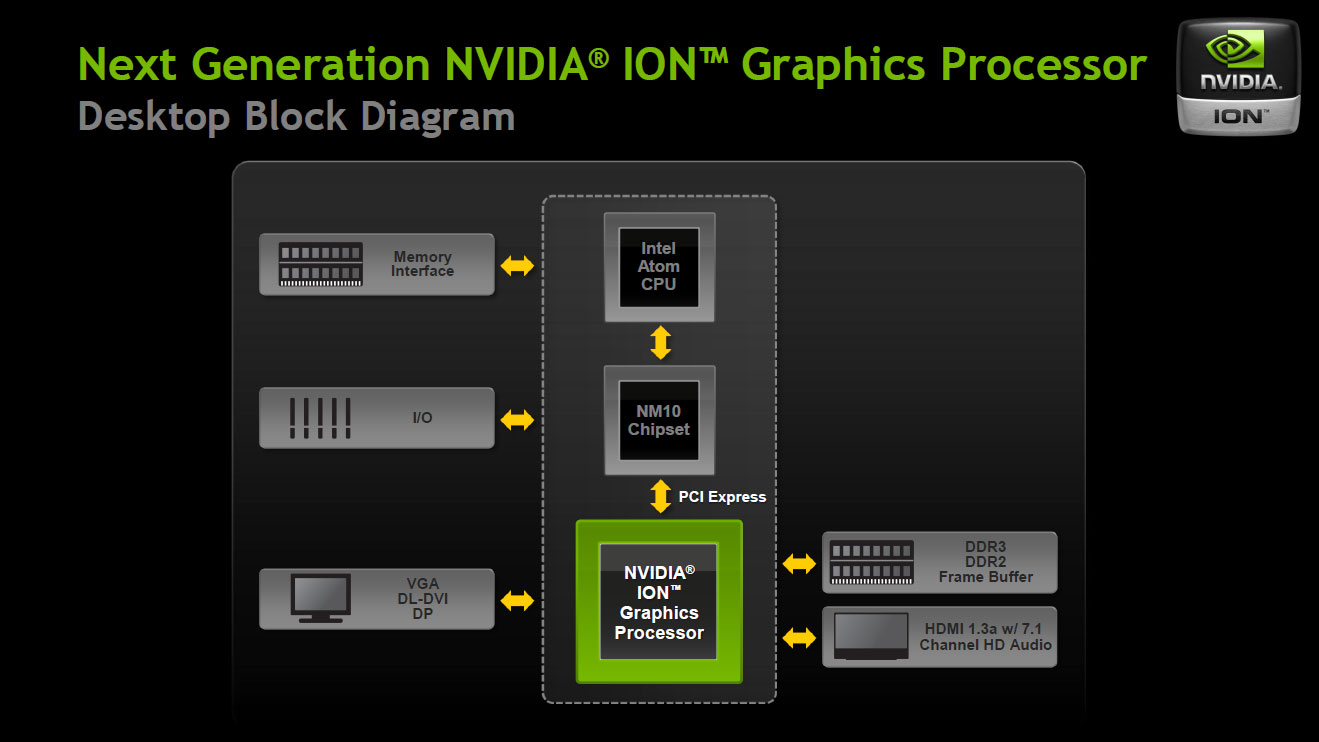
Since NG-ION is now a discrete GPU, it also comes with up to 512MB of dedicated DDR3 memory. This alone should provide better performance than the old version, as there's now more bandwidth to go around. NVIDIA isn't disclosing clock speeds yet, but given the process shrink we would expect moderately higher clocks. That probably won't matter much for complex games, as the Atom CPU will continue to be a bottleneck, but it will help with some games and CUDA applications. NVIDIA says that in general NG-ION will be 50 to 100% faster than the original ION.
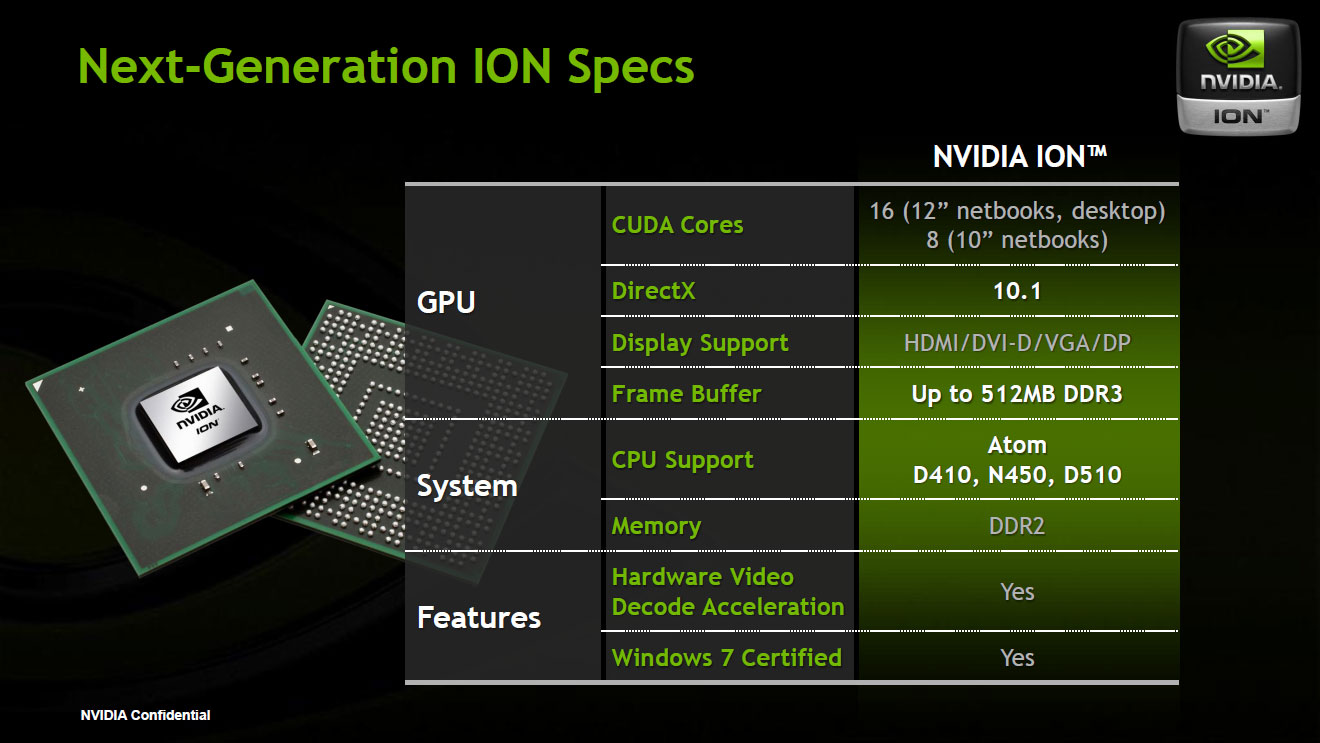
Like the previous iteration of ION, there will be two versions of ION. Nettop IONs will come with 16 SPs (aka CUDA Cores), while netbooks will come with either 16 SPs or 8 SPs. The 8 SP version is designed specifically to fit within the thermal constraints of a 10.1" chassis, so we'll actually see 10" netbooks with ION this time around. Fewer CUDA Cores may impact gaming performance (depending on the title) and CUDA applications, but NVIDIA says Blu-ray playback will continue to work, so by extension HD video decoding won't be a problem.
The one aspect of the technology that NVIDIA wouldn't discuss extensively is how Optimus works within the bandwidth constraints imposed by the NM10 chipset. Just to clarify, NM10 provides just four PCI Express 1.1 lanes, and while a manufacturer could choose to use all of those for the ION GPU NVIDIA says most will use a single link, leaving the other lanes open for additional devices. PCIe 1.1 provides 250MB/s of bidirectional bandwidth on each link, so that means Optimus will have to work within that constraint. Optimus copies content from the GPU memory to the system memory directly, to avoid any issues with flickering displays, but that means NG-ION will need to transmit a lot of data over a relatively narrow link.
Driving a low resolution 1024x600 LCD at 60FPS isn't a problem, but even at 1366x768 we are at the limits of x1 bandwidth (such a display would require 251.78MB/s to be exact). NVIDIA says that NG-ION won't have any trouble driving up to 1080p displays, so naturally we were curious how they manage to get 1920x1080x32-bit @ 60FPS (497.66MB/s) over a 250MB/s link. For now, unfortunately, they aren't saying, other than that there's some "intelligent work" going on in the drivers. Real-time compression is one option, and if you only transmit the meaningful 24-bits of color you can save 33% of the total bandwidth. All we know is that NVIDIA says it works, that the content isn't compressed (presumably that means no lossy compression, as clearly there has to be some form of compression happening), and that they're not overclocking the PCIe bus. In short, Optimus has some "special sauce" that NVIDIA doesn't want to disclose (yet?).
Update: The answer was staring me in the face, but I missed it. NVIDIA was kind enough to provide the remaining information. If you read below, HDMI requires the GPU, since the Atom IGP doesn't support HDMI output. That solves any question of 1080p support, since the only thing going over the x1 link at that point is the compressed video stream. For content running on the laptop LCD, the maximum resolution supported by the Atom LVDS controller is 1366x768, so NVIDIA can do two things. First, any content at a higher resolution (e.g. 1080p Blu-ray) can be scaled down to 1366x768 before going over the x1 PCI-E bus. Second, most videos are at 30p or 24p, so 1366x768x32-bit @ 30FPS is well withing the bandwidth constraints of an x1 link (125.9MB/s). For 1366x768 @ 60FPS, rendering internally at 32-bit (with the Alpha/Z/Bump channel) and then transmitting the final 24-bits of color data still seems like a good solution, but NVIDIA didn't clarify if they're doing anything special for that case or if they're just saturating the x1 link.
Speaking of Optimus, that also means that NG-ION netbooks are limited to Win7 systems. This won't be a concern for most users, but know in advance that installing Linux on such a netbook would mean the loss of your GPU functionality (short of some enterprising individuals figuring out how to do Optimus on their own, which I wouldn't put past the Linux community given time). NVIDIA informs us that there are currently no plans for Optimus on desktops or on other OSes.


One item that created a bit of confusion for us was the Windows 7 Starter requirement. NVIDIA is able to handle the Aero UI with ION, obviously, but what does that mean for Optimus? If GMA 3150 can't run Aero on its own, Optimus would have to constantly power up the GPU to handle Aero effects. That would be counterproductive and as far as we can tell, the real issue with Windows 7 Starter comes down to manufacturers wanting to save money by going with Starter instead of install Home Premium. GMA 3150 can handle Aero (albeit barely), so Optimus doesn't need to worry about using the GPU for standard Windows applications with Pineview CPUs like the N450. Whether all ION netbooks will require Home Premium isn't clear, but we see no reason to pair such a netbook with Win7 Starter.
Finally, because of the IGP restrictions on the GMA 3150, NG-ION will require the GPU to be active any time an HDMI connection is used. GMA 3150 does not have support for HDMI at all, so the HDMI connection will run solely off the ION GPU. Considering HDMI means you're tethered to an external display this shouldn't be a problem, as you can easily plug in the netbook. Second, GMA 3150/NM10 has a resolution limit of 1366x768 for LVDS and 1400x1050 for VGA, so higher resolutions will need ION—but again, higher resolutions will only be available with an external display. The VGA connection is supposed to come from the IGP, so the resolution limit for VGA will remain in effect.


 Facebook
 Twitter
 RSS
RSS


34 Comments
View All Comments
synaesthetic - Friday, March 5, 2010 - link
I thought the major difference nvidia pushed for ION2 was that it would be available on non-Atom platforms (like maybe Intel CULV)...I guess not. Unimpressive.
wicko - Wednesday, March 3, 2010 - link
I have yet to see the Ion platform really take off here in Canada. At least in netbooks anyway. Most of them come with Intel's GMA series, the only one I've seen with an Ion is an Asus Eee (and an Ion LE in an HP netbook).I'd be more excited if I could buy the actual product :(
CZroe - Wednesday, March 3, 2010 - link
I don't know why this article speaks as if it will soon be available when it has already been available. For example, many already own the Acer Aspire one 532G. Just look at the AspireOneUser.com forums.JarredWalton - Wednesday, March 3, 2010 - link
I'm not sure where people are buying the 532G... I can find the 532H all over the place, but not the 532G. Can you link me to a thread? Because I don't see any on the main pages; just an Engadget blog.anandtech02148 - Tuesday, March 2, 2010 - link
nvidia going up against microsoft& intel ,except for the zuneHdthey hold the netbook standard,its wintel all over again.
maybe apple should use that $40billions &buyout nvidia,
it make senses sinced apple is building their own Soc.
Penti - Tuesday, March 2, 2010 - link
A good Broadcom Crystal HD alternative then, just as I thought a GPU connected on the PCI-E bus. Copy Engine is of course new tech that weren't around when I speculated, but if it's just gonna be used for DXVA then it's pretty moot in the netbook space. In the HTPC space there's other chips that can be used any way as you won't need the copy engine there. But certainly a nice addition making 1080p HDMI possible.darkhawkff - Tuesday, March 2, 2010 - link
Being an HP 311 owner, who is extremely happy with the little machine, I fail to really see any value added to both the new Ion, as well as the new Atom CPU's. Granted, the old Ion wasn't exactly a powerhouse, but for what it was it was great. Given the simple fact that (atleast on my HP 311) I was able to attain 2.2 GHz stable overclocks on the Atom N280 processor, it made it possible to (reasonably) play semi-recent games even on it. Testing has shown that at the >2.0 GHz range, the GPU becomes the bottleneck, not the CPU (check out www.myhpmini.com for results). I even use it to play WoW on while I watch a movie or TV. Would I be able to do a 10 man or 25 man raid on it? No, but for questing and doing 5 mans it works quite well. Add in the fact that all the HP 311's hardware (outside of Wireless Lan) is supported by OSX, making it the perfect Mini Mac, how can you really go wrong?Nvidia is just trying to continue to stay in the Netbook market, and I can't blame them. But I really see very little value added compared to current offerings. Yes, the video card is probably a little bit better, but will a GT210 really be that much better than even a 9400 at this point? I would wager no.
JarredWalton - Tuesday, March 2, 2010 - link
My own testing suggests that CULV at 1.3GHz is still a bottleneck for G210M, which is around 60% faster than 9400M because of the dedicated RAM and higher clocks. I doubt that even Atom at 2.2GHz is going to make the NG-ION the bottleneck. As for the original ION, it probably had as much of a bottleneck from the shared memory bandwidth. (Also: few people would recommend running the HP Mini 311 at 2.2GHz; 2.0GHz is where I'd draw the line, and an extra 10% in CPU clock with a much greater risk of system damage is pretty extreme.)So take ION, get rid of battery life limitations, and make it 50 to 100% faster. Yes, the new ION is clearly better than the old version in quite a few ways. Is it universally better? No, because Optimus has a few minor drawbacks: Win7 required--but we would all run that regardless, right?--and there's simplicity in not having to transfer data between GPU RAM and system RAM.
Finally, comparing an overclocked HP Mini 311 to what you would get from a stock NG-ION is setting up a straw man. Of course an overclocked ION/Atom are going to be faster (or at least equal), but you'll also be able to overclock NG-ION. We'll see how it all works out when we get actual hardware.
jimhsu - Tuesday, March 2, 2010 - link
Assuming I read your post right, I also agree that the Atom remains the bottleneck .. ION and ION 2 remain fundamentally CPU limited. Is there anything other than cost preventing the complete abandonment of Atom and replacement with CULV?jimhsu - Tuesday, March 2, 2010 - link
I commented on that mostly because I've personally used netbooks with Atom and find the performance completely unacceptable, even comparing with 5 year old desktops. When "simple" tasks like launching Word or Firefox become CPU limited operations (CPU pegged at 100%), it brings back unpleasant memories from the last decade. Resuming from sleep takes half a minute for the computer to be usable again. Etc, etc.