



Intel X25-M SSD: Intel Delivers One of the World's Fastest Drives
by Anand Lal Shimpi on September 8, 2008 4:00 PM EST- Posted in
- Storage
Application Loading Performance
You know what I hate about rebooting my machine? Starting all of my applications back up as soon as it boots, the OS is always crunching away at my disk long after I've hit my desktop and it takes forever to launch my mail application, IM client and start a web browser. These aren't complex requests, but they take forever on a conventional hard disk.
I ran a quick test to illustrate the point. I took my test image and booted it, as soon as I got a cursor in Vista I launched Adobe Photoshop CS3, PCMark Vantage, Google Chrome and Norton AntiVirus 2008. I timed how long it took for all four applications to come up. Note that this is actually a best case scenario, since my testbed image is very clean with a minimal number of applications installed. As you fill up your disk with more applications and files the disparity grows. Remember that HDD performance decreases as your drive fills up, SSD performance doesn't.
| Launch: Photoshop, Vantage, Chrome & NAV | |
| Intel X25-M (Intel, MLC) | 7 seconds |
| Western Digital Green 1TB | 15.6 seconds |
| Western Digital VelociRaptor | 12 seconds |
The differences in time here aren't huge on paper, but they are tremendous when you're actually using the machine. The funny thing about an SSD is you don't always appreciate the benefit when you've got it, but go back to a mechanical disk and it'll feel like something is wrong with your machine. The difference is noticeable.
Now let's look at individual application performance:
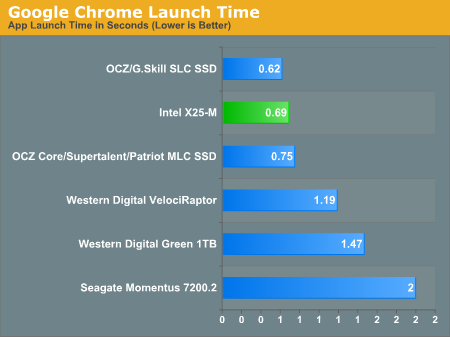
Google Chrome launches quickly on pretty much anything, the difference between SSDs is negligible but there is a slightly noticeable difference between running a simple, quick loading app on a HDD vs. a SSD. Again, the differences are small, but noticeable. On an SSD the application launches are instantaneous, on a HDD you can "feel" the load.
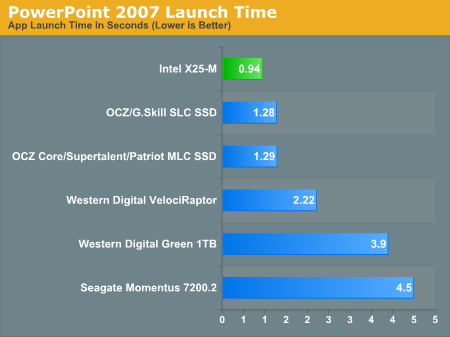
PowerPoint is similar to Chrome, but the application does take longer to load on mechanical disks. Again, the differences are noticeable - the X25-M will load PowerPoint in half the time of the VelociRaptor. You can argue that the price isn't worth it, but the point is that the load completes much faster...let's look at what happens when we're loading an application that does take a long time to start.
Photoshop takes its sweet time loading on a notebook drive, over 10 seconds on the Momentus 7200.2:
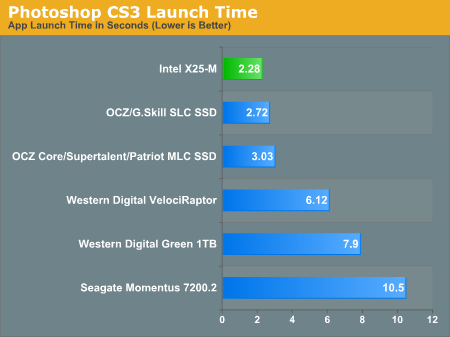
Even on the VelociRaptor it's a 6+ second ordeal. On the X25-M and all of the other SSDs, we're talking less than 3 seconds (the X25-M is naturally the fastest at 2.3 seconds).
My rule of thumb has always been that a good SSD will cut application launch times in half compared to a desktop hard drive, so if you have a particularly beefy application that takes a good while to load, expect that time to go down considerably. Remember, these are best case scenarios, in a little bit I'll start multitasking and then we'll separate the men from the boys.


 Facebook
 Twitter
 RSS
RSS


96 Comments
View All Comments
Alleniv - Wednesday, August 19, 2009 - link
Hi all,I report this new review about X25-M, that takes in consideration a comparative with other SSDs and also with HDDs, with several benchmarks ? http://www.informaticaeasy.net/le-mi...m-da-80gb.h...">http://www.informaticaeasy.net/le-mi...m-da-80gb.h...
Bytales - Saturday, January 3, 2009 - link
You said this: For example, let's say you download a 2MB file to your band new, never been used SSD, which gets saved to blocks 10, 11, 12 and 13. You realize you downloaded the wrong file and delete it, then go off to download the right file. Rather than write the new file to blocks 10, 11, 12 and 13, the flash controller will write to blocks 14, 15, 16 and 17. In fact, those four blocks won't get used again until every other block on the drive has been written to onceBy this i understand that a bigger capacity SSD, for instance 320 vs 160 will have more blocks and hence you will need more writes to deplete the number a write cycles the SSD was designed for. So for SSD bigger means even longer lasting. IS this TRUE ?
lpaster - Wednesday, November 26, 2008 - link
Can you overclock this SSD?Sendou - Wednesday, February 9, 2011 - link
There are optimization methods available for SSD's which can mitigate performance loss through genuine usage over time.One such is Diskeeper's HyperFast Technology.
There is a white paper regarding HyperFast available at:
http://downloads.diskeeper.com/pdf/Optimizing-Soli...
BludBaut - Thursday, March 31, 2011 - link
I read the pdf article you linked from Diskeeper.Based on the information Anand has given in his articles about Intel's technology, Diskeeper's "whitepaper" sounds like crap advertising by a company who's afraid their technology might be considered not only useless but detrimental to use with SSDs. I'm inclined to agree since Diskeeper's own results show a 4x write loss by just *one* "optimization" while Anand's article clearly suggests that the proper design (which he says Intel has accomplished) eliminates the need for Diskeeper's service.
Until I find more thorough examination of the facts, Diskeeper's remarks make me distrust them.
On the other hand, Anand's article definitely sounds not just like a puff piece for Intel, but qualifies in my mind as advertising. Wonder how much money Intel has spent on Anandtech? That's not to suggest that anything is misrepresentative (well, it wasn't meant to sound that way, but keep reading and you'll find the one-sided praise will later be partially retracted and I don't know the end of the story yet), but we all know that advertising always leaves out the negatives.
(Reviews shouldn't sound like advertisements but anyone who's been reading magazine reviews for 30 years knows that's frequently the case. The reviewer's bills get paid by the manufacturers' of the products he's reviewing. But, the reviewer is objective of course. It's a matter of journalistic integrity. Yeah, I believe that. Don't you?)
One such negative was the promotion of the life of the drive. "20GB a day for five years"? Anand praises Intel for multiplying that by five to "100GB a day for five years" but then tells us that they'll only guarantee the drive for three years and has the audacity to suggest we'll likely have a recourse "if we can prove" ... -- how is anyone going to prove how many GBs a day they put on their computer? The annoyance of trying to keep track is not something 99% of people would do.
Did you do the math to see how long it takes to write 100GB to a drive with a write speed of 200MB/s? Eight minutes and twenty seconds is all it takes.
Well, that's great if all you use your computer for is reading articles, checking the news and sales prices and sending email. The drive should last as long as your computer. But if you love video (who loves video???), it's a different story entirely.
There's another negative that, though first denied, eventually was acknowledged. More than six months later, Anand reports back and says essentially, 'Intel is still the best but the performance does degrade with time and I don't know why.' If he's explained it since then, I've yet to read it.
So, for those just reading the article, don't get so encouraged that you start drooling. The article has a tendency to make one think, "What am I waiting for? I want one of these puppies!" Unfortunately, Intel's technology isn't as rosy and bulletproof and Anand made it sound.
kevonly - Friday, November 21, 2008 - link
I hope you do some benchmark on Samsung's new 256GB SSD. Hopefully it's as good as Intel's.kevonly - Friday, November 21, 2008 - link
its read/write speed is 200/160 mb/s. Will it sustain that speed in a multi applications running environment??kevonly - Friday, November 21, 2008 - link
sorryread/write speed is 220/200 mb/s.
scotopicvision - Monday, November 10, 2008 - link
The article was an amazing read, fantastic, and well done thank you.D111 - Saturday, October 25, 2008 - link
Legacy OS like Windows Vista, XP, and Applications like Microsoft Office 2003, 2007, etc. have built in, inherent flaws with regard to SSDs.
Specifically, optimizations of these OS for mechanical hard drives like superfetch, prefetch, etc. tend to slow down, rather than help performance and is unnecessary to speed up reads in an SSD, but slow it down with unnecessary writes of small files, which SSDs are slower than a regular hard drive.
Things like automatic drive defragmentation with Vista does nothing for SSDs except to slow them down.
Properly optimized, even low cost 2007 generation SSDs test out as equivalent to a 7200 rpm consumer grade drive, and typical SSDs made in 2008 or later tend to outperform mechanical hard drives.
The tests done here have done nothing to "tweak" the OS to remove design hindrances to SSD performance, and thus, have no validity or technical merit.
The test, as presented, would be similar to installing a 19th century steam engine on a sailing ship, and observing that it is rather slow ---- without mentioning the drag and performance hits caused by the unused sail rigging, masts, etc.
See the discussion here for a detailed discussion of SSD performance tweaks and what it takes to make them perform well with legacy OS and Applications.
http://www.ocztechnologyforum.com/forum/forumdispl...">http://www.ocztechnologyforum.com/forum...display....