



Apple's Mac mini - Tempting PC Users Everywhere
by Anand Lal Shimpi on January 25, 2005 7:39 AM EST- Posted in
- Mac
Introducing the Mac mini
Before we get to the mini itself, let's have a quick rundown of the specs of the Mac mini:
| Apple Mac mini 1.25GHz | Apple Mac mini 1.42GHz | |
| CPU: | PowerPC G4 1.25GHz | PowerPC G4 1.42GHz |
| Memory: | 256MB DDR333 | |
| Graphics: | ATI Radeon 9200 | |
| Hard Drive: | 40GB 2.5" HDD | 80GB 2.5" HDD |
| Optical Drive: | Slot-loading Combo Drive (DVD-ROM/CD-RW) | |
| Ports: | One FireWire 400; two USB 2.0; DVI (VGA adapter included); 1/8" headphones/line-out; 10/100 Ethernet; 56K modem | |
| Monitor: | None | |
| Keyboard/Mouse: | None | |
| Software: | Mac OS X 10.3 (Panther), iLife '05 | |
| Price: | $499 | $599 |
First Encounter with the Mac mini
The box is small:
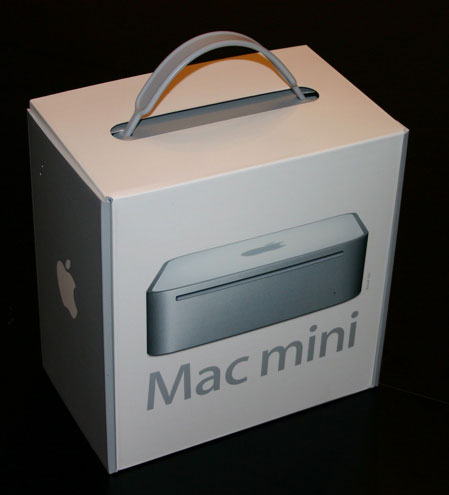
If you need a carrying case for your Mac mini, just save the box and it will serve perfectly. Remember that the mini measures 6.5" on each side and is only 2" high, so the box is pretty small. The box is slighty longer and wider than the mini itself, but about twice as deep.
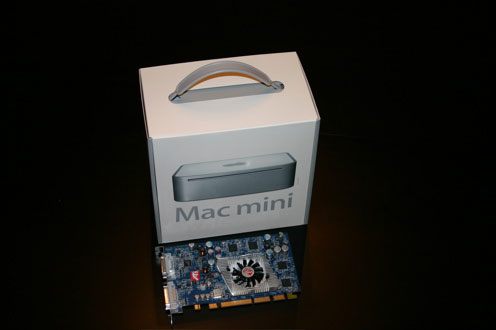
A Mac mini box compared to a regular sized ATI Radeon 9800 Mac Edition video card.
What's interesting about the box is that on the back face of it, you have instructions on how to set up the computer. As you can expect, it's not too difficult, but helpful for the first-time computer user.
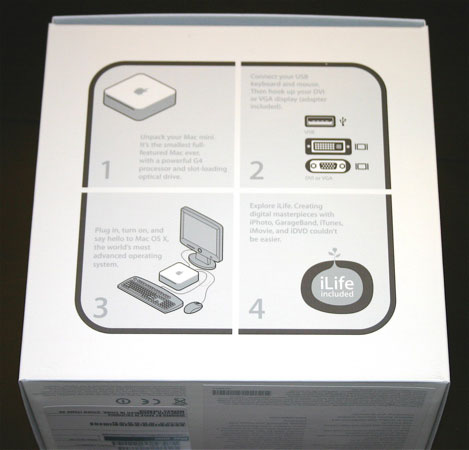
The Mac mini box itself is representative of Apple's simple design philosophy, but what truly sums up Apple's intentions with the Mac mini is the side of the box:
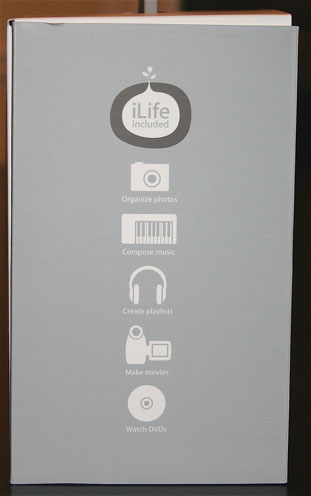
The side of the box simply states that iLife is included, and below that, it says that you can organize photos, compose music, create playlists, make movies and watch DVDs. This isn't the side of a computer box. This is the side of a consumer electronics device box; it's the side of a multifunction iPod's box. And this is where it hit me - what I was holding in the mini's box didn't feel like a computer. In fact, it didn't feel like I was unpacking a computer either. Apple has effectively made their computer into something that doesn't seem like one at all, perfect for those who are intimidated by computers, but definitely leaves those of us who aren't feeling somewhat strange - not in a bad way, and not in a good way, but just in a different way. If every other computer manufacturer in the world made their computers and boxes look like the mini's, then I'm sure that the feeling wouldn't be so strange; but the fact of the matter is, they don't, and the Mac mini is different - and you know that before you even hit the power button.
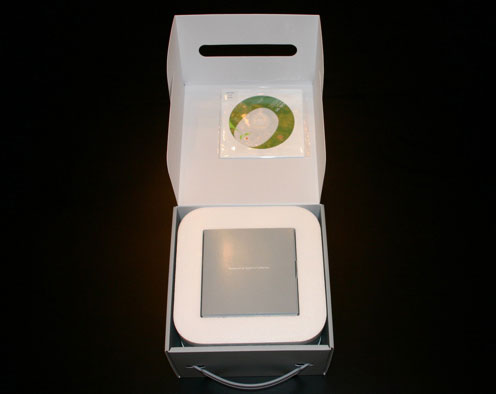
Inside the Mac mini box, there are already indications that Apple was working as quickly as possible to get these things out and shipped. The best example of this is that the Mac mini comes with iLife '04 installed (meaning that the master image for the mini's hard drive was made before iLife '05 was ready to be put on it), and stuck to the top of the inside of the box is an iLife '05 DVD.
You have your handful of users guides, warranty information and the usual paperwork that comes with any computer, but with the mini, it all seems a lot "cooler" for some reason. Everything is well made, well put together, and well, mini. Once again, I wasn't reminded of a computer; I was reminded of buying something from Bose or Mercedes.


 Facebook
 Twitter
 RSS
RSS


198 Comments
View All Comments
wildgift - Monday, September 19, 2005 - link
I bought one, and it's nice. It's very quiet (meaning it doesn't add to the noise in the office), reasonably quick, and very easy on the eyes. It is a decent development machine, at least for smaller database driven websites, and is portable enough to tote to the office. There's definitely something to be said for carrying your entire development environment around, but without spending all the $$ for a laptop. The price/performance ratios suck, but the overall fit and finish, and very nice software, more than compensate for the approximaely $150 premium you pay for going with a Mac. A SFF PC / OS combo to match the Mini simply cannot be purchased. A fairly comparable SFF PC (like the AOpen that's quiet) with the same RAM and larger hard drive, and slightly faster CPU, costs almost the same, and lacks the software. (Yes, I'm getting one of those too.)Also, going with any Mac at all gets you the better aesthetics that Windows lacks, and Linux totally lacks. You get better typefaces. You get better color calibration. Printing is smoother (and the addition of gimp-print is a big plus). You can type in any language you know. Even the screensaver photos are nicer. With iWork, you get nicer templates. Even the old AppleWorks clip art is pretty good (not really good, but, ok for "free" clipart). These things matter a lot if you work with documents.
If you're in the Unix niche, a Mac is nice because it has Unix under the hood. It's not quite the standard Solaris, BSD, or Linux environment, but it's close enough for most things.
The Mini is a pretty good computer, and a very good *product*. It's not the monster of spec benchmarks, but, most people, including technical people who you might think would care, simply don't care about those numbers.
steveo561 - Friday, April 1, 2005 - link
Interested in a FREE MAC MINI???I just got mine FOR FREE...EVEN SHIPPING...NO JOKE
Just copy and paste the link EXACTLY as you see it below:
www.FreeMiniMacs.com/?r=16680884
All you have to do is go to the link, sign up for one FREE offer, and have some of your friends do the same and it's all yours for FREE.
www.FreeMiniMacs.com/?r=16680884
steveo561 - Monday, March 28, 2005 - link
Interested in a FREE MAC MINI???I just got mine FOR FREE...EVEN SHIPPING...NO JOKE
Just copy and paste the link EXACTLY as you see it below:
www.FreeMiniMacs.com/?r=16680884
All you have to do is go to the link, sign up for one FREE offer, and have some of your friends do the same and it's all yours for FREE.
www.FreeMiniMacs.com/?r=16680884
MarshallG - Monday, February 28, 2005 - link
I love Anand's Mac articles. It's great to see an obviously pro-Windows guy like Anand look at the platform with such an open mind.Our home PC just died and this looks like a great replacement. I like the fact that I won't worry about viruses or spyware. I might get my 70 year-old mother one for the same reason.
But I'm surprised that Anand makes little if any mention of the Unix core of these machines. This is Linux for people who don't want to deal with driver problems. You can open a shell window, and run Perl or a zilllion other UNIX languages and apps. I'm really impressed by that! Now I can *really* teach my children how to use computers.
WorkingHardMan - Friday, February 11, 2005 - link
The way Tiger has been described by Apple is that Tiger will still handle the pixles if the GPU can not. Having said all that, the mini isn't really being marketed to the kind of people who want or need high quality 20" and 23" displays. One of the Apple desktop computers would make more sense for that crowd.Xmate - Thursday, February 10, 2005 - link
I'm sorry if this issue has already been addressed, I'd apreciate if you could restate the solution if it has been:OS X Tiger is supposed to use to GPU instead of the CPU to render all the pixels on the display correct? Well, while the Mac mini seems to be a very good solution for a PC user wanting to try out OS X, but from what I can see, the mini simply doesn't have nearly enough power in the GPU to power any of Apple's Cinema Displays. I have currently heard that most people are happy with the mini 20" CD combination, and I might (not certain) have heard people being happy with it even with the 23". With Tiger this is almost definetly not going to be the case.
I was wondering if anyone has any input on that, and if they know of some possible solution that could be implemented to solve the problem.
Thank you for your help,
Stefan
Wightout - Tuesday, February 8, 2005 - link
http://www.pbs.org/cringely/pulpit/pulpit20050120....PhoenixPyre - Sunday, February 6, 2005 - link
Yeah, that Dell configuration isn't normal. To get those specs normally, you would have to pay well over $499. Not to mention it would be under the Small Business section of Dell.com and you would probably have to pay a good amount for shipping (as noted in #189).jaxcs2002 - Thursday, February 3, 2005 - link
Hey good aricle but you tried to discuss too many things with this article. Two notes:1)The comparison Dell and the mini is fair but Dell doesn't sell any standard configuration computers. Every week (really, not kidding here), they run some kind of a promotion. You were able to snag a free LCD when you browsed the Dell page that day, but did you get free shipping? I guarantee the next week, you won't be able to get an LCD but maybe extra memory and a larger hard disk. They do this obviously to make each week a sale and to induce you to buy immediately.
2) You make note that the comp is not for Apple power users and then promptly seem to forget that fact. What user would buy a mini mac and hook it to a 23" Cinema Display? It is interesting to note that it would not do well, but the Dell standard vidcard (integrated probably) wouldn't either. Judgeing from your article, it would probably be fine on a 15 or 17 inch screen.
I think it would have been helpful, especially since you hint at it anyway to talk about its utility in performing more "average joe" type taks such as usng it in conjunction with the apple air port as a music file server or as video server. You know, those tasks that a buyer of an ipod might do with a mac mini. In every way, you seem to perfer its bigger cousins but this a mini, what tasks does the mini do well?
pitdog - Wednesday, February 2, 2005 - link
sorry for the double post....new to the forums