



Intel's Pentium 4 570J - Will 3.8GHz do the trick?
by Anand Lal Shimpi on November 14, 2004 10:56 AM EST- Posted in
- CPUs
Testing EDB Functionality
As we just mentioned, Intel’s Execute Disable Bit is enabled through Windows XP Service Pack 2, but being proponents of testing as many supported features as possible we turned to Robert Schlabbach’s Data Execution Prevention Test (aka NXTEST) to test Intel’s EDB.
CPUs that support Data Execution Prevention (DEP) will have to run in Physical Address Extension mode in order to enable DEP support. You can confirm the operating status by looking at the System Properties control panel:
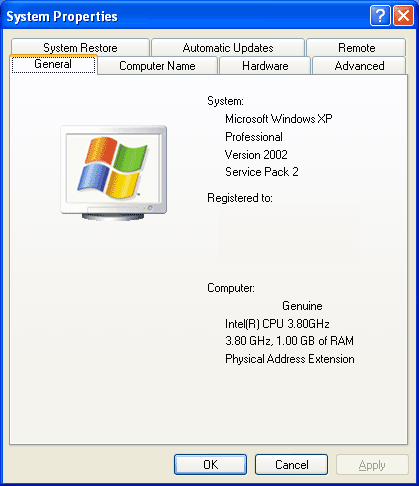
Physical Address Extension should be listed here.
Before setting up NXTEST you have to enable full Data Execution Prevention under SP2. By default DEP is only enabled for certain Windows programs and services, given that NXTEST is not one off those Windows programs and services we had to manually enable DEP for all programs.
Microsoft buries the DEP controls under the Performance Options control panel, to get there you must first visit the System Properties control panel:
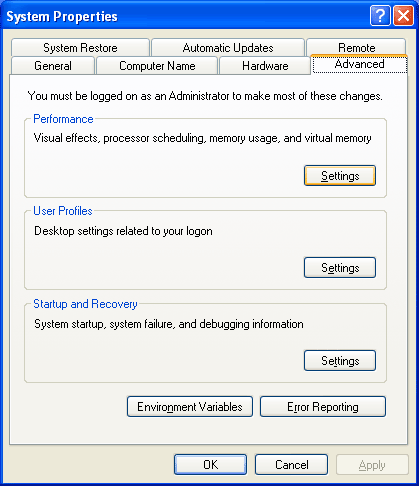
Then click on the advanced tab and select the Performance Settings option.
The third tab in the Performance Options control panel is the Data Execution Prevention tab, which is where you can enable/disable system-wide DEP:
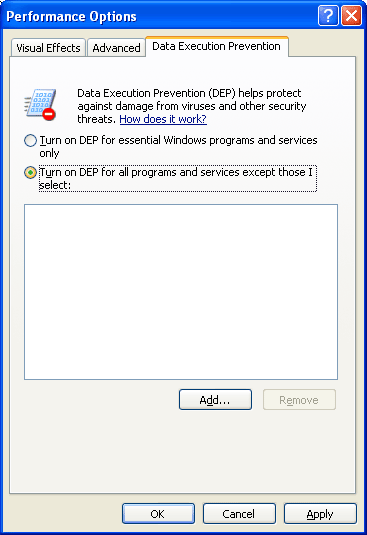
A reboot later we were ready to run NXTEST:
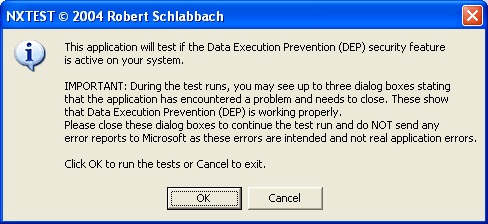
As expected, running the test confirmed that Intel’s EDB was working properly:
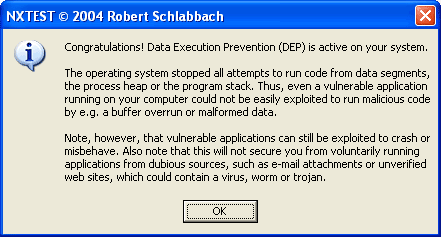
Intel didn’t make a huge deal out of EDB support for two likely reasons: 1) AMD beat them to the punch with their NX bit support, and 2) the benefits are not as tangible to end users since EDB doesn’t prevent all types of malicious code from wreaking havoc on your system, neither Intel nor AMD wish to inspire false confidence in their processors’ abilities to provide greater security.


 Facebook
 Twitter
 RSS
RSS


42 Comments
View All Comments
pplapeu - Wednesday, November 17, 2004 - link
why do you no longer overclock?you know users will do that. What if this processor was dialed up 10%, it would clock at 4.18Ghz and could run faster. I think the performance tales would be far different.
Staples - Monday, November 15, 2004 - link
Well the CEO did step down a few days ago. I hope we see better management soon. This is an embarrasment for Intel. Ever since the A64 came out, Intel has been releasing backseat products.IntelUser2000 - Monday, November 15, 2004 - link
No, its that most of you guys are AMD biased. Say Intel does release a high-performing Pentium M architecture based chip. Then you guys will just shut up and say nothing else. If AMD comes with 5% performance lead, AMD is thought of as GOD or something. Probably even greater. And about BTX, Pentium M does run pretty cool, but at 21W, that was equal to initial 0.18 micron P3's. Actually some of the DESKTOP P3's had ~15W TDP. I heard 286's and 386's had less than 5W TDP. Cooler, and faster is always better. Granted you may not need as much if your processor runs hotter, but still its necessary. It's also mentioned that since quiet PCs are gaining popularity, BTX can help a lot since it will allow graphics cards to have smaller fans.Another 3.8GHz P4 link: http://www.tomshardware.com/cpu/20041115/index.htm...
Quite contrary to their 3.6GHz throttling article, they seem positive towards 3.8GHz P4.
fawifewaewaf - Sunday, November 10, 2013 - link
diaff cretinmlittl3 - Monday, November 15, 2004 - link
#35,Do you know that the long post of #21 is the author of the article you just read (which is way longer than any post) and the owner of Anandtech? Do you see the post is from ANAND Lal Shimpi? And that his post was in response to the other long post which Anand saw as important enough to respond to.
I enjoy all the comments on this site, long and short. It gives readers a sort of "behind the scenes" look at hardware and software. I think there should be no restrictions as it currently stands.
Keep 'em coming. Go Anandtech :)
bob661 - Monday, November 15, 2004 - link
Based on #32's link, it would seem that the P4's would decrease in performance during sustained use with an average user. So unless you're an enthusiast, you would not see the full performance of any of the new P4's.Alphafox78 - Monday, November 15, 2004 - link
There should be a size limit on posts...GTMan - Monday, November 15, 2004 - link
Does the EDB functionality lower system performance when it is turned on?Auteur - Monday, November 15, 2004 - link
#12:The only reason HardOCP uses DVD2AVI in their bench marking suite is its the only Divx front end that runs faster on AMD cpu's than Intel's. Its a dead app (the author no longer updates it) that can't IVTC, deinterlace, clean or sharpen video. Its great for demuxing audio and thats it.
Intel's chips dominate when you use the popular front ends like AutoGK, Gordian Knot or Xmpeg. Read Doom9's forum if you don't believe me.
langles - Monday, November 15, 2004 - link
Did you read the article at Tom's Hardware this weekend about the thermal issues with the Pentium 4 3.6 GHz?http://www.tomshardware.com/cpu/20041114/index.htm...
"The Heat Can Cause Intel's P4 To Throttle And Damage Over Time"
I would expect that this issue is even worse for the 3.8 GHz.