



Western Digital Red Review: Are NAS-optimized HDDs Worth the Premium?
by Ganesh T S on August 17, 2012 4:20 PM EST- Posted in
- Storage
- NAS
- Western Digital
Performance Metrics and Power Consumption
The performance evaluation reports are organized under two categories: Standalone and NAS-based. In the latter case, we have two NAS systems which are not in the officially sanctioned list (LaCie 2big NAS and Netgear NV+ v2) and one recommended by WD as definitely compatible (Synology DS211+). As mentioned earlier, we present the equivalent performance numbers for the 3 TB Seagate Barracuda 7200 rpm drives. We make use of the standard single-client NAS testing methodology using NASPT / robocopy.
First, let us take a look at the HD Tune Pro benchmarks on the standalone drive.


The sequential access speeds vary between 59 MBps and 148 MBps depending on whether the outer or inner parts of the platter are being accessed. 4KB random accesses aren't going to win any performance benchmarks (the numbers reported by HD Tune Pro above aren't directly comparable with what we have reported using IOMeter in other HDD reviews).
The following graphs summarize the results from our NAS testing. In all configurations, the drives were put in RAID-1.
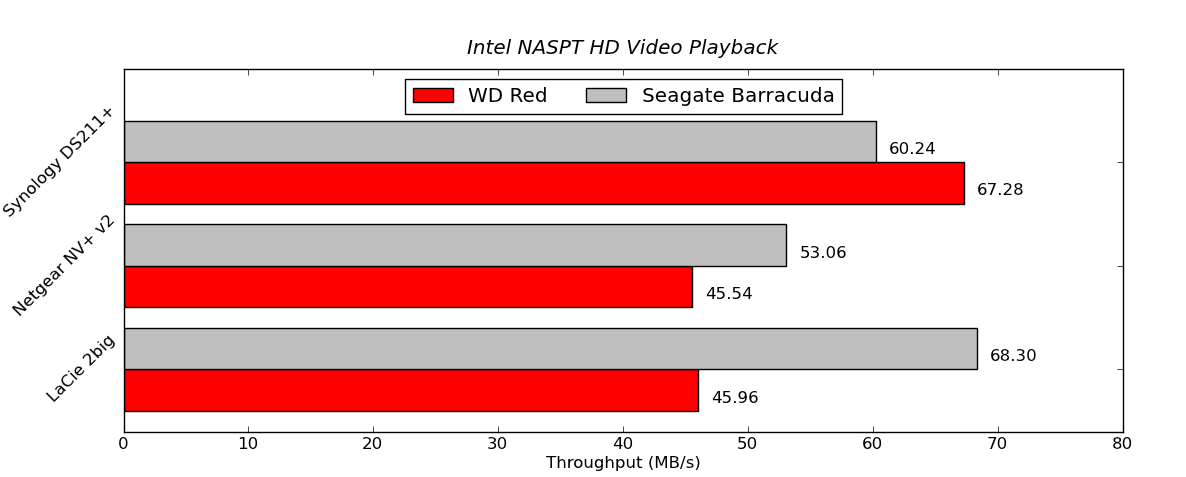

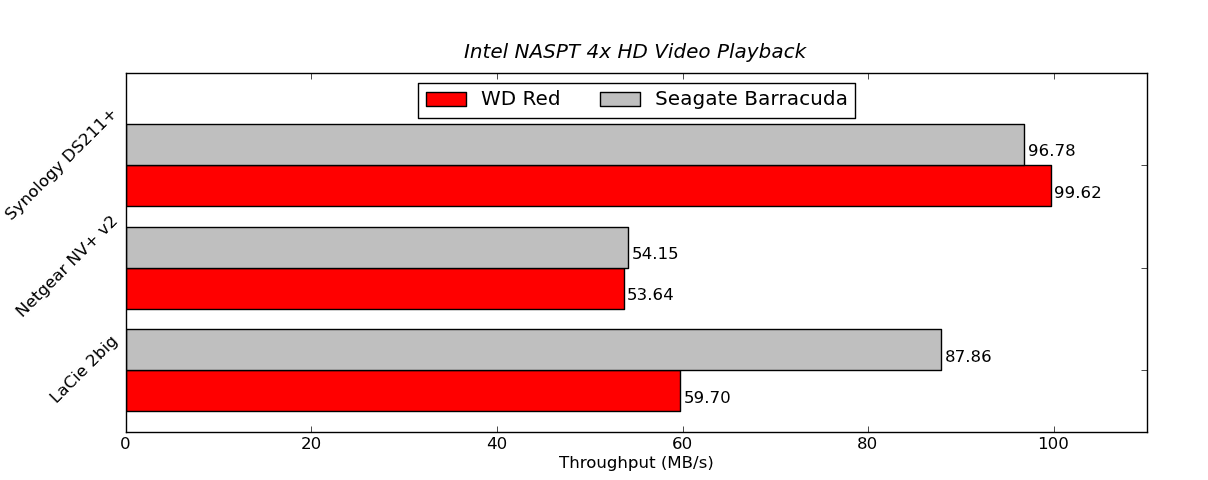
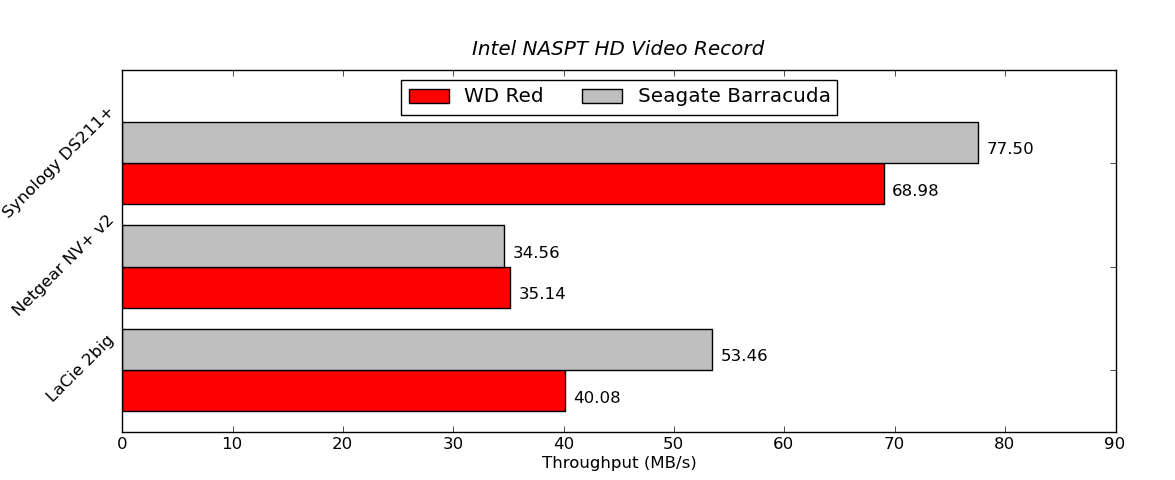

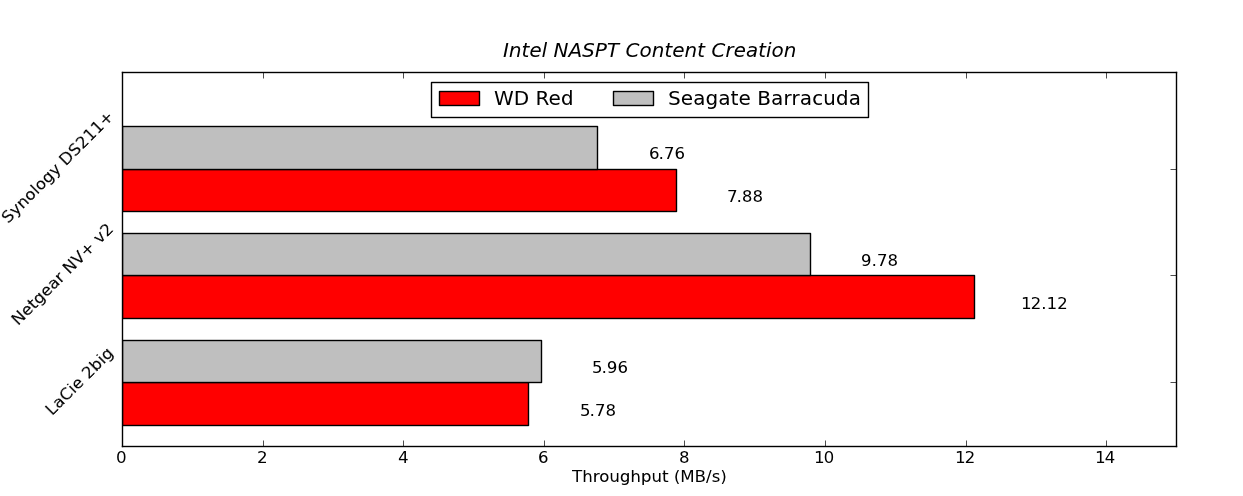
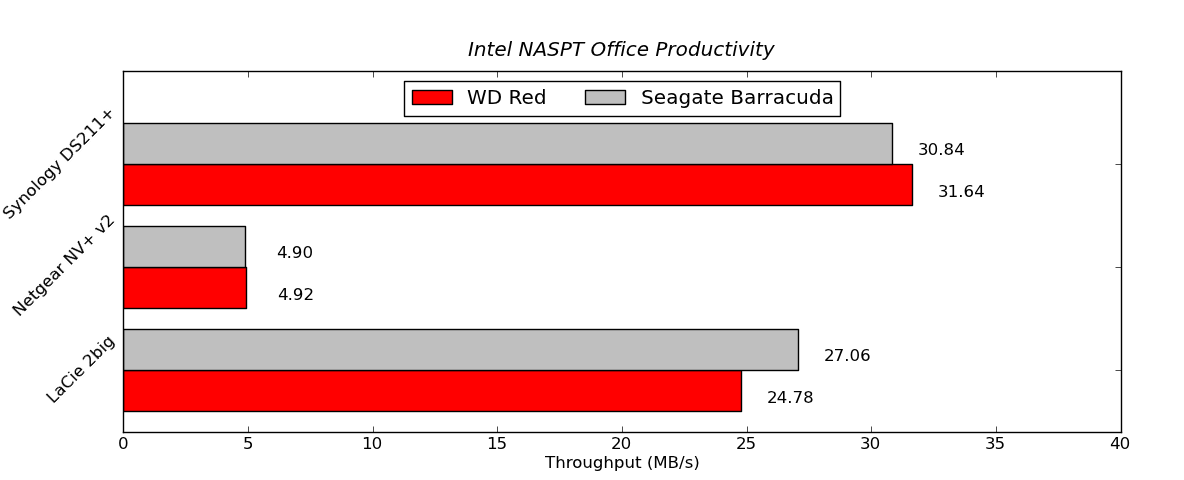

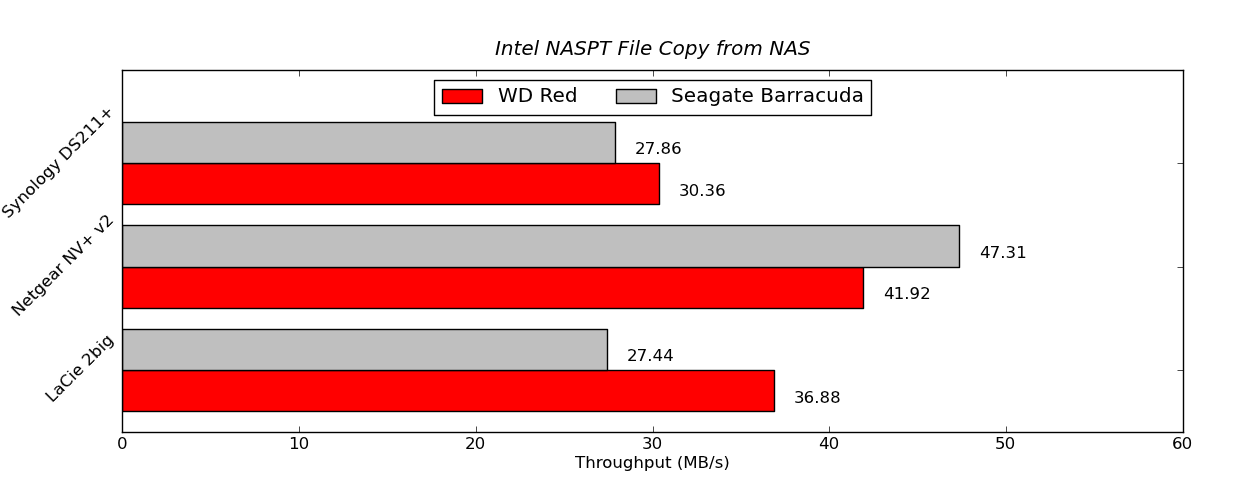
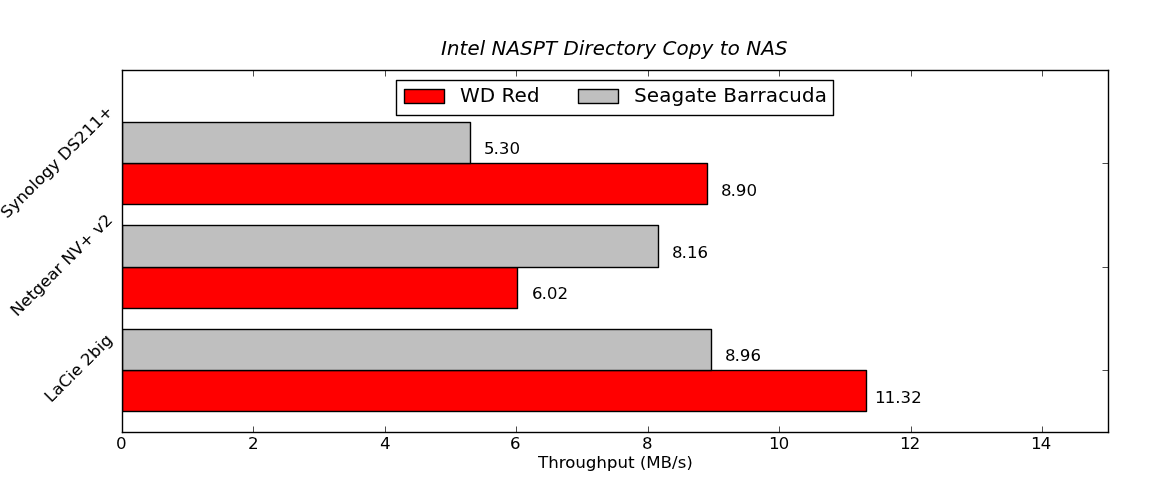
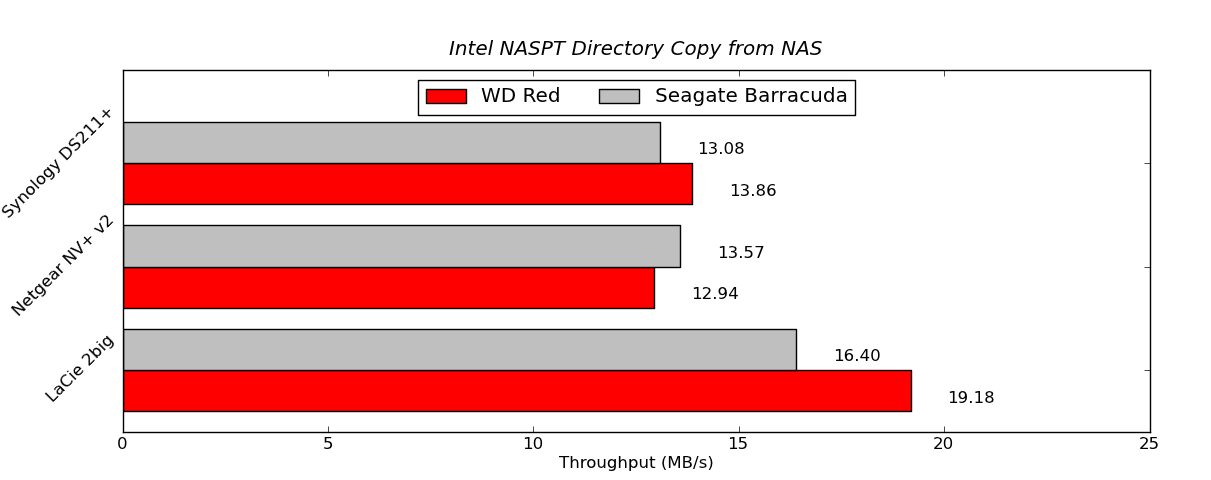

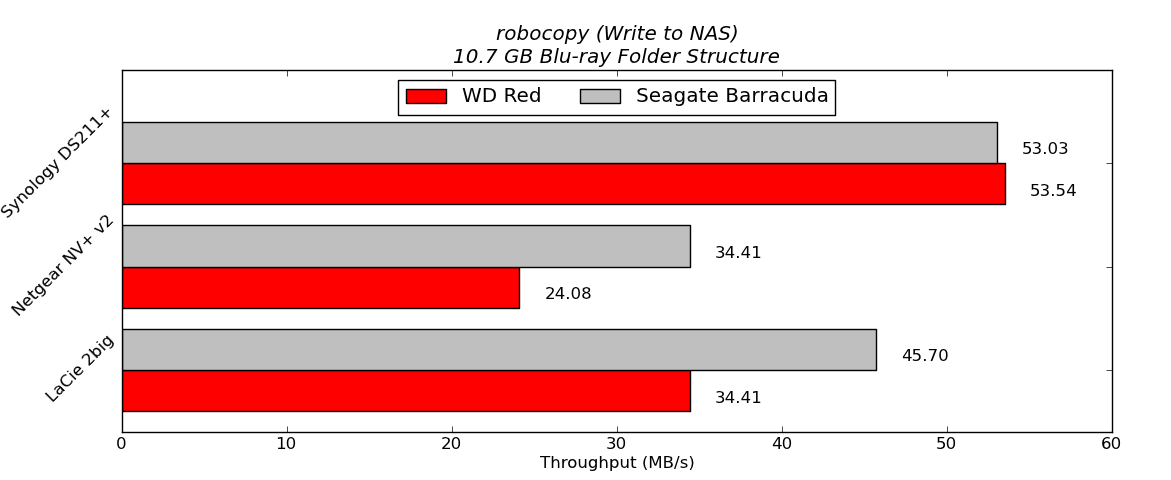
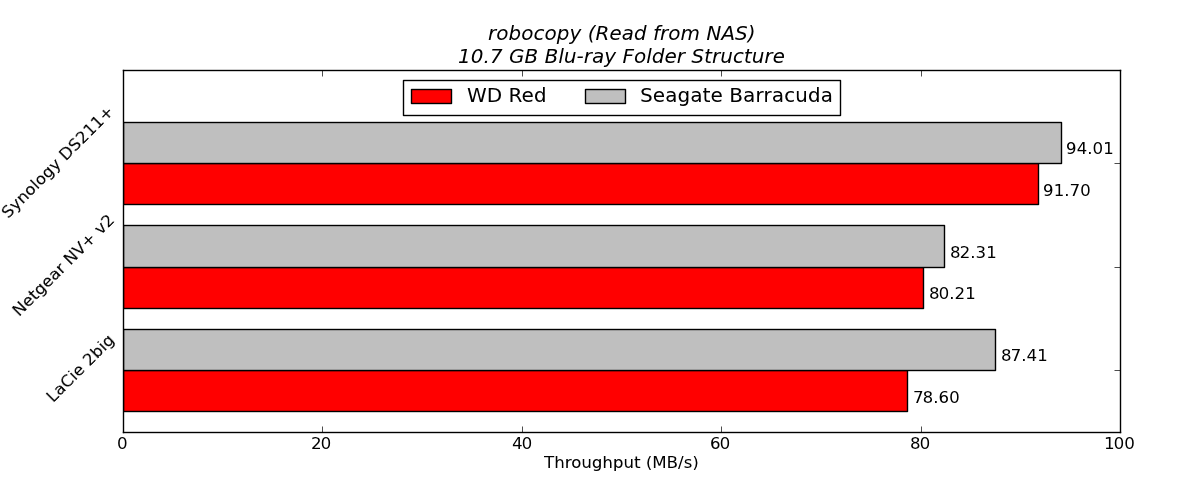
In order to put the final two graphs in perspective, we note that the standalone WD Red (freshly formatted) connected to a SATA 6 Gbps port of the Asus P8H77-M Pro delivered 130.07 MBps in the write test and 137.46 MBps in the read test. In the NAS systems, the WD Red performs quite well, particularly in the Synology DS211+. It does lose out to the Seagate 3TB hard drives under some circumstances. However, one can safely say that in 2 - 5 bay NAS systems based on ARM chipsets, it is unlikely that 7200 rpm drives are going to consistently deliver better performance than the 5400 rpm / IntelliPower drives.
In order to get an idea of how much power savings one can expect from using these drives, we took the LaCie 2big NAS and ran the disk performance bench using both the Seagate and WD drives in RAID-1 configuration. The following table summarizes the power consumption under various operating modes.
| LaCie 2big NAS Power Consumption | ||
| Mode | Seagate 3 TB | WD Red 3 TB |
| Sleep | 7.7 W | 7.7 W |
| 100% Read | 20.6 W | 14.8 W |
| 60% Rand, 65% Read | 21.2 W | 15.9 W |
| 50% Read | 20.9 W | 14.9 W |
| Rand 8K 70% Read | 20.6 W | 14.7 W |
It is interesting to see that the WD Reds consume just slightly more than two-thirds the power of the 7200 rpm drives when subject to similar accesses over the network. Of course, one might say that 7200 rpm drives such as the Seagate one we used above are not suitable for NAS applications at all. However, note that LaCie had in fact bundled them with their 2big NAS with the OS pre-installed.


 Facebook
 Twitter
 RSS
RSS


87 Comments
View All Comments
vgray35@hotmail.com - Tuesday, August 21, 2012 - link
This works fine as long as you can control drive temperatures, and minimize excessive thermal cycling. One important element of the RED drives is that they are rated to 70C operating temperature instead of the usual 55C, so these drives are going to be more reliable.It is possible this higher temp capability may trickle down to future cheaper drives making your approach even more viable.
andersenep - Tuesday, August 21, 2012 - link
An 80mm and 120mm fan keep them idling at about 36C (and they are pretty quiet about it) in a relatively cramped case. Even under extreme prolonged load I would be surprised if they ever got over 55C. My thermostat stays at 25C/78F.As for thermal cycling, I admit that I leave the thing running 24/7 which probably costs me a pretty penny over the long haul. I keep meaning to plug it into my killawatt out of curiousity.
I wouldn't mind paying a little extra for the 3 year warranty, but for what these things cost I could buy a couple green hot spares and still come out $150 ahead (using 2TB drives).
For a home NAS, green is the way to go. Just turn off intellipark. If you're leery of all the bad hype with the WD green drives, samsungs cost the same price and I've had good luck with those for about two years as well now. If you are using any sort of mass storage without a reasonable level of redundancy and regular backups you are just asking for trouble.
I was moderately interested when the red line was announced, but I can't see any added benefits that justify the premium price.
vgray35@hotmail.com - Wednesday, August 22, 2012 - link
Your sentiments will be shared by others, thus keeping RED drive volumes low, and this will lead WD to drop prices to where they are supposed to be.Just wait a while and watch.
Hard drives exceeding 45C start to fall off rapidly in terms of cycle life, while the RED drives may perform as well with temps reaching as high as 55C. The RED drives below 45C are likely to last a very long time with load/unload cycles of 600,000 matching Enterprise drives.
quanta - Wednesday, August 22, 2012 - link
It isn't so much the testing methodology is flawed, but the reviewed drive model for the Seagate drive. Seagate has been making 7200rpm Barracuda with 1TB platters (non-XT) for quite some time, yet only the 500GB platter version of Barracuda XT is used in this review. If Barracuda XT must be used for the test, it should be the 3TB version, which has slightly higher density (600GB), or the Seagagte Constellation ES.2 counterpart.quanta - Wednesday, August 22, 2012 - link
Never mind the 2TB claim, the test did use the 3TB drive. But still, the tested Seagate drives have such huge density disadvantage, it's disappointing that Barracuda XT/Constellation ES don't have the new terabyte platter models.stoked - Wednesday, August 22, 2012 - link
Just ordered 14 of these for a Supermicro 24 drive bay chassis. Crossing fingers we won't have any issues with the LSI 2108 controller and these drives.vgray35@hotmail.com - Monday, September 3, 2012 - link
EXCLUSIVE NASWARE TECHNOLOGY.
The secret is in the technology.
WD’s exclusive NASware technology improves NAS storage performance by reducing common hard drive concerns in NAS systems including concerns for things like compatibility, integration, upgrade ability, reliability and cost of ownership that are experienced with a hard drive designed for desktop computers. Our exclusive technology, NASware™, makes WD Red thrive in the demanding small-NAS environment.
NASware Enhanced reliability.
Your NAS systems is always on, a highly reliable drive is essential. With a 35% MTBF improvement over standard desktop drives, the WD Red drive is designed and manufactured to be a more reliable and robust solution.
NASware 3D Active Balance Plus.
Our enhanced dual-plane balance control technology significantly improves overall drive performance and reliability. Hard drives that are not properly balanced may cause excessive vibration and noise in a multidrive system, reduce the hard drive life span, and degrade the performance over time.
================ WD speaks with forked tongue ====================
CAVEAT EMPTOR
So now we have a better balanced drive to reduce noise, vibration and improve drive life cycle. Are we made to believe this requirement of RED drives is only needed in a 24/7 NAS environment? This is rubbish, balanced drives are needed everywhere.
Desktops running for 8 hours every day is certainly ON for a long time and qualifies as 24/7. But is it not also true that unbalanced drives in a desktop will also reduce drive cycle life? So why is it OK to put such unbalanced drives in desktops which are expected to last just as long as NAS systems? Why is it OK to put a lower quality drive in a desktop and insist a better quality drive is needed for NAS.
Pure Crap. Desktop drive cycle life is just as important. Why is it OK to increase the risk of a drive crash on a desktop, while one goes to great pains to reduce this risk on a NAS system?
BALANCED DRIVES ARE NEEDED ON DESKTOPS TOO.
Western Digital is admitting that GREEN and BLUE drives are CRAP and not suitable for desktops, in part because they are not suitably balanced. Or put another way, they have designed the cheaper drives to be less balanced by design, and dictate that desktops will be subjected to higher reliability risks in terms of disk crashes. By their own admission inadequately balanced drives lead to reduced cycle life. In reality there is no difference between NAS and DESKTOPS in terms of needed cycle life, and what is plainly obvious is that RED drives really constitute a MINIMAL quality for desktop too.
MARKETING BROO HA HA - just another fancy term for Corporate lying.
DRIVE BALANCE IN A SINGLE DRIVE SYSTEM IS JUST AS IMPORTANT AS IN A MULTI- DRIVE SYSTEM FOR THE PURPOSES OF IMPROVING DRIVE CYCLE LIFE. Marketing not withstanding.
What we need is a way of measuring drive balance quality in hard drives, and stick it to them when reviewing these hard drives. We need to be able to measure the WOBBLE FACTOR to gain control over drive quality assessments.
Hot_Jane - Thursday, October 11, 2012 - link
If these "red" drives are so much better, and more durable, than their "black" drives... why do the "reds" have a 2 *YEAR* shorter warranty????(anandtech foolishly compares warranties only on the drives that are even LESS than the "reds".)
Casper42 - Wednesday, November 14, 2012 - link
http://www.newegg.com/Product/Product.aspx?Item=N8...Sale today on Red
$149 / 3TB
Limit 3
andrewket - Thursday, November 15, 2012 - link
I followed your link. I'm showing $169/ea. Is there a coupon code I need to use?