



Western Digital Red Review: Are NAS-optimized HDDs Worth the Premium?
by Ganesh T S on August 17, 2012 4:20 PM EST- Posted in
- Storage
- NAS
- Western Digital
WD Red Lineup: Differentiating Features
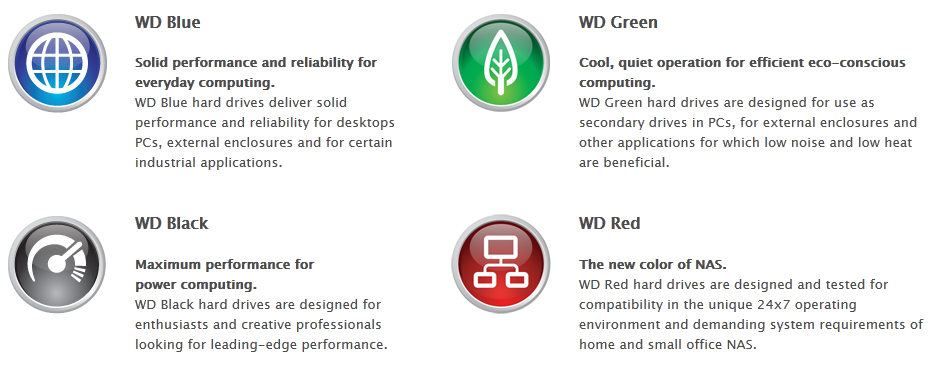
Western Digital has well-defined product categories for each market segment. The WD Black series caters to those requiring a lot of performance without power concerns. The Green series serves the opposite end of the spectrum, where performance is not that much of an issue (secondary drives for PCs / external enclosures), but heat and power could do with some reduction. The Blue series served the middle tier (everyday computing with optimal performance) and the notebook market. However, none of these models are recommended by WD for 24x7 operation (which happens to be an essential requirement for almost all NAS systems). Till now, none of the HDD vendors have anything specific for SMB / SOHO NAS systems. WD aims to capture this segment of the market with the WD Red lineup.
High end enterprise configurations are served by drives rated for stressful conditions (such as Seagate's Constellation and Cheetah lineups, WD's own RE4 and Hitachi's Ultrastar series). These drives commanded a huge price premium that even tempted some IT staff to fill their RAID arrays with consumer hard drives. Unfortunately, most of these temptations have resulted in bad results (particularly if the consumer hard drives have not been properly 'configured' prior to usage). What are the aspects which differentiate these enterprise drives from consumer versions?
SMART Command Transport Error Recovery Control: This feature allows the OS to set a soft time limit for completion of reads and writes. Seagate calls this ERC (Error Recovery Control). Samsung / Hitachi drives term this CCTL (Command Completion Time Limit), while Western Digital gives it the TLER (Time Limited Error Recovery) moniker. In a typical desktop drive, this could be a large number. In case of a bad sector or some other similar issue, the hard disk might keep retrying the access or try to remap the bad sector right away. The OS would remain waiting for the hard disk to deliver its delayed response. In a NAS environment, this delay could prove fatal, with the drive either being dropped or the NAS going into rebuild mode. So, it is essential that the SCT ERC number be set to a duration shorter than what the NAS OS would wait for before declaring the drive dead. Enterprise drives usually allow configuration of this value and set it by default to a low one (because the RAID controller can get hold of or recover the data from the other drives in the NAS).
Vibration Tolerance: NAS systems usually place a large number of drives close together. If vibrations aren't mitigated, it could result in decreased lifespan of the drives. Enterprise drives usually have increased vibration tolerance and also have in-built mechanisms to dampen themselves.
Higher MTBF and Longer Warranties: HDD vendors provide higher Mean Time Between Failures (MTBF) ratings for their enterprise drives and also walk the talk by usually providing longer warranties compared to the desktop drives.
If you are interested in further coverage of these aspects, this page serves as a good starting point. Some studies have shown that there is not much difference between desktop and enterprise hard drives with respect to real-life MTBFs. StorageMojo, in particular, has a number of posts stressing this viewpoint. Assuming that the end user has the data backed up, it is undeniable that the longer warranty period (in which RMA can be processed) is definitely an advantage. It is also likely that if the HDD vendor has enough faith to increase the warranty period, at least some improvements (particularly in the vibration tolerance mechanism) have been done compared to the consumer desktop versions.
Coming back to the WD Red, readers must be wondering how many of the above aspects can be brought to the consumers by WD without eating into their profit margins from the RE4 sales. We first start off with a overview of some of the aspects of the NASware firmware
Intelligent Error Recovery Control: This NASware feature corresponds to the TLER configuration. The value for the soft time limit can be set through smartctl, if the manufacturer allows it. We tried this out on the WD Red drive connected directly to our testbed.
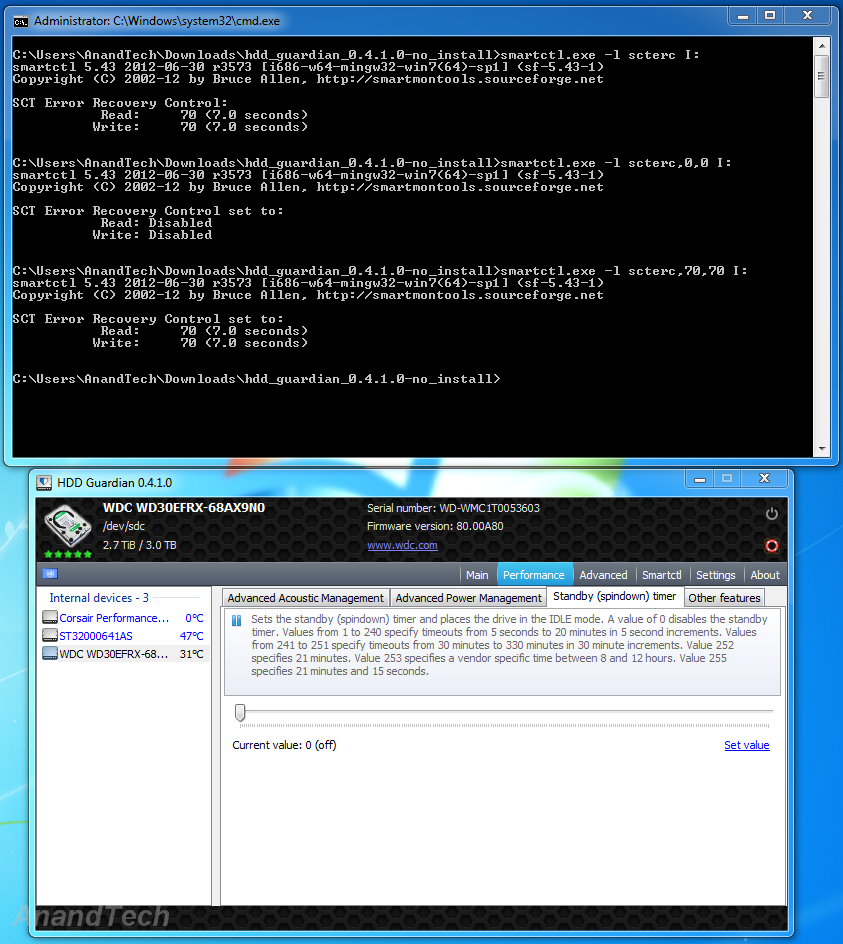
We find that, by default, the soft limit is set to 7s. This means that all the NAS units certified to be compatible with the WD Red drives wait for more than 7s for a transaction to complete before dropping drives or starting a rebuild. The important aspect is that this value is configurable, and can even be completely disabled, as shown in the screenshot above.
Power Management Features: Some hard drives adopt aggressive head parking and disk spindown to save on power. For example, the WD Green drives were guilty of parking the head after just 8 seconds of inactivity. This increases the load cycle count unnecessarily (drives are usually rated for 300K cycles). Disk spindown (or standby) timer is an orthogonal parameter which actually stops the motor and puts the drive in IDLE mode. As the screenshot above shows, the standby timer is off by default, but this value can be altered through HDD Guardian or any other similar software. The head parking parameter is usually accessible through the Advanced Power Management (APM) feature of the hard drive. Unfortunately, HDD Guardian and other HDD tools indicated that there was no APM support in the WD Red. Eventually, we had to resort to running WD's own WDIDLE3 tool in the DOS mode. It turns out that the head parking interval is only accessible through a proprietary command and WD doesn't expose it to external tools.
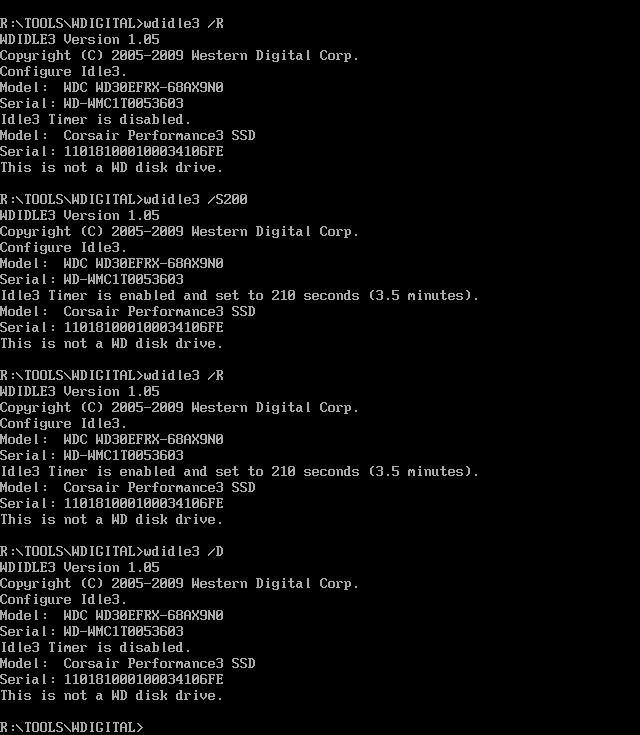
As the screenshot above shows, head parking is completely disabled by default. It is also possible to set the head parking time limit, and it is sticky through power cycles. For NAS applications, it is better to leave it in the default state of head parking being disabled.
How does the WD Red achieve power optimization? The secret lies in IntelliPower. The WD Red drives spin at 5400 rpm as per the analysis done by the folks at SPCR. It is the combination of these features which allow the WD Reds to balance performance and also reduce power.
3D Active Balance : Vibration Reduction: WD claims that it is the first-to-market with 3D mechanical balancing technology for vibration reduction. This has obvious benefits in terms of decreasing noise and avoiding performance reduction. However, comparative measurements of this feature with the competition is outside the scope of this review.
Some of the other features of the WD Red drives include support for the ATA Streaming Command Set in the firmware. This allows optimal drive buffer management so as to ensure smooth streaming of AV data (particularly when the NAS is acting as a DLNA server). This obviously requires support in the NAS firmware also. In addition, we also have support for the SMART Command Set (SCT). We saw this earlier in this section when using smartctl to get / set the TLER parameters. Note that the SCT doesn't allow altering of the APM parameters for spindown / head parking, as they belong to the non-SMART device settings.


 Facebook
 Twitter
 RSS
RSS


87 Comments
View All Comments
Wwhat - Friday, August 17, 2012 - link
I think that you can't always compare drives made one year from ones made another year (or more) later, even when the manufacturer names them the same or claims the same capabilities. And I don't mean that they always get better.pdf - Friday, August 17, 2012 - link
Disappointed that there's no mention of the fact that the rest of the WD range used to allow configuring TLER and APM, before WD purposefully gimped the firmware and disabled those options in what I can only assume was a move to force people to purchase their more expensive drives if wishing to use them with hardware RAID controllers.brshoemak - Saturday, August 18, 2012 - link
I know what you mean, I had some WD RE drives that I paid a huge premium for, but later I purchased a Caviar Black that I could configure TLER and the like. Good times.While I understand where you're coming when you say their tactics are shady, keep in mind in many cases there are differences besides just firmware that affect a drive. Although most drives in certain series were reliable to a degree (Samsung F4/WD Caviar Black/etc.) I wouldn't put them in an SMB environment due to hardware differences. That being said, when I need to setup another large RAID6 array, it's very likely I'll go with the drives.
dealcorn - Friday, August 17, 2012 - link
SAS/SATA controllers typically support 8 drives in SATA mode. Is there a design feature why these drives should be limited to 5 bay devices? I appreciate that there may be a marketing benefit.Watwatwat - Friday, August 17, 2012 - link
I know on green drives its somewhere around 8 seconds, because i've disabled it before using wdidle utility, how green is it if a drive fails early because of head parking vs the extra energy use..... I somehow doubt its really green once you add it up..OCedHrt - Saturday, August 18, 2012 - link
Or Black, etc? Comparing it to the Seagate and all is nice, but doesn't really tell us if it's a better suited NAS drive versus WD's other offerings?vgray35@hotmail.com - Saturday, August 18, 2012 - link
All these life cycle metrics I have found over the last 10 years are largely irrelevant. A single hard drive cannot even handle normal duty in a laptop that is used 12 hours a day everyday. The only aspect that is important and should be prominently displayed on your screen at all times is hard drive temperature. That is the only way to gain control of what is going to happen on your system. The other element and one you have no control over is temp cycling. It is cycling temperatures from 15C to 50C on a regular basis that will kill a hard drive, and there is no way around that simple fact which demands high quality drives be used whenever possible. All manufactures drives behave largely the same way, and are largely unfit for duty in an environment where temp cycling is the norm.Servers running 24/7 at constant temp will last much longer, even with GREEN drives, but temp cycling will quickly kill it even when using BLUE drives. A GREEN drive in my laptop cannot last due to temp cycling. Laptop cooling design across the board largely sucks, and hard drives cannot consistently handle temps reaching 50C, if daily usage involves temp cycling. Laptops are turned off often which stresses the hard drive.
A Dell 1501 laptop with GREEN drive failed after 8 months, and the next one failed after 12 months. BLUE was not much better failing after 13 months and 18 months. Now I have BLACK and it has lasted 18 months so far but I will not hold my breath. Most times one is lucky and disk failure permits data to be recovered after it has cooled down,.but occasionally data recovery is not possible happened only once but painful). Backing up data every week is a pain as a lot of important data may accumulated in a week. Backing up daily takes too long and uses up too much space. Backups come at an extremely high penalty in terms of time and disk space. What we need is better hard drives.
Hard drive classifications are really fiction. GREEN (occasional use) means guarantied to fail in under 1y in a laptop used everyday all day, but at constant temp will last longer. BLUE means not much better than GREEN and likely will not last a year when subjected to temp cycling in a laptop. BLACK means better than blue drives but watch your temps closely, and clean out your laptop cooling filters twice a year, and try to keep temp under 45C. I doubt that RED is much better tan BLACK, even as a single hard drive in a laptop that will be subjected to temp cycling on a regular basis.
HERE IS MY RESPONSE TO WESTERN DIGITAL (AND ALL OTHERS)
Scrap GREEN and BLUE drives as they are not fit for laptop duty where temp cycling will kill them quickly. BLACK and RED is all you need offer. All hard drive categorizations need to be able to handle extreme temp cycling before being offered to the public. Get out of the business if you cannot make such hard drives.
Hard drive metrics and marketing brooh hah hah is largely an attempt to distract us from the real issue of TEMP CYCLING. Hard drives are badly deigned devices no matter how you cut it, if they cannot be expected to last 5 to 7 years when subjected to extreme temp cycling. Laptop manufacturers too get a clue and make laptops that can be properly cooled.
Let us send a message to Western Digital, and refuse to buy anything other than BLACK and RED drives, especially when temp cycling is going to be the norm. The only systems that could possibly handle the crappier drives are servers which will be running at near constant temps 24/7. All laptops should have nothing in them except RED drives, but don't be fooled, even these RED drives are not particular good unless they can be made to last 5 to 7 years in a laptop.which I seriously doubt as evidenced by WD 3 year warranty
We need one more chart showing how a hard drive performs when subjected to heavy loads, with one temp cycle per hour from 15C to 50C. When Western Digital provides a PINK drive with 7 year warranty, designed for extreme temp cycling, then I will be impressed and not before.
Enterprise hard drives in a laptop will surprise you. They do not last as long as you think they might, when subjected to extreme temp cycles. There is no such thing as a laptop that does not provide an extreme temp cycling environment for a hard drive, which will greatly stress that hard drive and greatly shorten its life.
I agree with this article - buy RED - but I would qualify that statement with never buy GREEN or BLUE ever for any purpose. These latter drives have been expressly designed to skirt the fringes of mechanical failure as close as possible - they are designed to last on average no longer than they need too, which translates to - guaranteed to fail rather often. Yes the premium of the RED drive is worth it, but that premium exists only because the GREEN and BLUE crappy drives exist at all. There would be NO premium if the RED drives were the lowest quality drive offered.
kyuu - Saturday, August 18, 2012 - link
Yeah! Let's only buy the manufacturer's most expensive products! That'll show 'em!...?
Anyway, any data showing these supposed super-high failure rates among the green/blue lines, or just ranting and anecdotes? Besides, in laptops, most people are getting whatever the OEM stuck in it. And there's no magical solution to notebook cooling, especially with the drive towards thinner and lighter. You just have to be prepared for the inevitable failure of an HDD. It's a sealed mechanical device -- it will fail.
vgray35@hotmail.com - Saturday, August 18, 2012 - link
The original hard drive in the laptop can be replaced from the start and then every so often replace it before it fails (possibly if you are lucky).There is data out there, but what I am talking about is my own experimentation and testing and experience. GREEN AND BLUE suck like you cannot believe. It is all quite logical really - 24/7 certification means the ability to provide reliability despite heavier work loads and temp cycling. All I did was to understand what lack of this certification means, and test under those conditions. It means marginal reliability by definition, but also this marginal reliability feature element is overtly engineered into the drive by designing for lower cost using purposefully minimalist mechanical constructions. They build for less and then charge less. The problem is they have gone too far, and are deluding themselves that it is an acceptable approach to achieve the bottom line, but in reality their definition of less is too low a level of quality causing a high turn over in failures. We fall for the lie, and believe we can live with less.
It is not about sticking it to them by buying their more expensive product, but rather about buying what you need instead of letting their marketing making you believe what you think you need. Savvy. Caveat Emptor - you take control of what you need to have, and stop them sticking it to you. Yes, and what you need definitely costs more. Then again one could just become a victim of failing trash, where one spends days recovering from a crash.
24/7 certification means the ability to provide reliability despite heavier work loads and temp cycling. Is there any reason for settling for less - I don't think so. Even a laptop needs his level of reliability as user data really is that important.
Watwatwat - Saturday, August 18, 2012 - link
whats for certain is that even their greens need cooling, i've had green external drives, and running seatools tests on them they get toasty, i popped the plastic usb case off after running the test and guess what, the drive was almost too hot to touch. thats a green drive!sold with 1 year warranty by western digital, in a usb case with no ventilation, again, its not so green if its made to die early.
they couldn't even be bothered to include a few holes n the plastic case for even a little air flow..