



Western Digital Red Review: Are NAS-optimized HDDs Worth the Premium?
by Ganesh T S on August 17, 2012 4:20 PM EST- Posted in
- Storage
- NAS
- Western Digital
Performance Metrics and Power Consumption
The performance evaluation reports are organized under two categories: Standalone and NAS-based. In the latter case, we have two NAS systems which are not in the officially sanctioned list (LaCie 2big NAS and Netgear NV+ v2) and one recommended by WD as definitely compatible (Synology DS211+). As mentioned earlier, we present the equivalent performance numbers for the 3 TB Seagate Barracuda 7200 rpm drives. We make use of the standard single-client NAS testing methodology using NASPT / robocopy.
First, let us take a look at the HD Tune Pro benchmarks on the standalone drive.


The sequential access speeds vary between 59 MBps and 148 MBps depending on whether the outer or inner parts of the platter are being accessed. 4KB random accesses aren't going to win any performance benchmarks (the numbers reported by HD Tune Pro above aren't directly comparable with what we have reported using IOMeter in other HDD reviews).
The following graphs summarize the results from our NAS testing. In all configurations, the drives were put in RAID-1.
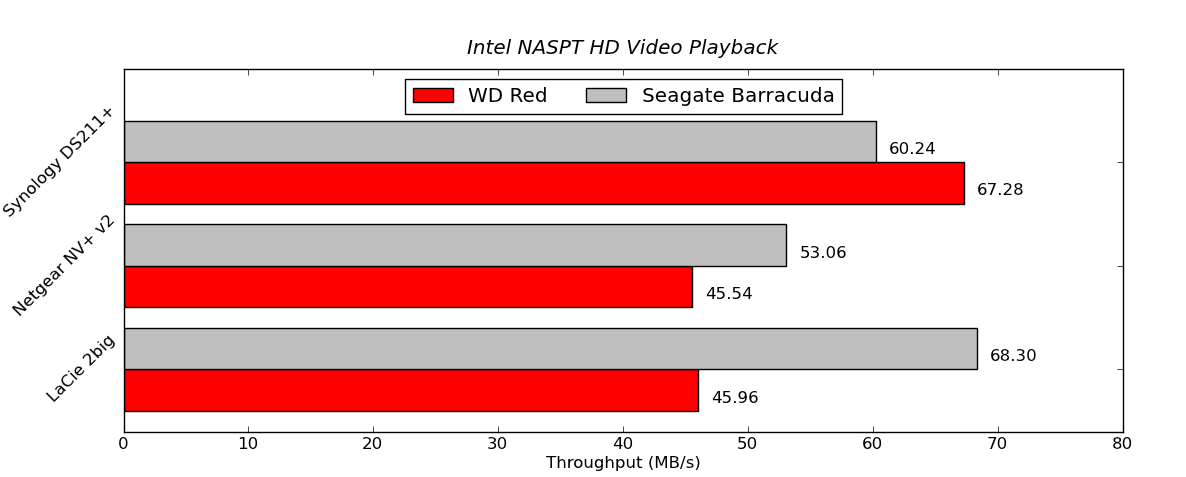

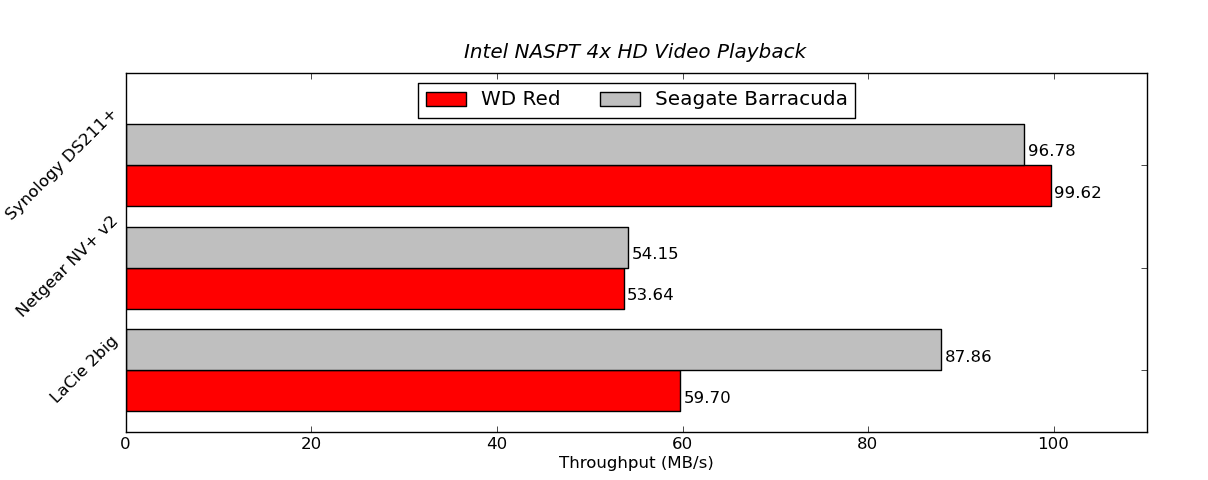
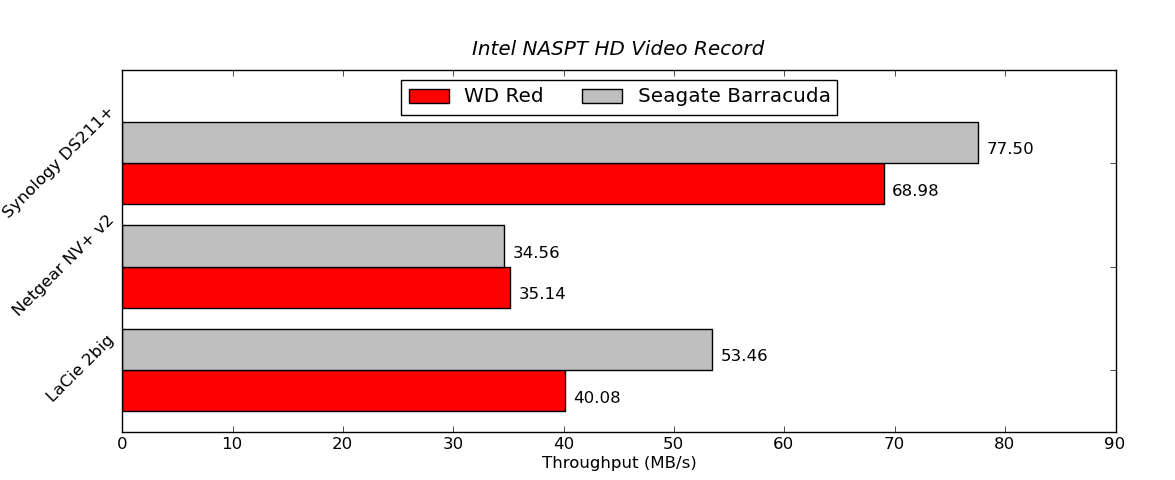

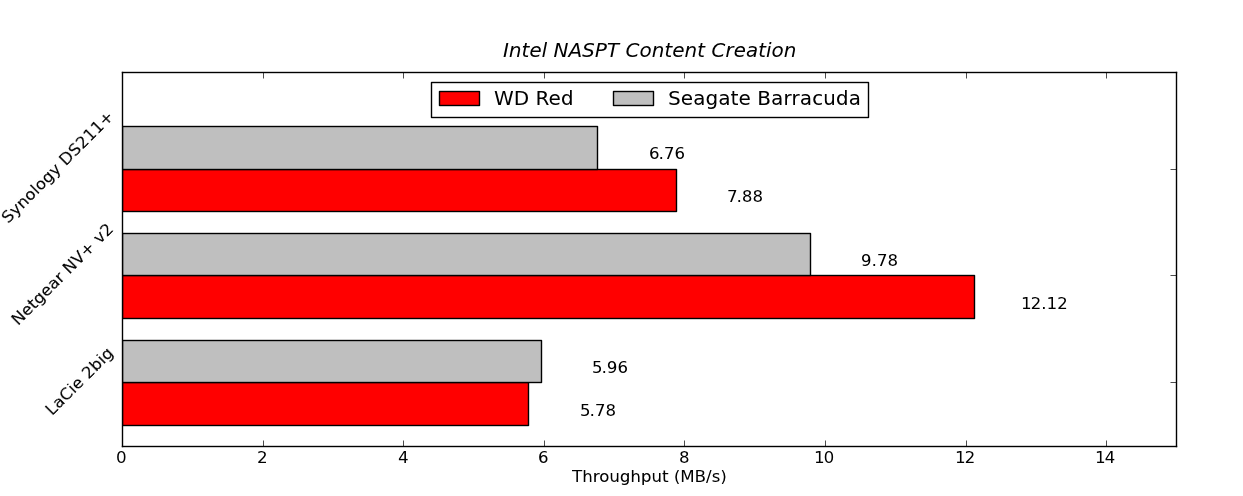
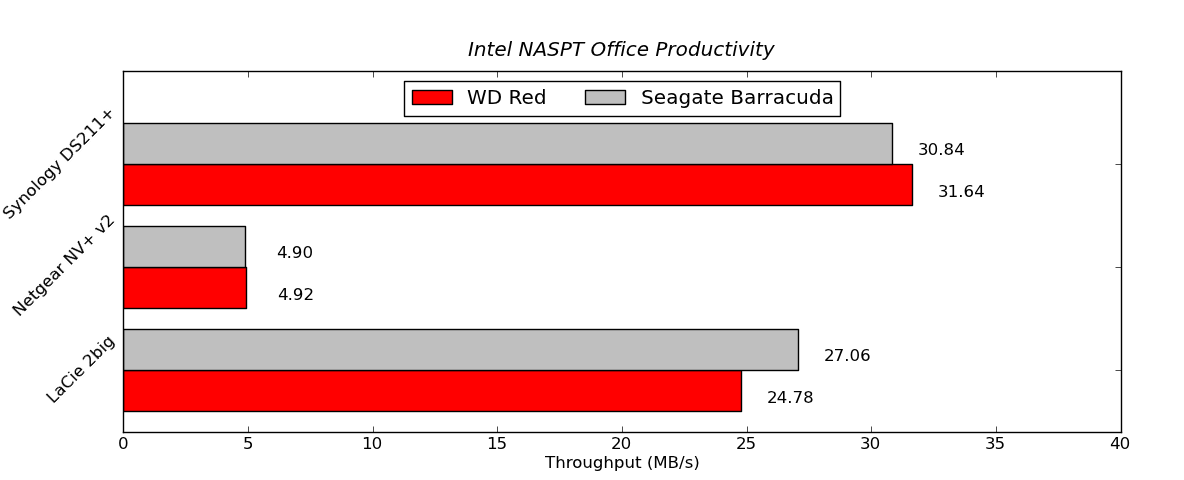

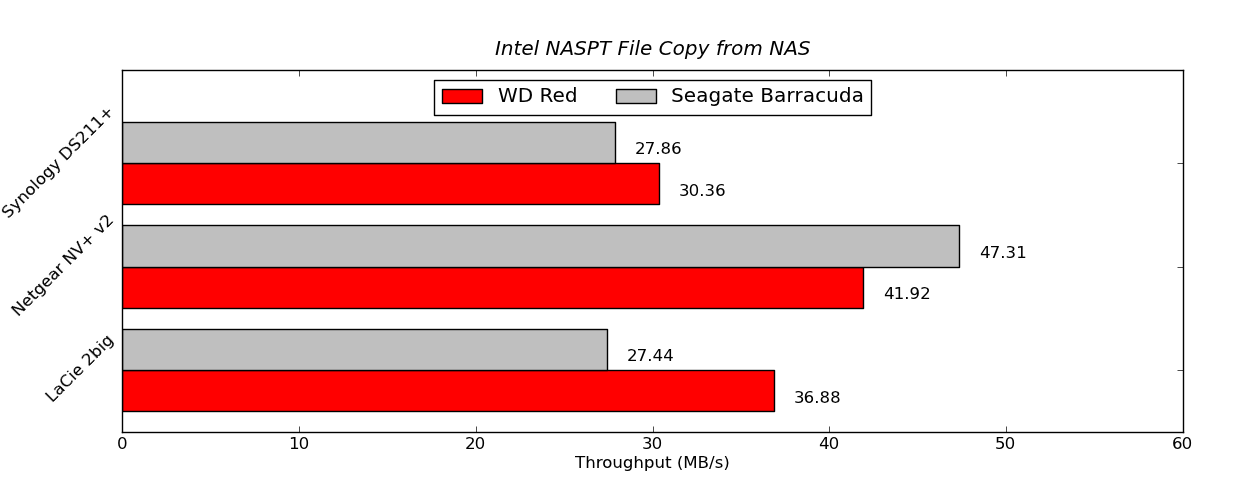
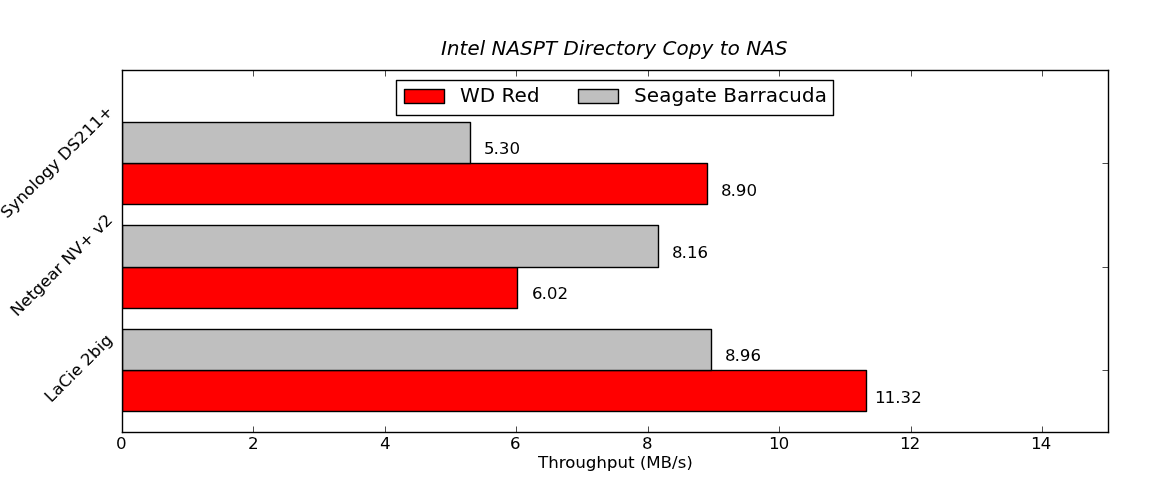
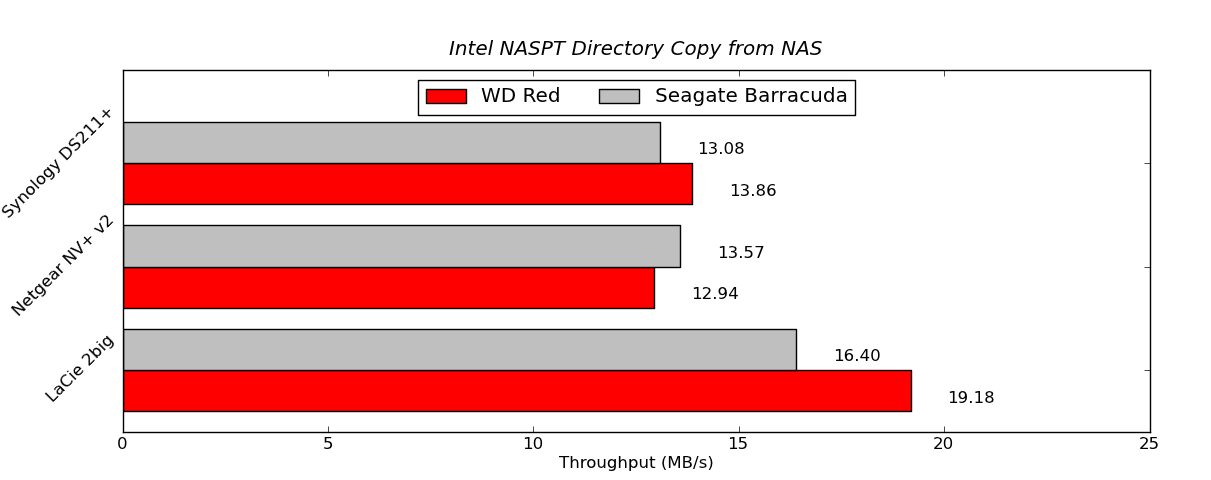

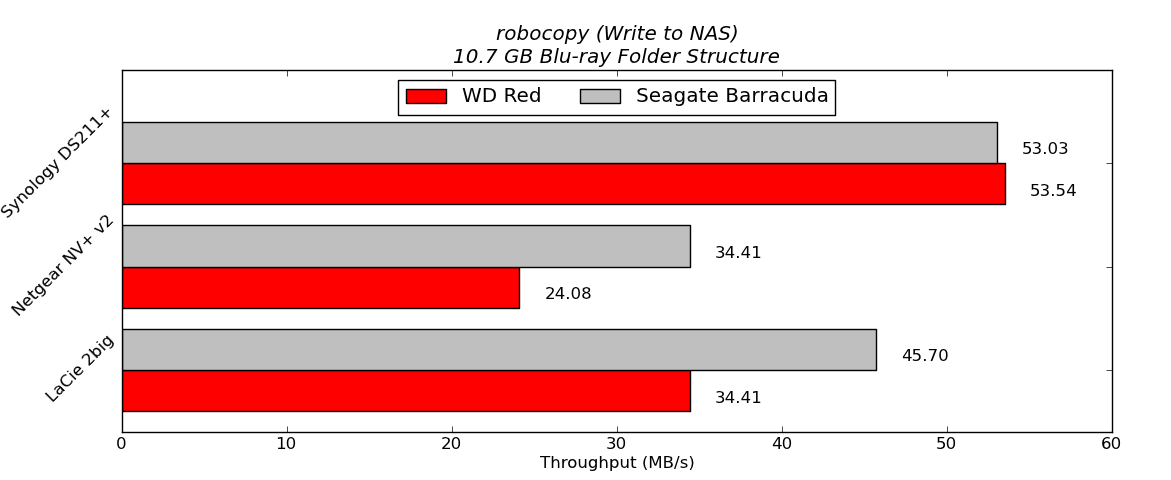
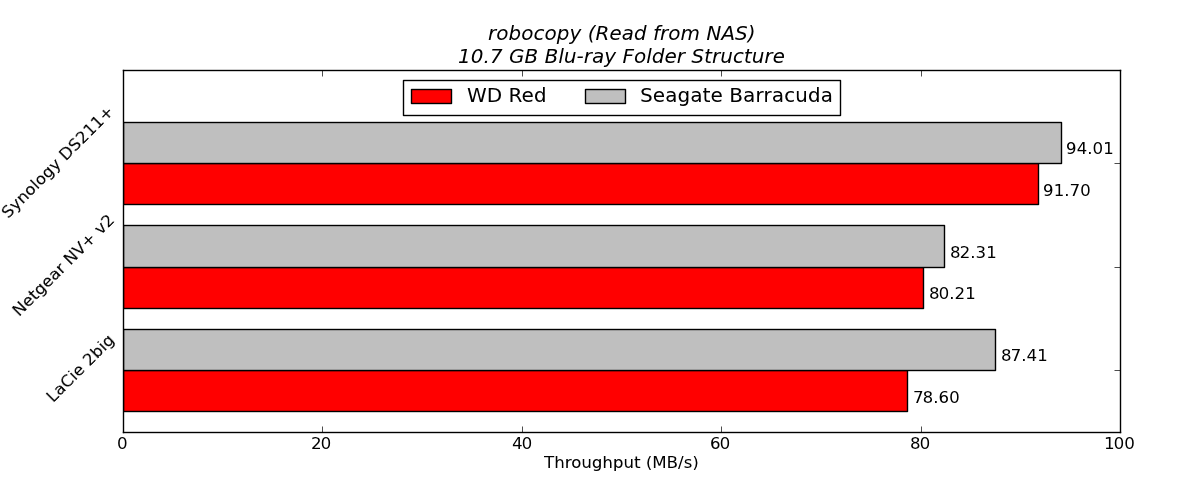
In order to put the final two graphs in perspective, we note that the standalone WD Red (freshly formatted) connected to a SATA 6 Gbps port of the Asus P8H77-M Pro delivered 130.07 MBps in the write test and 137.46 MBps in the read test. In the NAS systems, the WD Red performs quite well, particularly in the Synology DS211+. It does lose out to the Seagate 3TB hard drives under some circumstances. However, one can safely say that in 2 - 5 bay NAS systems based on ARM chipsets, it is unlikely that 7200 rpm drives are going to consistently deliver better performance than the 5400 rpm / IntelliPower drives.
In order to get an idea of how much power savings one can expect from using these drives, we took the LaCie 2big NAS and ran the disk performance bench using both the Seagate and WD drives in RAID-1 configuration. The following table summarizes the power consumption under various operating modes.
| LaCie 2big NAS Power Consumption | ||
| Mode | Seagate 3 TB | WD Red 3 TB |
| Sleep | 7.7 W | 7.7 W |
| 100% Read | 20.6 W | 14.8 W |
| 60% Rand, 65% Read | 21.2 W | 15.9 W |
| 50% Read | 20.9 W | 14.9 W |
| Rand 8K 70% Read | 20.6 W | 14.7 W |
It is interesting to see that the WD Reds consume just slightly more than two-thirds the power of the 7200 rpm drives when subject to similar accesses over the network. Of course, one might say that 7200 rpm drives such as the Seagate one we used above are not suitable for NAS applications at all. However, note that LaCie had in fact bundled them with their 2big NAS with the OS pre-installed.


 Facebook
 Twitter
 RSS
RSS


87 Comments
View All Comments
bill.rookard - Friday, August 17, 2012 - link
I have to say, I've been running a 5 disk Raid5 using the WD Green 2TB's, and I had one die after 30 days (RMA'd and replaced no charge), but since then, been running it 24/7 since about 2009 as well. It's not an appliance NAS - it's a full size tower, AMD Phenom/Gigabyte board/5x2Tb WD drives running FreeNAS - and it's been (with the exception of the one failure) solid.When it does come around to start looking into replacements, the Red series will be worth looking at as well as I expect NAS systems to become more and more prevalent.
vgray35@hotmail.com - Saturday, August 18, 2012 - link
The GREEN drives are performing well for only one reason - they are not being subjected to extreme temp cycling. Constant temps increase hard drive life quite dramatically. That same drive would quickly die in a laptop that is not routinely monitored for operating temps, with cooling filters cleaned on a regular basis. Turning the laptop on and off regularly will kill a GREEN hard drive quickly.It is all about extremes of temp cycling. I would not risk keeping the GREEN drives, when you could upgrade to RED at a convenient point in time, rather than be subjected to recovering from an actual hard drive failure. It is quicker, simpler, and less painful to do it now before they fail. Running 3 years on GREEN is one very risky business.
Gr8Ape - Saturday, August 18, 2012 - link
i can not +1 this enough.dj christian - Tuesday, August 21, 2012 - link
Which i have done. Had no problems with the Green discs since i bought them and they've been running for 6 and 8-thousand hours respectively.pieterjan - Wednesday, September 26, 2012 - link
Aggressive head parking (5 seconds) probably adds to the quick failure. The wdidle3 tool lets you disable it, however. In fact, except for the anti vibration feature and 24/7 support (that doesn't exist outside the US), I see little difference between the red and green drives...Phynaz - Friday, August 17, 2012 - link
Pretty horrible article, charts are unreadable.Actual writing is difficult to read, please be more concise.
Oh and crap like "IT departments have been tempted to use consumer drives". Absolute bullshit. If the author has done this he should be fired from his job.
mwildtech - Friday, August 17, 2012 - link
Cut him a break man. If you don't like the article, then don't read it. Not bullshit on IT departments not tempted to use consumer drives. A ton on schools and S&L Gov IT Departments use consumer drives in their NAS devices. I know, because they buy them from me.Gigantopithecus - Friday, August 17, 2012 - link
Yet another useless comment from Phynass. The graphs are perfectly legible, the writing is fine, and if you've never seen an IT department use consumer drives, you've never worked with small businesses. Get a life you fucking nitwit.Azethoth - Friday, August 17, 2012 - link
RAID: Redundant Array of Inexpensive Disks.Gosh, am I doing something wrong using cheap drives in a RAID? Am I going to get fired?
Do you scream when you type, because I don't want cheetos sprayed all over me. Does your Mom mind when you throw tantrums in the basement?
PS: you need to just turn on caps lock and leave it on.
yyrkoon - Friday, August 17, 2012 - link
LOL cheetos . . .And yeah, I guess it was an accident that SAS controllers can interface with SATA drives . . .