



Acer Iconia A500 - Honeycomb on a Budget
by Vivek Gowri & Jarred Walton on June 24, 2011 4:00 AM ESTGaming Experience
I'll preface this section by saying I'm not much of a gamer on PC anymore, and not at all a smartphone/tablet gamer. I tend to only play racing games, and I basically jumped to consoles after the 360 came out, focusing on things like Forza 2, Forza 3, DiRT 2, and the console version of NFS: Shift. I didn't buy a PS3 until Gran Turismo 5 released. So with that in mind, I immediately delegated this section to Jarred, but I did fire up NFS: Shift once on the Iconia, just to see.
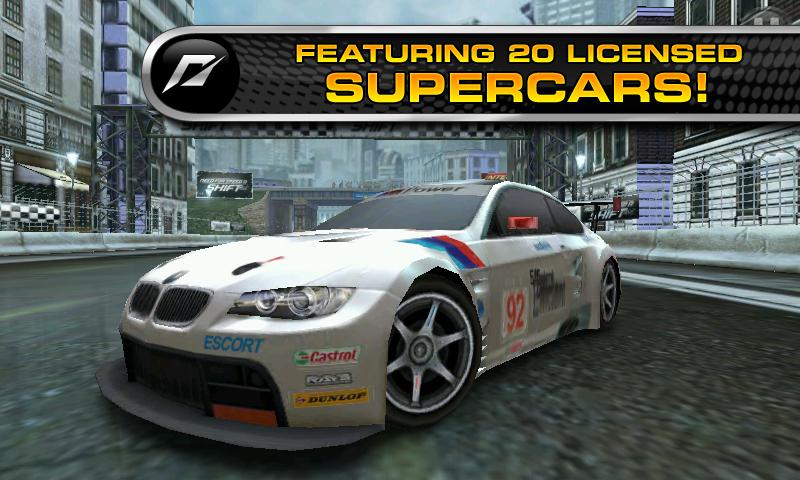
Like Real Racing: HD on the iPad, I hated NFSS on Android. The idea of tilting the tablet to accelerate, turning it right and left to turn, and pressing the screen to stop basically killed me. I couldn't do it—I got through two laps of the first race before I quit. Beyond Angry Birds, Fruit Ninja, and the like, I really just don’t enjoy gaming—3D or otherwise—on the tablet platform. Maybe I’m archaic at the ripe old age of 20 years and 18 days, but I like buttons. With racing games, wheels are ideal, but I can get away with gamepads and keyboards at worst. The point being, buttons are necessary for the level of control I need. Analogues are better, but at the very least, I need buttons. But I only tried out Shift; Jarred tried a whole bunch of other games, so I’ll turn it over to him.
Jarred's Thoughts on Gaming
Unfortunately, I don’t have a lot of good news to add to the gaming discussion. Like Vivek, I tried out NFSS and rage quit after a couple laps. I remember running the original Need for Speed and thinking it was okay; then I got a shiny new 3dfx Voodoo back in the day (yeah, almost before Vivek was born…) and it came with a copy of Need for Speed 2: Special Edition. My college roommates and I had a blast racing against each other, and at the time I thought the graphics looked amazing. Need for Speed 3 and my Voodoo 2 graphics card upped the ante quite a bit. Why do I mention those old games? Because to my eye, I think those actually look better than Need for Speed Shift on the A500—certainly by the time we hit NFS5 (Porsche Unleashed), the games looked better in 2000 than NFSS does on Tegra 2. Ouch. Frame rates also feel a bit sluggish on the A500, even with the distinct lack of visual fidelity.
If NFSS was the worst offender, Tegra 2/Honeycomb as a gaming device might not be so bad, but I continued my descent into darkness. Acer includes Let’s Golf HD and a demo version of Hero of Sparta HD. If you thought I was old talking about the original NFS games, let me just set the record straight. I remember playing Links 386 Pro back in the early 90s. Heck, if that’s not bad enough, I even played quite a bit of Mean 18 as an early teenager. Unlike NFSS, Let’s Golf HD looks a lot better than the old 199x golf games, but the problem is I stopped playing golf games around the time 3D graphics started to take off. Why? Because I didn’t find them fun anymore. Tapping a space bar (or clicking with your mouse) is about as much like playing golf as tilting a screen around is like driving a car. If you like golf games, though, Let’s Golf isn’t too bad. Graphically it’s nothing to impress, delivering DX8 era graphics with flat textures (e.g. no transparency on the water) and some minor rendering errors, but it runs well enough.
Moving on through the list of games, Hero of Sparta HD has a nice introductory video followed by incredibly lame gameplay. It’s an action-RGP type game, attempting to replicate Diablo at some level I suppose, but the controls are awkward at best (you can’t tap on the screen to tell your hero where to go), and it’s entirely too short—I played through the first level in about five minutes on the first try. Graphically, we’re again looking at around DX8 level, with clipping errors (the cape on your hero goes into his body all the time). Where I can see some users liking Let’s Golf, Hero of Sparta is a complete miss in my view; I have no desire at all to pay for the full game, even if it only costs $3.
The three included games may not be the best example of what tablet gaming has to offer, however, so we decided to go looking for other options. Dungeon Defenders has a free offering that we tried; it’s part action RPG and part tower defense, but neither part impressed. The way the controls and camera kept swinging around almost made me nauseous, and I’m not one to usually get queasy even from the worst 3D titles (i.e. Descent). Actually, part of the feeling almost certainly came from the frustration of my on-screen character not doing what I wanted. So we’re now 0 for 4 on the gaming experience.
NVIDIA also gave us access to some games that are or will be available via NVIDIA’s Tegra Zone; some are in a beta state so we couldn’t test them very well. Riptide GP is a jet ski racing game similar to NFSS, with a similarly painful controller mechanism. Pass. Galaxy on Fire 2 also proved to be too much for me to control well, so after 15 minutes I quit. Bang Bang Racing is a top-down racer where you hold your finger on the screen to “steer”, somewhat like the old Super Sprint games but without the control scheme to make it fun. Guerrilla Bob THD actually fared better than most with its control scheme, but it wasn’t enough to keep me playing past the second level.
Wrapping up the gaming tests, we come to the titles that actually worked well and where I could reasonably see myself spending more than five minutes. Pinball HD is a pinball game with three different tables. Since pinball is simple to control—you only have left and right flipper buttons plus the plunger to launch the ball—it worked on a tablet. If you like pinball, that’s great, but if you find pinball boring it’s not going to change your mind. The 3D graphics add a nice touch here, and the tables offer a fair amount of variety, but I do have to admit that precision was lacking.
And of course, there’s always Angry Birds. You can get ad-supported HD versions of all three Angry Birds games for free, and just as they’ve attracted millions of players on other platforms, they work well on the A500. I’ve personally gotten three stars on all of the released levels using my iPod Touch 4th Gen, and the larger display on the A500 makes for a better experience, particularly when zooming out. That said, there’s only so many times you can play a glorified artillery duel before you need some other sort of gaming distraction.
Graphically, Tegra 2 is okay but nothing spectacular, especially if you’re used to testing and playing games on laptops and desktops. The GeForce ULP used in Tegra 2 packs the same number of shaders (eight) as the old GeForce 8100, but they’re running at 300MHz (compared to 1200MHz on the 8100); that means it has about 25% of the horsepower of the old 8100 IGP, and in terms of capabilities it’s limited to DX9 level features. Yes, it uses a lot less power than the old 8100, but for a 1280x800 display it’s far from being fast.
Overall, it’s difficult to say if the problem is with the platform or if it’s simply the current crop of games. Out of all of the titles I tested, the only ones where the user interface works for me are where touch makes sense. Angry Birds works, but nothing that tries to emulate a gamepad came off well. Similarly, anything using the gyroscopes to try and mimic a steering wheel lacked precision and failed to impress. In short, while there’s nothing inherently wrong with DX8/9 era gaming, what we need are good games that transcend the level of graphics. Right now, I’m just not seeing any of those.


 Facebook
 Twitter
 RSS
RSS


45 Comments
View All Comments
VivekGowri - Friday, June 24, 2011 - link
Fair point, I'll stop saying that.TrackSmart - Monday, June 27, 2011 - link
I was walking by Staples today and saw lots of banners advertising tablets Motorola Xoom, Blackberry Playbook, and Acer Iconia 500 among them). I couldn't help but stop in for a hands-on test. At first glance, the Iconia looked nice, but in the hand the Xoom sitting right next to it felt like a much more premium device. The Iconia was priced at $450. The Xoom at $600. So I guess that's what 1/3 higher price buys you. The Iconia was less sleek and had flex to it that nearby Xoom didn't show any signs of.My main impression is that these 10" tablets are much larger than I'd like them to be. The 7" playbook felt like a better size. If they could have kept the 7" screen size on the Playbook, but shrunk the huge bezel by 75%, it would have been portable enough for day-to-day usage as an internet portal and as an ereader. And if they then dropped the price down to about $300 (netbook prices), I might even be tempted to buy one.
For now, they hold limited appeal (for me personally) due to large size and high prices relative to what you get in terms of performance and functionality. Maybe the next generation will get there.
TrackSmart - Monday, June 27, 2011 - link
Looking at my post, I can see why the Nook Color is doing so well. It's priced right and still feels like a fairly premium device despite that low price.MrMilli - Friday, June 24, 2011 - link
quote: "The GeForce ULP used in Tegra 2 packs the same number of shaders (eight) as the old GeForce 8100, but they’re running at 300MHz (compared to 1200MHz on the 8100); that means it has about 25% of the horsepower of the old 8100 IGP, ..."Let's not forget that the Geforce ULP is a Geforce 6000 generation GPU. That means 4 pixel and 4 vertex shaders. I would say that it doesn't even have 15% of the horsepower of the old 8100 IGP.
radium69 - Friday, June 24, 2011 - link
QUOTE:"What I really need for tablets to be useful is a killer app. I don’t carry around a clipboard ever, so they can’t fill that role. If I need to type an email or do any real work, a keyboard is generally a requirement. For everything that a tablet can do, a decent smartphone is similar and it can fit in your pocket. So on the one hand, I love having a larger 1280x800 display that I can actually use to browse the web, but on the other hand I just can fit something like that into my current lifestyle. The most use I got out of the A500, outside of testing, was on Sundays when I took it to church. I was able to replace several bulky items (scriptures and lesson manual) with a single device that easily fits in a briefcase, and it was easier to use than a notebook. I could still do the same thing on a smartphone or iPod Touch, but reading books/manuals on the iPod isn’t very easy on the old eyes. I would assume that students could benefit from a tablet in a similar manner, provided they can get all of their books and other materials in digital format. Carrying a <2 lbs. tablet around campus in place of three heavy textbooks sounds like a great idea, but I’m not sure about note taking and I always had a soft spot for scribbling in the margins—plus I know a lot of engineering courses have open book exams, and I doubt they’d allow a tablet to qualify as a “book”."
This is what I think it's saying:
A tablet doesn't excel in anything except portability. It might be usefull for students but not more.
I think, you have covered it all. A tablet is just a "Tablet" might be fun for gimmicky sales and might bring laptop prices down. But they never can compare to a netbook or a decent notebook. And with the grow of smartphones all around I think we are looking at better battery life in our phones. So basically, all ground is covered with a net/notebook or phone.
It all adds up to the equation...
Productivity on a tablet is close to 0% anyway.
I hope they be gone soon and focus more on phone progress and laptop progress.
FrederickL - Friday, June 24, 2011 - link
Yes, to a considerable extent they still are. However the author has mentioned the upcoming developments in hardware and I believe that the signs are that those developments are accelerating. In a year to eighteen months we are likely to be seeing a whole new generation of *much* more powerful tablets (both 7 and 10 inch form-factor) with much longer battery-life. If the rumours are to be believed we may even begin to see Win8 devices as early as Q4 2012. Combine that with a charging/extra ports docking station and a full song with choruses fully functional os that functions the same as on any work-station or laptop (*if* MS actually succeed in implementing what they say they are aiming for) then, and IMHO only then, we will have devices that will have a similar effect on the laptop market that the laptop has had on the stationary pc market. I imagine a 7 inch form-factor with a docking station in my tv-bench. When I put it in the dock it boots the conventional GUI to the TV and I can interact with it by means of mouse/keyboard from the comfort of my armchair. When I take it from the dock it switches automatically to the touch UI and I slip it into the inside pocket of my jacket knowing that I have something to read on the bus. At work it goes into a second dock etc. If I am travelling I take a small media keyboard with my tab if I know that I have a lot of writing/data entry to do. Such a device would replace my living room pc, my laptop and my Kindle. Now *that* would be a productive device!
oliwek - Monday, July 4, 2011 - link
"And with the grow of smartphones all around I think we are looking at better battery life in our phones"really? come on, android phones with heavy use do not last a full day without charging. ASUS Transformer tablet with dock on the contrary stays ON for 16 hours (9 hours for the tablet alone).
darkhawk1980 - Friday, June 24, 2011 - link
I came to most of the same conclusions myself, before I bought my Asus Transformer.The Iconia, while it has a few nice features (ie screen is one of the better LCD's, built in USB and microSD), it's not enough to make it a worthwhile buy while a tablet like the Transformer exists. At $350, it's a great buy. At $400, it's maybe worth it if you like the included USB. At $450, it's over priced and not worth it at all.
Lastly, concerning the 'usefulness' of tablets, it really depends. I don't want to lug around even a 2 lb netbook to work and back (I carpool about 35 to 40 minutes 1 way to work), and my company doesn't allow personal computers in the building (tablets are not defined as computers where I work, as stupid as it sounds). That being said, a tablet works very well for me. I also get ALOT more use of it at home now while watching TV, and even taking photos and videos of my son with it. It is bulky and clunky for photos/videos, but I make do and I enjoy it very much. While productivity isn't the main reason for my purchase, I can see where this would have it's uses. I think the biggest problem is the lack of a good annotating application (similar to Iannotate for iOS) on Android. If one did exist, it would really benefit Android as a whole in the schooling market.
haplo602 - Friday, June 24, 2011 - link
I think Jarred nailed it :-) The tablet is a portable document reader, nothing more. Basicaly I can find a single use for it. When I travel and don't want to carry a laptop. These are usualy short and light trips. Use for web, email, ebook, movies and simple games.Paired with a stupid mobile (like my SE C510) for tethered connectivity.
Belard - Friday, June 24, 2011 - link
Same as before... man, you guys are sometimes too 'techie".Not a creation device, but a playback device. Yes, my iPad is weak compared to my dual-core ThinkPad or my QuadCore Desktop with a 24" screen. But try relaxing in bed or the sofa with a notebook or desktop computer. Be cozy with those devices... not going to happen.
How about boot up time? These tablets are instant on... vs. 1-2 minutes for a typical notebook or desktop. (I put my notebook in sleep mode half the time, restart time is still about 6~10 seconds).
Try reading an ebook from your notebook to you kid(s)... especially while the cuddle next to you.
Theres a reason we have desktops and notebooks... and a tablet is no different. Its designed to function for its form-factor. High-end gaming, I'm not really seeing it... gotta have REAL buttons and twisting-tilting your screen for a steering wheel sucks. Steer buttons on the side of the screen would be better. There is a REASON a $120~180 Nintendo DS or PSP make good game platforms, but not good e-readers or browsers.
Why do we have more than 2-3 times of glasses and cups? Why have a saucer when a plate will do? Anyone with a knife-block with 6~20 types of cutting tools?
- - - -
Productivity on a tablet can vary, depending on your needs. I've only bought my first notebook 3 years ago because I had a need for a portable computer, but for the most part - its first year was very light usage.
In about a 14 months, Apple has sold 25 million ipads (10 million iPad2 in 2 months)... they are not going anywhere.
Funny thou, in the movie 2001, the astronauts in Discovery are using a tablet that is as thin as the iPad2 (if not thinner) and about the same size. Not bad for a movie from 1968... then in the movie 2010, they used an AppleII as a notebook... that is HUGE. :)