



ASUS UL80Vt First Look: Mobility Redefined
by Jarred Walton on October 24, 2009 8:00 PM EST- Posted in
- Laptops
Thursday marked the official launch of Windows 7, so perhaps we can finally put those Mac versus PC commercials behind us. Whatever your feelings towards Vista, the fact remains that it garnered a less than stellar reputation. As we discussed in our Windows 7 RC1 article, many people have the impression that Windows Vista is awful but they can't tell you why. Microsoft hopes to change things with the launch of Windows 7, a.k.a. Windows Vista 2.0.
One of the sore spots for Windows, and Vista in particular, has always been battery life. We have discussed this previously, but the simple fact of the matter is that Mac OS X on a MacBook is easily putting any Windows laptop to shame when it comes to mobility. There are many potential contributing factors, including better optimization of the hardware/software combination, tweaks to perhaps enable lower voltages by default on Intel CPUs, and the ability to keep the CPUs running in deeper sleep states more of the time. We will have an updated comparison with OS X in the near future, but to date everything appears to be in favor of Apple MacBook; Windows 7 improves the situation.
Microsoft has a white paper detailing some of the changes in Windows 7 that should result in improved battery life. We have already explored this topic previously, but those are only preliminary results. Moving forward, the laptops we review are going to shift to Windows 7 instead of Windows Vista, and today marks the onslaught of the Windows 7 laptop releases. One of the first Windows 7-based laptops to arrive in our labs for testing comes from ASUS.
We looked at the ASUS UL50Vt running on Windows 7 Home Basic and found that ASUS could deliver nearly 7 hours of battery life while surfing the Internet -- and that's using our heavy Flash-based tests. One of the more interesting aspects of the ASUS UL series is that they allow overclocking of the ULV processors -- typically 1.73GHz instead of the default 1.30GHz, though in low-power states it's also overclocked from 800MHz to 1066MHz. The overclocking is achieved by simply raising the FSB from 800MHz to 1066MHz; since the chipset and other components can all run a 1066FSB already, the only component that's truly overclocked is the CPU, and it has no difficulty running at 1.73GHz.
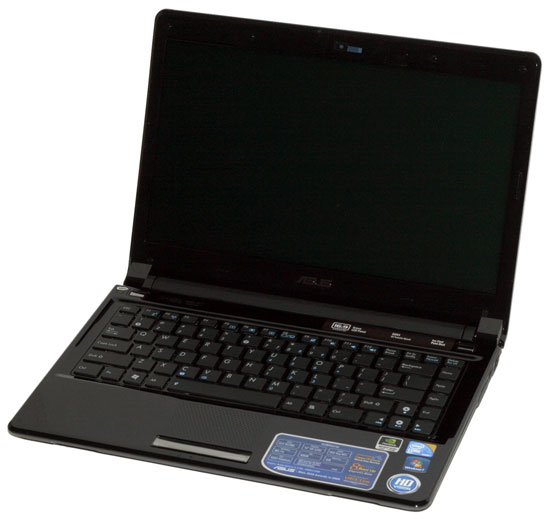
We have the final release version of the ASUS UL80Vt in our hands, and we have begun testing. Today we provide a quick look at what the laptop offers and our initial impressions.


 Facebook
 Twitter
 RSS
RSS


100 Comments
View All Comments
ProDigit - Tuesday, October 27, 2009 - link
With the better graphics card I meant the integrated one.. Not the external one.Also, if I'd remove the external graphics card, would I have a PCIE slot available for mods?
ProDigit - Tuesday, October 27, 2009 - link
I don't agree on better LCD's on budget laptops!In fact I oppose it.
I'd rather pay $50 less for a laptop that has a worse LCD, than pay $50 more for a better LCD!
And by the looks of it, we're going that way, with PixelQi's screen which does not display colors faithfully, but could result in upto 20% more batterylife with their white background reflective screens.
I don't care about color precision. A netbook does not need a screen that is showing 32bits faithfully, or that has a high contrast ratio!
What it needs is show basic colors (16 - 24bits is more than ok!), and has a wide range of brightness.
If it isn't reflective (with white background like PixelQi's screens, or e-ink screens), then it needs to have an extreme low setting for comfortably using the PC in a dark room (eg bedroom at night without external light); and the info on the screen should be visible in the daylight, under the sun!
Contrast VS brightness, I'd set my $15 on better brightness settings,rather than pay $50 for a higher quality screen.
Faithful reproduction of screen colors only matter for those who need it, like web designers, photographers, video editors...
But the majority of users are like me. 99% does not care if the green looks a bit blue-ish, or the white looks somewhat a bit yellowish!
strikeback03 - Tuesday, October 27, 2009 - link
But if the screen crushes blacks so badly that all the pics from last Saturdays party that you are looking at on Facebook look like shadows in a coal mine, that screen has failed at even basic functions.Again, I don't think anyone is asking for better screens to be standard, but make them an option in models which are otherwise nice for those who are willing to pay for the upgrade.
atlr - Monday, October 26, 2009 - link
I would pay more for a better display with a matte or antiglare finish.Exile550 - Tuesday, October 27, 2009 - link
I would like very much a matte finish.estyx - Monday, October 26, 2009 - link
Can you please test it when using the GPU for HD-resolution decoding? I.e MPC-HD playing 720p and 1080p h264 with gpu-accel decoding. This is very useful to know when concidering buying a laptop for taking long trips on train, bus, car etc, because then you're so bored you need some movies and series to watch :)Otherwise it seems like a nice laptop! Looking forward for a bit deeper review
JarredWalton - Monday, October 26, 2009 - link
I'm running all sorts of tests as I get the chance. The GMA 4500MHD does x264 offload, as does the G210M. I can tell you that my test x264 720p file just about 6:30 with the 4500MHD; the G210M test is still running. I have a bunch of tests to still run (with and without Turbo, IGP and discrete, gaming performance, etc.) but that will all be revealed eventually. Given the number of tests I still need to run, I expect it to be another week or two before I'm anywhere close to finished.robertpolson - Monday, October 26, 2009 - link
I am dealing with a dilema righ now. Stay with my order for UL80vt, get a macbook pro or wait for UL30vt to come out (if it will) at the end of the year.What I like about UL over macbook pro:
1) Longer battery life
2) More hard drive space
3) Double the memory
What I do not like about UL comparing to macbook pro:
1) No bluetooth
2) Webcam sucks big time - 0.3 megapixel is a joke in 2009
3) Larger in size comapring to macbook pro.
I think I ca live with either OSX and Windows 7.
What do you think ?
JarredWalton - Monday, October 26, 2009 - link
What do you use Bluetooth for? The only time I've ever used it on a laptop was for a Bluetooth mouse, but I'd definitely prefer a wired mouse; the BT mouse was a bit finicky.As for the webcam, I'm not sure if it matters that it's "only" 0.3MP. All the video conferencing stuff I've tried seems to limit me to 320x240 video regardless. I certainly don't take pictures with my laptop webcam; do you?
Mind you, I'm not saying these areas aren't important. You say they are for you, so I'm just wondering what it is you do that I may have overlooked, since I've never felt either was necessary.
PS - Benefit #4: optical drive, if you need it.
heulenwolf - Monday, October 26, 2009 - link
Dear Asus,I've been tracking netbooks since you released the first EEEPC. I always found them interesting but, despite their low price, continued to buy larger laptops or smaller internet-enabled devices until the 1005HAB came out. I saw it while perusing a Best Buy and could not resist. The screen is so nice to look at that it makes me look past some of the drawbacks inherent in a netbook. When at home, I'll gladly use the $300 netbook instead of my $2000 work laptop with a larger screen, faster and better everything (except for the screen, though its no slouch), and longer battery life. When I'm traveling, I don't even consider other options. I bring the 1005HAB. If you'd like this happy Asus EEEPC customer to purchase more lucrative Asus products in the future, please give more weight to the screen quality in your value proposition than was demonstrated in this review.