



Radeon 5970 Overclocking: The VRM Temperature Bottleneck
by Ryan Smith on November 25, 2009 12:00 AM EST- Posted in
- Ryan's Ramblings
In our Radeon HD 5970 review, we ran in to some issues when trying to overclock the card to 5870 speeds of 850MHz/1200MHz. At the time this is something we attributed to the VRMs, meanwhile AMD suggested that it was cooling related, and that we should manually increase the fan speed.
As it turns out, we were both right, we just didn’t have the tools at the time to properly identify and isolate the issue. Late last week we got our hands on a beta version of Everest Ultimate, which added preliminary support for the 5970. With that, we could read and log the voltages and temperatures of the various components of the 5970, and properly isolate the issue.
From that, we’ve discovered a few interesting things about the 5970. Let’s start things off with the cooler removed from the 5970.
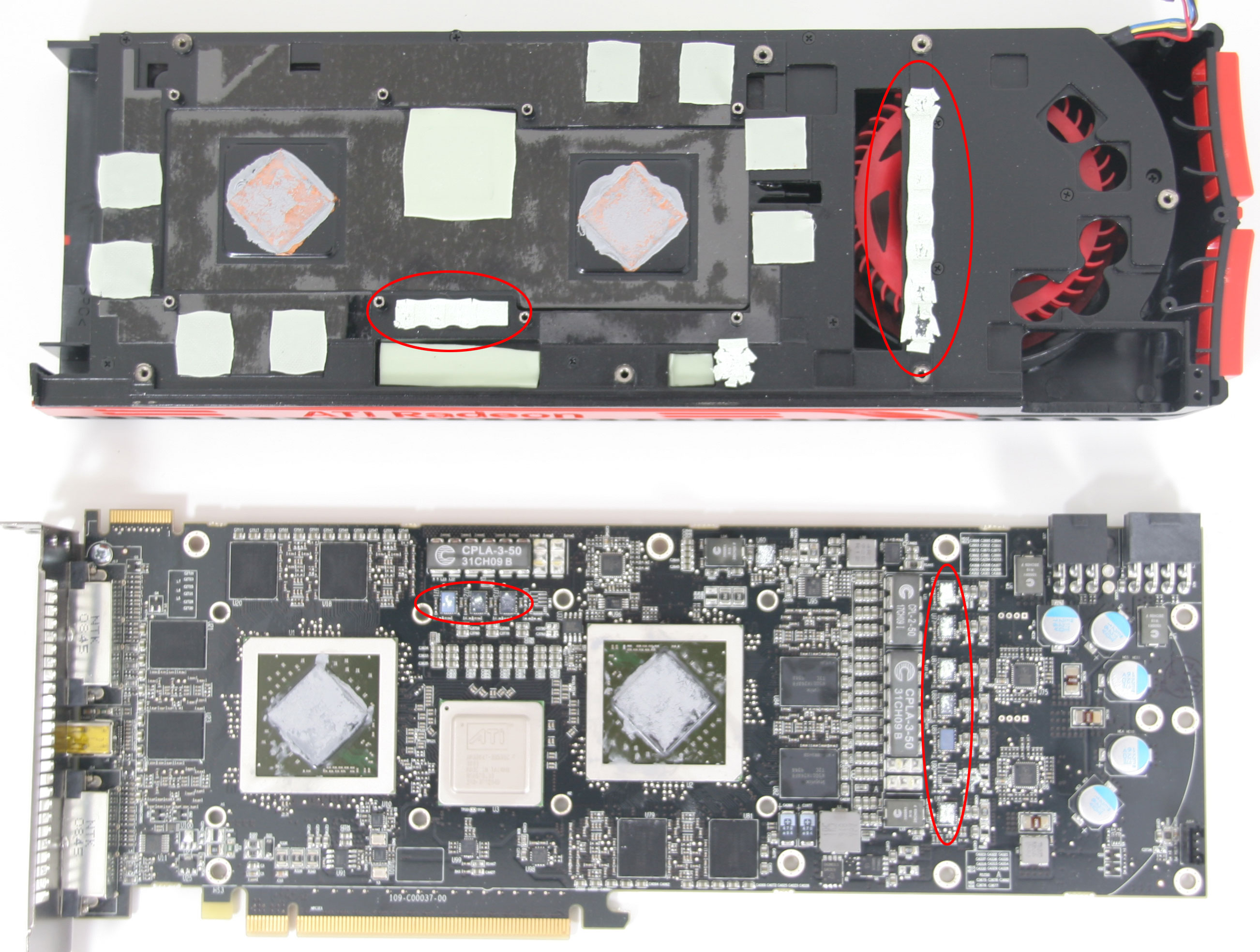
We’ve gone ahead and circled the VRMs in red. There are 9 altogether; 6 on the right side, and 3 near the left side of the card. We aren’t able to track down what each specific VRM is connected to, but we believe that each GPU is attached to 3, each GPU’s RAM is attached to 1, and finally the PLX PCIe bridge is attached to 1. Regardless, pay attention to the location of these VRMs for later discussion.
As we previously noted in our 5970 review, when overclocked the card was throttling down in two cases. One was when running OCCT/FurMark, members of AMD’s “power virus” list by virtue of the fact that they put a card under a greater load than AMD believes to be realistically possible. Our 5800 series cards never throttled under these applications, so to see the 5970 throttle here was a bit surprising but not wholly unexpected.
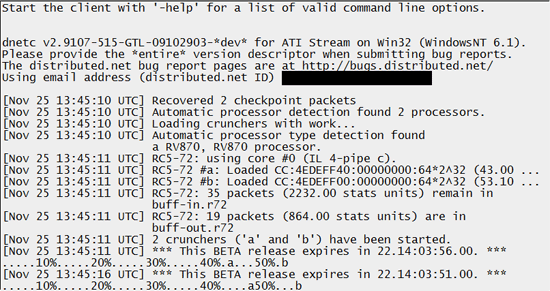
The second case was using Distributed.net’s pre-release GPU client for use with AMD’s GPUs. Since this is a real program, this was absolutely unexpected, and is what instigated our look in to the matter.
In both cases, the key was the overall load on the GPU cores, and consequently the amount of power required to drive the GPUs. When a bank of VRMs reached roughly 120C (this being averaged among all the VRMs in that bank), overcurrent protection kicked in and throttling began. In the case of FurMark this was very quick and even at 100% fan speed the cooler could still not keep the VRMs cool enough to allow full-time 850MHz operation. The Dnet client on the other hand was much slower to ramp up, and we ultimately found that 70% fan speed was enough to keep our hottest bank of VRMs below the threshold, stabilizing at 116C.
Notably, during this whole period the GPU cores themselves stayed at or under 94C, which is still a few degrees below their own throttle point. AMD’s fan quickly ramped up, and in our testing it only needed to go to 59%. So if the cores did get hotter there was still plenty of room to go with the fan.
This brings us to our first point of concern for the 5970, which is the fan speed. Clearly it’s adequate for the GPU cores themselves, but we cannot find any proof that the fan speed is adjusted based on the temperature of the RAM or the VRMs. If the fan speed were to ramp up in the case of near-critical temperatures in the VRMs, then the Dnet client likely would have ran without an issue the first time, as this would have pushed the fan to 70%.
We asked AMD about whether the fan speed is affected by VRM temperatures at all, but we didn’t receive a response. This isn’t particularly surprising since post-launch periods are a good time to take a vacation and there’s a holiday this week for their American employees, but it means we couldn’t get a confirmation of our assumption. So for the time being, we’re working on the assumption that only GPU core temperatures drive fan speed.
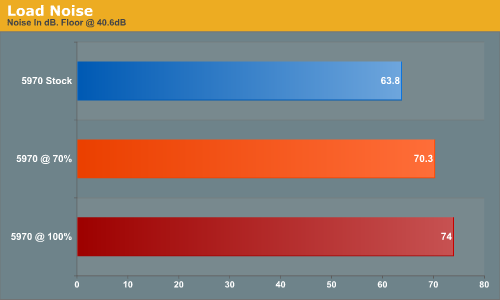
It also bears mentioning that the 5970 gets quite a bit louder when the fan goes up to 70%. We went ahead and captured the noise data for it at 70% and 100%, which is in the chart below. At the 70% fan speeds needed to run the Dnet client at 5870 speeds, you’re looking at 70dB, which is quite a bit louder than the fan noise at stock speeds. It is in fact uncomfortably loud by this point.
Our second point of concern goes beyond just the fan, and is the overall cooling of the VRMs. When we looked at our Everest logs after running the Dnet client, we noticed something interesting with respect to which VRMs were overheating. The VRM bank attached to GPU 1 was some 25C hotter under load, but it wasn’t GPU 1 that was the hottest. GPU 2 was consistently a couple of C warmer. We don’t believe this to be in error, so to understand why this is, we refer back to our disassembled 5970.
As the fan is on the right, the right side of the heatsink the vapor chamber dumps its heat in to is going to be cooler than the left side by the virtue of the fact that the left side is effectively using the already hot-air of the right side to cool. The heatsink and vapor chamber mitigate this some, but the right side of the card – and consequently the right GPU– should be cooler than the left side. This leads us to believe that GPU 1 is the right GPU, and GPU 2 is the left GPU.
This is important since if we look at the VRMs, the VRMs feeding GPU 2 sit under the vapor chamber, while the VRMs feeding GPU 1 (along with the RAM and PCIe bridge) are not. We haven’t been able to fully dissect the cooler, but the VRMs on the right side sit right underneath the fan, and we don’t believe there to be a significant heatsink in the metal bar that sits above them. So while the VRMs feeding GPU 2 are being cooled by the vapor chamber, the VRMs feeding GPU 1 are only being cooled by the heat dissipation properties of a metal bar.
From this, we can conclude that the VRM banks are receiving wildly different amounts of cooling. The VRMs on the right side are not cooled nearly as well as those on the left and as a result the card is being held back by the VRMs on that right side. To that extent, we believe that if all the VRMs received the same level of cooling as the VRMs on the left side, then the card would have no problem maintaining 5870 speeds while running the Dnet client, and likely even FurMark. It’s also worth noting that all the 5800 series cards share the design of placing the VRMs under a metal bar under the fan, but the 5970 seems to suffer more for it compared to the 5800 series.
Finally, there’s the matter of whether this is even going to matter for most users. After catching the VRMs hitting 120C under the Dnet client, we went looking at other applications and games to see where else the card was throttling. The result of that inquiry was that we couldn’t find anything else that could match the Dnet client in total load. The Dnet client is a bit of a special case here, since crunching encryption keys makes exceedingly good use of the 5-wide SIMD design in the 2000-5000 series cards. When we took a look at something similar to the Dnet client, in this case the Folding@Home GPU client, we couldn’t break 100C. The significance of that result remains to be seen though, since the Folding@Home GPU client hasn’t been optimized for the 5800/5900 series yet like the Dnet client has. Our ultimate concern is that this card is going to repeatedly fall flat on its face at 5870 speeds with more GPGPU applications as OpenCL and DirectCompute take off, and the number of such applications bloom.
| Radeon HD 5970 Temperatures | ||||
| GPU 1 Temp | GPU 1 VRM Temp | GPU 2 Temp | GPU 2 VRM Temp | |
| FurMark | 89C | 110C | 91C | 83C |
| Dnet Client | 87C | 101C | 88C | 77C |
| FurMark OC | 91C | 120C | 94C | 100C |
| Dnet Client OC | 93C | 120C | 94C | 94C |
| Cryis Warhead OC | 87C | 96C | 89C | 74C |
| STALKER OC | 85C | 96C | 88C | 72C |
Meanwhile in games it was a similar story. Crysis and the STALKER benchmark are two of the most demanding games we’ve tested on the 5970, and in both cases the VRMs again peaked at near 100C. As games aren’t going to hammer the SIMDs like GPGPU applications do, the power load from games should be lower than for GPGPU applications.
As far as our opinion on the 5970 is concerned though, this doesn’t change anything. While we’ll buy AMD’s “power virus” rationale for FurMark and OCCT, the Dnet client is not a power virus. It’s a real application, one that AMD even used in their 5800 presentation back in September. Thus as far as we’re concerned, our 5970 is only good for 775MHz, the lowest clock speed where the VRMs stayed under 120C. Granted, AMD will never officially promise that the 5970 can reach 5870 speeds, but based on how the 5970 was promoted and presented the fact of the matter is that the card can’t meet its advertised capabilities – this card is clearly meant for 5870 clockspeeds.
With that in mind, we’ll end on two thoughts. The first of which is that in spite of our experience, for pure gaming scenarios we don’t have any data to bring in to doubt the idea that the card can run at 5870 speeds without throttling. So long as you only intend to play games, those speeds should be fine.
Our second thought is that cards from vendors with custom overclocking utilities will be better able to maintain 5870 speeds at all times. These are cherry-picked chips, so there’s no reason why they absolutely need 1.1625v core voltage to run at 850MHz; we suspect that they could do with less. Since voltage is our main enemy here, even a small drop in voltage should have a noticeable impact on VRM temperatures. But you’re going to need a utility with a full suite of voltage options to take advantage of that.


 Facebook
 Twitter
 RSS
RSS


45 Comments
View All Comments
nightstar - Thursday, December 3, 2009 - link
I enjoyed reading this artical. I found it to be well written and researched, with one exception. You quote AMD as calling Furmark and OCCT "power virus".I expect the authors and editors at such a prestigious website as Anandtech would understand what a virus is in the context of computer software, however some clarification seems to be required. A virus is malware that self replicates after infecting a system, spreading to other systems.
To the best of my knowlege neither of the aforementioned stress testing software tools fit the criteria of a "power virus" or any sort of computer virus for that matter. While I'm not surprised that a hardware manufacturer would try to spin a design deficiency by redefining worlds I hold journalists to a higher standard than Corporate PR reps.
How very Orwellian of you.
War is peace, Freedom is slavery. Certain third party stress-testing programs are power viruses...?
AuDioFreaK39 - Sunday, January 17, 2010 - link
I find that explanation to be a little extreme.TurboMecca - Thursday, December 3, 2009 - link
I've got a Powercolor 4870PCS+ (1GB, slight factory-overclock) and it displayed the same problem when running Furmark andother demanding graphic-intense programs.
Powercolor later decreased the factory overclocking of this card to just a mild/small overclock (without telling it's customers, same old O/C figures at their site). They also increased min fan speed to 63% which made the card sound like a old GeForce 5800:
http://www.youtube.com/watch?v=PFZ39nQ_k90">http://www.youtube.com/watch?v=PFZ39nQ_k90
Even later Ati made their graphicsdriver recognize when Furmark was being run and underclocked the card to cope with Furmark (at a lower FPS of course).
This is ridiculous and embarassing both for Ati/AMD and all the hardware-testing sites (Anandtech hereby excluded, after this article :-))
Stupid manufacturers that cannot construct a graphics-card that manage to run stable at even base clocks.
TurboMecca - Thursday, December 3, 2009 - link
I had some links to articles at EXPreview that verified my statement above, but they doesn't seem to be accessible at this time (maybe later):http://en.expreview.com/?p=680">http://en.expreview.com/?p=680
http://en.expreview.com/?p=700">http://en.expreview.com/?p=700
TurboMecca - Thursday, December 3, 2009 - link
I might as well add that the "cooling" solution (heatsink) on my Powercolor 4870 PCS+ doesn't even seem to make contact with the VRM:s.So instead of help cooling the VRM:s the stupid designers at Powercolor manage to cave in/embed the VRM:s, thus increasing the temperature even further.
LedHed - Tuesday, December 1, 2009 - link
ATI has been designing their X2 cards cooler like this for what? 3 years? From the beginning people have been telling them that the design results in hot air of one GPU being blown into the other; resulting in one GPU being hotter.I find it hilarious that ATI has done this AGAIN with their "top dog" card. I own a GTX 295 and it idles @ 41C and Full loads @75C, if NVIDIA figured out how to cool dual GPU cards so well over a year ago why is ATI still scratching their heads?
Once again ATI has produced an overly HOT card that can't be used to it's full potential with the stock cooler.
Proxicon - Saturday, November 28, 2009 - link
I think I would rather get two 5870's than this, except currently this is a cheaper alternative by close to $150.00 dollars with the pricing inflation ala demand.Also, I don't think it's a good idea to be using AS-5 or anything with silver that is conductive on this 600 dollar + card or its VRM's or anywhere on that PCB if I was you, unless your sure that you could keep it in the right spots putting that massive heatsink back on.
Maybe AS-5 on GPU and Ceramique for all the lil VRM's and stuff that might overflow off and onto the board.
They will release a waterblock for this thing that will cool the GPU's and VRM's if you want to overclock. I think you could expect more dramatic results with that.
I think this card is a solid deal.
GO ATI!!
fausto412 - Saturday, November 28, 2009 - link
i think ATI will have to address their cooling design and the location of VRM's in future cards. this is a major discovery and i wouldn't buy this card based on those super high VRM temps. i know i probably would not run into issue but components that run that much hotten than usual ones can't last as long. i look forward to an update on this issue and what if anything ATI will do to mitigae the problem.Targon - Sunday, November 29, 2009 - link
This is something that most people don't seem to understand about ATI/AMD and NVIDIA. Both companies release reference designs, but NVIDIA does NOT make retail graphics cards, and it is hit and miss if ATI/AMD will release a retail card or not for a given GPU these days.So, you have those companies that will just copy the reference design, and may reproduce a design flaw in the reference design, and you have those that come up with their own cooling solution which DOES tend to be better than the reference design. Those, such as Sapphire Tech that have their own cooling solutions will hopefully solve this problem and provide a much better experience.
Proxicon - Saturday, November 28, 2009 - link
VRM temps were really only an issue when overclocking, otherwise they were running within there temp boundarys. I think thats what the article said maybe I misunderstood.