



New Acer Timeline and Windows 7 Laptops
by Jarred Walton on October 28, 2009 1:00 AM EST- Posted in
- Laptops
Acer recently launched some updated laptops with Windows 7. For that matter, just about every laptop manufacturer out there has new laptops sporting Windows 7, but we're going to start our coverage of mobile press releases with Acer since they were kind enough to send us the pertinent details. (Ed: This blog may be a bit long, but we'll try to do them more often going forward so we can keep it short.)
Our intention going forward is to do more blogs on product announcements, letting you know what new items might be worth a look… or perhaps which ones you should skip. These blogs are not reviews, since we don't have hardware, but we'll try to cover the important details and let you know what we think of the various laptops. And if you're a PR representative from a different manufacturer and you have product information, send me an email. We don't have time to cover every laptop/netbook launch, but the more information we have to pass along, the better informed we can keep our readers.
We recently looked at ASUS' latest foray into the mobile world, the "UnLimited" UL80Vt. It uses a Core 2 Duo SU7300 CPU overclocked to 1.73GHz by default, plus giving users the option to switch between discrete and integrated graphics. The design and features of the UL80Vt are very good, but what if you don't want to spend $820, and what if you don't have a need for discrete graphics? If you're interested in some other options, Acer might have what you're after. Let's take a quick look at the latest Acer product launches.
Acer Timeline
The more interesting launches from Acer are going to be the updated Timeline models. Acer has now models ranging from the new 11.6" Timeline up to the larger 15.6" AS5810TZ. All of the models we'll be discussing now include Windows 7, and we see no reason to even consider Windows Vista on a laptop at this point. Windows 7 definitely beats Vista in both performance and battery life. Windows XP battery life is similar to Win7, but that's only if you're willing to live with the old XP UI. Of course, we understand that some people still prefer XP, but we'll focus on the new Win7 models.
| Acer Aspire Timeline 1810 (AS1810T) Specifications | |
| Processor | Intel Core 2 Duo SU7300 (AS1810T-8638/8679) (1.3GHz, 45nm, 3MB L2 cache, 800MHz FSB, 10W) Intel Pentium SU4100 (AS1810T-4013/4174) (1.30GHz, 45nm, 2MB L2 cache, 800MHz FSB, 10W) |
| Chipset | Intel GM45 + ICH9M |
| Memory | 2x2GB DDR2-667 (8638/8679) 1x2GB+1x1GB DDR2-667 (4013/4174) |
| Graphics | Intel GMA 4500MHD |
| Display | 11.6" Glossy 16:9 768p (1366x768) |
| Hard Drive(s) | 320GB 5400RPM HDD |
| Optical Drive | N/A |
| Networking | Gigabit Ethernet Intel Wifi Link 5100 Bluetooth 2.1+EDR |
| Audio | HD Audio (2 stereo speakers with two audio jacks) |
| Battery | 6-Cell battery Up to 8.0 hours |
| Operating System | Windows 7 Home Premium 64-bit |
| Dimensions | 11.2" x 8.0" x 0.9-1.2" (WxDxH) |
| Weight | 3.1 lbs (with 6-cell battery) |
| Extras | Webcam 84-Key keyboard Flash reader (MMC/MS/MSPro/SD/xD) Multi-gesture touchpad Diamond black (4013/4174) or sapphire blue (8638/8679) |
| Warranty | 1-year standard warranty |
| Pricing | Online pricing: Acer AS1810T-4013 for $550 Acer AS1810T-4174 for $550 Acer AS1810T-8638 for $600 Acer AS1810T-8679 for $600 |
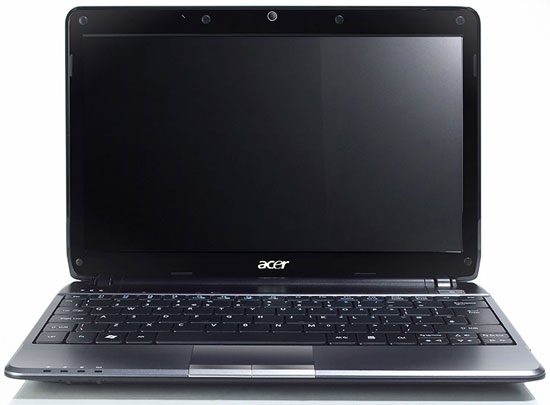
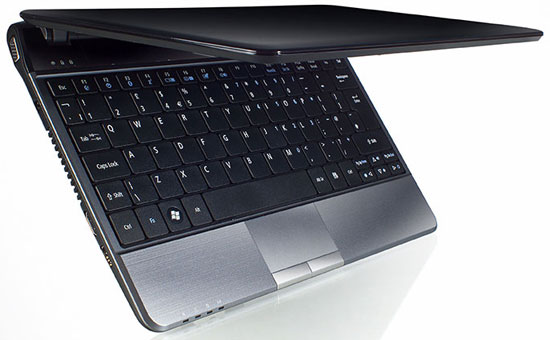
The Timeline 1810 is the newest edition of the Timeline series, with a netbook-sized 11.6" chassis. Unlike the typical Atom netbook, however, Acer uses a Core 2 Duo SU7300 -- the same CPU as the ASUS UL80Vt. Or at least the more expensive model uses the SU7300, while the slightly cheaper option uses the Pentium SU4100. The two CPUs have the same 1.30GHz clock speed, but the SU7300 has 3MB shared L2 cache compared to 2MB L2. For $50, the upgrade probably won't make that much of a difference, but the 8638/8679 also include 4GB RAM instead of 3GB. The 1810 comes with a 6-cell battery and weighs just over three pounds. Battery life should exceed 8 hours in light operations, while more intense workloads like x264 or DivX video playback will probably be closer to 5 hours.
Like all of the Timeline series, the LCD is LED backlit and has a resolution of 1366x768. That resolution might be a bit low on the larger models, but it works well on an 11.6" LCD. Unfortunately, we don't have details on what LCD is being used -- we asked, but Acer wasn't able to provide that information. The 1810 is available in either black or blue at present, with what appears to be a brushed aluminum palm rest. If you want an alternative to a netbook that doesn't cost an arm and a leg, the Timeline 1810 will fit the bill. Performance of the SU7300 is going to be at least twice as fast as any Intel Atom netbook, and the GMA 4500MHD is likewise a large step up from the aging GMA 950 (or the GMA 500). H.264 video decode works with the 4500MHD as well, so the only drawback relative to ATI and NVIDIA solutions is gaming/graphics performance. What you're getting is essentially over twice the performance of a netbook for about twice the cost.
| Acer Aspire Timeline 3810 (AS3810T/AS3810TZ) Specifications | |
| Processor | Intel Core 2 Duo SU7300 (AS3810T-8737) (1.3GHz, 45nm, 3MB L2 cache, 800MHz FSB, 10W) Intel Pentium SU4100 (AS3810TZ-4078/4925) (1.30GHz, 45nm, 2MB L2 cache, 800MHz FSB, 10W) |
| Chipset | Intel GM45 + ICH9M |
| Memory | 2x2GB DDR3-1066 (4078/8737) 1x2GB+1x1GB DDR3-1066 (4925) |
| Graphics | Intel GMA 4500MHD |
| Display | 13.3" Glossy 16:9 768p (1366x768) |
| Hard Drive(s) | 500GB 5400RPM HDD (4078/8737) 320GB 5400RPM HDD (4925) |
| Optical Drive | N/A |
| Networking | Gigabit Ethernet Intel Wifi Link 5100 Bluetooth 2.0+EDR |
| Audio | HD Audio (2 stereo speakers with two audio jacks) |
| Battery | 6-Cell battery 8+ hours |
| Operating System | Windows 7 Home Premium 64-bit |
| Dimensions | 12.67" x 8.97" x 0.92-1.13" (WxDxH) |
| Weight | 3.5 lbs (with 6-cell battery) |
| Extras | Webcam 86-Key keyboard Flash reader (MMC/MS/MSPro/SD/xD) Multi-gesture touchpad |
| Warranty | 1-year standard warranty |
| Pricing | Online pricing: Acer AS3810TZ-4078 for $650 Acer AS3810T-8737 for $750 AS3810TZ-4925 not available online; try CostCo, Best Buy, Office Depot, Radio Shack |
The Timeline 3810 is virtually the same specs as the 1810, but with a 13.3" chassis. Models with the SU7300 and SU4100 are available, but memory is DDR3-1066 instead of DDR2-667. Prices are slightly higher for the base model 4078, or $750 at present for the 8737. Both come with 4GB RAM while the retail chain version (the 4925) comes with 3GB. For the extra $100, there doesn't appear to be a good reason to choose the 8737; the SU7300 shouldn't be more than about 5% faster than the SU4100 (thanks to the added L2 cache).
| Acer Aspire Timeline 4810 (AS4810TZ) Specifications | |
| Processor | Intel Pentium SU4100 (AS4810TZ-4120/4508) (1.30GHz, 45nm, 2MB L2 cache, 800MHz FSB, 10W) |
| Chipset | Intel GM45 + ICH9M |
| Memory | 2x2GB DDR3-1066 |
| Graphics | Intel GMA 4500MHD |
| Display | 14.0" Glossy 16:9 768p (1366x768) |
| Hard Drive(s) | 500GB 5400RPM HDD (4120) 320GB 5400RPM HDD (4508) |
| Optical Drive | 8x DVDR SuperMulti |
| Networking | Gigabit Ethernet Intel Wifi Link 5100 |
| Audio | HD Audio (2 stereo speakers with two audio jacks) |
| Battery | 6-Cell battery 8+ hours |
| Operating System | Windows 7 Home Premium 64-bit (4120/4508) Other models with Windows Vista or XP available |
| Dimensions | 13.32" x 9.44" x 0.94-1.13" (WxDxH) |
| Weight | 4.2 lbs (with 6-cell battery) |
| Extras | Webcam 86-Key keyboard Flash reader (MMC/MS/MSPro/SD/xD) Multi-gesture touchpad |
| Warranty | 2-year standard warranty (4120) 1-year standard warranty (4508) |
| Pricing | Online pricing: Acer AS4810TZ-4508 for $600 AS4810TZ-4120 not available online; try CostCo, Best Buy, Office Depot, Radio Shack |
The Timeline 4810 is again virtually the same specs as the other models, only you can find older models with Vista (and even XP), the CPU is always the Pentium SU4100, and it uses DDR3-1066 RAM. Other than the slightly larger 14.0" chassis, the big change relative to the 3810 is that Acer includes an optical drive. That makes the 4810T virtually a direct competitor to the ASUS UL80Vt. You basically lose some of the performance and features of the ASUS UL80Vt but save over $200. The 4810 provides a slightly slower (stock CPU), but no overclocking; it doesn't include discrete graphics; it has a slightly smaller battery (6-cell vs. 8-cell); and it also weighs about half a pound less than the UL80Vt. $600 for a moderate sized laptop that will provide over twice the performance of any Atom-based netbook is a reasonable option. Again, we don't know much about the LCD, but it's likely going to be a low contrast option. The retail-only 4120 includes a 500GB hard drive, but we were unable to determine pricing; it's likely going to be about $50 more.
| Acer Aspire Timeline 5810 (AS5810TZ) Specifications | |
| Processor | Intel Pentium SU4100 (AS5810TZ-4761/4784) (1.30GHz, 45nm, 2MB L2 cache, 800MHz FSB, 10W) |
| Chipset | Intel GM45 + ICH9M |
| Memory | 2x2GB DDR3-1066 |
| Graphics | Intel GMA 4500MHD |
| Display | 15.6" Glossy 16:9 768p (1366x768) |
| Hard Drive(s) | 320GB 5400RPM HDD |
| Optical Drive | 8x DVDR SuperMulti |
| Networking | Gigabit Ethernet Intel Wifi Link 5100 |
| Audio | HD Audio (2 stereo speakers with two audio jacks) |
| Battery | 6-Cell battery 8+ hours |
| Operating System | Windows 7 Home Premium 64-bit (4120/4508) Other models with Windows Vista available |
| Dimensions | 14.88" x 10.19" x 0.97-1.16" (WxDxH) |
| Weight | 5.3 lbs (with 6-cell battery) |
| Extras | Webcam 103-Key keyboard with 10-key Flash reader (MMC/MS/MSPro/SD/xD) Multi-gesture touchpad Esspresso Brown (4761) Aluminum (4784) |
| Warranty | 1-year standard warranty |
| Pricing | Online pricing: Acer AS5810TZ-4761 for $650 Acer AS5810TZ-4784 for $650 |
Finally, the 5810 is the largest version of the Timeline series, although it still targets "8+ hours" of battery life with a 6-cell battery. Remember that battery cell sizes aren't all the same, so it may actually have more battery capacity to keep run times consistent with the other Timeline models. Like the 4810, it includes an optical drive -- no surprise with the 15.6" chassis. The only change worth noting relative to the 4810 (other than size) is that the 5810 includes a full keyboard with 10-key pad. Available in "espresso brown" or aluminum, the 5810 with Windows 7 is priced at $650.
Acer Aspire 5738
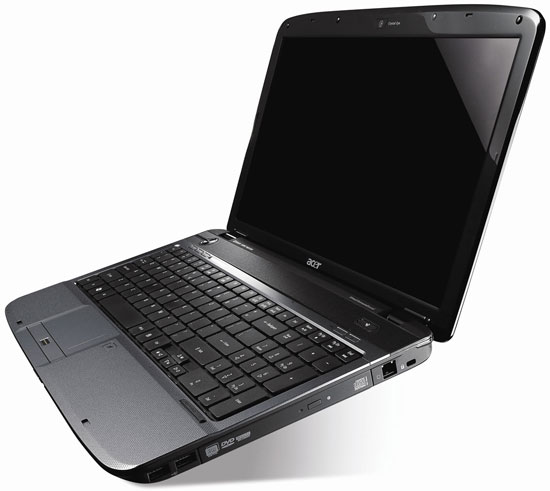
The other new product line Acer recently announced uses the basic 15.6" Aspire chassis, but with a few additions. Several models are available, with prices ranging from as little as $480 to as high as $760. The least expensive model 5738Z-4111 uses DDR3-800 RAM and Intel GMA 4500M graphics and targets "up to 3.5 hours" of battery life. The AS5738-6444 and 6969 are the same as the 4111, but they use DDR2-667 and the GMA 4500MHD. There's also a 500GB HDD on the 6969 for about $20 extra. We're not sure why these models are supposed to get "up to 4.5 hours" of battery life, given that DDR2 uses a higher voltage than DDR3. Here are the detailed specs.
| Acer Aspire 5738/5738PG/5738DG/5738Z Specifications | |
| Processor | Intel Core 2 Duo T6600 (5738/PG/DG) (2.2GHz, 45nm, 2MB L2 cache, 800MHz FSB, 35W) Intel Pentium Dual-Core T4300 (5738Z) (1MB L2 cache, 45nm, 2.10GHz, 800MHz FSB, 35W) |
| Chipset | Intel PM45 + ICH9M (5738PG/DG) Intel GM45 + ICH9M (5738/Z) |
| Memory | 2x2GB DDR2-667; Up to 2x4GB supported 2x2GB DDR3-800 for 5738Z |
| Graphics | ATI Mobility Radeon HD 4570 (PG/DG) Intel GMA 4500MHD (5738) Intel GMA 4500M (5738Z) |
| Display | 15.6" CCFL Glossy 16:9 768p (1366x768) |
| Hard Drive(s) | 320GB 5400RPM HDD (5738/DG/PG/Z) 500GB 5400RPM HDD (AS5738-6969) |
| Optical Drive | 8x DVDR SuperMulti |
| Networking | Gigabit Ethernet Intel Wifi Link 5100 AGN (5738/DG/PG) Acer InviLink 802.11n (5738Z) 56K Modem |
| Audio | HD Audio (2 stereo speakers with two audio jacks) |
| Battery | 6-Cell battery Up to 3.5 hours (5738DG/PG/Z); 4.5 hours (5738) |
| Operating System | Windows 7 Home Premium |
| Dimensions | 15.1" x 9.8" x 1.0-1.5" (WxDxH) |
| Weight | 6.2 lbs (with 6-cell battery) |
| Extras | Webcam 103-Key Keyboard with 10-Key 5 multimedia buttons |
| Warranty | 1-year standard warranty |
| Pricing | Online pricing: Acer AS5738Z-4111 for $480 Acer AS5738-6444 for $630 Acer AS5738-6969 for $648 Acer AS5738DG-6165 for $761 Acer AS5738PG-6306 for $800 |
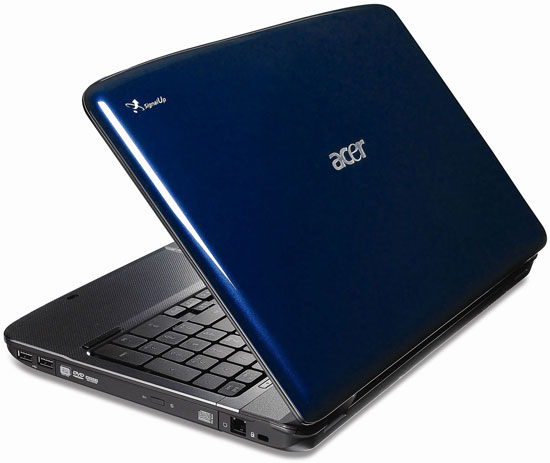
The more interesting options for most people are going to be the 5738PG and 5738DG. The PG includes a multi-touch LCD. We asked for details on the manufacturer and LCD specs but did not receive an answer from Acer. Hopefully it's at least not a glossy LCD, given the coating most touch LCDs have that reduces brightness and contrast relative to other LCDs. It's worth noting that the 5738PG is not a tablet, which limits the usefulness of the touch LCD in our book, but others may feel otherwise. It's also the most expensive option, but it includes a discrete HD 4570 GPU.
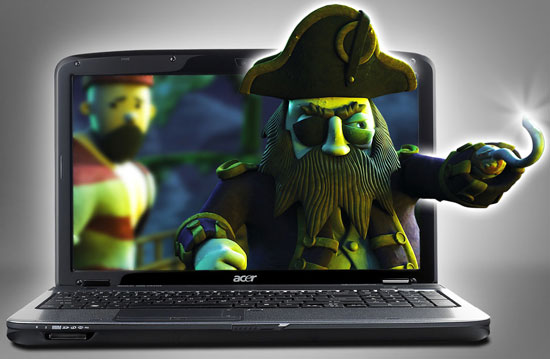
The specs for the 5738DG are identical to the 5738PG, but it doesn't have a touch-sensitive LCD. Instead, Acer includes a "TriDef 3D screen" with polarized 3D glasses. The 3D mode can be enabled and disabled at the press of a button, and the feature is supposed to work with both 2D and 3D content. How well does it work? Without using one in person, we really have no idea. We asked about the LCD and technology but have not received any answer. We don't know if the basic premise is like older 3D displays that appeared to flicker a lot, or if the DG uses a 120Hz LCD, or if this is something new. We're very hesitant to recommend purchasing any 3D product (outside of a GPU) without testing out the feature in person. In the past, such technology has been prone to cause headaches and discomfort after a few minutes to an hour or more. NVIDIA's 3D Vision is perhaps the best 3D offering we've tested, and even it only delivered lackluster results in most instances. Still, we're intrigued that anyone would even consider making a 3D laptop LCD. Now you can wear your "sporty and stylish 3D polarized glasses" while on the road as well!


 Facebook
 Twitter
 RSS
RSS


38 Comments
View All Comments
mackanz - Monday, November 9, 2009 - link
I have been using this for 2 weeks now. By miles and far, this is the best "netbook" i have tried so far.No problems running 1080p content (ripped BD) out of the hdmi, cpu activity stays at 25% or so.
For normal 1080p content, or mkv's as we know them, cpu activity never goes above 65%. For the heck of it, i connected 2X24" 1080p screens, one via HDMI and the other via VGA, crammed all usb ports with what i could find, had activity both on wireless, BT and Ethernet. It still performs really really well. This thing with a 160GB Intel gen 2 SSD would rock.
Original installation is full of bloatware though, as usual with Acer home pc's. It actually takes longer time to uninstall everything you dont want/need than wipe the harddrive and install Win 7 via usb key.
This is really something official reviewers have to keep an eye on. if not, we consumers will have to put up with this forever. Original Install had 68 processes running after boot and 1.7gb ram used. Clean drive and new install had 35 processes and .9gb ram im use.
My personal "dreambook" would have to be this with a slightly better cpu, built in 3G, Intel gen 2 SSD and a magnesium body with slightly bigger buttons below the touchpad. i'd easily fork out $1200 for that. That would also effectively kill the astronomical prices HP, Dell and Lenovo charges for their 12" line of semi-professional Notebooks.
Daventure - Sunday, November 8, 2009 - link
Asian and EU models of Timeline series have the option of integrated ATI HD-4330. Might be a price position issue or marketing issue with Intel?JarredWalton - Sunday, November 8, 2009 - link
I've heard you basically can't sell a laptop/PC in Asia without discrete graphics (for some reason).Bauxite - Tuesday, November 3, 2009 - link
The $399 model is missing from this lineup, how could they overlook the model that is making the biggest splash right now?A 3 lb, 11 inch "netbook" with a core 2 duo!
(yeah its a SU2300 "celeron" but intel is playing games with names, this is no atom-esque slouch)
It pretty much puts a hard ceiling on realistic prices and configurations of atom netbooks, especially some of the overpriced ION types considering this has enough cpu guts to play a fair amount of hd video without 'assistance'.
Also, gateway (made by acer) has variants that may be slightly more appealing to some people, its hardware and price configurations are basically the same.
The other "netbook" I am looking forward to seeing soon is the 12" MSI coming with an amd dual core and a new IGP that might not completely suck.
TejTrescent - Monday, November 2, 2009 - link
Getting over 8 hours with light use is ENTIRELY possible. I've regularly gotten 10 with light browsing and note taking being the only things I do.I'm pretty happy with the thing, honestly. Core 2 Solo ULV still blows away Atom.
MonicaS - Monday, November 2, 2009 - link
These laptops are pretty unattractive. I can see Toshiba making something like this, but somehow I expected better from Acer. I know they can do better and they proved it with the Gemstone (I think thats what it was called). Thats a beautiful laptop. Apple has proven over and over that people care as much about looks and possibly more, then they do about specs. Actually most people don't really even understand specs anyway.Monica S
Los Angeles Computer Repair
http://www.sebecomputercare.com">http://www.sebecomputercare.com
mschira - Saturday, October 31, 2009 - link
HiIf Asus can overclock the ASUS UL80Vt, what would it take to overclock the timeline models?
I very much like the 13" model, but a bit more beaf would be great!
M.
mattthemuppet - Thursday, October 29, 2009 - link
looks like the Su7300 is the top of the line CPU now, I wonder why? Cost? No Intel SSD option either, though I did wonder how they managed to do that with a SU9400 for $900 (or $800 at Newegg) and make money.Still, handy little laptops (I have the 3810T-6775), never noticed any performance issues and the battery life is simply amazing. With WiFi on and general use (not idling, not at full load either) I've had nearly 7 1/2h out of a single charge. Mouse buttons and speakers aren't great and the keyboard takes a little getting used to, but other than that I'm very happy. Be putting Win7 on it as soon as my upgrade disk arrives :)
Shadowmaster625 - Thursday, October 29, 2009 - link
I got my 4810TZ for $449, from Radio Shack (of all places). It works great. It does what I need for the most part. However, it is right on the edge of not being powerful enough. For example, it starts to bog down a bit when I have more than half a dozen firefox tabs open (with at least one youtube clip) and WMP running.The battery does last a long time. I dont even have to charge it every day. Sleeping overnight only consumes about 4% of the battery.
I dont think there is a better performing notebook for $450 that still gives you the battery life of a netbook. It is simply a larger, more powerful netbook that costs little more than most other netbooks.
jepc - Friday, October 30, 2009 - link
I also bought the 4810TZ at Radioshack for $449, but it has a SU2700 single core processor, which is noticeably slower than the 4100 and 7300.