Motherboards Memory Storage Cases/Cooling/PSUs IT Computing Displays Mobile Mac CPUs & Chipsets Video Digital Cameras Linux Gadgets Systems Trade Shows Guides Home Increase Font Size Decrease Font Size Change Page Size
Gigabyte GA-P55-UD6 - The Big Kahuna
Date: July 16th, 2009
Author: Gary Key
Buy the Gigabyte GA-EP45-UD3P Motherboard
Blank
 Newegg $129.99
20.00 rebate
 Amazon $137.86
 Buy.com $137.85


The upcoming launch of the Intel P55 and associated S1156 based processors is starting to resemble the buildup we noticed before the P965/Core 2 launch. We are already swamped with weekly press releases touting specifications and feature information from all of the P55 launch partners. In fact, revisions are occurring on an almost daily basis as each manufacturer tweaks their final product designs in hopes of capturing your hard earned dollars.

While aesthetics, features, and colors are an integral part of the motherboard design, ultimately how well it performs is based on the quality of components and BIOS design. We also happen to rate warranty and customer support at the top of this list but eventually it always comes back to performance or price for most users.

When it comes to performance, Gigabyte is usually a name that always comes up in the course of a conversation when discussing motherboards. They typically have extremely solid products and occasionally will hit one of those grand slam home runs with a product like the GA-EP45-UD3P, a board that offers the right blend of features, performance, support, price, and character.

The reason we bring this up is that the GA-P55-UD6 is already invoking the same feelings for us. Well, all except price as this will be Gigabyte's premium P55 offering. However, this board offers a lot for the money and is certainly targeting the enthusiast. Obviously, we cannot discuss performance yet, but the i5 is going to surprise a lot people, especially those buying into the lower end i7 market.
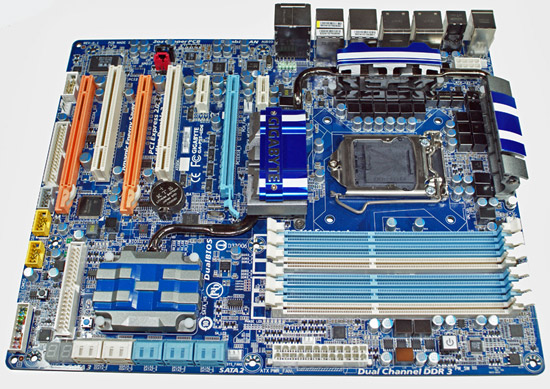


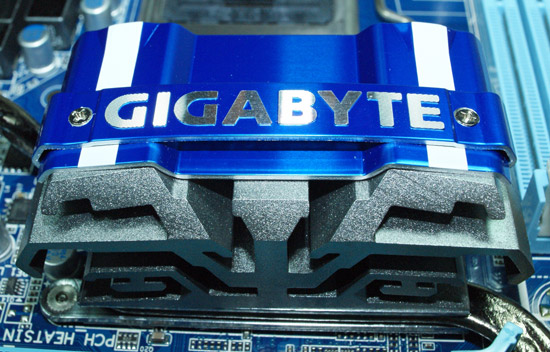
Even without the Gigabyte name plate on the P55 heatsink, taking one look at the layout and color scheme of this board instantly identifies its heritage. In fact, this design has not changed since we first looked at it during Computex this year. Gigabyte tossed the kitchen sink at this board and it stuck, but somehow it all works together without appearing to be too busy. We are not big fans of the floppy drive port and even IDE is starting to irritate us on the enthusiast boards, although one justification for IDE comes from the extreme overclocking community. In the quest to push PCIe speeds as far as possible the user can end up with some nasty SATA hard drive crashes that usually corrupt the operating system. So it turns out that an IDE drive can still be an overclockers best friend in certain situations.
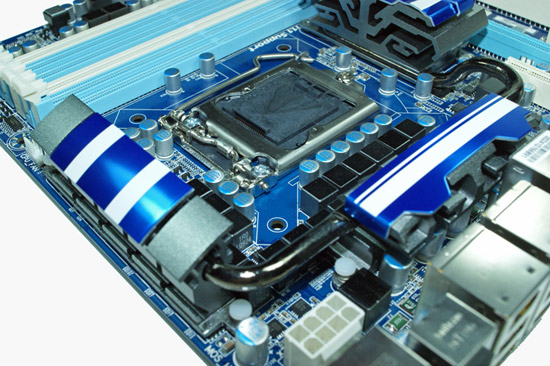


Hello 24-phase VRM technology. As with the space race and horsepower wars a few decades ago, we are now officially witnessing a Phase race in the motherboard industry. Does a greater number of phases actually improve clocking or temperatures, not necessarily, in fact, it can do just the opposite if designed poorly. The good news is that Gigabyte appears at first glance to have done their homework in this area. Exactly what the true advantages of this design compared to the 8-phase or 12-phase setups utilized by other companies is something we are testing at this moment.

Gigabyte continues on with their Ultra Durable 3 technology that consists of high quality solid capacitors, low RDS(on) MOSFETs, and ferrite core chokes plus their custom "Dynamic Energy Savings" technology that will throttle this board down to four-phases at idle or low load situations.
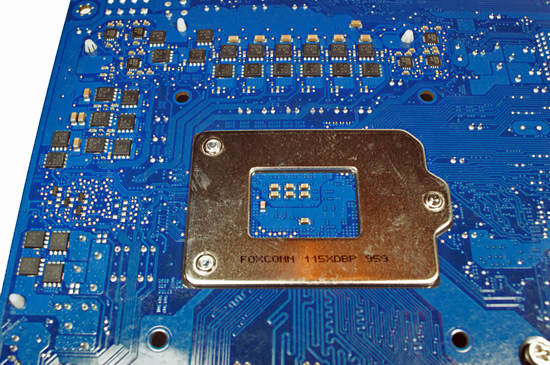


Due to the real estate involved in placing a 24-phase VRM setup on the board, the majority of MOSFETs and Intersil phase doublers are located on the back of the board. Considering some of the MOSFET temperatures we regularly see when overclocking the X58 motherboards, this area does cause us some concern for users who test on an open bench since airflow and heat dissipation under the board will be severely blocked.

Otherwise, the area is open and easily accommodated our larger air coolers and water blocks. On a side note, this will be an eight layer PCB design.
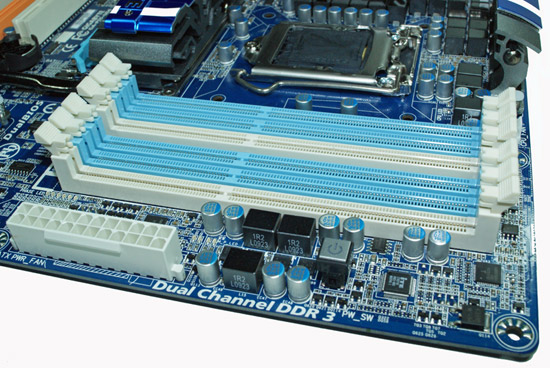


A first for the P55 platform is the inclusion of six memory slots instead of the standard four slot designs we are seeing on the other boards. Unlike the i7/X58 platform that supports and thrives on triple-channel memory performance, the P55/Lynnfield employs a dual-channel setup. We think the inclusion of the two additional memory slots is strictly for expansion possibilities. Gigabyte claims DDR3-2000+ memory capabilities and we fully expect to see those speeds when the board launches.

The 24-pin ATX power connector is located in a convenient location as is the power on/off switch. We do have to wonder why the clear CMOS, reset, and power switches are located at different points on the board.
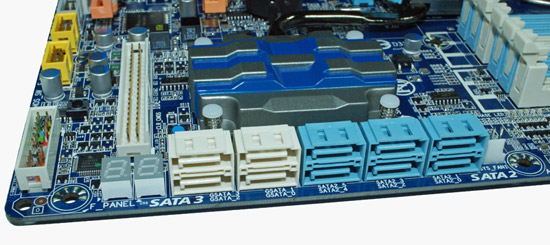


One of the more interesting areas on the board houses the various SATA ports (four 6Gb/s Marvell ports, six 3Gb/s P55 ports), LED debug display, clear CMOS and reset switches, and IDE drive port. Hiding underneath the heatsink is two Marvell 88SE9123 6Gb/s SATA chipsets that also provide IDE support. Contrary to reports on various forums and websites, it does appear the manufacturers are rethinking their recent decisions to drop the Marvell controller until the various hardware and driver problems are solved. It is too late in the process to qualify other controllers at this point for the majority of boards that were to include this chipset.

As such, it appears that Gigabyte (waiting on ASUS' official statement) is thinking they will leave the Marvell controller on the board and if 6G/s performance is not working properly, then the additional ports will be downgraded to 3Gb/s specifications. The "official" Marvell position is that the 88SE9123 controller suffers from PATA performance problems and that 6Gb/s SATA operation is not affected. However, after speaking with the motherboard suppliers and looking at our own test results, PATA performance/stability appears fine and 6Gb/s SATA performance is just not up to speed yet. Where the disconnect is between the motherboard engineers and Marvell is something we are trying to figure out at this point.
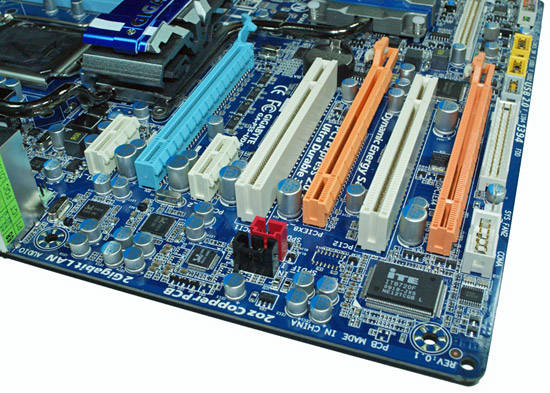


The P55-UD6 offers an abundance of expansion slots with an excellent layout. There are three PCIe x16 slots (x16/x4 or x8/x8/x4), two PCIe x1 slots, and two PCI slots. The Lynnfield processor series supports 16 PCIe 2.0 lanes and those lanes are assigned for graphics duty. The first x16 slot normally runs with 16 lanes and if you install a multi-GPU setup for CrossFire or SLI, then both slots run at x8. Truthfully, except for trying to set a benchmark record, the performance differences between dual x16 and dual x8 PCIe 2.0 is minimal at best in actual applications. The third x16 slot runs at x4 electrical and those lanes run off the P55 chipset.

Due to the performance hit of the DMI interface, NVIDIA has already informed the motherboard suppliers than they will not support SLI with this slot. We expect the same from AMD in regards to CrossFire X. We know of a few suppliers who have been toying with the NF200 bridge slot in order to run dual x16 or TriSLI on the P55 platform. So far, this concept has been problematic in the labs with performance and stability suffering to some degree at this stage in the game.
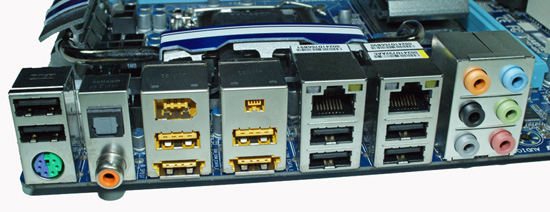


This I/O panel is loaded and ready for action. Gigabyte includes a combo PS/2 port, six USB 2.0 ports, two eSATA ports (JM362), two Gigabit Ethernet ports, IEEE 1394a port, optical and coaxial S/PDIF outputs, and the audio panel (Realtek ALC 889a). The Gigabit Ethernet controllers are courtesy of the Realtek RTL8111D chipset that features Smart Dual LAN technology. Simply put, if one controller fails, the board will automatically switch over to the other controller without the need to swap ports or run a second cable. Also, teaming is supported with a theoretical throughput of 2Gb/s, although actual throughput is far lower depending on your network setup.

That is it for now. Gigabyte is very interested in your thoughts on the design and feature list, so please feel free to leave comments.


54 Comments
Username:
Password:
Of phases and I/O by crackedwiseman, 207 days ago
OK, 24-phase power seems a bit much... I'm all for enthusiast hardware (as a temporarily budget-constrained enthusiast myself) but there are other things you can use that PCB space for. What about digital PWMs? I don't have any numbers to quote, but having used them on DFI's UT X58 board, they seem to make a difference. Yes, they run hot, but with all the aluminum necessary for cooling a 24-phase solution, I'm sure that some copper could have been used for an 8 to 12 phase digital solution (the 10-phase PWM solution on EVGA's X58 classified is rated at 600 watts, and it would be difficult to cool even that much without cold-bugging the Intel silicon).
Fewer phases leave room for other ICs, which brings me to my next point: why not use a PLX PCI express switch like the PEX 8647 or 8648 (or 8649 for the triple or quad GPU crowd)? The 8647 is (if I'm not mistaken) used on AMD's 4870x2 as part of the reference design, and its more versatile brother, the 8648 is capable of quad PCI-E x8 (among other configurations); the latency of these solutions is only 140ns, relatively small compared to the overall latency of PCI express. Larger solutions (admittedly, with 30ns more latency) could also connect to the troublesome Marvell SATA3 (6gb/s) chip, and could be used to disable it by simple disconnection until stable firmware shows itself. This is far better than dabbling with the hot and slow NF200 bridge from NVIDIA - the latency from that solution is noticeable in benchmarks, whereas the 4870x2's PLX solution is essentially equal in performance to 2 4870s in crossfire.

Reply
RE: Of phases and I/O by weevil, 207 days ago
Soon we'll have 48phase power!!! Is it really necessary or is just so they can say they have more phases than ASUS?

Reply
RE: Of phases and I/O by Stele, 205 days ago
[quote]As with the space race and horsepower wars a few decades ago, we are now officially witnessing a Phase race in the motherboard industry.[/quote]

This race started way back c.2002, courtesy of Gigabyte no less, with their 6-phase power boards. IMHO there's a very real danger that it's all just about paper features and marketing gimmicks to entice the (very numerous) clueless average Joe. Since then the other brands have had to keep up with the Joneses in the game, including Asus which at that time was conservative but solid.

As you pointed out, one question is whether it's really necessary; a 6-8 phase PWM with sufficient decoupling capacitance and properly selected inductors would already bring the output ripple within the CPU's required specs. If the problem is maximum output current capability, then, IMHO it would be better to have a design using, say, 2x 140A pulse capable MOSFETs than 10x 28A pulse capable MOSFETs just to make it look impressive in the marketing brochures and photos. Or worse, it may be a case of 10x say, 20A to save cost yet still look cool (since nobody would think that a circuit with a larger number of parts could be inferior to one with less right? Right??).

As crackedwiseman noted, there're more efficient ways to use the PCB space, to say nothing of saving time, effort and cost in trying to route through so many components during PCB design. Unfortunately, things like circuit and board design quality - e.g. the difference between a circuit that has to handle up to 100A but is designed to handle 200, vs one that's designed to handle just 100 - are unquantifiable and not immediately apparent until sometime down the line - not the few weeks that reviewers get to play with it, which some manufacturers might try to count on.

One question at this point: is it really 24-phase or is it just a smaller number of phases with parallel driver/MOSFET trees? A good example was the Asus boards that used the ADP3198 PWM controller - claimed 8 phases but was more of 4 phases with each phase having 2 sets of driver/MOSFETs in place of the usual 1 to provide the "doubling".

Reply
RE: Of phases and I/O by Wwhat, 203 days ago
Isn't it the other way around? Wouldn't we have benefited from 24 phase long ago but only because of technological development it can now finally be done in an economical fashion?


Reply
Exotic heatsinks... by Furuno, 207 days ago
So after seeing the ASUS P55 board and this board, I guess more and more motherboard maker (and maybe, eventually CPU cooler maker) will go for an exotic heatsink...

The one on ASUS looks like just chunks of metal with tiny heatpipe(s) under it, now this one on Gigabyte seems like it comes from other galaxy... Now I'm looking forward for the one that look like a football stadium.

I wonder if it's good or bad? Well, at least it's good on the aesthectic side, so how about the technical side?

Reply
RE: Exotic heatsinks... by RagingDragon, 205 days ago
The heatsinks don't look promising on the technical side. The colourful covers block airflow, and bodies have less surface area than a simple array of fins or spike/pins would.

Reply
RE: Exotic heatsinks... by Wwhat, 203 days ago
You have to keep in mind that the motherboard is normally in a vertical position so those coverings combined with the hot air going up might create a funnel effect that could actually benefit cooling even, although I'd have to see an experiment to know if that's possible in real life, but who knows maybe they did think and test it out.
Also those 'coverings' are aluminium so they are part of the coolingsurface at least.


Reply
I/O panel by Jarp Habib, 207 days ago
"This I/O panel is loaded and ready for action. Gigabyte includes a combo PS/2 port, six USB 2.0 ports, two eSATA ports (JM362), two Gigabit Ethernet ports, IEEE 1394a port, optical and coaxial S/PDIF outputs, and the audio panel."


Either my math skills are outta whack, or my observational powers are multiplying. I'm counting 8 USB ports. 2 grey above the PS/2 combo, 4 grey below LAN ports, and 2 yellow above the eSATA ports. Are those USB 3.0? What's the tiny yellow connector to the right of the 1394a?

Reply
RE: I/O panel by MadMan007, 207 days ago
The small port to the right of the regular 1394 port is a 4 wire Firewire port. The ones above the regular eSATA ports which are second up on those risers are 'power over eSATA' connectors.

Reply
RE: I/O panel by strikeback03, 207 days ago
I was wondering about the yellow USB ports too. So are they just USB ports that are only wired on the outer pins for +5 and GND? Or does a USB connector actually not fit there?

Reply
RE: I/O panel by RagingDragon, 205 days ago
Ugh. I'd rather have 2 real USB ports, than a pair of power only ones. The chipset has 12 USB ports, so 8 back panel USB ports would still leave 4 motherboard headers, which should be plenty.

Reply
RE: I/O panel by Wwhat, 203 days ago
How the hell do you make a reply that says 'power over eSATA' into 'USB with only power'?


Reply
whats wrong with intel ? by snakeoil, 207 days ago
so the sata 6gbps doesn't work, the core i5 is a crippled core i7, the socket is different so you cant upgrade to core i7, the mounting holes are different so you need a new cooler, amd has a working sata 6gpbs integrated with the chipset,amd has 6 cores cpus and demonstrated a working 12 core cpu. intel renaming scheme is humongous mess.
intel wont have nehalem 6 core until one year from now.
what is happening to intel?


Reply
RE: whats wrong with intel ? by ipay, 207 days ago
I smell an AMD fanboy... go back to your magical fairyland where AMD CPUs are good.

Reply
RE: whats wrong with intel ? by mesiah, 206 days ago

Here is your link to intels 6 core currently for sale:
http://www.newegg.com/Product/Product.aspx?Item=N82E16819117176&Tpk=e7450 (on a side note, what does server cpus have to do with the desktop format?)

You can call i5s and lynnfields crippled all you want, but it will just hurt that much more when you have to admit that intels scaled down cpu is still trouncing the best amd has to offer.

A search of asus, gigabyte, and xfx websites turned up no boards currently being sold for am3 that support sata 6gb/s. Although if there are boards out there please feel free to correct me.

Lastly, intel has never hesitated to go with new sockets for their systems. It's nothing new. I commend amd for sticking with a socket configuration for as long as they can to promote upgradeability but its never been a real part of intels scheme so it doesn't surprise or upset me that the lynnfield uses a different socket.

Before you call me an Intel fanboy let me say that all 3 of my main computers at home run amd cpus. I don't choose one over the other, I support the company who is pushing out the most innovation. For many years it was intel, but AMD really turned on the heat in the 90s and the first part of this decade. I'm sorry to say for those that cling to one manufacturer, but Intel has the ball right now and they are running away with it. Core 2 loaded the bases for intel, then core i7 knocked one out of the park. AMD has some serious catching up to do, and I hope they can. It does no good to see one business shut out the rest of the competition. If AMD can weather this storm I am sure they will come back with some real innovation of their own. Until then, AMD fanboys just need to give it up and admit that they lost the last two rounds but hopefully this fight is far from over.

Reply
RE: whats wrong with intel ? by crimson117, 204 days ago
Actually, AMD has done a good job lately competing in the mid range against both Intel and nVidia.

Reply
Marvell Confusion by TeXWiller, 207 days ago
I particularly like the idea of memory expandability although it would be nice to mention how far the memory speeds are dropping. Perhaps DDR3-800 is too slow for some of us. The Marvell confusion, however, will prevent me from even considering these boards (P55+SATA3) at this stage.

Reply
6 memory slots? by SixOfSeven, 207 days ago
"A first for the P55 platform is the inclusion of six memory slots instead of the standard four slot designs we are seeing on the other boards. Unlike the i7/X58 platform that supports and thrives on triple-channel memory performance, the P55/Lynnfield employs a dual-channel setup. We think the inclusion of the two additional memory slots is strictly for expansion possibilities."

What does this mean? In particular, are you suggesting that some future Socket 1156 processor will support the added slots? If so, please tell us more...

Reply
RE: 6 memory slots? by Rajinder Gill, 207 days ago
Lynnfiled only supports 3 DIMM's per channel if the DIMMs are registered. Not sure at this point where Gigabyte is going with six slots. Perhaps they know something we don't?

regards
Raja


Reply
Isn't P55 supposed to be "mainstream"? by Spivonious, 207 days ago
Here's my feedback for Gigabyte:

- 3 graphics slots is overkill for a non X58 board
- 6 RAM slots for 2 channels? From the color-coding it looks like 4 and 2. Why not 3 and 3?
- having dual LAN ports is a pointless feature. Can anyone explain how this is used on a non server?

Reply
RE: Isn't P55 supposed to be "mainstream"? by RagingDragon, 205 days ago
Big WTF on the apparent 4 + 2 DIMM setup. Wouldn't the assymmetric DIMM's play havoc with memory controller optimizations? To me 3 + 3 would make alot more sense.

Sure not many people use both ethernet ports, but there are plenty of less expensive boards with fewer features. Same goes for the 3 PCIe x16 slots, and the supplemental SATA controllers, and 24-phase power. However, there are some people who do use each, and offering separate motherboard designs for each option and combination thereof would be too expensive for the manufacturer - it ends up being less expensive for both the manufacturer and buyers needing/wanting any of these esoteric features to dump them all onto a single high-end board.

The vast majority of buyers don't need any of these features, and will buy less expensive models. The manufacturers know and expect that.

Reply
RE: Isn't P55 supposed to be "mainstream"? by Wwhat, 203 days ago
I use 2 'LAN ports' (as you call them) so I can have one for my router and one for LAN and keep the 2 separate from each other, including a different IP range.
Just to give you an idea what some people would use it for.


Reply
All I need are those 6 memory dimms by ytoledano1, 207 days ago
You can keep your two PCIE 16x ports and the PCIE 4x port. You can also keep the hundreds of SATA and ESATA ports, the RAID, high def audio and FireWire. All I need are those sweet 6 dimms. So why do I have to pay so much for features I don't need?

Reply
RE: All I need are those 6 memory dimms by Wwhat, 203 days ago
Because you are too dumb to buy a budget board instead of a premium one when you want a budget one?

Reply
Audio by TallCoolOne, 207 days ago
Can you tell us what audio chip this has? The article describes the audio output ports but not the chip itself.

Reply
RE: Audio by Gary Key, 206 days ago
It is the Realtek ALC 889a and this board will ship with Dolby Home Theater certification.

Reply
You can has comments by ipay, 207 days ago
Gigabyte wants comments on the board, here are mine:

1. DROP THE DAMN FLOPPY DRIVE CONNECTOR. No-one who wants it because no-one is going to use it. Intel OEM boards have lacked floppy drive connectors for years, for a very good reason.
2. Replace the 3rd full-length PCI-E slot with a standard PCI slot. Anyone who wants tri-SLI is going to buy an i7 setup anyway, so that slot is useless on the board.

Apart from that it's a very well thought-out and well-appointed design.

Oh, and Gary? When you tell me that there's power circuitry on the back of the motherboard, and then fail to provide a screenshot of the back of said board, I get a little annoyed.

Reply
RE: You can has comments by Gary Key, 206 days ago
Sorry about not displaying the flip side of the board. I have updated both the blog and gallery to include those pics.

Reply
RE: You can has comments by Anubis, 206 days ago
id use it

Reply
RE: You can has comments by Wwhat, 203 days ago
Advantage of 3 full length slots is that is the BIOS plays along you can select which 2 you use if you use 2 graphics cards, that could be a very nice option to have since you can adapt to the cooling situation and case you use.

As for the floppy, yeah I don't see a need for floppy anymore really, even when windows still might want you to use a floppy to install RAID drivers during windows installation it seems quite rare that someone would ever need to do that and they should if it's needed for the RAID system on a mobo just include the drivers on a small flash stick and emulate a floppy on a USB port if windows insists on floppy.
Seems excessive to trace and include a header for a floppy that you'd only ever use once and only a very few people.


Reply
Marvell 88SE9123 - How is it connected by abe88, 207 days ago
How does the Marvell 88SE9123 connect to the P55, I'm assuming it uses PCIe 2.0 1x is that correct? I haven't heard it mentioned anywhere.

Reply
Legacy ports by nekoken, 207 days ago
Considering that I still have to flash a videocard, hard drive, or other device's EEPROM via a DOS app on a floppy every few months I'm not really understanding the hatred for a floppy controller.

Same with the IDE connector. WinXP installs are a pain in the butt using a SATA or USB DVD drive.

I'd say there should be more complaints about the PS2 connector. Every decent BIOS in the last 6 years has USB keyboard enabled by default, and every OS has had that support built-in for many years.

All in all this looks like a pretty good board. 24 phase power seems like overkill though. It reminds me of the razor companies adding more and more blades so they can say they have more than their competitor. 8 phase power is plenty stable in my experience.

Reply
RE: Legacy ports by johnsonx, 205 days ago
You've heard of USB floppy drives, right?

You've heard that Windows XP is EOL, right?

There are some cases where you actually NEED a PS/2 keyboard. It's not common, but I have run into conditions under which a USB keyboard will simply not work (and a PS/2 add-in card won't work either, since they are ALWAYS implemented with a USB chip).


Reply
RE: Legacy ports by Earballs, 205 days ago
Now that I finally found an ergonomic keyboard that I like in USB you can remove the PS2 port. Thanks. =P

Reply
RE: Legacy ports by Wwhat, 203 days ago
I have had no trouble flashing stuff from a bootable flashdrive, to DOS it's all the same, I used to think you would need a floppy for such stuff but it's simply no longer true now that the modern BIOS can properly handle flash drives.


Reply
Any other boards to show off? by Mr Perfect, 206 days ago
I hate to ask again, but in the first Socket 1156 preview article you made mention of possible P55 mITX boards. Gigabyte, do you have any? If so, can you show us those?

Reply
Devices using Sata 6Gb/s by Nihility, 206 days ago
"and 6Gb/s SATA performance is just not up to speed yet"

Does this mean you have a device that you can use for testing the new SATA ports?

Reply
And when might we expect to see USB 3.0 find its way onto these boards? by TheBeagle, 206 days ago
When Gary said that they threw the kitchen sink at this board, that might have been an understatement. However, I'm personally waiting for the integration of USB 3.0 into these premium boards before I make the transition. It would seem that super high-speed IO (now that SSDs are gaining a foothold and starting to drop in price), coupled with further GPU refinements, and with the advent of Win7, these combined features that are going to be the wave of the near future. When they stabilize the 6GB SATA and integrate USB 3.0, they've got my money for a new board!

Reply
RE: And when might we expect to see USB 3.0 find its way onto these boards? by Casper42, 205 days ago
Last I read is that USB3 is still 4-6 months away.

I was really hoping that P55 would support SATA 6Gbps natively at the least.

Here's hoping that Intel has the P56?/P57? chipset ready early 2010 and it includes BOTH USB3/SATA3. Then you can stick your 32nm Core i5 in there and have quite a zippy little system.

Reply
RE: And when might we expect to see USB 3.0 find its way onto these boards? by Wwhat, 203 days ago
"ASUS P6X58 Premium motherboard arrives complete with USB 3.0 ports"

Seems USB3.0 is here, NEC makes chips for them at $15a piece it seems, which is cheap in one way but in the sense of the BOM it might be too high for many motherboard manufacturers.


Reply
Comments on the Design by Casper42, 205 days ago
Ditch the x16 physical slot for the 3rd one and either use x4 or x8 physically. The Graphics vendors will not support the card for TRI and stand alone PhysX is pretty much dead, so you may as well not confuse the issue.

While I know the x16 slots can be used for x1 devices, I think the x1 slot placement sucks.
The top one is Audio only due to length
The next one gets stomped on by a double wide Video card, which being an enthusiast board, purchasers would be more likely to have.
Swap the x1 and PCI slots that are in between the 2 x16 slots.

The 6 DIMM thing is also kind of weird unless you clarify that this is there only to support ECC/Registered DDR3. It wont ever support Triple channel, so again its just confusing.

Lastly, work in some spectacular BIOS support for USB Floppy drives and then ditch the Floppy header. IDE, I still kinda get it, but Floppy can SO easily go USB.

Reply
RE: Comments on the Design by RagingDragon, 205 days ago
I like the x4 slot, since it's useful for RAID controllers, but I'm on the fence about the physical x16 connector. On one hand it could confuse customers, on the other it allows alot of flexibility to install x8 or x16 devices. At first glance an open backed x4 connector would be the best of both worlds; however, that would leave the connectors of x8/x16 exposed, increasing the risk of shorts. Plus standard x16 connector which all motherboard manufacturers buy in huge quantities, may be cheaper than x4 or x8 connectors which sell in smaller numbers (and primarily to server vendors).

I agree about the x1 slot placement. The top one is pretty useless, I doubt bigger audio cards (like my Xonar) would fit, and the smaller audio cards which would fit offer little (if any) benefit over the integrated audio.

Reply
This looks like a winner by Byte, 205 days ago
I've always been loyal to Asus, but this has much more features and placement than their p55. Too bad the SATA3 is still too early and probably won't work till it's naively in the southbridges. My upgrade itch is so strong right now. I hope they can squeeze out USB3 onboard soon!

Reply
dual network ports by coachingjoy, 205 days ago
meh, I still fail to see the need or beauty of redundant network connections. Not a deal breaker but a waste of space and resources.

Reply
RE: dual network ports by rolodomo, 205 days ago
I find great use in two network connections on the motherboard. It's a feature I use everyday at HOME. I encourage Gigabyte to introduce this feature into more of their lower board lines.

Reply
Intel's vDimm limitation by troscat, 205 days ago
Is Intel's vDimm limit of 1.65V still applies for Lynnfield?

tia

Reply
Legacy support? by RagingDragon, 205 days ago
295Well if you want Gigabyte to drop IDE, floppy and PS2 ports, why not drop the old PCI slots too? The legacy support is all about not alienating potential customers:

* Some customers want to keep a using a perfectly good PS2 keyboard (i.e. don't want to waste time/money replacing it or buying converters).
* Extreme overclockers have had issues with USB keyboards, and that community is a significant source of hype for motherboard makers.
* While gigabyte motherboards can load BIOS upgrades from a USB drive, some customers have graphics card, hard drives, etc. which require a floppy for firmware updates.
* Some customers have some old PCI cards they want to continue using.

So how about offering 2 motherboard variants, one with legacy support and one without?

Personally, I don't care one way or the other about PS2, floppy, and IDE support. I would prefere to get rid of the PCI slots to make room for more PCIe slots - though with the addon SATA and network chips using PCIe lanes, maybe there aren't any more PCIe lanes available? If I have a single graphics card, can the PCIe x8 slot also be used as a PCIe x1 (i.e. can use the sockets in x16 + x1 mode rather than x8 + x8)? I like the PCIe x4 slot as it is useful for RAID controllers, but on the otherhand, the lanes could be split up to support more PCIe 1x connections.

Reply
Motherboard heatsinks by RagingDragon, 205 days ago
I'm not a fan of the heatsinks (nor those on the ASUS P55 board), while aesthically pleasing, they don't look terribly effective at cooling components:

* Low surface area
* Decorative covers block airflow

I'd like to see heatsinks with simple fins - or better yet spikes/pins which can take advantage of airflow in any direction (fins would have more surface area than spikes/pins; however, fins require airflow from a specific direction, and thus would be more sensitive to how air moves within the case).

Reply
"Dynamic Energy Savings" by blyndy, 204 days ago
features such as "Dynamic Energy Savings" are fine as long as:

a) I can disable them
b) They don't require anything to be installed in the OS!

Please include these details in your reviews.

Secondly, are those eSATA ports powered?

Reply
16x pci-e ETERNAL PROBLEM by moggz, 204 days ago
PLEASE GIGABYTE, I am on eof the many people who have a huge cooler on the gpu and a lot of space far down on the motherboard. I for one thinks that this is a huge wasteof slots and the ONLY CRITERIA that I look for in a motherboard is how far down the 16x pci-e slot is placed. This is never covered in reviews and very hard to find out so I usually have to guess as you motherboard manufacturers never write it out. I have desperately tried to make manufacturers understand this in the support but they JUST WON'T UNDERSTAND, so I am going to spell it out for you AGAIN in the hopes that some qualified person reads this:

WHAT LOCATION DOES THE LOWEST 16x PCI-E SLOT HAVE? I AM SPEAKING OF A SINGLE GPU SETUP. I DON'T CARE IF YOU CAN RUN 8x8x4x, CAN IT RUN 0x0x16x OR PERHAPS 0x16x0x AND DOES THIS CHANGE IF THE UPPER SLOTS ARE TAKEN BY NON-GPU CARDS

plz

Reply
Comments Page 1 of 2


AnandTech.com Blog Categories
All categories
Anand's Macdates
Anand's Theater Construction
Anand's Updates
Cases and Power Supplies
CeBIT 2008
CES 2008
Computex 2009
Derek Decanted
Eddie's Got Game
Gary's First Looks
IT Computing general
Jarred's Musings
Kris's Corner
Raja's Ramblings
Rob's Experiences...
Ryan's Ramblings
Virtualization
What's New with Wes
Blank
Blank

Blank

Latest news by
DailyTech

 February 9, 2010

Blank
Blank
Blank
Blank
Blank
Blank
Blank
Blank
Blank
Blank
Blank
Blank
Blank
Blank
Blank
Blank

 February 8, 2010

Blank


more Blogs Discussions


pipeboost
Copyright © 1997-2010 AnandTech, Inc. All rights reserved. Terms, Conditions and Privacy Information.
Click Here for Advertising Information