
Motherboards Memory Storage Cases/Cooling/PSUs IT Computing Displays Mobile Mac CPUs & Chipsets Video Digital Cameras Linux Gadgets Systems Trade Shows Guides Home Increase Font Size Decrease Font Size Change Page Size
The Final Update: Flash Video Performance on Ion
Date: May 26th, 2009
Author: Anand Lal Shimpi
Buy the MB MOBO Intel
Blank


It must be because this thing is so darn tiny that I don’t mind testing it all the time, but today’s short update marks the third follow up to our original Zotac Ion review.

The original article crowned the Zotac Ion as the best Atom based mini-ITX board I’d ever encountered. It wasn’t a hard feat to accomplish, after all, there are only two other Atom based mini-ITX boards on the market and neither one offers a real GPU.

The first follow up addressed questions that readers of the first article had. Looking into things like the overclocking potential of the platform and additional detail on power consumption.

The second follow up addressed the Zotac’s wake-on-USB support, or lack thereof. Today I’m publishing what I hope to be my last update on this hardware until I get a new revision, but as always if there’s something you’d like to know don’t hesitate to ask.

Wake-on-USB Support: The Explanation

Zotac has been very proactive with getting me updates on its motherboard, I have their excellent North American PR rep to thank for that :)

As I mentioned in the last update, the Zotac Ion board won’t wake up from a S3 sleep state after activity on a USB device (e.g. moving your mouse, hitting a button on a media center remote, etc...). Zotac listed the problem as being a hardware issue that won’t get fixed until the next revision of the motherboard; early adopters are out of luck. I now have an explanation as to why.
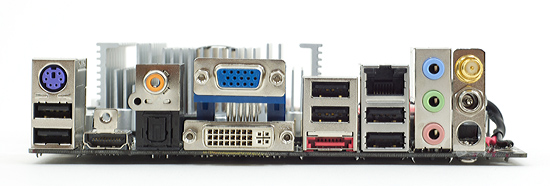
The USB ports on the current version of the motherboard (PCB version 00) are powered by the 5V rail from the motherboard. When the motherboard goes into a S3 sleep state, 5V power is shut off, so the USB ports are completely off.

In the next revision of the motherboard (PCB version 01) standby power will be connected to the USB ports, allowing the ports to still be alive when the board is in S3. The manual shows you where you can identify what PCB revision you have.

I’m guessing externally powered USB hubs are able to pull the system out of sleep since the USB device is still on, but a USB device connected directly to the motherboard will be completely powerless in S3. The explanation makes sense to me; if you were wondering, now you know.

Flash Video Playback on the Ion: Delving Deeper

I personally get most of my “TV” from Hulu so I completely understand the desire to know how well Intel’s Atom and the Ion platform in general perform when playing back Flash Video.

A few readers requested that I look deeper into the Ion’s FLV performance, especially when the Ion was overclocked. I had some spare time today so I did just that.

In my first follow up article I found that the Ion could play, without a problem, standard sized 360p and 480p Hulu videos. Attempting to increase the video window size to full screen yielded a highly unplayable video. I wanted to investigate further.

I used the latest version of Adobe’s Flash 10 player as well as Internet Explorer 8 under Windows Vista Ultimate 32-bit. With a desktop resolution of 1360 x 768 I tried five tests:

1) 360p, video window popped out and maximized to desktop resolution
2) 360p in Hulu’s full screen mode
3) 480p, video window popped out and maximized to desktop resolution
4) 480p in Hulu’s full screen mode
5) 720p playing a Hulu HD video

I ran the five tests in two configurations; first with the Atom 330 at its default 1.60GHz clock speed and second with the Atom overclocked to 1.92GHz (the highest stable frequency I could overclock the Atom to).
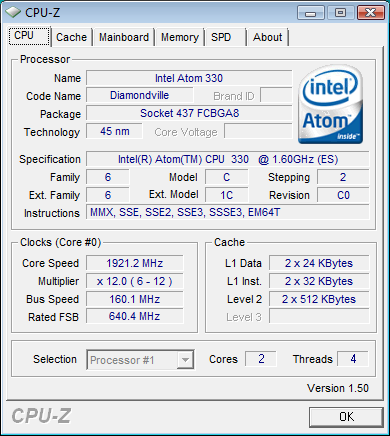
My impressions are in the table below:

Scenario Atom 330 @ 1.6GHz Atom 330 @ 1.92GHz
360p, maximized window Some tearing, lower frame rate than default window, perhaps slightly smoother with hardware acceleration turned off? Totally watchable, definitely lower frame rate but watchable
360p, full screen Totally unacceptable, not really higher CPU utilization than with a maximized window, but too choppy - distracting Passable, not perfect but it can work if you can ignore some of the choppiness
480p, maximized window Slightly lower frame rate than the 360p test, but better picture quality so this may be a better option for some. Still annoying to watch due to lower frame rate. Improved, I think passible.
480p, full screen Lots of tearing, somewhat more bearable than 360p full screen thanks to improved picture quality. I still prefer maximized window for higher frame rate. Still choppy.
720p HD Completely unwatchable, CPU utilization > 90% Still choppy but a bit better, painful but technically watchable


While hardware acceleration was enabled in the Adobe Flash Player 10 settings, I can’t say that I noticed a performance difference with it enabled or disabled. I’m not really sure what it’s doing but it definitely didn’t help keep my framerate smooth when upscaling video.


CPU utilization was around 64% when watching a 360p stream in a maximized window

The only situation I would consider 360p full screen Hulu to be passable is when the system was overclocked to 1.92GHz. You’re far better off maximizing your browser window and dealing with the application border than running in Hulu’s seamless full screen mode.
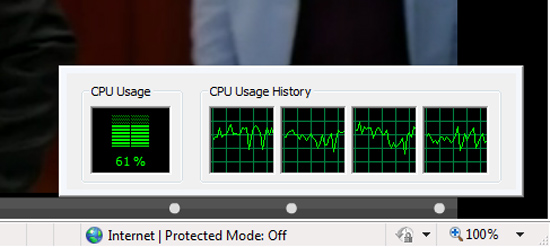

Overclocking the Atom dropped it to 61%, a small difference but noticeable

I will note that Hulu has difficulty playing in full screen on much faster systems as well, so I’m not sure we can really blame the Atom or Ion for its performance limitations here. It appears that video scaling under Flash is just not very efficient.
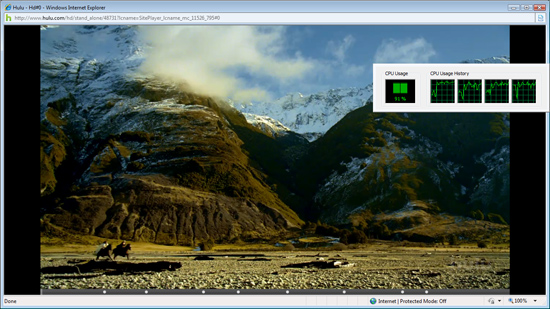

Hulu HD was basically unwatchable thanks to a > 90% CPU utilization

The HD stream is unplayable at stock frequencies but not because of scaling issues, since there's actually much less scaling being done from 720p to 1360 x 768. The HD stream falls victim to the Atom's limited CPU power, which overclocking helps overcome. I do still think that HD Hulu playback is too much for even an Atom 330 unfortunately.
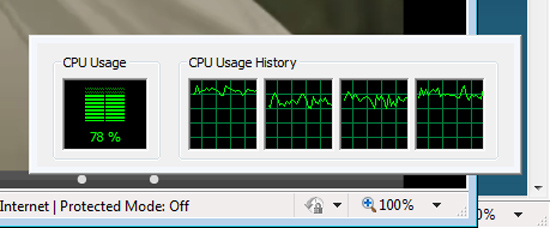

Overclocked, even HD hulu saw a benefit as CPU utilization dropped to below 80%

Overall the overclocking helped, but don’t expect any miracles. Be happy with smaller Hulu window sizes or be doomed to feel unfulfilled it seems. If NVIDIA wants a good case for CUDA, give us smooth FLV playback at any resolution and I'll be happy :)

With that said and done, it’s back to CPUs and SSDs for me.


54 Comments
Username:
Password:
What about other browsers? by tdktank59, 178 days ago
What about Firefox... or Chrome... or some other light weight browser...

I haven't looked into how lightweight IE is compared to FF... But most technically inclined people will be using other browsers than the default hideous IE...

Reply
RE: What about other browsers? by Ryan Smith, 178 days ago
It wouldn't make a difference. The problem is that Flash is doing the scaling. The browser is little more than a container for Flash in this case.

Reply
RE: What about other browsers? by Pandamonium, 178 days ago
All I can say is "damn it" and "thank you Anand!"

I was really hoping that Flash 10 would allow the ION-A to handle full screen Hulu. It looks like I'll be waiting for a faster Ion combo.

Reply
RE: What about other browsers? by TA152H, 178 days ago
Have you thought about getting a Penryn based Pentium and underclocking it and undervolting it? You could probably get really low power that approaches the Atom/Ion platform with much better performance.

You could look at the Centaur Nano processors too. They are much more advanced than the Atom, although their power use is not really that impressive with the higher end models. But, it's worth looking into to see if they have one that has the performance you need at a power use you can live with. The high end ones aren't impressive though, but, maybe the lower end ones have considerably lower power use. No one ever tests them though, they just test the Atom, or they test the fastest Nano.

Reply
RE: What about other browsers? by sprockkets, 177 days ago
I like the Nano, but a 2 Core ATom with hyperthreading seems to trump it. Though I would like to see soon a dual core Nano. I think Via said that was going to be saved for the 45nm generation.

As bad as the 945G is, I would rather take an ION or that over anything VIA, especially for Linux. Here's to seeing an ION for Nano.

If you really want to just undervolt and underclock a Penryn, just set Vista to always be in battery saver mode w/o short idle times to standby, and the board will auto underclock and undervolt.

Reply
RE: What about other browsers? by plonk420, 177 days ago
Socket P is looking more interesting (until we see Atom's performance with integrated video (ew) and integrated memory controller):

http://www.newegg.com/Product/ProductLi...amp;N=2000340759&SpeTabStoreType=0

up to 2.5ghz C2D at 25 watts, but there are no mobos by The Major Brands... or RECENT ones, at least.

Reply
RE: What about other browsers? by aj28, 177 days ago
Too bad they're way too expensive to be considered for low-cost applications. I mean, if you're willing to invest a bit of money in your HTPC, alright, but when you start dropping $200/300+ on a dual-core processor... It's going to take a long time for the energy savings to account for the extra investment, and no amount of energy savings can make up for the lack of computing power versus similarly priced LGA775 models.

Reply
RE: What about other browsers? by sprockkets, 177 days ago
You need to check this board out then:

http://www.logicsupply.com/products/ga_6kieh_rh

Of course, it is $239. I'd rather just use the Zotac Board for $100 less.

Reply
RE: What about other browsers? by MrPoletski, 177 days ago
check out the pandora

openpandora.org

Reply
RE: What about other browsers? by vol7ron, 177 days ago
While that's true for the most part, it's not entirely true. Background processes and resource use do effect both cpu and gpu performance. Additionally, there have been noticeably differences when using standalone flash player and an embedded flash player. Also, the streaming performance over one browser over another may also effect.

Though, I agree with your hypothesis that it probably wouldn't matter.

One thing that I would like to see is possibly a smaller resolution. Granted that didn't work with a larger resolution, but how about a kitchen monitor, or possibly something you would use on a boat?

Reply
RE: What about other browsers? by mindless1, 176 days ago
What new monitor would one want to use that's less than 360p?

Reply
RE: What about other browsers? by vol7ron, 175 days ago
Sorry, I did not mean as far as quality, I meant for desktop resolution. For instance 1280x1064, 1152x864, 1024..

360p is just quality resolution, meaning it provides a 1:1 between video and screen pixels. 480p is just a little more progressive, like EDTV, not HD. Generally when you go above 480 it is considered HD.

I don't consider myself an expert, so forgive me if this is wrong, but going down to a smaller desktop resolution, should enhance the video playback performance, right? The test is using a desktop resolution that is 1360x768. This has me wondering about a couple things:

«1» is that the maximum resolution of the monitor? As in, is it usually that small, or is it scaled down that small. This is important because for LCDs the maximum resolution seems to be the best performing - I'd like to see the test done on a monitor that is actually that small.

«2» This test is using a really small widescreen resolution of 1360x768, which is unusual to me -- I've seen 1366, but not 1360. Not to mention, it is really wide. I'm curious if a 4:3 aspect ratio monitor might also improve performance. So possibly 1024x768. Granted, you would lose the wide screen enhancements, but if it works, it might make this system seem more lucrative.

Reply
RE: What about other browsers? by iFX, 177 days ago
Firefox 3 and Chrome are not lightweight by any means. Of the three (IE, FF and Chrome) FF is easily the most resource intensive. The footprint with several tabs open can be north of 300 MB.

Reply
RE: What about other browsers? by ICBM, 177 days ago
Agreed, Firefox is the opposite of lightweight. I prefer using IE on older machines that are limited in regards to ram.

Reply
RE: What about other browsers? by vol7ron, 175 days ago
This depends. Without add-ons, IE has more memory leaks, but if you start using FF add-ons, there are also considerable memory leaks.

I might consider Chrome to be lightweight at the moment. You have to understand that early IE was integrated with Windows. Even some of the later versions still use operating system files, so there are hidden costs that might not be reported. Whereas the standalones are more wysiwyg.

Reply
Why not add a PS/2 port? by TA152H, 178 days ago
Why don't they add a PS/2 mouse port, instead of wiring the USB to standby power? The PS/2 mouse port is more efficient on CPU cycles, and on the Atom, that's important. There aren't too many other devices you'd connect to USB that you'd use to wake up a computer, so it's a good idea. The PS/2 port is probably the oldest part of the PC still around. AT-Bus, and Microchannel are gone, processors have all changed, power supplies are different, cases are different, parallel and serial ports are long gone. The last vestige of the best computer line ever made, the PS/2, is the little ports. I guess the 3.5 floppy disk could be too, but others used that before IBM did with the PS/2.

I still remember the logo from 22 years ago ...

How're you going to do it? PS/2 it!

They were wonderful machines.

Reply
RE: Why not add a PS/2 port? and Spare Time by Depeche, 178 days ago
I agree with the PS/2 port. He makes a very good point. Those things were awesome and never fail. :)

"A few readers requested that I look deeper into the Ion’s FLV performance, especially when the Ion was overclocked. I had some spare time today so I did just that."

Spare Time? I just read your bio you get 3 hours of sleep a day and you have spare time?! :)

Thanks for all the reviews on the board. I have been very anxious to get one. Keep up the good work. I am not going to get one until its been all worked out :)

Reply
RE: Why not add a PS/2 port? by sprockkets, 178 days ago
It's considered legacy. The only reason why some boards still have a keyboard port is because the BIOS is iffy when using a USB keyboard. Not impossible, but just iffy.

Reply
RE: Why not add a PS/2 port? by TA152H, 177 days ago
It's considered legacy is an important reason? How does that make sense? It does the job, and better (since it is more efficient) and someone decided it's legacy, so we should stop using it and use the newer, less efficient way, just because it's new?

Do you work for Microsoft?

Reply
RE: Why not add a PS/2 port? by MrPoletski, 177 days ago
umm, a PS2 mouse would require a PS2 controller which would require a bridge over to the PCI bus. This alone is about 10x as much effort as adding a single extra USB1 port.

Reply
RE: Why not add a PS/2 port? by TA152H, 177 days ago
Not sure if you noticed, but they already have a PS/2 port for the keyboard.

Reply
RE: Why not add a PS/2 port? by mindless1, 176 days ago
It doesn't require anything not already including in chipsets and super IO chips. It's not a matter of having another USB port for the mouse, it's a matter of, well actually there was no point to the argument in the first place as whether it's USB or PS2, either way it still has to have the 5VSB routed to it which was the design mistake Zotac made.

Therefore, I'm in favor of it having a PS2 port because it already has USB too. More ports are generally better than fewer, especially when an inexpensive USB hub can be used when more are needed and it may actually be the better solution than loading down a small form factor PSU's 5VSB rail with several always-powered USB devices.

Reply
RE: Why not add a PS/2 port? by sprockkets, 176 days ago
I'm surprised there is any super i/o in this board. I guess nVidia puts it in their chips. Most others ditched it long ago and use external chips (Intel).

Of course, you could fit around 3-4 USB ports in the space of two PS/2 ports :)

Reply
RE: Why not add a PS/2 port? by sprockkets, 177 days ago
Look, when USB came out, we had PII processors in the 233-300mhz range. Now we have processors in the ghz range, USB 2 and soon to come USB3.

Are you really, really that short on CPU cycles for your, *gasp*, mouse? Do you understand that no laptop uses PS/2 anymore for anything? For that matter, they don't even use PATA anymore.

Your line of reasoning is 10+ years old. Once we kill the old BIOS, we will have no need whatsoever for BIOS floppies, PS/2 mice or keyboards or any other legacy scum from the 80s. I wish that motherboard makers start offering EFI which is still backwards compatible for those old OSes.

Reply
RE: Why not add a PS/2 port? by mindless1, 176 days ago
His line of reasoning is timeless. Don't fix what isn't broken, don't change things only for the sake of change. Don't remove features unless you're adding others to replace them, which isn't the case where as an onboard USB pin header or external hub would allow more USB devices than any sane person would care to connect.

I will agree that the difference in CPU cycles for a keyboard or mouse is negligible, but there can be other reasons of practicality like already owning the PS2 peripheral or a KVM you'd like to use with the board, it isn't the same situation as buying an entire Dell system complete with everything from keyboard to speakers to monitor.

Reply
RE: Why not add a PS/2 port? by sprockkets, 176 days ago
Well, USB fixes the quirks of PS/2, namely, putting the mouse and keyboard in the wrong ports, unplugging the mouse or keyboard and finding it not work until a reboot, or having to align the plug in.

Can't mess up which USB plug you put it in, and I find it easier to put in a USB port than a PS/2, but only slightly. tell. Plus, you can use ports in the front of your computer for your mouse or keyboard. Never had that option with PS/2.

OK, so none of these was solving a really big issue, but it is nice to use the same port for everything.


Reply
RE: Why not add a PS/2 port? by FaaR, 176 days ago
Wut?

Where do you even FIND a PS/2 mouse today, and how many cycles exactly do you think it'll save you? Is it even going to be measureable, even on a stinker of a CPU like the atom (performance-wise anyway)? I seriously doubt that.

I have a PS/2 mouse tucked away in my closet, a Logitech Mouseman+, kept for nostalgic reasons because it's the best damn old-style ball mouse I ever used. Got a mouse wheel, 4th thumb button and everything. But it's more than ten years old now. Nobody makes PS/2 mice anymore. Why bother? Let PS/2 die, it's old crap. We don't need dedicated ports for a single type of device anymore.

Reply
RE: Why not add a PS/2 port? by mindless1, 176 days ago
In normal everyday use most people would find it impossible to accurately guess whether their mouse was hooked up to PS2 or USB. That makes it anything but crap.

Get rid of a port only when something better replaces it. USB does not replace it because the board can have BOTH. USB suppliments it.

As for your idea about the old Logitech Mouseman, it's invalid. Plenty of mice have came out since then that were dual port capable, with no good reason to plug them into USB for most people unless they have an illogical bias.

More importantly there are support issues. If someone has a lot of USB peripherals you don't necessarily want them all powered by a tiny PSU's 5VSB rail, so you either make it harder for the user to figure out which ports remain powered, put jumpers on the board to switch each port pair (which I felt was the best solution but they didn't) but that also poses the possibility someone will try to power a lot of devices off a dinky PSU's 5VSB rail, or provide a PS2 port so IF someone wants to use it they can.

If they don't want to use it, guess what? Most people do not use every single port, slot, and connector on a system already. That you personally wouldn't use it is not a good reason to deprive someone else from having it.

Reply
Hulu full screen issues are resolution dependent by kuli, 178 days ago
So I too, have been playing around with an atom PC. Albeit, with one of the intel-based N330 mobo's.
I experienced frame droppage on hulu full screen as well. However, I found that if I dropped the resolution to 800 x 600, it was 100% watchable. I also noticed that it didn't seem to be very well multi threaded, as the processor usage of only 2 of the 4 logical cores went up significantly while watching video. Since Hulu is 480p, dropped resolution on the monitor will not affect the quality of your video stream, although it's really annoying to have to switch resolutions just to watch television. I can only assume that the scaling of the video must be being done entirely in software, and in an extremely inefficient method of doing so. If I can play a full 1080p movie without the aid of nvidia GPU, there is no reason why I shouldn't be able to play lowly 360 or 480p streaming content in full screen.

Reply
On2 VP6 vs. VP7 by Sunraycer, 178 days ago

I'm not 100% sure, but I think that Flash Video on Hulu is using the VP6 CODEC? What about the stuff from ABC and FOX .com that use Move Networks's On2 VP7 CODEC, think we'd expect the same performance? (Note I don't think the Move Player will run in Chrome yet.)
I've got the Intel board with the Atom 330 running as an HTPC. My resolution is set 1360x768 to my TV. When running in full screen it stutters a bit when it starts and then once in a while. However, I'm running my OS (XP) on an old SSD (OCZ Core2). I'm not sure if that plays into it or not...

Reply
on USB by sprockkets, 178 days ago
Zotac should just do what everyone else does: Put a jumper to enable or disable 5V support for USB. But, then again, real estate on those boards is quite a premium.

Seeing as how Newegg is out of stock already, getting one should be easy.

But hey, Anand, is Zotac fixing this on the LGA board too?

Reply
RE: on USB by strikeback03, 177 days ago
I've built several computers for work, and the only Motherboard I have seen one of those jumpers on is an old nForce4 DFI board.

Reply
Flash on Atom sucks! Flash blocker while surfing by mschira, 177 days ago
Totally. I have an Asus EEE 1000, and typically I have the machine in the max performance mode (super hybrid engine) - I think 1.8Ghz.
Web browsing using firefox was painfull at times, when more than one tab open and the web site had a lot of flash
Typically the flash is nothing but advertising stuff - so they drain your battery for annoying you. Brilliant.

So I got the flash blocker add on. What a relief!
Not only does all the annoyance disappear, but also the battery lasts longer, many tabs work fine all good.
M.

Reply
RE: Flash on Atom sucks! Flash blocker while surfing by nubie, 176 days ago
I agree on that flashblock, the last few Flash updates (past year or two) have been so badly optimized it grinds even 3ghz machines to a halt.

I consider flashblock a necessity, it is installed right after FF on every system I set up.

Blame Adobe, they need to get Flash fixed, there is no call for this kind of poor performance (delivering simple content that consoles 2 generations ago could deliver, while grinding new PC's to a halt.)

Reply
Different Browsers by B3an, 177 days ago
I know you wouldn't think that using a different browser would make a difference with Flash performance, as the browser is just a container, but it does.

I've been a Flash developer for years and have noticed how different browsers have different performance and CPU usage with Flash. Normally upto 15% perfromance difference at most, and some browsers have tiny micro stutters in the frame rate every now and again (which is only really noticable with something running at a high frrame rate, like a Flash game).

So maybe update this with a couple of other browsers? Although i very much doubt it will make a dramatic difference.

Reply
who to blame? by alpensiedler, 177 days ago
[quote]so I’m not sure we can really blame the Atom or Ion for its performance limitations here[/quote]

let's blame adobe for a crappy standard. imo flash is very crappy. still no x64? runs poorly on decent hardward? bloatware with the windows install? seriously flash is garbage, i wish we'd adopt a better standard.

Reply
RE: who to blame? by lwatcdr, 177 days ago
There is an X64 build of Flash. It just happens to be for Linux. Which makes me wonder if the X84 build running under Linux would do any better?
I can play Hulu on my Linux box... Hey don't put that ION system away just yet. Time to fire up Ubuntu X64 and give it a shot.


Reply
RE: who to blame? by icrf, 177 days ago
Yeah, what he said. My goal is to boot XBMC off a USB flash stick, so some linux tests would be nice.

Reply
RE: who to blame? by robhancock, 176 days ago
The x64 build of Flash seems to still be crap, last time I checked. It performs even worse than the 32-bit version since hardware acceleration (what little there is) isn't implemented.

Flash is just a CPU pig in general. You can take the exact same Flash video that takes 80% of the CPU in Flash and play it in Totem or VLC and it will use a tiny fraction of that amount of CPU time. It's really unfortunate that so much video on the web is using such a crappy player..

Reply
RE: who to blame? by sprockkets, 175 days ago
Better than Real, Windows only Windows Media, or the plague of Quicktime.

Reply
Do it! by gwolfman, 177 days ago
..."If NVIDIA wants a good case for CUDA, give us smooth FLV playback at any resolution and I'll be happy :) ..."

Do it Anand, you can make it happen!

Reply
Flash is the problem by BernardP, 177 days ago
The thing is, Flash Video is resource hungry. On my Athlon dual-core 5400+ NVidia 8200 IG, I average 30% to 40% CPU utilisation when streaming YouTube HQ (not HD) video at full-screen (in my case, a custom rez. of 1384x864). No wonder the Atom is struggling.

Reply
HTML5? by AndreasM, 177 days ago
I wonder if it would be capable of running HTML5 based video smoothly, e.g. http://www.youtube.com/html5

Reply
Flash "Hardware Acceleration" by Rainman200, 177 days ago
Flash HW acceleration is really a poor choice of naming for what it actually does which is GPU composting and scaling, that is not GPU based video decoding in the sense of DXVA.

Flash is not just video that's the problem, its a framework that is a pig when it comes to performance any way its being used, I've seen CPU spikes just from flash banner advertisements.

What might be worth checking out if yo update your article with tests is the silverlight HD video demos, MS have used them in a few sites and the performance is much better than Flash video.
http://www.iis.net/media/experiencesmoothstreaming
http://roland-garros.france2.fr/?page=exclusif_HD

Reply
RE: Flash "Hardware Acceleration" by BikeDude, 177 days ago
CPU spikes from banner ads? I've seen full blown 100% CPU usage for as long as the web page was open.

I used to work on an application that displayed stock exchange information for users. Part of the application was a news feed with links to web pages. I.e. the app integrated IE using ActiveX.

That application required a certain amount of CPU. Without CPU power, it would sometimes lag behind and display old quotes.

So whenever users inadvertently hit a webpage with a maverick banner ad... Bye-bye sanity. And of course, our process was the one pegged with 100% CPU usage (since IE was at the time hosted inside that process space). At one point we told users to open those news outside our application, which helped a bit, because then they could identify that someone else was the culprit.

Such banner ads is a form of DoS-attack. The victims will often be clueless about what is going on, and are unable to use their computers normally.

Reply
RE: Flash "Hardware Acceleration" by danwallie, 176 days ago
Rainman200, I agree, we need to see how this board can handle Netflix's excellent Silverlight application.

Reply
ffdshow upscaling with Atom by shiznit, 176 days ago
Anand, thank you for all the work informing us about the Zotac Atom 330 + Ion board, you have covered almost all of my bases in regards to deciding if this board will be good enough for my first HTPC build which is long overdue.

I have one more question though. I will still be watching many dvds and I need to know if the Atom 330 can handle upscaling to 1080p through ffdshow. I know some of the post processing filters can hog even a quad but if you could test resize to 1920x1080 with some NR that would be fantastic and answer the final question many of us have about using this platform for HTPC. Thanks.

Reply
I've confirmed these findings by jonbach, 176 days ago
I have one of the Zotac samples as well. Hulu is fine in windowed mode, but not full screen. While I agree that is certainly a problem, I personally feel this is neither a NVIDIA or flash problem, but a Hulu problem. I've had the same problems on my home PC and laptop -- full screen Hulu is problematic. As far as I understand, the video playback is indeed GPU accellerated, but the upscaling to fullscreen is not. My laptop runs 1680x1050, and even with a 9650GT video card and dual core P9600 CPU, it can't reliably handle full screen playback. But its buggy -- it will play fine until I pause, and then following that it is choppy. ION definitely has the firepower to do it, evidenced by that fact that there is only ~10% CPU usage while playing 1080p blu-ray content. I personally think Hulu has some work to do, because other sources of HD content play just fine, even on flash. It plays this video ( http://harrypotter.warnerbros.com/harrypotterandthehalf-bloodprince/ ) just fine, with under 20% CPU usage, which points me to the possiblity -- is Hulu encoding in something other than H.264? And whatever that codec is, perhaps it does not support accellerated scaling.

BUT until Hulu does make improvements, that's a moot point. The fact is, if you're getting the ION for Hulu playback, ION isn't going to cut it at this point in time. I have to think that Hulu is working on this though.


Reply
Flash Sucks by mode101wpb, 176 days ago
The Atom 230 with GMA950 can handle 720P if it's devoid of flash. I had the same issues with youtube and hulu in HD mode. I can also play DVDs with no issues.

Flash just sucks the life out of it.

The only solution for youtube is to download the HD content and watch it.

Reply
Watch Hulu, YouTube and others without Flash by crabnebula, 176 days ago
Even on my Athlon dual core HTPC, full screen Flash Video upscaled to 1080p is painful.

Those of you who want to overcome this might want to try PlayOn. It is a DLNA media server that can serve up Hulu and others to any DLNA compatible-device or software, such as a PS3 or an Xbox 360. There are at least two DLNA clients available for Windows Media Center (PlayIt and Tubecore), and WMP also works.

Reply
Comments Page 1 of 2


AnandTech.com Blog Categories
All categories
Anand's Macdates
Anand's Theater Construction
Anand's Updates
Cases and Power Supplies
CeBIT 2008
CES 2008
Computex 2009
Derek Decanted
Eddie's Got Game
Gary's First Looks
IT Computing general
Jarred's Musings
Kris's Corner
Raja's Ramblings
Rob's Experiences...
Ryan's Ramblings
Virtualization
What's New with Wes
Blank
Blank

Blank

Latest news by
DailyTech

 November 20, 2009

Blank
Blank
Blank
Blank
Blank
Blank
Blank
Blank
Blank

 November 19, 2009

Blank
Blank
Blank
Blank
Blank
Blank
Blank
Blank


more Blogs Discussions


pipeboost
Copyright © 1997-2009 AnandTech, Inc. All rights reserved. Terms, Conditions and Privacy Information.
Click Here for Advertising Information