Motherboards Memory Storage Cases/Cooling/PSUs IT Computing Displays Mobile Mac CPUs & Chipsets Video Digital Cameras Linux Gadgets Systems Trade Shows Guides Home Increase Font Size Decrease Font Size Change Page Size
Antec Skeleton: Space Age or Space Cadet?
Date: October 13th, 2008
Author: Christoph Katzer


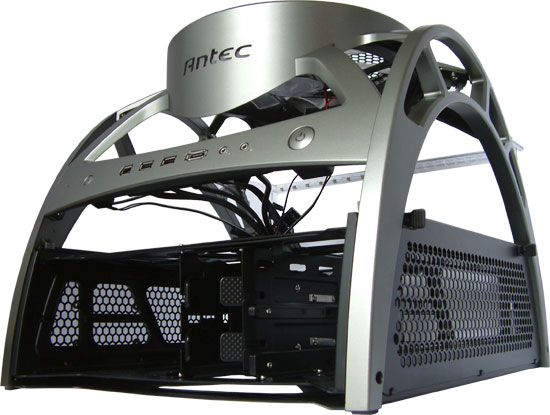
At Computex earlier this year, Antec showed us a prototype of the Skeleton. We recently received a sample of the final product. The whole chassis looks different now, which is good. Let's first start with a quick discussion of the case functionality. Who would need or want something like this? Frankly, I don't. I like small and sleek cases, preferably stored under my desk where I don't see or hear the PC. However, this case may be great for people that frequently change motherboard jumpers, and add or reconfigure other items. Some might even like the appearance of the case, which is a highly subjective area; many of us think it looks rather ugly, but as they say, beauty is in the eye of the beholder.

If you're mostly interested in the functionality, the outward appearance is rather irrelevant. Form follows function and that is an important part of this chassis. It looks somewhat like a lunar station with its half-moon structure and the large 250mm fan in the top. The front has the usual buttons and jacks: power, IEEE1394 FireWire, two USB ports, an eSATA port, and headset and microphone jacks. On the left side we find the reset button as well as a small status LED embedded in the plastic frame.

All of the cables hang out the back of the case, since there is nowhere to hide them. In the center of the chassis is a mounting plate for a large ATX motherboard, and as we will below you can slide the tray out of the chassis. The back has a thin clear acrylic frame installed that helps provide support for expansion cards (i.e. graphics cards). Below the motherboard in the back is the tray for the power supply. The sides feature a metal plate perforated with hexagonal shapes, and like the motherboard tray the PSU tray is removable. The fan in the top can be turned on and off with a small switch at the back, and a second switch allows you to control the LED lights.

Installing the components is fairly easy. You can slide the whole inside of the frame out the back by removing two screws on each side in the back. The power supply mounts in a small cage that can also slide out off the main frame. You can use a variety of power supplies, with an 80mm fan or 120mm fan, though a model with an 80mm fan would make more sense in this case since there are fewer obstructions to block airflow. After installing the main components, the motherboard easily slides into the frame and you can tighten the screws.
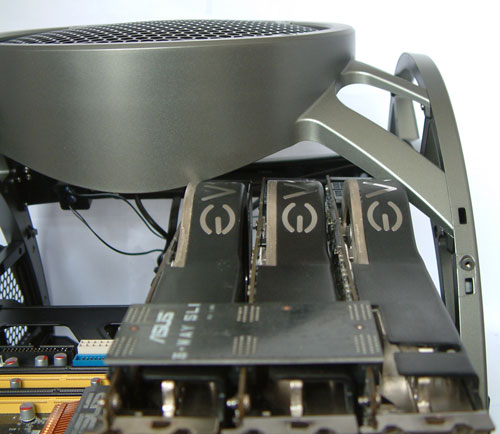

Houston? We have a problem.

Unfortunately, we couldn't install our three NVIDIA GeForce 8800 Ultras since we could not slide the motherboard tray back into the chassis. As you can see above, the first and last graphics cards collide with the upper part of the chassis. However, if your graphics card does not have a bulge like the 8800 Ultra you will not have this problem. In addition, we were able to slide the motherboard tray into the chasses without the cards and maneuver them into the slots inside of the chassis (though this required more effort than usual). The installation of all the other components went without problem.

Antec delivers a very sturdy case with the Skeleton and it's already available in the U.S. Europe still doesn't have any in stock, and the one shop that lists the Skeleton is asking €340 ($465) for it. The U.S prices are a little more moderate, starting at $140. Whether you find that price acceptable or not is for you to decide. However, there is another issue to consider. An open case like this does not have any EMI protection, which means in the worst case you will have problems with radio and/or TV reception when the system is on, particularly if it's near your stereo/television. Despite that, the case is something new in a market full of normal, dull cases. The exclusivity alone will attract some customers; there are certainly users who frequently swap components or simply like the unique design who will be interested in getting their claws on the Skeleton.


55 Comments
Username:
Password:
IN for 1 by KeypoX, 483 days ago
I like it... hello world

Reply
Tower heatsinks? by shabby, 483 days ago
Have you guys tried mounting tall tower heatsinks? I would hope theres enough space for them.

Reply
RE: Tower heatsinks? by Christoph Katzer, 483 days ago
There is space for most bigger heatsinks. With some exeptional big ones you might have the same problem like we had with the gfx and you would need to install them later though. Just go like this, everything as tall as a normal size graphics card will fit perfectly. When it's taller it will still fit, but after the slide went back. It also depends on where exactly your CPU socket is located since some might sit a little higher (closer to the upper edge) some a littler lower.

Reply
EMI by Martimus, 483 days ago
"An open case like this does not have any EMI protection, which means in the worst case you will have problems with radio and/or TV reception when the system is on, particularly if it's near your stereo/television."

I looks like a Faraday cage to me. It doesn't look very susceptible to EMI to me.

Reply
RE: EMI by Spacecomber, 483 days ago
I'm not an electronics expert by any means; so, I was wondering, how would one go about testing a case for whether it is susceptible to radiating electronic noise? I was curious about whether the case that looked like a kick bass drum might have a problem with this, as well (since the enclosure wasn't made of metal).

Reply
RE: EMI by Goty, 483 days ago
Not enclosing all sides of the case just means it would radiate preferentially from the open sides. To completely block all emission, the system would have to be completely enclosed.

I honestly don't see EMI being a big factor. How many cases do you see out there with windows in the side? Now, how many of those do you see causing any sort of noticeable interference with any other consumer electronics?

Reply
RE: EMI by JarredWalton, 483 days ago
Actually, I've seen quite a bit of problems with radio interference. In fact, my radio reception in my house is *terrible* - probably has to do with the number of PCs/laptops downstairs. The real question is: how many people still listen to or watch OTA radio and TV transmissions? About the only time I have the radio on is in my car these days, and I've been using cable or satellite TV for two decades or more.

Reply
RE: EMI by Screammit, 483 days ago
My cable provider charges extra for HD capability, now that you can get OTA HD service on major networks, I just use that, as there is no loss in signal quality and I can't get comedy central in HD yet :P

and I have definitely noticed a problem getting a signal with my HTPC turned on

Reply
RE: EMI by Christoph Katzer, 483 days ago
Anyway, there is no reason to argue about it. In the European Union it is forbidden to sell products that aren't protected which means you cannot have any opening larger than 1cm². I am still searching for U.S regulations though but I am sure Antec can also bring some light into this matter.

Reply
RE: EMI by Spacecomber, 483 days ago
I think that the problem is with more than just OTA radio/TV reception. Wires and other components in your electronic equipment can act as antennas in your electronic hardware and pick up (and transmit) this noise. This can add unwanted background noise to your HiFi, for example.

I'm using a fairly well shielded computer as a music server, and I find that I have to be careful how some of the wires lay in relation to one and other in order to keep the background noise level as low as possible.

Reply
RE: EMI by Aluvus, 483 days ago
A Faraday Cage encloses all sides with (usually) a metal mesh. This case has no shielding on the top area where the motherboard sits(superstructure looks to be mostly plastic, and is very open regardless), and the drive area is open on 2 sides. The case will provide very little protection from EMI.

Reply
RE: EMI by Griswold, 483 days ago
You dont seem to be familiar with the faraday cage concept - that or something is wrong with your eyes. :P

Otherwise you would know, that it has to be enclosed entirely by a conductive material, be it solid or a mesh. This thing has huge holes on all sides and therefore it will neither be protected from outside EMI nor will it keep EMI contained.

Reply
space by 4wardtristan, 483 days ago
for such a space age design, it doesnt look that spacious

Reply
Innovation by greylica, 483 days ago
This is a great innovation for overclockers, but need more attention on details like those of the VGA fans. Probably a 120MM Tower willn´t fit into the case too.
Another great Idea is to put a grid outside the unit for cover, only to avoid some problems with curious persons that can´t resist to put a finger where isn´t alowed.
(Touch memory when the system is running ?:P )
To improve better cooling, a big fan without a duct can´t help a lot, most of the airflow is lost, then we prefer 4- 80X80 or 90X90 MM fans in the top with plastic ducts and temperature control. (tpc controller)
But well, this is a great change and an art piece for pcs.
Like some naked motorcycles, this atr case could be improved as well to the point we can admire a piece of art inside the desk.

Reply
Not Sufficiently Impressive by Risforrocket, 483 days ago
Meh. Too open, too unprotective of expensive and delicate computer parts. And it's not really cool enough to overcome those faults. I won't buy one.

Reply
RE: Not Sufficiently Impressive by mmntech, 483 days ago
It's probably a dust magnet too. They've had cases like this for ages and in the past, they've not been recommended for permanent use. I definitely wouldn't put this in a house with kids.

Reply
Uh. Is this thing safe? by emilyek, 483 days ago
Is Antec trying to create a liability lawsuit machine?

People will spill their Mountain Dew in it.

Or perhaps people's babies or pets will decide to poke around in it while it's running.

Seems like a bad idea to me.

Reply
RE: Uh. Is this thing safe? by Griswold, 483 days ago
Agreed. But they can protect themselves with a huge red sticker on top of it saying "do not pour liquids on your computer, keep out of reach of your children and pets and do not poke the little gizmos with a pen or similar objects". :p

Reply
RE: Uh. Is this thing safe? by strikeback03, 483 days ago
Unfortunately Antec can't make sure its customers are not stupid, so they might have to throw a label on the box that says something to the effect of "If you have kids or rodents don't buy this case".

Reply
cheap Amiga Walker copy by 7oby, 483 days ago
Seems to be a cheap copy of the Amiga Walker :-)
http://www.blachford.info/computer/walker/walker.html

Reply
RE: cheap Amiga Walker copy by Christoph Katzer, 483 days ago
I don't see much similarity between the both... What has the one concept to do with the other?

Reply
RE: cheap Amiga Walker copy by 7oby, 483 days ago
I did put a smiley, which means my posting shouldn't be taken literally.

For those who've been in IT business for more than 15 years, it's verly likely they came in touch with the Amiga the one or the other way. At that time a x86 PC was always a cuboid either staying on the one side (desktop) or the other (tower). There wasn't even such thing as a midi tower let alone HTPC case. Only companies such as Atari, Apple, C=/Amiga were designing other shaped computers.

Since a cube has the largest volume among cuboids with a given surface area, you could call that in a certain sense efficient. And companies who design efficient solutions are innovative even besides the aesthetic aspects. Showing other companies have innovative before.

To sum it up: I think my post will put a smile on some geek's faces.

Reply
RE: cheap Amiga Walker copy by TA152H, 483 days ago
Actually, most professionals never came across an Amiga - it was a toy machine. Atari's were typical keyboard and computer design. Macs have always been strange shaped, and always slow and overpriced. We used to call them MacIntoys. Amigas were also pretty boring in terms of shape as well. A prototype doesn't mean the same thing as a production machine.

x86 computers came in many shapes and forms (although none of them would be considered exotic). The PS/2 line alone had several different shapes, from the small Model 50/70, and the 55/56/76, the mid-sized desktop Model 90 (the machine I used mostly at the time) to the larger desktop cases like the 77. There were also towers, like the 60/80 initially, and the 95 which was shorter and wider. The 95 would be a mid-tower by today's standards. The point is, they made all the sizes they needed, and there were multiple sizes so you could get what you really wanted.

The cases of a PS/2 were FAR superior to the junk you can buy today. Most of the geeks here would struggle to even lift a PC/AT or PS/2 Model 80. They were much more advanced back then too; the PS/2 Model 70 could be taken about without a screwdriver, and didn't even have a single ribbon, cable, etc... in it. You could take the entire computer apart in less than a minute.

I collect antique computers and have PS/2s that were never used, and some PC/ATs, so I am not going on memory only. I had to lift a PC/AT the other day, and still am surprised at just how heavy it is. The keyboards were also very heavy.

Stuff now is high-speed junk. It's fine because we replace it before it goes bad, most of the time, but my Tandy 3000 I bought for around 5K in 1986 still runs fine today, and I did things that you would never think of doing with today's computers. Back then, you actually had to have some skill to overclock. It was not as simple as changing BIOS settings and then pounding your chest like you've done something. You'd have to unsolder the crystal, and buy another one, and solder it in, and hope you didn't screw anything up. On some old machines, before the PC, to do upgrades, you'd have to cut electrical connections, and run wires and solder them in for certain upgrades. Uggggh. But, my Tandy 3000 went through this a few times, and still never complains, and has been running overclocked (10 MHz) by 25% almost since the beginning.

New machines are fast, and they are cheap, but, in terms of quality, they are much lower. It's a good tradeoff though, since computers only have a limited useful lifespan for most people. Also, they are much easier to move. The weight of old computers is unreal.


Reply
RE: cheap Amiga Walker copy by TestAccount, 483 days ago
Contrary to popular belief, the PC was more of a toy machine than the Amiga based on game sales.

The Amiga's professional sector was video (editing / rendering / broadcast graphics). So quite a bit of professionals came across the Amiga. If any of you remember the Newtek's Video Toaster you know what I am talking about. Also the "channel channel" as I used to call it, aka the guide channel on cable, was run on Amigas. Every now and then when they would update the guide, you could see the Workbench in the background.

Reply
RE: cheap Amiga Walker copy by TA152H, 482 days ago
You're using pretzel logic. Everything on a PC sold better than on an Amiga. So, considering the huge installed base of PCs, naturally even games sold better. Proportionally, especially back then, PCs were the business machines, and Amigas were much less. I never saw one in a business in my life. I'm not saying no one used them, but they were by no means something most people came across as the original poster had said.

I'm not knocking them, by the way, they just weren't business machines. I liked the 68K line a lot, and I hated x86 assembly with a passion. The 68K was much more elegant, but the operating system for the Amiga was primitive compared to OS/2, and they simply didn't have the quality of software available for it. And, of course, with IBM being so important back then, connectivity with mainframes was very important as well. I don't think the Amiga had a 3270 emulator, but maybe it did.

It's a pity that everything is based on the x86 now, arguably the worst instruction set from that era. It's a real irony that the worst one won, because of a poorly thought out decision by IBM to use a clearly inferior processor (as compared to the 68K). Now we're stuck with it :-P.

Reply
RE: cheap Amiga Walker copy by kondor999, 482 days ago
BTW, my La-7 will eat your Ta-152H for lunch - anytime, anywhere baby!

Reply
RE: cheap Amiga Walker copy by Clauzii, 483 days ago
I have a PS/2 Model 30. Still works and yes, can be taken apart faster than any modern PC :D

Reply
Luddite by kondor999, 482 days ago
Your sort of 'professional" is what made me leave Tech and go to medical school. You are completely out of touch with modern tech, aren't you?

Overclocking a Tandy 3000 by 10%? Swapping crystals? Who the Hell cares?

And if you think it doesn't take some skill to overclock today - you're hopelessly uninformed. You ever build a custom liquid nitrogen cooler for that Tandy? No - I suppose not. Do you even know what a Peltier cooler is?

Maybe you should pull your head out of your ass, stop screwing with 25 year old useless junk (like that Tandy) and learn something about the current state of the art.

Jeez, I'm 42 - but you sound like my grandfather. The only people who still think the Amiga and Mac were toys are bitter old fossils who fail to recognize that both the the Mac (for its brilliant interface) and the Amiga (for its innovation in using seperate chips for graphics and sound) were instrumental in creating the modern PC that we know and love today.


Reply
RE: Luddite by Pythias, 476 days ago
Nerd Rage!

Reply
RE: cheap Amiga Walker copy by Clauzii, 483 days ago
Thanks for the link :)

Quite a trip back in time :D

Reply
Does that work? by djc208, 483 days ago
A 500W PSU and a triple SLI setup. Does that actually run properly, or was that just to show a PSU installed? I've read the 1000+ watt monsters aren't necessary but that seems a little small.

Reply
RE: Does that work? by Christoph Katzer, 483 days ago
Finally one who actually saw that. Just wanted to show how you install a PSU. I tried PSUs with 80mm and 120mm fan to check if there is enough space for airflow. I am running that triple SLI with the PCPower 860W AT Edition.

Reply
Too Large - Too Dangerous by piasabird, 483 days ago
My first thought is it is just too large. I cant see putting this on top of a desktop ever. Instead of making really large computers we need smaller computers.

The other thing is if you have children poking their fingers in to touch or move the wires all I can see is Zap or electrocution of children.

Also in a well designed case, you can pull air through the case and cool off the Drives. In this case this does not seem possible. Then fan noise can not be blocked in an open case. Also Vibration noise can not be reduced in an open case. What you will not get though is the amplification of these items when inside a case.

While this case design is interesting as a showpiece you need room for it and it is not children friendly.

Reply
Perfect case for ... by TA152H, 483 days ago
This is the perfect case for people that never quite get around to putting all the sides of their case. You know, you don't want to close it until you get that new hard drive in, or replace the fan, or put the extra memory in. Of course, sometimes (often?), I never do anything with it, despite always having these intentions. Am I alone in this? Maybe not; this case seems to make me feel a little less stupid, since it might be made for those of us who have this failing.

I am guilty of this just as often as I put the sides on. But this is better, since it allows convention to work better since the top is also, mostly, open.

It may not be so attractive, but it's more attractive than my computer cases that I never quite get around to closing.

Also, it would use less power than a normal case, for the simple reason you need less fan power to get air out of the case. But, you'd have to use low noise components, since it's not only failing to block EM radiation, it's also not blocking noise.

I don't think it's for everyone, but I think it is for someone. That's really all any case can hope for.

I like the idea, and think it will be a success.


Reply
Cooling? by Randybob, 483 days ago
No cooling information?

Reply
RE: Cooling? by Crucial, 483 days ago
Why would you need that in an advertisement fluff piece?

Reply
RE: Cooling? by Christoph Katzer, 483 days ago
Open up your current case, you will then have the same temperature your CPU would have in that case. Since it is open there is not much difference as the mobo would just lie on the table. The additional airflow from the top just keeps it at room temp, can't be less ;)

Reply
RE: Cooling? by judeau, 483 days ago
If I opened my current case I wouldn't have a giant fan on top of it blowing air. I don't expect it to drop below room temp but I want to know how close to room temp it stays as you pump power through it.

How loud is that 250mm fan? How much air does it push? In the article you say you wouldn't want it on your desk because computers are loud. How loud was this case compared to others? Obviously 3 vid cards will make it quite loud but is it possible to get a decent setup that woudl be quiet?

I think Randybob is just confused since this review doesn't do any of the standard benchmarking/comparisons usually seen at anandtech like their recent review of the HTPCs which had temp readings, fan speed info and noise info.

Overall I'm a little dissapointed there wern't more details about the case or any testing with it.

Reply
RE: Cooling? by Christoph Katzer, 483 days ago
That's why it's called a blog. I want to test it a little longer. In general I use the cases for a few month to check their usability in daily life before writing a review about it.

As for being quiet, I don't think you are going to build a silent PC with that case :D But the fan is not very loud at all. I will have these readings as well in a following review. Be sure about it...

Reply
RE: Cooling? by judeau, 482 days ago
My Bad. Didn't realize it was a blog not an actual review. Was showing up top where I usually find reviews and under the "More Reviews" section. It does say blog so I should have realized.

Reply
RE: Cooling? by JarredWalton, 481 days ago
Most blogs go to the lower area, but there wasn't much else up when I posted this and I figured it was interesting enough to warrant promotion to a "top of page" position. Seems like the number of comments support that, since most blog posts don't get more than 10-20 responses. Even if half of these comments are to say, "Wow, that is one ugly case!" LOL

Reply
Bent Heat Sink by Ratinator, 483 days ago
That heat sink near the audio connectors....is it supposed to be bent and looking like it is lifting off the board or is that somethign you had to do to get the video card to fit?

Reply
RE: Bent Heat Sink by Christoph Katzer, 483 days ago
I saw that only from the pics, never recognized before. No idea how that happend ;)

Reply
Hope you don't have cats... by Ratman6161, 483 days ago
I'm a dog person myself, but my wife is a cat person has four of the furry little ba$&@%)$. So in my house, that motherboard would be encrusted with a combination of cat hair and dust within about three seconds!

Reply
RE: Hope you don't have cats... by JarredWalton, 481 days ago
I don't know... some of the dogs I know might mistake this for some sort of fire hydrant and decide to mark it as their own. Definitely not a case for anyone with pets or children, I think we can all agree.

Reply
Nice fan by SpatulaCity, 483 days ago
I actually think it looks interesting in it's own special way, but I really like the fan on top idea. I do worry about the EMI since I have so many other electronics in the same closet.

Are there any other enclosed computer cases hat have a fan on top like this one does? I utilize a duct fan to suck air out of my computer closet and I would like to hook it up to a main computer ventilation fan directly.

Reply
Duo case by MadAd, 483 days ago
Now if only it could be extended to take 2 PCs in one cage it would be a winner.

Reply
Just what is it! by steveyballme, 483 days ago
... it's a case, for what? a pump?


http://fakesteveballmer.blogspot.com

Reply
Noisy? by Linden, 482 days ago
I am torn. Emotionally, I very much like the design and innovation of this Skeleton. As a system builder, tweaker, and overclocker, I see so much fun and ease of use with that frame-case (but maybe it's a pain in the but for high performance CPU heatsink mounting?).

Noise. Hmm, what would it sound like? Maybe not so bad with a low-flow 120mm fan on the CPU heatsink and a passive cooler on the video card, such as the Arctic Cooling Accelero?

This is definitely a case targeted for a limited demographic-- 1) no small children, 2) no inquisitive pets, 3) dust tolerant or willing to clean often, 4) ample desk/room space for the large footprint....

But I want one!

Reply
RE: Noisy? by Linden, 482 days ago
Looking at the top fan frame assembly, it appears to be attached to the lower assembly with screw-type hardware, one for each arm. Is that correct? If so, what effort is involved in removing the fan and it's support assembly. If that is not labor intensive, that would be a solution for relatively easy installation of large CPU heatsinks and video cards with a "bulge."

I am looking forward to the full review.

Reply
Comments Page 1 of 2


AnandTech.com Blog Categories
All categories
Anand's Macdates
Anand's Theater Construction
Anand's Updates
Cases and Power Supplies
CeBIT 2008
CES 2008
Computex 2009
Derek Decanted
Eddie's Got Game
Gary's First Looks
IT Computing general
Jarred's Musings
Kris's Corner
Raja's Ramblings
Rob's Experiences...
Ryan's Ramblings
Virtualization
What's New with Wes
Blank
Blank

Blank

Latest news by
DailyTech

 February 9, 2010

Blank
Blank
Blank
Blank
Blank
Blank
Blank
Blank
Blank
Blank
Blank
Blank
Blank
Blank
Blank
Blank

 February 8, 2010

Blank


more Blogs Discussions


pipeboost
Copyright © 1997-2010 AnandTech, Inc. All rights reserved. Terms, Conditions and Privacy Information.
Click Here for Advertising Information