



PhysX’s Big Break? Unreal Tournament 3 PhysX Performance
by Ryan Smith on December 14, 2007 12:00 AM EST- Posted in
- GPUs
PhysX Performance Under UT3: AGEIA’s Maps
To start things off, we’ll begin with the physically demanding situations from AGEIA’s map pack before moving on to the stock UT3 maps. As AGEIA’s showpieces, these maps will trend to being PPU limited.
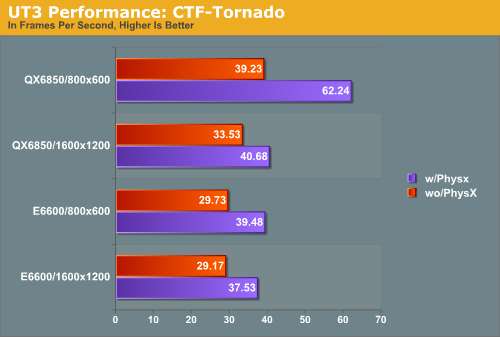
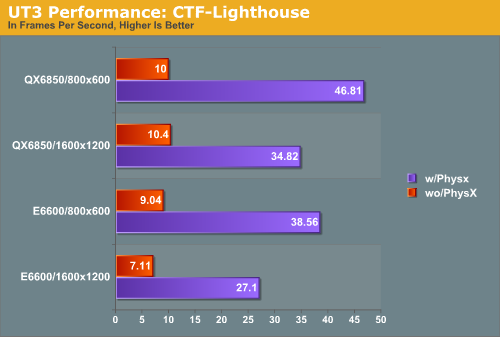
Although UT3 isn’t a particularly resource-hogging game, it does tend to be GPU limited more than any other situation. We see that on our 1600x1200 tests, where CTF-Tornado performs very similarly with both of our processors when PhysX enabled. What we end up with overall are very balanced results that show that everything can be a bottleneck at some point.
As we hinted at earlier, CTF-Tornado is generally playable with or without the PhysX PPU with any of our setups. Adding the PPU adds anywhere between 20-25% in our more realistic 1600x1200 situations, to 30-60% when we move away from the GPU bottleneck. However what the benchmarks don’t show is the performance of the map at its lowest; UT3 doesn’t give us the lowest frame rate values for these situations, but when staring directly in to the tornado – the most physically demanding action on this map – performance is certainly dropping in to the single digits. This is fine for bot matches, but this would be impractical for online play.
CTF-Lighthouse on the other hand shows massive performance improvements, and is completely unplayable without a PPU, where it’s literally a slideshow. Adding the PPU increases performance by a minimum of 280%, a welcome change from the PPU driving performance down in some of our past benchmarks. Even with the PPU however, CTF-Lighthouse struggles to be smooth at times, staying just on the side of playability. With no real way to vary the physics load we can’t test all possible options, but we believe it’s very likely that we’re PPU limited on this map, certainly at 800x600 when the GPU bottleneck is removed.
We also have a quick look at CPU usage for UT3 when running this map, to get an idea of just how well the CPU is being used; if it’s not being well used by the software PhysX simulations, then CTF-Lighthouse in particular is not a fair comparison. UT3 is designed around dual-core processors with some light helper threads to occupy cores 3 and 4, so if physics are the bottleneck then the multithreaded software PhysX simulations should be able to completely load the CPU.
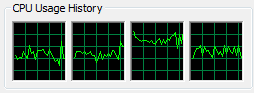
However we are not seeing this. CPU usage is hovering at a little below 60% total usage on our QX6850. Given that we're not GPU limited, one thread in particular must be the CPU limited thread, and isn't capable of being further split. Our first thought is that the thread(s) that handle game logic also are doing the software physics, which would explain why we're not seeing a greater use of the other cores for the physics calculations. It's unfortunate if this is the case though, as it means that Unreal Tournament 3 (and possibly other Unreal Engine 3 games) is unable to fully utilize more than 2 cores and change. It also means that we potentially could be getting better software performance, which works against the PhysX hardware.
Never the less, this map is certainly designed to be a best-case scenario for the hardware, which is exactly what it delivers.


 Facebook
 Twitter
 RSS
RSS


29 Comments
View All Comments
marbles - Saturday, December 22, 2007 - link
We represent a very small fraction of PC gamers and users and even many of us are not sure we'll ever buy a PPU card. From someone who has repaired and built PCs over the years and has spent hours explaining the difference between "free" onboard graphics and 700.00 graphics cards I don't want to have to explain a PPU.Look at the Geo mod capability in Red Faction (7 yrs ago) and the physics incorporated into the Source engine (3 yrs ago). They all came "free" because of the willingness of the game maker to make this work and keep the game playable on a reasonable PC. Look at Fracture out next year for the PPU-less 360 and PS3.
The quality of popular PC franchises are already being compromised for consoles so there is little hope that a PC specific PPU will ever be required to play any game. I think AGEIA's best hope for the PC is middleware and having their technology integrated into main boards or graphic cards.
Are these two UT3 maps available for the consoles?
perzy - Wednesday, December 19, 2007 - link
The CPU is dead! The future is dicrete processors.The heat wall is a not a bump in the road, it IS a wall.
Look at chipzilla that had a concussion rammin it's head in the wall, spent 4-5 years redesigning then pentium m to core 2 duo.
AMD bought a gpu-manufacturer that still has a few years of developing before the heat wall and Intel bought Havok and is quietly gearing up it's own dicrete gpu-dept.
Nvidia seems to be working on worlddomination on their own, or just trying to boost their own value before being bought by chipzilla.
Sure you can have maybe 16 cores (heatwall + power envelope) on a CPU but still they are slow and they dont have their own superfast dedicated ram.
So Ageia is right on the mark, how far they now seem to be from it.
0roo0roo - Sunday, December 16, 2007 - link
give me all the physics you can on a 2 or 4 core cpu and go on from there. a phyx card does nothing during normal use. its dead weight. i'd rather pay for a nicer cpu or gpu which are used in some way 100% of the time. there just isn't a killer game play app for the ppu. stacking boxes is already possible and not that compelling. developing a ppu only killer app game isn't really something i can see happening. while they wait for that miracle to come by cpus will creep up and surpass the card anyways:PFrancisbacon - Monday, December 24, 2007 - link
You're absolutely correct.Games developers will only take PPUs seriously once a lot of people have them, and this will only be the case once Nvidia and ATI start shipping graphics cards with PPUs on-board.
This is not too far off, Nvidia and ATI are both known to be working on including physics on their next generation of cards.
Buying a bodge-job like this, a PCI expansion card which actually offers very little in the way of power and only really affects one mainstream game in a very minor way is a total waste of money right now. It's far more sensible to upgrade your CPU and wait for physics-enabled graphics cards to come out.
On top of all this, I'm fairly certain exactly the same results could have been acheived by fully utilising all four cores of the CPU, but the Ageia modders chose not to, for obvious reasons.
Francisbacon - Monday, December 24, 2007 - link
You're absolutely correct.Games developers will only take PPUs seriously once a lot of people have them, and this will only be the case once Nvidia and ATI start shipping graphics cards with PPUs on-board.
This is not too far off, Nvidia and ATI are both known to be working on including physics on their next generation of cards.
Buying a bodge-job like this, a PCI expansion card which actually offers very little in the way of power and only really affects one mainstream game in a very minor way is a total waste of money right now. It's far more sensible to upgrade your CPU and wait for physics-enabled graphics cards to come out.
On top of all this, I'm fairly certain exactly the same results could have been acheived by fully utilising all four cores of the CPU, but the Ageia modders chose not to, for obvious reasons.
Sacher - Sunday, December 16, 2007 - link
Nice in-depth article. I'm wondering, what did you (Ryan) have the texture-detail and world-detail [advanced video] settings at?Does the physics load change when using different world-detail settings?
FITCamaro - Friday, December 14, 2007 - link
While performance didn't increase that much with the PPU on the real maps, did the game look better? You didn't answer this. If I get noticeable better effects with the PPU and the same performance as without, thats a win to me. If it just displays the same effects as without the PPU just faster, then no its not worth it.Physics is not about increasing the FPS of a game. It's about making it more realistic and immersive.
Ryan Smith - Friday, December 14, 2007 - link
We mentioned this elsewhere in the article, but the effects are the same. Enabling the PhysX hardware only offloads them to the PPU, it doesn't create any new effects.ET - Friday, December 14, 2007 - link
For a low end or old system, an inexpensive card which could offer a performance boost would have been welcome. However these tests show more of a performance gain on the quad core than the dual core. While this might mean that people with money to spare (high end quad core users) may be able to get even more performance for relatively little (compared to their CPU's price), low end buyers can't get as much of a boost.Which sounds to me backwards. If I could get a significant performance boost for my semi-old PC, I might have been more interested.
SuperGee - Sunday, December 16, 2007 - link
That is because a lowbudged game rig has several bottlenecks and if this is GPU holding back FPS, ofloading a not so bottlenck like CPU yields not much in such case.As most game tend to be GPU limited. And a old or low budged PC wil often be most limited on GPU.
A PPU isn't ment for offloading but for more Physics. This means a decent game-rig is needed to use a PPU properly with a physics load made for PPU.
A PPU is more ment for Physics enthausiast, early adopter, hardcore gamers or highbudged rigs. To play PhysX games in optimal settings.
The QC yield so much because the benched it with a less GPU stressing setting. Wich is not the way people game with a high-end game PC.