



Logitech G5 Laser Mouse: When an update is not worthy of a new name
by Gary Key on July 25, 2007 12:01 AM EST- Posted in
- Peripherals
We have always enjoyed Logitech mice and can count on them providing interesting product refreshes every couple of years. Their last major product refresh for the gaming community consisted of the G5 corded and the G7 wireless mice back in the fall of 2005. Both mice have enjoyed a successful lifespan with very good design ergonomics, software support, and desktop performance in the rodent arena. For the better part of the last two years the superb Razer gaming series of mice have been their chief competition. However, for some of us, the real competition to the G5 has not been from companies like Razer but from Logitech's very own MX518.
The G5 Laser Mouse was originally intended to be the replacement for the MX518 in the gaming sector but as it turns out; the MX518 continues to be sold and is doing quite well in the market. With a street price around $35 the MX518 is still a very good bargain for those needing a gaming centric mouse that is also very adept at performing general desktop activities such as Photoshop. One of the reasons we believe the MX518 is still a fan favorite besides the great value and still competitive performance is the fact the general design is very good, well at least for those of us who happen to be right handed.
While the G5 improved upon the MX518 with a vastly improved sensor engine, software adjustable support for USB report rates up to 1000 reports per second, improved dpi selection, and better surface textures, it was the lack of a second thumb button that was really perplexing to us. It was so perplexing that we never really considered an upgrade to the G5 was essential. After all, the ergonomics, features, and performance were close enough that an additional $20 at the time just did not seem to be a wise investment. As we were in the middle of preparing for our upcoming micro-ATX extravaganza (Yes, you'll finally see it in the very near future!) something interesting happened: we needed a mouse for our gaming system buildup and the "new" G5 Laser Mouse looked like it would fit the bill perfectly this time. Actually, we have a mouse from RAZER that is awfully close also, but for the time being our thumbs are happy to have the second button again.
As we looked over the product packaging there was only one item that stood out to us. Logitech's marketing department plastered a "Now with 2 Thumb Buttons" label on the front of the "new" G5 box and apparently called it a day. Of course, we prefer not to use the word "new" when describing this mouse and apparently Logitech agrees with our sentiments. Unless you are able to physically view the two mice side by side then it would be difficult to determine which revision will land at your doorstep as the official description remains the same for both mice. However, we have noticed that most major e-tailors are now providing additional product details and generally there still is a price differential between the two units. This price differential can easily determine which version will be received as the original G5 is selling for around $45 and the revised G5 going for $59. We still recommend making sure which version the vendor will ship to you. In fact, when we originally ordered two of these of mice, both versions arrived although we paid for the 2007 version.
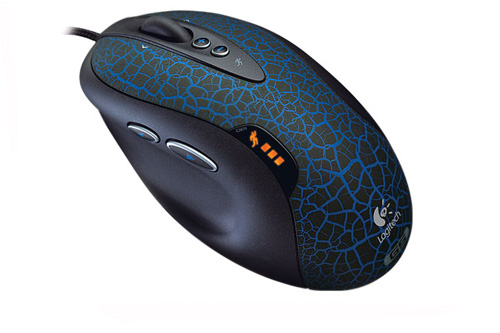
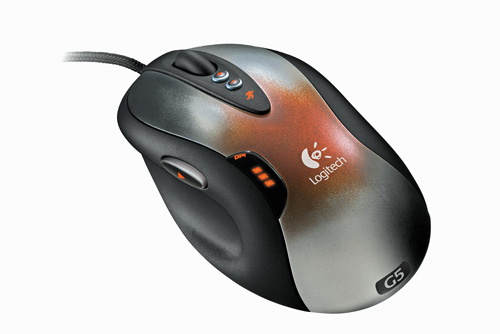
The Logitech G5 Laser Mouse 2007 pictured on the left is meant as the direct replacement for the original G5 pictured on the right. The overall design of the revised G5 is strictly evolutionary in nature with minor changes to graphics design and a return of the second thumb button we were enamored with in the MX500 series. Both mice share the same laser engine specifications with a 2000-dots-per-inch (dpi) optical sensor and the ability to change dpi settings on the fly. Also retained from the original version is the same tunable weight cartridge system and braided USB cord. Let's take a closer look at the features of the revised G5 laser Mouse and see how it performs.
The G5 Laser Mouse was originally intended to be the replacement for the MX518 in the gaming sector but as it turns out; the MX518 continues to be sold and is doing quite well in the market. With a street price around $35 the MX518 is still a very good bargain for those needing a gaming centric mouse that is also very adept at performing general desktop activities such as Photoshop. One of the reasons we believe the MX518 is still a fan favorite besides the great value and still competitive performance is the fact the general design is very good, well at least for those of us who happen to be right handed.
While the G5 improved upon the MX518 with a vastly improved sensor engine, software adjustable support for USB report rates up to 1000 reports per second, improved dpi selection, and better surface textures, it was the lack of a second thumb button that was really perplexing to us. It was so perplexing that we never really considered an upgrade to the G5 was essential. After all, the ergonomics, features, and performance were close enough that an additional $20 at the time just did not seem to be a wise investment. As we were in the middle of preparing for our upcoming micro-ATX extravaganza (Yes, you'll finally see it in the very near future!) something interesting happened: we needed a mouse for our gaming system buildup and the "new" G5 Laser Mouse looked like it would fit the bill perfectly this time. Actually, we have a mouse from RAZER that is awfully close also, but for the time being our thumbs are happy to have the second button again.
 |
 |
| Click to enlarge | |
As we looked over the product packaging there was only one item that stood out to us. Logitech's marketing department plastered a "Now with 2 Thumb Buttons" label on the front of the "new" G5 box and apparently called it a day. Of course, we prefer not to use the word "new" when describing this mouse and apparently Logitech agrees with our sentiments. Unless you are able to physically view the two mice side by side then it would be difficult to determine which revision will land at your doorstep as the official description remains the same for both mice. However, we have noticed that most major e-tailors are now providing additional product details and generally there still is a price differential between the two units. This price differential can easily determine which version will be received as the original G5 is selling for around $45 and the revised G5 going for $59. We still recommend making sure which version the vendor will ship to you. In fact, when we originally ordered two of these of mice, both versions arrived although we paid for the 2007 version.
 |
 |
| Click to enlarge | |
The Logitech G5 Laser Mouse 2007 pictured on the left is meant as the direct replacement for the original G5 pictured on the right. The overall design of the revised G5 is strictly evolutionary in nature with minor changes to graphics design and a return of the second thumb button we were enamored with in the MX500 series. Both mice share the same laser engine specifications with a 2000-dots-per-inch (dpi) optical sensor and the ability to change dpi settings on the fly. Also retained from the original version is the same tunable weight cartridge system and braided USB cord. Let's take a closer look at the features of the revised G5 laser Mouse and see how it performs.


 Facebook
 Twitter
 RSS
RSS


39 Comments
View All Comments
Zoomer - Saturday, August 4, 2007 - link
What really irks me is the repositioning and shrinking of the thumb button. I really like the mouseman optical style.The positioning was a lot like the ifeel version: http://www.geocities.com/Area51/Station/2137/Hardw...">http://www.geocities.com/Area51/Station/2137/Hardw...
bloc - Friday, July 27, 2007 - link
I've been pestering logitech for ages about getting a 3 button mouse with a scroll wheel on the side.Why?
The old school three button mouse was useful in *nix cause it was the paste button. Pasting with a wheel, or a rebound thumb button isn't the same.
The ergonomics of a scroll wheel is better with the thumb, and not the middle finger. Look at how the other fingers move when you scroll with the middle finger. A scroll wheel on the side is perfect as the thumb naturally moves in that motion.
The last thing they need to do is make the mouse shorter. Palming a mouse isn't ideal for everyone. I rather use finger tips to lift, move and reposition.
Time to rethink the mouse logitech/ms...
strikeback03 - Monday, July 30, 2007 - link
I don't use my middle finger for the wheel - use index for wheel and left button and middle for right button. Ring finger guides the right side of the mouse, pinkie just along for the ride. I also rarely pick up the mouse, I just leave my wrist on the desk and move the mouse with my fingers.kachaffeous - Thursday, July 26, 2007 - link
I have the old G5 and the middle mouse click problem is a deal breaker until it gets fixed. Anyone have the old and new to compare the two?GokieKS - Wednesday, July 25, 2007 - link
The only thing that precluded me from getting the G5 before was the lack of a second thumb button - I ended up searching high and low for another MX500 (which I prefer to the MX510/518) and settled on a MX400. Now that's been rectified, the G5 really will be the best wired mouse available, and I think I'll be picking one up soon.skyyspam - Wednesday, July 25, 2007 - link
It has 10 buttons I can press to do things in games. Technically, the new G5 has 11, but for some dumb reason logitech left out the front-most button that you click with your middle finger (the sensitivity + button). I use this, and all other MX518 buttons, exclusively in games.I want more buttons.
An MX518 with left/right tilt would be ideal right now. That'd be 12 total programmable buttons to play with.
Thalyn - Wednesday, July 25, 2007 - link
I've been using an MX1000 for a long, long while now, simply because it's mind-numbingly convenient having all those buttons (page up/down on the jog buttons, home/end on the rocker, and shift/ctrl/alt on the side) - I could handle 2 (alt wouldn't be a big loss), but going down to one would just be frustrating (at least for a little while).Any word if they're updating the G7 to match?
Omega215D - Wednesday, July 25, 2007 - link
I managed to get this mouse at Best Buy for $50 a while back. I found that the weights on this version of the G5 are easier to remove and the textured surface feels pretty nice. It performs really well when playing FPS but sometimes the stock DPI settings can be a bit too quick but changing them to suit me is really easy.I prefer the new G5 to the my MX518.
GlassHouse69 - Wednesday, July 25, 2007 - link
It is fucking uglyfucking
ugly
next.
copper and faded metal look so much nicer.
fucking
ugly.
yes, the word fucking I said.
Jodiuh - Thursday, July 26, 2007 - link
...and it feels like spidey's love juice...or dead skin, take your pick. It's also not as "cool" to the touch after extended gaming. The 518 always feels cool to touch.