



Quake 4
We include the Quake 4 timedemo in our benchmarks to give us a good idea of how well these cards perform on this graphics engine. As we talked about in a previous article, our Quake 4 benchmark gives us results that don't directly reflect actual gaming performance. However, testing shows that performance in the game will be similar if slightly lower than what we show, so we can still get a good idea of how well these cards perform relative to each other.
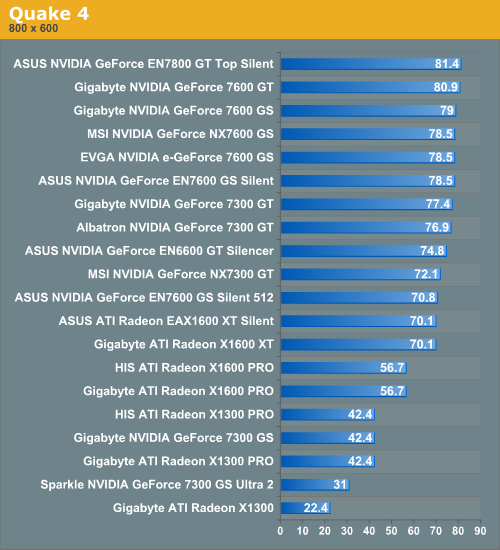
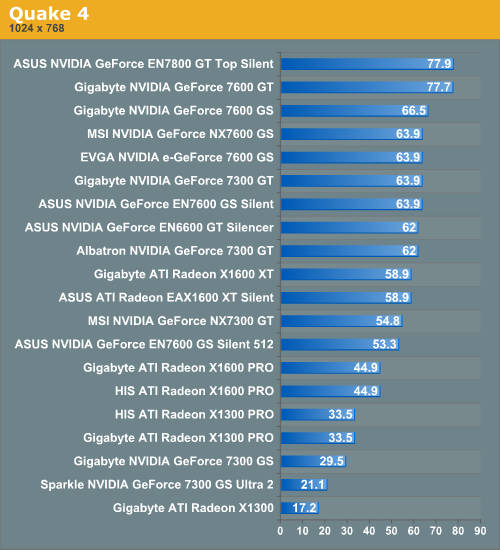
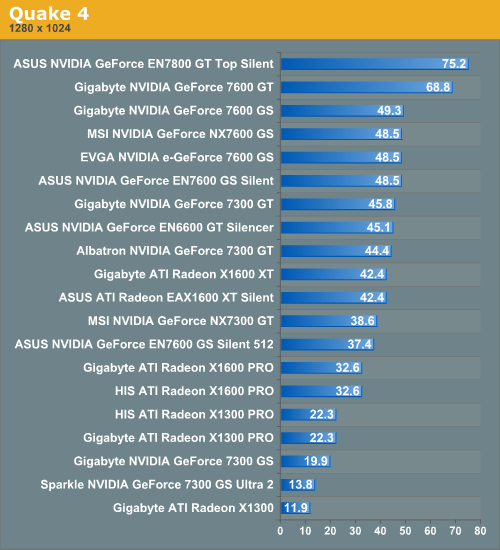
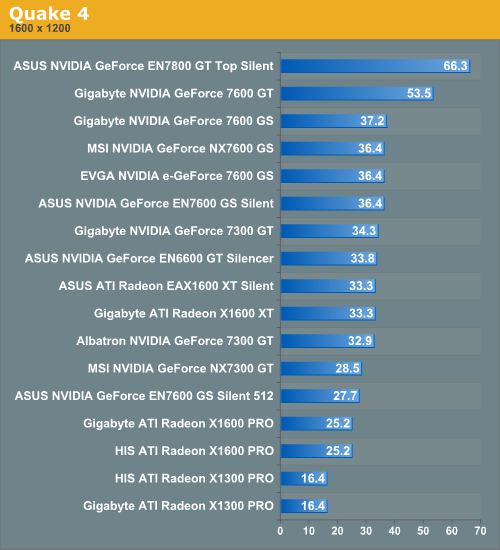
Something we see in Quake 4, as well as the other tests, is that the Gigabyte 7600 GT stands out along with the ASUS EN7800 GT Top Silent particularly at higher resolutions. At 1600x1200, the 7600 GT gets a full 16 more FPS than the Gigabyte 7600 GS; a 44% increase in framerate. This is a big difference but makes sense given that the Gigabyte 7600 GT costs about $60 more than the Gigabyte 7600 GS (about $170 as opposed to $110). However, the Gigabyte 7600 GS and the other 7600 GS cards perform well even at the highest resolution here. The X1600 XTs do well at 1600x1200, but the X1600 Pro does better at 1280x1024. The X1300 Pro and the 7300 GS cards do best at 1024x768 resolution and lower.
We include the Quake 4 timedemo in our benchmarks to give us a good idea of how well these cards perform on this graphics engine. As we talked about in a previous article, our Quake 4 benchmark gives us results that don't directly reflect actual gaming performance. However, testing shows that performance in the game will be similar if slightly lower than what we show, so we can still get a good idea of how well these cards perform relative to each other.
Something we see in Quake 4, as well as the other tests, is that the Gigabyte 7600 GT stands out along with the ASUS EN7800 GT Top Silent particularly at higher resolutions. At 1600x1200, the 7600 GT gets a full 16 more FPS than the Gigabyte 7600 GS; a 44% increase in framerate. This is a big difference but makes sense given that the Gigabyte 7600 GT costs about $60 more than the Gigabyte 7600 GS (about $170 as opposed to $110). However, the Gigabyte 7600 GS and the other 7600 GS cards perform well even at the highest resolution here. The X1600 XTs do well at 1600x1200, but the X1600 Pro does better at 1280x1024. The X1300 Pro and the 7300 GS cards do best at 1024x768 resolution and lower.


 Facebook
 Twitter
 RSS
RSS


49 Comments
View All Comments
TheInternal - Tuesday, September 12, 2006 - link
It's wonderful to see Anandtech take the time to review silent products. I've really been trying to quiet down my PC, and seeing this review gave me some further encouragement. With rumors of ASUS acquiring XFX, it will be interesting to see if Anandtech decides to review the passively colled XFX 7950 GT with heat pipes that look awfully reminescent of the ones from the ASUS 7800 you reviewed.I'm also curious to see if any 7900 GS cards become available with passive cooling soon.
Richey02hg - Tuesday, September 5, 2006 - link
I was just curious if any of these cards are AGP? or they all PCI Express only? and also, its hard to tell since an x800xt all in one wonder isnt in there. But would any of these be an upgrade over that? Because I have to admit, just seeing that word "silent" makes me happy cause my GPU is insanely loudJarredWalton - Wednesday, September 6, 2006 - link
All are PCIe. I'm not sure if there are any silent AGP cards out there other than very low end components. As for the X800 XT, that is roughly equivalent to the 7800 GS in performance, albeit without SM 3.0 support. 7600 GT would also be pretty similar in performance I think. I would recommend holding onto your current system as long as you can, and when he can no longer stand the performance it offers do a wholesale upgrade to PCI-E GPU and motherboard, and probably a new CPU and RAM is well. At that point, you might as well just go ahead and buy a completely new system -- you could even try selling off your current system to recoup some of the cost.Richey02hg - Thursday, September 7, 2006 - link
thanks for the advice, Im actually planning to get a laptop in 2006 and thanks to your review im definetly waiting for that second wave (forget the name) of the core 2 duos for laptops :)Eddie Lin - Thursday, August 31, 2006 - link
Gigabyte seems don't need reserve SLI bridge seems 7300GS only go with S/W SLI and don't need bridge. Is really good heatsink design on this cardDerekWilson - Friday, September 1, 2006 - link
Thanks Eddie --We have added this information to the article.
yacoub - Thursday, August 31, 2006 - link
It's an absolute joke that Asus and Gigabyte don't have silently-cooled 7900GTs out yet. The card requires less power and runs cooler than the 7800GT did. It's a shoe-in to get a silent version. wtf.This is practically a roundup of grandfathers and retirees when you include a 7800GT. ;P
nullpointerus - Friday, September 1, 2006 - link
Maybe they are trying to get rid of old cards without dropping the price too much?yyrkoon - Thursday, August 31, 2006 - link
Alot of people that would consider buying a fanless GPU wouldnt even care if it DID make tons of noise, some of us live in deserts, where its extremely dusty. There is nothing like owning an air compressor or two, just for 'dusting' you house, shops, and PC / electronics innards.I guess I'm one of the few people who actually enjoy having a fan or two on while I'm sleeping for background noise, but less moving parts means longer part life here in the Nevada desert. However, I own a eVGA 7600GT KO, that has a fan on it, and you know what, I have a really hard time hearing it from 6 feet away. In fact, the 120mm low RPM fans that came with my Lian Li case make more noise, and they dont make much noise themselves.
I think its a great idea that these manufactuers are making products like this, but at the same time, for me personally its not really an option. I only buy parts from a compnay with a good reputation, and offer excellent customer support, and hence I'm very picky about who I buy from. At the same time, I know what I want, and if something passive isnt availible on say a 7600GT (which is what I wanted for this current system), and at the same time, from a company I would normally buy parts from, then I wont bother. I would think it a better option to buy the part you wanted for a video card, then buy an aftermarket passive cooler if it comes down to that (which would probably void your warranty, so again, for some of us, not really an option).
So basicly, what it boils down to, is that I have to buy a graphics card with a fan to get what I want, and if problems later ensue, its a good thing I have a can of miracle oil around, and a few saringes . . .
Josh Venning - Thursday, August 31, 2006 - link
These are some good points; it's true that with less moving parts you would theoretically see longer life and resistence to dust and dirt, something that could be a plus. And while it's true that a normal graphics card (with a fan on it) will be pretty hard to hear from a little ways away inside your computer case, the idea is that some people need that extra bit of silence for whatever reason, and every extra fan adds to the noise level on the system. For myself, when recording sound/music with a computer, getting things as quiet as possible is very important, so this is one case where eliminating even a couple of dbs is worth buying a silent gpu for. (especially if, like myself, your recording computer is one you also want to be able to play games on.)