



Half Life 2 GPU Roundup Part 2 - Mainstream DX8/DX9 Battle
by Anand Lal Shimpi on November 19, 2004 6:35 PM EST- Posted in
- GPUs
If you haven't read Part 1 of our Half Life 2 GPU Roundup, click here to read it before continuing on with this article.
The golden rule of Half Life 2 is this – regardless of what sort of graphics card you have (within reason), the game will run well, but at varying levels of image quality. Here’s an example: in our at_canals_08 benchmark at 1280 x 1024, the ATI Radeon 9700 Pro averages 54.2 frames per second. A GeForce4 MX440, averages 45.6 frames per second - pretty close considering the 9700 Pro was one of ATI's most powerful GPUs and sold for $400, and the GeForce4 MX is basically a GeForce2 MX. Now both of these cards were run at their maximum detail settings, but here’s where the two cards differ: the best image quality settings the GeForce4 MX can achieve are significantly lower than what the Radeon 9700 Pro can achieve. It is this type of situation that lays the foundation for our comparison here today.
When it comes to developing games, the biggest thing publishers look for are minimum system requirements. The lower the minimum system requirements, the more games publishers can sell. But the problem with really low minimum system requirements is that you end up with a game that doesn’t look too great on higher end hardware. Valve has spent a great deal of time ensuring that multiple rendering paths were included with Half Life 2 to not only offer great performance on low end graphics cards, but also to offer spectacular image quality on high end GPUs. The three codepaths that we will be looking at today are Valve’s DirectX 7, DirectX 8/8.1 and DirectX 9 paths in Half Life 2.
All of the GPUs we compared in Part 1 of our Half Life 2 performance guides not only default to the DirectX 9 codepath, but also perform very well under it. We will show a comparison between the DX9 and DX8 codepaths shortly but rest assured that if you can run Half Life 2 in DX9 mode then you definitely should as it offers the best image quality you can get.
Half Life 2 performs a system-wide autodetect that will automatically select the best rendering path and image quality settings for your hardware. You can find out which rendering path you are using by looking at the video options control panel within Half Life 2:
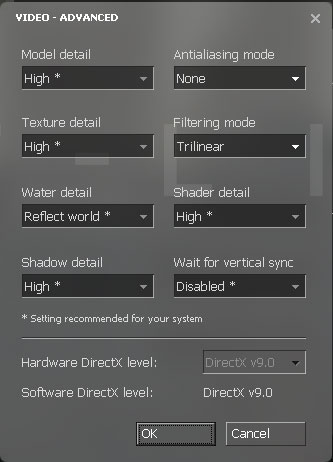
The Hardware DirectX level field indicates what rendering path you are currently using. You can specify alternate rendering paths by using the following commandline switch: -dxlevel xx, where xx is 90 for DirectX 9, 81 for DirectX 8.1, 80 for DirectX 8.0 and 70 for DirectX 7.0. You can specify whatever DX level you'd like, but if your hardware doesn't support it you won't get any of the benefits of it. For our tests here today we used the DX9, DX8 and DX7 rendering paths. When possible we used the DX8.1 rendering path.
The point of this article is to compare both the image quality and the performance of the more mainstream DirectX 8 and DirectX 9 GPUs, and what better way to start than by looking at the difference in image quality between the DX8 and DX9 codepaths...


 Facebook
 Twitter
 RSS
RSS


62 Comments
View All Comments
stealthc - Monday, January 3, 2005 - link
I have geforce4 mx 440, with 1.7ghz intel cpu and the frame rate is unacceptable, jittery all to hell, stupid HL2 autodetects it as dx7.0 card, I forcefully correct but still. How the hell are you pulling off frame rates like that with that particular card? I barely get a stable rate at 800x600 res at 20fps. I see lots of red and usually yellow when I use cl_showfps 1 in consoleThere's something completely messed with this game it shouldn't run like this.
Counter strike source is unplayable, I can't get over 10fps in it. Usually it hangs at around 3 to 6 fps.
I'm pissed off I spent $60 on a freaking game that does SH*T for me. I already beat it but it's so not smooth and jittery I'm surprised I could even hit the side of a barn.
Barneyk - Monday, December 6, 2004 - link
"The next step is to find out how powerful of a CPU you will need, and that will be the subject of our third installment in our Half Life 2 performance guides. Stay tuned..."Yeah, im waiting like hell, i wanna se how HL2 performs on old CPUs, i have a TB1200 and a GF4 Ti4800SE, Graphics perfomance was OK, but the game playing was really sluggish, but still very playable.
And i wanna se som comparison graphs on how different CPUs perform, and i've been waiting, when do we get to see the HL2 CPU roundup? :)
charlytrw - Thursday, December 2, 2004 - link
take a look on this link, here are some interesting info about how to improve performance on geforce fx users in about a 50% on dx9 mode. Try it yourself. The link to the article is:http://www.hardforum.com/showthread.php?t=838630&a...
I hope this can help to some geforce fx users... :)
clstrfbc - Wednesday, December 1, 2004 - link
Did anyone else notice the piers and pylons don't have reflections in the screen shots on page 2, Image Quality, the second picture, the one of the water and damn/lock.When you roll over, you see the non-reflexion version in dx8, rollback and something looks funny. The refelctions look good, but there are lots of things missing, most obviously the piers, aslo some bullocks? (things you tie ropes to)
Hmm, maybe the pier is a witch, or is it a vampire, so it has no reflection....
Other than that, the game is awesome. I'm well into city 17, and only took a break because the wife was becoming more dangerous than the Combine.
Running on a Athlon 1.7 512Mb and Saphyre Radeon 9000 128Mb?, it it plays fine excepte the hickups at saves and naptimes at loads.
MrCoyote - Monday, November 29, 2004 - link
This whole ATI/Nvidia DirectX/OpenGL optimization is driving me insane. Developers need to stop trying to optimize and code for "universal" video cards.One reason why DirectX/OpenGL was created, was to make it easier on developers when accessing different video cards. It is a "middle man", and the developer shouldn't have to know what card someone has in their system.
But now, all these developers are using stupid tricks to check if you have an ATI or Nvidia card, and optimize the paths. This is just plain stupid and takes more time for the developer.
Why don't they just code for a "universal" video card, since that's what DirectX/OpenGL was made for?
Alphafox78 - Wednesday, November 24, 2004 - link
'Glide' all the way!!!I used to run Diablo on a voodoo2 and you could switch from glide to Dx and glide looked so much better! even after upgrading to a geforce card glide looked better... not that its relevant here. heh
nserra - Wednesday, November 24, 2004 - link
#55 OK I agree. No I was not trying to saying that 6xxx is bad, or that it will be bad. Nor I think it superior do Ati X line and vice versa. But we already have the "bad" example of the nvidia FX line (for games), how will both scale?! I didn’t like 3Dmark bench, but was 3Dmark03 that bad? It was already showing something at the time….One day I said here it was important to bench an Ati 8500/9000 vs Geforce3/4 using current drivers (and platforms maybe too) with new and older games to test.
This is very important since you will know if support to older hardware is up to date, and also how is performance on these cards today.
I am not saying that while 8500 loosed to Geforce4 in the past, that it will win today, I just want to know how things are now! Is PS1.4 of the 8500 giving it any thing now since then it doesn’t? I don’t know!
But everyone said the test was pointless and that there where no need to bench "older" hardware, since no one was planning to buy it....
Lord Banshee - Tuesday, November 23, 2004 - link
well it kinda matter what you do with your computer. Personaly i like my 5900XT over the 9800Pro i have because it is faster in 3D Modeling software.. But for gaming the 9800Pro is fare better.But as you say that the NV3x wasn't bad then but now, well i think it was bad then just had nothing to prove it. Now that their is a lot of DX9 games out the poor mistake on nvidia engineers show. And they know they missed up thats what the 6800 can use a 16x1 pipeline config. I belive the 59xx's were 4x2 and the 9800 was 8x1. the 6600GT also shows nvidia's mistake being that it is a 8x1 and beating the paints off the 4x2 5900 series.
But i was unsure about if you were tring to say in your last post if you think nvidia fudged again and that it will show in due time with the 6800 series, but if this is the case and you are tring to say that. I don't think so and i believe Nvidia truelly has a very compeditive card that meets the demands of all users.
nserra - Tuesday, November 23, 2004 - link
#52 You are right. I was talking about the NV3x core. But dont forget that this CHIP was not that bad at the time, its really bad TODAY!Example: Now who is better served, who had bought a 5600/5700 or a 9600 card?
pio!pio! - Monday, November 22, 2004 - link
#48 agreed..it may be that dx8 water looks that crappy while dx8.1 water looks like what you and I are seeing