



The First Look, Continued
Moving past the more basic cosmetic changes, Microsoft has made several changes in Vista both as direct features and part of Aero in order to add functionality and improve usability/productivity, most of which require full Aero functionality to use. The most basic change among these has been a modification of ALT+TAB for switching programs, which has been given the formal name of Windows Flip. The main change here is that using the scaling abilities of Aero, each program shows up as a combination of its application icon and the active window of the application, giving the ability to see what's going on in the application you're about to switch to. This is most helpful when multiple copies of the same application are open. Microsoft previously implemented this as a PowerToy for XP, so some Windows users may already be familiar with it; while this feature was very slow on XP because of GDI+, the use of the compositing engine resolves this difficulty under Vista.
Also given a similar treatment has been the taskbar, which now can show you a preview of what running application you're mousing over. It's arguably similar to how Mac OS X uses a scaled version of a minimized window to represent the item in the dock, but since Mac OS X and Windows use slightly different paradigms for dealing with open applications, it's not overtly imitating the Mac. Interestingly enough, unlike some of the other productivity features, this one can easily be turned on and off as a preference.
Last but not least on the list of productivity additions is a brand-new feature Microsoft is calling Flip3D. As the name would imply, it's what amounts to an enhanced version of Flip, but at the same time that would be an understatement. As you can see in the above screenshot, the biggest influence is clearly that of Exposé on the Mac - a utility attempting to help the user stay organized by seeing every open window at once - but Microsoft has gone in an entirely different direction in how they are presenting everything.
Activated via Win+Tab, Flip3D works like a rolodex of windows, with a mouse wheel (or repeated pressing of the TAB key) allowing the user to flip through the windows until they find the one they're looking for. However, this is one major case where we wish Microsoft would have just completely copied Apple, rather than trying to create their own implementation. Flip3D in its current incarnation is not at all a useful productivity tool because the rolodex design means that it can't really show everything at once like Exposé can. Having to wheel through things further hinders its effectiveness, as it's not as smooth an operation as simply using the mouse to select the desired window. For all you true nerds and geeks out there, Flip3D is an O(n) operation where Exposé is O(1). Lastly, for such a great emphasis on eye-candy in Aero, the rotated view of the windows is poorly thought out; by rotating the windows it creates aliasing which in spite of the power of modern video cards is not being removed. The artifacting around the window borders and the illegibility of the text simply make Flip3D ugly to look at and ugly to use. In this case, Microsoft simply would have been better off not implementing Flip3D than using this. We like Exposé, and a version of it in Windows would be very nice, but Flip3D is a second-rate copy at best, and ultimately does not function nearly enough like Exposé to be useful.
One last addition related to the overall look of Vista but not specifically a productivity tool is a new class of utilities called Gadgets. Here Microsoft's inspiration is very clear; if you've ever used Widgets on Mac OS X or Konfabulator on the Mac/PC, then you know what Gadgets are all about. For those of you new to the idea, Gadgets/Widgets are small JavaScript/XML powered applications that do one small feature, such as displaying the current weather conditions, CPU usage, etc. Here Microsoft has gone for a carbon copy implementation of Konfabulator's widget idea, with Gadgets residing on top of the desktop and visible when the desktop is brought to the front, or they can be brought to the front on their own by pressing Win+Space. Widgets have been a huge success both for Mac OS X and Konfabulator, so we're not the least bit shocked to see them implemented in Vista.
Moving past the more basic cosmetic changes, Microsoft has made several changes in Vista both as direct features and part of Aero in order to add functionality and improve usability/productivity, most of which require full Aero functionality to use. The most basic change among these has been a modification of ALT+TAB for switching programs, which has been given the formal name of Windows Flip. The main change here is that using the scaling abilities of Aero, each program shows up as a combination of its application icon and the active window of the application, giving the ability to see what's going on in the application you're about to switch to. This is most helpful when multiple copies of the same application are open. Microsoft previously implemented this as a PowerToy for XP, so some Windows users may already be familiar with it; while this feature was very slow on XP because of GDI+, the use of the compositing engine resolves this difficulty under Vista.
Also given a similar treatment has been the taskbar, which now can show you a preview of what running application you're mousing over. It's arguably similar to how Mac OS X uses a scaled version of a minimized window to represent the item in the dock, but since Mac OS X and Windows use slightly different paradigms for dealing with open applications, it's not overtly imitating the Mac. Interestingly enough, unlike some of the other productivity features, this one can easily be turned on and off as a preference.
 |
| Click to enlarge |
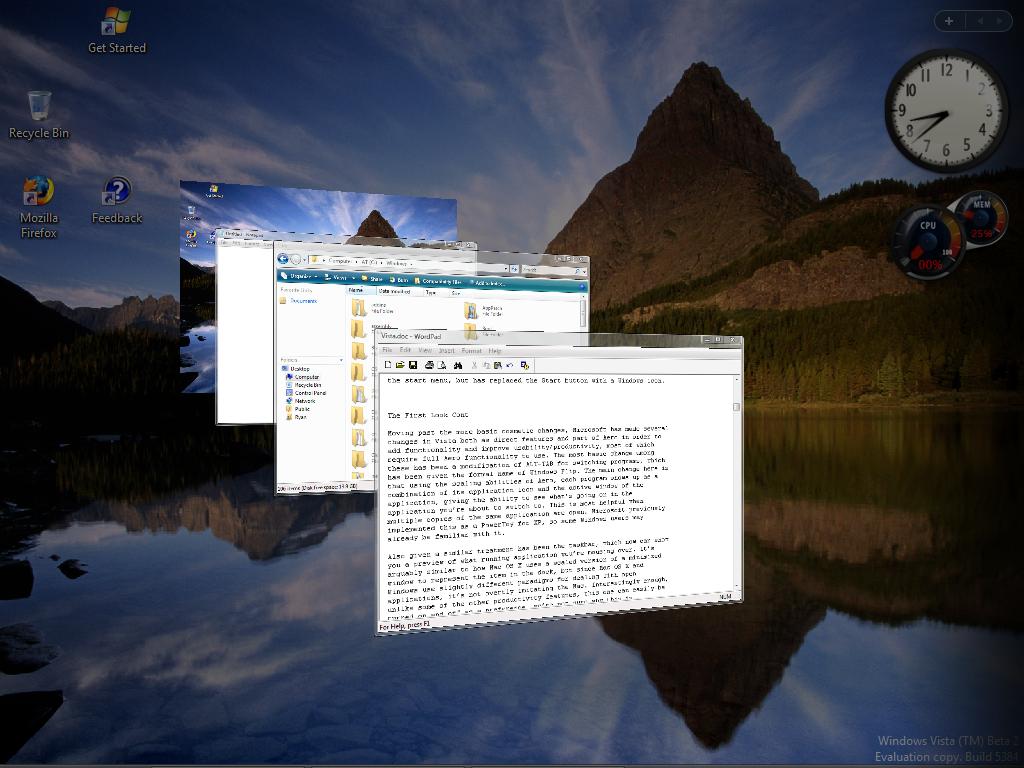
Last but not least on the list of productivity additions is a brand-new feature Microsoft is calling Flip3D. As the name would imply, it's what amounts to an enhanced version of Flip, but at the same time that would be an understatement. As you can see in the above screenshot, the biggest influence is clearly that of Exposé on the Mac - a utility attempting to help the user stay organized by seeing every open window at once - but Microsoft has gone in an entirely different direction in how they are presenting everything.
Activated via Win+Tab, Flip3D works like a rolodex of windows, with a mouse wheel (or repeated pressing of the TAB key) allowing the user to flip through the windows until they find the one they're looking for. However, this is one major case where we wish Microsoft would have just completely copied Apple, rather than trying to create their own implementation. Flip3D in its current incarnation is not at all a useful productivity tool because the rolodex design means that it can't really show everything at once like Exposé can. Having to wheel through things further hinders its effectiveness, as it's not as smooth an operation as simply using the mouse to select the desired window. For all you true nerds and geeks out there, Flip3D is an O(n) operation where Exposé is O(1). Lastly, for such a great emphasis on eye-candy in Aero, the rotated view of the windows is poorly thought out; by rotating the windows it creates aliasing which in spite of the power of modern video cards is not being removed. The artifacting around the window borders and the illegibility of the text simply make Flip3D ugly to look at and ugly to use. In this case, Microsoft simply would have been better off not implementing Flip3D than using this. We like Exposé, and a version of it in Windows would be very nice, but Flip3D is a second-rate copy at best, and ultimately does not function nearly enough like Exposé to be useful.
 |
| Click to enlarge |
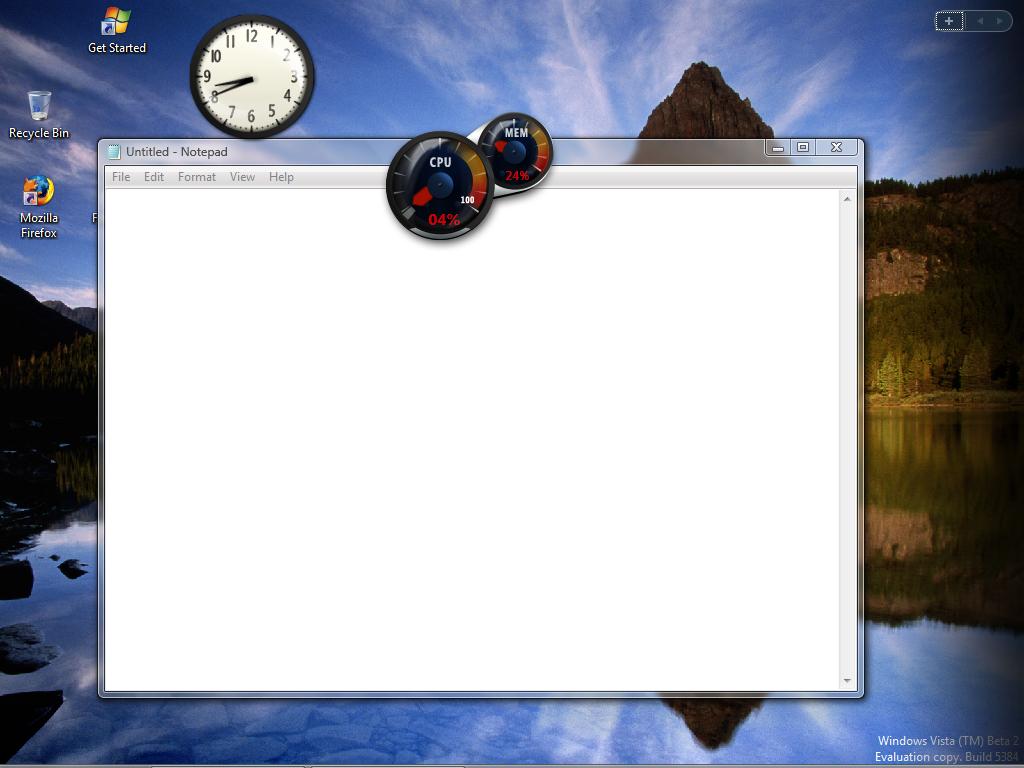
One last addition related to the overall look of Vista but not specifically a productivity tool is a new class of utilities called Gadgets. Here Microsoft's inspiration is very clear; if you've ever used Widgets on Mac OS X or Konfabulator on the Mac/PC, then you know what Gadgets are all about. For those of you new to the idea, Gadgets/Widgets are small JavaScript/XML powered applications that do one small feature, such as displaying the current weather conditions, CPU usage, etc. Here Microsoft has gone for a carbon copy implementation of Konfabulator's widget idea, with Gadgets residing on top of the desktop and visible when the desktop is brought to the front, or they can be brought to the front on their own by pressing Win+Space. Widgets have been a huge success both for Mac OS X and Konfabulator, so we're not the least bit shocked to see them implemented in Vista.


 Facebook
 Twitter
 RSS
RSS


75 Comments
View All Comments
aeschbi99 - Wednesday, July 5, 2006 - link
HiI just loved your article about Vista....especially the comparison to TIGER...I am a big MAC fan! But what MS did with Flip3D it appears to me is a copy of SUN's "Looking Glass" - which was out I believe even in 2003.
Redmond --- start your copy machine.... the real invention starts somewhere else....
see link http://java.sun.com/developer/technicalArticles/J2...">http://java.sun.com/developer/technical...s/J2SE/D...
absynthe49 - Saturday, July 1, 2006 - link
I really enjoy anandtech but I didn't really like the style of this article. When I read it.. I was quite sad that vista was looking so bad at this stage... particularly the game performance.But then I remembered that I read in a few places that Vista would not support native DirectX 9. That it would be in a way.. emulated. So there was an expected decrease in numbers. My understanding was that new powerful hardware would be coming out and that it would run the older games fast enough to overcome the loss from emulation.
The article almost seemed to say that gaming looks doomed in a way.
So basically... the drivers are not tweaked yet... this is still a beta... there may still be a debugging layer running... and I think vista runs directx 9 through an emulation layer.
So unless this is false and it actually runs directx 9 natively... is it really a surprize at all that directx 9 games run from 20 to 30 frames per second slower? This did not seem to be addressed at all in the article and I thought it was kind of premature worry so much.
NullSubroutine - Monday, June 19, 2006 - link
they can say every hardware/software limitation they want. i dont buy that they 'cant' make dx10 for xp and they 'cant' have full opengl support. just too convienent for microsoft.mongo lloyd - Sunday, June 18, 2006 - link
Although Microsoft may not consider itself to be in direct competition with Apple, this is the match-up most people have been waiting for. Only people who give a shit about OSX, which is far from "most people".drewintheav - Sunday, June 18, 2006 - link
I thought the staged install method was supposed to be so fast?It took way longer to install than it does for me to install XP.
The Vista Media Center is not useable at this point...
The video stutters, the audio drops out, and it crashes all the time.
I had always heard Mac fanatics saying how much better OSX was than XP
I didn't really believe it could be "so much" better
I tried out OSX after I installed Vista.
And now it is very obvious to me where Microsoft has gotten most of its new UI ideas.
At this point I would say that Microsoft's has executed them very poorly
which is a little disappointing.
It is disappointing to me that even if everything worked perfectly in Vista
it would still lag behind OSX on a number of points
In fact if Apple sold OSX for Intel as a retail product
and added a Media Center application
I would switch to MAC and just run windows Windows apps with an emulator or a VM
and dual boot XP for games.
Microsoft really has a lot of work to do and I hope they get it together...
OSX is way more innovative than Vista at this point...
AndrewChang - Wednesday, June 21, 2006 - link
Well, after months of deliberation, it looks like my next personal computing platform will be a merom/leopard based mac book pro. I don't expect to be using a vista based pc until at least the first or second service pack. A fully intergrated bookcamp/virtualization in this next OSX release should take care of my legacy applications (games on xp). Thanks Anandtech, w/o your Macintosh articles I would have never considered all the wonderful options available to me. It'll be fun learing how to use a new OS, especially one that is already superior what us PC users have to look forward to.Pirks - Monday, June 19, 2006 - link
There's no point - since Dell with the same configuration as iMac and with the same set of basic apps (like DVD burning/mastering etc) costs the same as iMac - why would you buy Dell in the first place? To me it seems that if you spend $1500 on a Dell plus retail Mac OS X instead of iMac - you'll get lower quality product.
Hence no retail Mac OS X - nobody is interested because iMacs are priced on par with comparable Dells.
There is Front Row - check out decent Mac sites, read reviews - you'll be surprised how much you missed, hehe ;-)
nullpointerus - Monday, June 19, 2006 - link
Not everyone who wants to run Mac OS X wants to purchase a prebuilt computer for it. You should know that if you're posting here because this site is mostly made up of enthusiasts.Mac OS X w/ Front Row isn't comparable to Windows MCE. Show me the integrated program guide and automatic recording capabilities. You may as well compare Paint to Gimp or Photoshop.
Pirks - Monday, June 19, 2006 - link
Same can be said about the post of the guy above asking for the OS X retail version. If I should know this site is for enthusiasts - THEN HE SHOULD KNOW what OS X is and why it is so successful and generates lots of buzz in IT press - pecisely because it DOES NOT have a retail version. Hence asking OS X to give up it's number one advantage - smooth integration with hardware because hardware is NOT open - is not much smarter than my post above.Depends on what the user wants. I suppose some users are happy with limited functionality of Paint and don't need/don't want Photoshop.
nullpointerus - Saturday, June 17, 2006 - link
"We also tested the boot times for a clean install of each operating system, using a stopwatch to see how long it took for the OS to boot to the point where it presented a usable login screen."Um...you must have something seriously wrong with your system. I'm using a lowly Athlon64 3000+ Winchester and 2GB PC3200 RAM. I did a clean install of the x64 version and timed it with my digital watch; it took ~50 seconds to get to the desktop, not the login screen. I had to switch to the 32-bit version because of driver support, and I can tell you it doesn't take 48 seconds to get to the login screen.
Now, if you rummage around in the control panel's performance applet, you can look at services and drivers which are slowing the boot process down; USB audio and nVidia's drivers affected my system, and even so it starts nearly 30 seconds faster than your clean x64 system. Maybe there's something on your PC that's causing problems?
Also, something on my second boot will chew up large amounts of CPU time, making the login screen unresponsive. On subsequent boots this problem disappeared, and I was able to enter my password immediately and login fairly quickly. I have drivers for my Linksys WMP54GX and Creative Audigy installed now, too, so my PC should be worse than your clean system.
Maybe you could check these things out and retest?