



The SSD Anthology: Understanding SSDs and New Drives from OCZ
by Anand Lal Shimpi on March 18, 2009 12:00 AM EST- Posted in
- Storage
Putting Theory to Practice: Understanding the SSD Performance Degradation Problem
Let’s look at the problem in the real world. You, me and our best friend have decided to start making SSDs. We buy up some NAND-flash and build a controller. The table below summarizes our drive’s characteristics:
| Our Hypothetical SSD | |
| Page Size | 4KB |
| Block Size | 5 Pages (20KB) |
| Drive Size | 1 Block (20KB |
| Read Speed | 2 KB/s |
| Write Speed | 1 KB/s |
Through impressive marketing and your incredibly good looks we sell a drive. Our customer first goes to save a 4KB text file to his brand new SSD. The request comes down to our controller, which finds that all pages are empty, and allocates the first page to this text file.
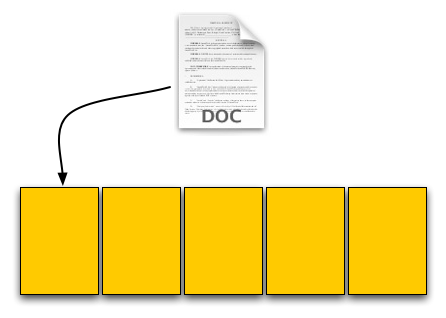
Our SSD. The yellow boxes are empty pages
The user then goes and saves an 8KB JPEG. The request, once again, comes down to our controller, and fills the next two pages with the image.
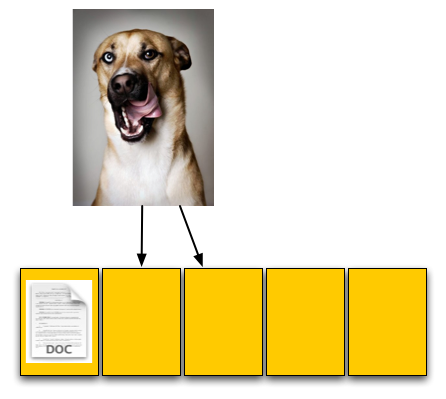
The picture is 8KB and thus occupies two pages, which are thankfully empty
The OS reports that 60% of our drive is now full, which it is. Three of the five open pages are occupied with data and the remaining two pages are empty.
Now let’s say that the user goes back and deletes that original text file. This request doesn’t ever reach our controller, as far as our controller is concerned we’ve got three valid and two empty pages.
For our final write, the user wants to save a 12KB JPEG, that requires three 4KB pages to store. The OS knows that the first LBA, the one allocated to the 4KB text file, can be overwritten; so it tells our controller to overwrite that LBA as well as store the last 8KB of the image in our last available LBAs.
Now we have a problem once these requests get to our SSD controller. We’ve got three pages worth of write requests incoming, but only two pages free. Remember that the OS knows we have 12KB free, but on the drive only 8KB is actually free, 4KB is in use by an invalid page. We need to erase that page in order to complete the write request.
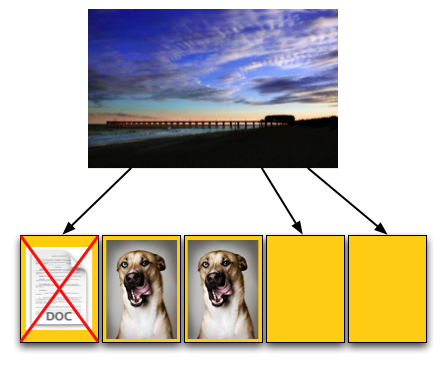
Uhoh, problem. We don't have enough empty pages.
Remember back to Flash 101, even though we have to erase just one page we can’t; you can’t erase pages, only blocks. We have to erase all of our data just to get rid of the invalid page, then write it all back again.
To do so we first read the entire block back into memory somewhere; if we’ve got a good controller we’ll just read it into an on-die cache (steps 1 and 2 below), if not hopefully there’s some off-die memory we can use as a scratch pad. With the block read, we can modify it, remove the invalid page and replace it with good data (steps 3 and 4). But we’ve only done that in memory somewhere, now we need to write it to flash. Since we’ve got all of our data in memory, we can erase the entire block in flash and write the new block (step 5).
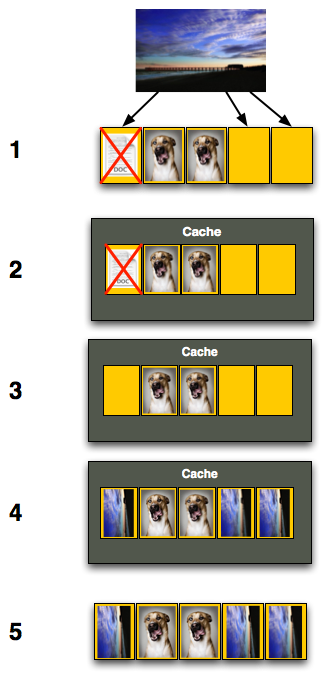
Now let’s think about what’s just happened. As far as the OS is concerned we needed to write 12KB of data and it got written. Our SSD controller knows what really transpired however. In order to write that 12KB of data we had to first read 12KB then write an entire block, or 20KB.
Our SSD is quite slow, it can only write at 1KB/s and read at 2KB/s. Writing 12KB should have taken 12 seconds but since we had to read 12KB and then write 20KB the whole operation now took 26 seconds.
To the end user it would look like our write speed dropped from 1KB/s to 0.46KB/s, since it took us 26 seconds to write 12KB.
Are things starting to make sense now? This is why the Intel X25-M and other SSDs get slower the more you use them, and it’s also why the write speeds drop the most while the read speeds stay about the same. When writing to an empty page the SSD can write very quickly, but when writing to a page that already has data in it there’s additional overhead that must be dealt with thus reducing the write speeds.


 Facebook
 Twitter
 RSS
RSS


250 Comments
View All Comments
KadensDad - Tuesday, October 27, 2009 - link
How do these drives fail? I have heard that they will just suddenly die, no more writes or reads possible. What I would like to know is what happens when it dies? Do you lose all data? Just can't write anymore? How does the OS respond? Any early warnings? What about e.g. CRC? How does possibility of data corruption compare to traditional SSD? What about RAID? Since the drives are electrical, not mechanical, this reduces the number of failure vectors and environmental concerns (e.g., ambient temperature over lifetime of the drive). Won't SSDs therefore fail closer together in time in a RAID configuration? This reduces the window of opportunity for fixing an array and also decreases the applicability of RAID, however marginal.adsmith82 - Monday, September 14, 2009 - link
I need to run HDDErase on an X25-M. No matter what bootable CD or flash drive I create, HDDErase does not see either of my SATA hard drives. I already disabled AHCI in BIOS. Also, I am using version 3.3. I know that 4.0 does not work with the X25-M.Can someone help me troubleshoot this please? Thanks.
gallde - Thursday, June 11, 2009 - link
You point out that TRIM will only work on deletions, not on overwrites. But, couldn't a smart controller look at blocks that have a majority of invalid pages and "trim" them as well, recovering clean pages as a background process?forsunny - Thursday, August 13, 2009 - link
Why not just make the SSDs capable of individual page erases instead of blocks? Problem solved.Ron White - Sunday, August 31, 2014 - link
Erasing the NAND transistor in an SSD requires such a large jolt of voltage that it would affect surrounding transistors.lyeoh - Friday, May 29, 2009 - link
Good and informative article.Regarding the shill tshen83 who claims that Anandtech cost the drive manufacturers millions of dollars in sales.
If that is true, Anandtech has saved customers millions of dollars.
Anandtech should care more about their readers losses than drive manufacturer losses. If Anandtech was a site for drive manufacturers and their shills we wouldn't be reading it.
To me, if the SSD drive manufacturers lose money, it's their own fault for building crap that has higher write latencies than old fashioned drives with metal discs spinning at 7200RPM or slower. Not anandtech's.
I can get higher sequential reads and writes by using RAID on old fashioned drives. It is much harder to get lower latency. So Anandtech did the right thing for OCZ.
Lastly, there might be a way of making your windows machine stutter less even with a crap SSD. Note: I haven't tested the actual effect on an SSD because I don't have an SSD.
Basically by default when Windows accesses a file on NTFS, it will WRITE to the directory the time of the access. Yep, it writes when it opens files and directories (which are just special files). That might explain the stuttering people see. For a lot of things, Windows has to open files.
Warning! There are reasons why some people or programs would want to know the last access time of files. Me and my programs don't (and I doubt most people would).
If you are sure that's true for you (or are willing to take the risk) set NtfsDisableLastAccessUpdate=1 as per:
http://technet.microsoft.com/en-us/library/cc75856...">http://technet.microsoft.com/en-us/library/cc75856...
poohbear - Sunday, April 26, 2009 - link
Brilliant article and very informative on these emerging technology. I wont be buying one anytime soon @ their prices, but good to know we'll FINALLY be replacing convential HDD which are the one component that have been pretty much the same since as far back as i can remember"SSDs have +5 armor immunity to random access latency"
rofl that's the best analogy i've seen on a hardware review site. is every comp geek a RPG geek @ heart?
Gootch - Sunday, April 19, 2009 - link
Great article. Realy made me understand what I need to look at before making the plunge. Mistakes and all, my compliments. As for value between the now seemingly drastically improved Vertex vs the X25-M, I compared prices between the two and per Gb, the Intell product for say an 80 Gb drive is Can $5.86/Gb, while the OCZ 60 Gb SSD is Can $6.81/Gb. Now that we are no longer comparing apples and oranges, I think we need to point out that the Intel product is not only faster and maintains it's performance edge better, but it is cheaper per Gb. At least in Canada. I have many OCZ products and I love the company and it's customer support. I can only hope that they will make their SSDs more competitive in the near future, because most consumers will pay the extra 70 bucks and go with the X25 when they pay attention to the numbers, both performance and price.Baffo - Saturday, April 11, 2009 - link
I could forsee a whole host of issues with encrypting SSD drives, not the least of which is essentially making the drive completely "used" outside of the drive slack space - which would be a temporary reprieve for the reasons discussed in this article. However, I could also see potential performance and lifetime issues since modern encryption uses streaming ciphers (e.g. an entire encrypted block - which may or may not conform to the physical block size will be changed for even one bit change within the block itself). Has anyone looked at the resultant effect on performance due to using encryption - it would be good to compare say Bitlocker, PGP, Checkpoint, and an open source encryption solution (Crypt or something like that?). This could actually become a real driver for moving to on-drive encryption where it would have the opportunity to optimize the encrpytion for the pro/cons of the SSD architecture.brandensilva - Friday, April 10, 2009 - link
Great article! I respect that OCZ made the necessary changes to make this drive work. I'd rather take a slightly slower drive if it meant consistent performance.If my hard drive started to stutter I'd flip out! I'm glad that they took the feedback and instead of selling faulty drives, that would ultimately hurt their brand, they decided to go back to the drawing board and iron out the kinks. I'm not expecting them to compare to Intel's 25-M per price or performance. They don't have nearly the cash or manufacturing capacity to compete with Intel but they do have that small business feel with receiving feedback and making improvements, which is important to customers.
Lets hope they continue to utilize that aspect of their business and further improve on their products and bring us some reliable SSD's in the future.