



MTRON SSD 32GB: Wile E. Coyote or Road Runner?
by Gary Key on August 15, 2007 3:00 AM EST- Posted in
- Storage
MTRON is a fairly new player in the storage market. In fact, the company was founded less than two years ago in South Korea. They have been on the fast track since with major funding being provided by Hyundai IT Ltd. and Digital First Co., Ltd. They have steered clear of mechanical drive designs and instead have focused their efforts entirely on Solid State Drives (SSD). We have been keeping track of MTRON since the introduction of their first 64GB SSD last year. However, it was their promise of an SSD product with a proprietary controller chipset that would allow it to run with the Raptors that really piqued our interest.
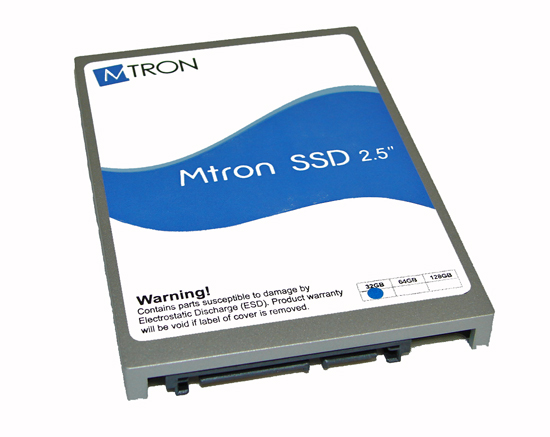
Therefore, we were really excited when our friends at DV Nation contacted us about the recent arrival of the MTRON MSD-S25032 32GB 2.5" product that advertised maximum read speeds of 100 MB/sec, write speeds of 80 MB/sec, and burst speeds up to 150 MB/sec - all that combined with random access speeds of around 0.1ms. These specifications far exceed those of the latest SanDisk and Samsung consumer SSD products that are approaching 67MB/sec read speeds and 45MB/sec write speeds, although these also boast typical average random access times of .12ms.
We were giddy like kids on Christmas morning when the drive arrived and immediately threw it in our new desktop storage test bed to see if these performance claims were true. We have seen some of these SSD products hyped since CES 2007 and yet the drives are just now shipping in any type of volume, and our review samples have only just started arriving. We were somewhat skeptical of the MTRON performance claims also as even Samsung is not committing to 100 MB/sec read rates until sometime next year.
We ran our first theoretical throughput tests and were rewarded with average read speeds in the 75 MB/sec range and write speeds around 67 MB/sec. We ran similar tests with a different program and had slightly lower results. Our first thoughts had us concluding this was another case of marketing hype not meeting up with actual product results so we tried some additional benchmarks. The performance results were very good but still nowhere near the promises.
After a few phone calls and several email exchanges, it was suggested that we drop our Intel P35/ICH9R test board and switch over to any of the NVIDIA 680i/650i products. Apparently those whispers we had been hearing about some of the latest Intel chipsets not working at full speed with the latest SSD products were true, or at least it appeared that way. We swapped out the motherboards, loaded a new drive image, and fired up the benchmarks. Sure enough every benchmark we had run to date improved with the NVIDIA 680i board, and we noticed our HD Tach numbers were now close MTRON's performance claims.
The final HD Tach results showed the NVIDIA 680i generating a sustained transfer rate of 95.1 MB/sec, write speeds of 74.7 MB/sec, and a burst rate of 100.4 MB/sec. The same MTRON drive on the Intel P35/ICH9R boards scored a sustained transfer rate of 79.4 MB/sec, write speeds of 67.2 MB/sec, and a burst rate of 82.7 MB/sec. For those keeping count, the NVIDIA 680i chipset was showing a 17% improvement in sustained transfer rates, 11% improvement in write speeds, and a 21% increase in burst rates. Some of the synthetic benchmarks show improvements up to 88% in certain cases while our current application benchmarks show anywhere from a 1% to 20% gain when using the NVIDIA 680i SLI MCP instead of the Intel ICH9R.
This threw a kink into our entire review process as the numbers were way outside the scope of normal benchmark variations. We compared several of our current hard drives and experienced the typical difference of 1%~3% between the two chipsets with the NVIDIA controller being slightly faster in several tests but certainly nothing you would ever notice in actual usage. We tried several P35/ICH9R boards along with a few P965/ICH8R boards with the same results. We are in the process of testing other Intel desktop chipsets, such as the 975X/ICH7R combination, and will start on the notebook chipsets shortly.
While the percentage improvements with the NVIDIA chipset sound significant in several cases, in actual application usage it remains very difficult to discern any differences between the two chipsets. It is like watching Wile E. Coyote chase the Road Runner; he is always close but just cannot match the Road Runner's sheer speed, even though he would be fast enough for most of us. However, with this latest generation of SSD product we would have to suggest using the NVIDIA 680i at this time if you want to extract the best possible performance. Hopefully, Intel will provide us an answer shortly as to why the current ICH9 and ICH8 Southbridges cap the performance of these latest SSD drives to around 80 MB/sec for sustained transfer rates.
Our preview today is based on a limited test suite that is desktop centric in nature. We will follow up shortly with an additional review of this drive in its native configuration for notebooks. At that time we will also present our revised benchmark test suite designed around Windows Vista and actual application usage. The revised storage benchmark suite is also suitable for providing direct comparisons to the new hybrid hard drives that combine NAND flash memory and a mechanical hard drive to offer the best of both worlds - or at least that's the theory. In the meantime, let's take a quick look at this drive and see how it compares to the top performing desktop drive, the venerable Western Digital Raptor 150GB.
Therefore, we were really excited when our friends at DV Nation contacted us about the recent arrival of the MTRON MSD-S25032 32GB 2.5" product that advertised maximum read speeds of 100 MB/sec, write speeds of 80 MB/sec, and burst speeds up to 150 MB/sec - all that combined with random access speeds of around 0.1ms. These specifications far exceed those of the latest SanDisk and Samsung consumer SSD products that are approaching 67MB/sec read speeds and 45MB/sec write speeds, although these also boast typical average random access times of .12ms.
We were giddy like kids on Christmas morning when the drive arrived and immediately threw it in our new desktop storage test bed to see if these performance claims were true. We have seen some of these SSD products hyped since CES 2007 and yet the drives are just now shipping in any type of volume, and our review samples have only just started arriving. We were somewhat skeptical of the MTRON performance claims also as even Samsung is not committing to 100 MB/sec read rates until sometime next year.
We ran our first theoretical throughput tests and were rewarded with average read speeds in the 75 MB/sec range and write speeds around 67 MB/sec. We ran similar tests with a different program and had slightly lower results. Our first thoughts had us concluding this was another case of marketing hype not meeting up with actual product results so we tried some additional benchmarks. The performance results were very good but still nowhere near the promises.
After a few phone calls and several email exchanges, it was suggested that we drop our Intel P35/ICH9R test board and switch over to any of the NVIDIA 680i/650i products. Apparently those whispers we had been hearing about some of the latest Intel chipsets not working at full speed with the latest SSD products were true, or at least it appeared that way. We swapped out the motherboards, loaded a new drive image, and fired up the benchmarks. Sure enough every benchmark we had run to date improved with the NVIDIA 680i board, and we noticed our HD Tach numbers were now close MTRON's performance claims.
The final HD Tach results showed the NVIDIA 680i generating a sustained transfer rate of 95.1 MB/sec, write speeds of 74.7 MB/sec, and a burst rate of 100.4 MB/sec. The same MTRON drive on the Intel P35/ICH9R boards scored a sustained transfer rate of 79.4 MB/sec, write speeds of 67.2 MB/sec, and a burst rate of 82.7 MB/sec. For those keeping count, the NVIDIA 680i chipset was showing a 17% improvement in sustained transfer rates, 11% improvement in write speeds, and a 21% increase in burst rates. Some of the synthetic benchmarks show improvements up to 88% in certain cases while our current application benchmarks show anywhere from a 1% to 20% gain when using the NVIDIA 680i SLI MCP instead of the Intel ICH9R.
This threw a kink into our entire review process as the numbers were way outside the scope of normal benchmark variations. We compared several of our current hard drives and experienced the typical difference of 1%~3% between the two chipsets with the NVIDIA controller being slightly faster in several tests but certainly nothing you would ever notice in actual usage. We tried several P35/ICH9R boards along with a few P965/ICH8R boards with the same results. We are in the process of testing other Intel desktop chipsets, such as the 975X/ICH7R combination, and will start on the notebook chipsets shortly.
While the percentage improvements with the NVIDIA chipset sound significant in several cases, in actual application usage it remains very difficult to discern any differences between the two chipsets. It is like watching Wile E. Coyote chase the Road Runner; he is always close but just cannot match the Road Runner's sheer speed, even though he would be fast enough for most of us. However, with this latest generation of SSD product we would have to suggest using the NVIDIA 680i at this time if you want to extract the best possible performance. Hopefully, Intel will provide us an answer shortly as to why the current ICH9 and ICH8 Southbridges cap the performance of these latest SSD drives to around 80 MB/sec for sustained transfer rates.
Our preview today is based on a limited test suite that is desktop centric in nature. We will follow up shortly with an additional review of this drive in its native configuration for notebooks. At that time we will also present our revised benchmark test suite designed around Windows Vista and actual application usage. The revised storage benchmark suite is also suitable for providing direct comparisons to the new hybrid hard drives that combine NAND flash memory and a mechanical hard drive to offer the best of both worlds - or at least that's the theory. In the meantime, let's take a quick look at this drive and see how it compares to the top performing desktop drive, the venerable Western Digital Raptor 150GB.


 Facebook
 Twitter
 RSS
RSS


37 Comments
View All Comments
enovikoff - Thursday, October 29, 2009 - link
I purchased two 7000 series SSDs for running a commercial datacenter (hey, they're billed as "enterprise") Both failed within 3 months and MTRON did not stand behind them. Instead they said that I should mail them to Korea(!!!) and wait to see if their tests indicated that they were defective. In my business "waiting" means I either have to spend money to replace the hardware or leave my customers high and dry. Attempts to RMA the SSDs through their reseller, NeoStore, also failed: NeoStore took the SSDs back and then never acknowledged emails or calls. $2000 worth of hardware (I have receipts/invoices to prove everything) is in their possession, and my company is out the $2000 as well as the refunds we had to pay our customers for the downtime.Avoid MTRON: they're not ready to provide reliable units or do business in the United States.
WaterGun - Thursday, August 16, 2007 - link
The same drive is for sale in Japan for only 99800 Yen ~ US$900. Here is a list of online shops:http://www.3top.co.jp/shohin_ichiran.php?SearchMod...">3 Top
http://shop.tsukumo.co.jp/goods/4582149901982/2015...">Tsukumo
http://www.ark-pc.co.jp/item/MSD-SATA602532/code/1...
So, why is there such a big price difference? Any takers?
brundlefly - Friday, August 17, 2007 - link
Hmmm there should be some kind of service that helps you order from Japanese web sites.PrinceGaz - Thursday, August 16, 2007 - link
Presumably, the 32GB SSD is measured using binary GB (1,073,741,824 bytes) rather than decimal GB like traditional hard-drives, therefore making it roughly 34.3GB when comparing it to other hard-drives. Still a bit on the small side, but perhaps worth mentioning.brundlefly - Thursday, August 16, 2007 - link
fdisk shows the device as 33.2 GB, but formatted as ext3 df shows ~31GB available.Disk /dev/sda: 33.2 GB, 33285996544 bytes
255 heads, 63 sectors/track, 4046 cylinders
Units = cylinders of 16065 * 512 = 8225280 bytes
df .
Filesystem 1K-blocks Used Available Use% Mounted on
/dev/sda5 31981396 8893912 21462916 30% /mnt/mtron
brundlefly - Thursday, August 16, 2007 - link
I received one of these this week too for evaluating as a MySQL datadir.The results were outstanding - we had a handful of problem queries which would take 30-40 seconds on a 15k Fujitsu MAS Ultra SCSI. The same queries take about 3 seconds on the MTRON.
I have worked with large MySQL databases for years, but there are a lot of examples like this one where I just cant qualify throwing a few days into A/B testing various indexing and table schemas for the performance issues with a handful of slow queries - especially when just *loading* a table and creating an index can take 20-30 min each. Throwing hardware at the problem is far cheaper and you can use simpler table layouts, plus you may not even be able to achieve this performance any other way in some scenarios.
IMHO this is a unique 'drop-in' solution for a lot of specific data center applications. In the long term you are going to see these replace mechanicals across the board in the server room because they will be cheaper and far simpler to deal with then SCSI and offer far better performance with low heat, noise, and power.
I also popped it in my notebook, which was just sublime. I already had the fastest mechanical in this notebook - a brand new Hitachi 7k200 with 16MB cache.
Within 34 min I had a 32-bit Vista Ultimate / Ubuntu Feisty x64 dual-boot setup - Vista booted in 21 seconds, Ubuntu in a little under 30 (a savings of about 6 seconds for each). No noise, vibration, or heat - the fan never came on, even set to high performance power profile. I didnt do a battery life test but from the battery remaining indicator I would expect an extra half hour.
Immediately the advantages of having a .1ms access time became apparent. Stuff just happens. Firefox cold boots in 3s, open a bunch of apps - the disk doesnt care, every piece of data is exactly .1ms away. Write speeds are more traditional but still as good as or better than the Hitachi. Subjectively the mental line between memory and disk usage just kind of dissolves.
While booting, I heard the BIOS check the optical drive, and it was like 'wtf with this prehistoric mechanical thing in my notebook!' In a notebook, the mechanical drive is dead, IMHO, but yet once the prices come down.
The lack of storage space was a downer, especially after just getting used to the 200GB in the Hitachi. I was thinking this could be partially augmented with a cheaper, slower 16GB expresscard SSD for music, etc.
On my overclocked 3Ghz C2D 6400 2GB Raptor desktop, the results were similar but subjectively not as exciting since I dont really care about heat noise vibration power (BF2142 booted to 'join game' in 70s vs 80s on the raptor). I would definitely wait until the prices for a 64GB came down to $300 or so before using one as a boot drive.
I use VMWare workstation a great deal, although I havent tried it yet this would be another application which would benefit greatly since it uses a pseudo-disk.
The disk is definitely going into production immediately on the MySQL server, and I am considering getting one as my primary Linux development workstation disk as 32 GB goes a long way in that application, and I have never seen a Linux desktop perform like that. Plus I do a lot more disk-intensive stuff in development vs web surfing etc on my notebook or desktop PC.
There is no argument IMHO - mechanicals are a dead-end technology as a notebook/desktop/server boot and application disk as soon as the prices come down.
bji - Wednesday, March 14, 2012 - link
You ended up being correct on all counts: 4 and a half years later and SSDs are making major inroads in every place you predicted they would. You can get a 120 GB SSD now for under $200 and it blows away the 32 GB Mtron you tested in every performance category.Googer - Thursday, August 16, 2007 - link
Could you possibly revisit this article at a later date and post some Mtron vs Raptor RAID 0 benchmarks?Also for the enterprise market and serious enthusiast, comparing this SSD to a Seagate 15k.5. Which would be the better value, 15K SAS or SATA SSD?
erikejw - Thursday, August 16, 2007 - link
Please get another one and test it in Raid 0.Verdant - Wednesday, August 15, 2007 - link
I would kill for one of these for my tablet, that would really affect battery life....and all the other good looking benefits. On the other hand i don't see working within the SSD capacity limitations, and i don't see spending nearly as much on an hd as the machine itself. I am hoping next refresh (2-3 years)something like this will meet my needs.