



Flash Media: 1GB CompactFlash Roundup
by Purav Sanghani on December 23, 2005 12:05 AM EST- Posted in
- Storage
Introduction
The demand for flash media has grown astronomically over the last few years as more digital devices such as personal digital music players, personal digital assistants, and digital cameras have gone main stream, and we're only going to see the demand for higher capacities and speeds to complement the quickly advancing technologies such as professional digital cameras and personal entertainment devices.
One of the most common types of flash media is the CompactFlash digital media, which is based on the same ATA standard as on hard disk drives. CompactFlash media was the first to provide high capacities and keeps its track record by providing up to 8GB of solid state memory (by the time that this article will be published). The transfer rates of CompactFlash media have also increased over the years from the 1x, 150KB/sec standard cards to the current maximum of 16MB/sec rates. Also, the CFA ( CompactFlash Association) released (just under a year ago) revision 3.0 of the CompactFlash Specification Revision to increase the interface transfer rates to 66MB/sec.
There is an abundance of brands, capacities, and speeds of CompactFlash media in the market today, which range in price between $15-$800 (256MB-8GB), but our focus for this roundup will be currently the most widely used capacity of 1GB. We have put together a list of brands both well known in the memory and flash media industry as well as some that many of us are seeing for the first time. Take a look at our competitors below.
All of these cards are standard CompactFlash Type I media cards with varying speeds with exception of the Lexar Professional series media, which features its "Write Acceleration Technology", said to improve image write speeds by up to 23% with compatible cameras. This is done with the aid of special firmware on the media as well as the cameras themselves, which allow them to work together to improve the write algorithms. However, we have also seen an improvement in write speeds in our benchmarks as well, but we'll let you see for yourself.
The demand for flash media has grown astronomically over the last few years as more digital devices such as personal digital music players, personal digital assistants, and digital cameras have gone main stream, and we're only going to see the demand for higher capacities and speeds to complement the quickly advancing technologies such as professional digital cameras and personal entertainment devices.
One of the most common types of flash media is the CompactFlash digital media, which is based on the same ATA standard as on hard disk drives. CompactFlash media was the first to provide high capacities and keeps its track record by providing up to 8GB of solid state memory (by the time that this article will be published). The transfer rates of CompactFlash media have also increased over the years from the 1x, 150KB/sec standard cards to the current maximum of 16MB/sec rates. Also, the CFA ( CompactFlash Association) released (just under a year ago) revision 3.0 of the CompactFlash Specification Revision to increase the interface transfer rates to 66MB/sec.
There is an abundance of brands, capacities, and speeds of CompactFlash media in the market today, which range in price between $15-$800 (256MB-8GB), but our focus for this roundup will be currently the most widely used capacity of 1GB. We have put together a list of brands both well known in the memory and flash media industry as well as some that many of us are seeing for the first time. Take a look at our competitors below.
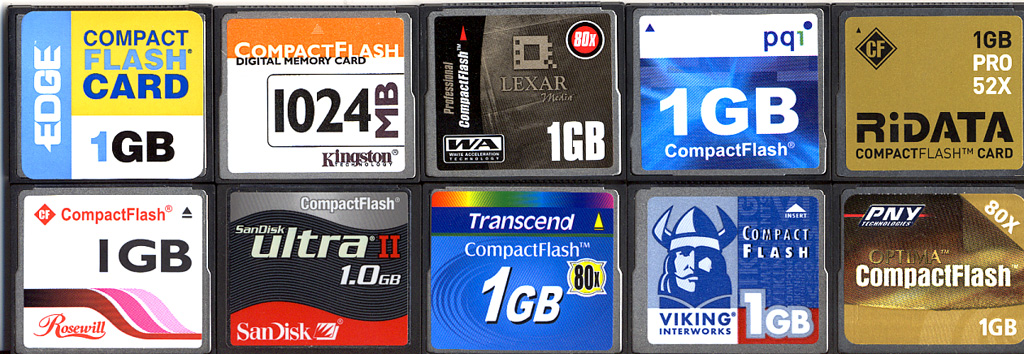
Click to enlarge.
| Model | Part No. | Price | |
| EDGE | Standard | PE188993 | $59.77 |
| Kingston | Standard | CF/1024 | $49.99 |
| Lexar | Professional (80x) | - | $87.59 |
| PNY | Optima (80x) | - | $85.72 |
| PQI | Standard | AC16-1030 | $60.81 |
| RiData | Pro 52x | - | ~$56 |
| Rosewill | - | RCF1024 | $51.99 |
| SanDisk | Ultra II | SDCFH-1024 | $73.95 |
| Transcend | 80x | TS1GCF80 | $65.95 |
| Viking | Standard | CF1GB | $53.99 |
All of these cards are standard CompactFlash Type I media cards with varying speeds with exception of the Lexar Professional series media, which features its "Write Acceleration Technology", said to improve image write speeds by up to 23% with compatible cameras. This is done with the aid of special firmware on the media as well as the cameras themselves, which allow them to work together to improve the write algorithms. However, we have also seen an improvement in write speeds in our benchmarks as well, but we'll let you see for yourself.
Special thanks to NewEgg for providing us with the CompactFlash cards for this review.


 Facebook
 Twitter
 RSS
RSS


24 Comments
View All Comments
macraig - Sunday, December 25, 2005 - link
Your research for the CF Roundup was incomplete: Pretec, a manufacturer with a history of producing higher-capacity CF media before anyone else, has been producing a 12GB CompactFlash card for some time now; it's also 80X media to boot. It will set you back as much as a complete gaming desktop system, of course; right now the MSRP is still $5000, but I think I saw it for $1700 somewhere. Pretec's two or three press releases about it were widely reported. A search in Google for "12gb cf" will educate you. Pretec also produces a 4GB SD card, greater capacity than anyone else AFAIK. I was surprised Pretec wasn't even included in the review.Mark Craig
mindless1 - Sunday, December 25, 2005 - link
The price-point for 12GB CF seems a bit unrealistic still for most uses.4GB SD are available from other brands now and at more normal price levels, between $250-300 to start. Key with these is the ability of the device using them to support the capacity and filesystem.
tygrus - Saturday, December 24, 2005 - link
Merry Christmas and a Happy new Year.artifex - Saturday, December 24, 2005 - link
Also, why not use an IDE to CF straight adapter?You don't know for sure that that device you're connecting in the middle can actually write at the max speed the card is capable of. A few years ago, Lexar was packing their own adapters in with their cards, saying people had to use them to get top speed. And that was back when top speed was 4, 8, 16x.
Glitchny - Friday, December 23, 2005 - link
i know they cost like 2x as much as the ultra 2s however i ould have liked to see them included in the tests to see just how fast they arePauli - Friday, December 23, 2005 - link
Maybe I'm missing something, but isn't this "Endurance Factor" pretty useless. It sounds to me like they're saying that, because a card is faster it will be written to more often and thus, not last as long. For digicam users this is not relevant; we will be writing to it the same number of times regardless of its speed -- I don't take more photos just because the CF speed is faster!AtaStrumf - Friday, December 23, 2005 - link
I agree! Sure looks a bit too simple of a test to have any real value.If you're thinking of branching out, may I suggest Flash MP3 (+FM Tuner) Players, the cheap kind, not iPod Shuffle kind. I spent the entire last night going through tens of cheap ass "reviews", just to find out ... not much. Maybe I was just looking in all the wrong places, but not being a big portable music fan (buying a xmas gift), I just didn't know where to look and google wasn't terribly useful either and neither were forums.
I ended up buying a derivative of this here thingy:
http://www.s1mp3.org/en/index.php">http://www.s1mp3.org/en/index.php
I posted my review of it here:
http://users.volja.net/lukaakul/cny512-usb20.htm">http://users.volja.net/lukaakul/cny512-usb20.htm
[in slovene, but there are some nice pictures to look at, really]
In short, it's fine at playing MP3s (though to be honest, I didn't have anything to compare it to), but sloooooooooooooowwwwww at transferring files. That same old Full Vs. High speed USB 2.0 trick.
Ecmaster76 - Friday, December 23, 2005 - link
I know typically most people with use USB card readers, but perhaps it might be worth testing with a IDE<->CF adapter to see if anything comes out differently.BTW Said adapters + 8GB CF rock if you want to make a truly silent, no moving parts computer...
highlandsun - Friday, December 23, 2005 - link
Agreed. Actually I'd like to see a test using a notebook and a CF to PCMCIA adapter, since that was my primary interface. I hate USB adapters...BikeDude - Sunday, December 25, 2005 - link
Delkin has a CF to CardBus adapter that on my laptop delivers 10MB/s (reading Sandisk Extreme III cards). A PCMCIA adapter would only deliver a tenth of that speed... (granted, it costs significantly less, but its usefulness is limited on 1GB+ cards)--
Rune