



Real-world virtualization benchmarking: the best server CPUs compared
by Johan De Gelas on May 21, 2009 3:00 AM EST- Posted in
- IT Computing
Inquisitive Minds Want to Know
Tynopik, a nickname for one of our readers, commented: "Is Nehalem better at virtualization simply because it's a faster CPU? Or are the VM-specific enhancements making a difference?" For some IT professionals that might not matter, but many of our readers are very keen (rightfully so!) to understand the "why" and "how". Which characteristics make a certain CPU a winner in vApus Mark I? What about as we make further progress with our stress testing, profiling, and benchmarking research for virtualization in general?
Understanding how the individual applications behave would be very interesting, but this is close to impossible with our current stress test scenario. We give each of the four VMs four virtual CPUs, and there are only eight physical CPUs available. The result is that the VMs steal time from each other and thus influence each other's results. It is therefore easier to zoom in on the total scores rather than the individual scores. We measured the following numbers with ESXtop:
| Dual Opteron 8389 2.9GHz CPU Usage | |
| Percentage of CPU Time | |
| Web portal VM1 | 19.8 |
| Web portal VM2 | 19.425 |
| OLAP VM | 27.2125 |
| OLTP VM | 27.0625 |
| Total "Work" | 93.5 |
| "Pure" Hypervisor | 1.9375 |
| Idle | 4.5625 |
The "pure" hypervisor percentage is calculated as what is left after subtracting the work that is done in the VMs and the "idle worlds". The work done in the VMs includes the VMM, which is part of the hypervisor. It is impossible, as far as we know, to determine the exact amount of time spent in the guest OS and in the hypervisor. That is the reason why we speak of "pure" hypervisor work: it does not include all the hypervisor work, but it is the part that happens in the address space of the hypervisor kernel.
Notice how the scheduler of ESX is pretty smart as it gives the more intensive OLAP and OLTP VMs more physical CPU time. You could say that those VMs "steal" a bit of time from the web portal VMs. The Nehalem based Xeons shows very similar numbers when it comes to CPU usage:
| Dual Xeon X5570 CPU Usage (no Hyper-Threading) | |
| Percentage of CPU time | |
| Web portal VM1 | 18.5 |
| Web portal VM2 | 17.88 |
| OLAP VM | 27.88 |
| OLTP VM | 27.89 |
| Total "Work" | 92.14 |
| "Pure" Hypervisor | 1.2 |
| Idle | 6.66 |
With Hyper-Threading, we see something interesting. VMware ESXtop does not count the "Hyper-Threading CPUs" as real CPUs but does see that the CPUs are utilized better:
| Dual Xeon X5570 CPU Usage (Hyper-Threading Enabled) | |
| Percentage of CPU time | |
| Web portal VM1 | 20.13 |
| Web portal VM2 | 20.32 |
| OLAP VM | 28.91 |
| OLTP VM | 28.28 |
| Total "Work" | 97.64 |
| "Pure" Hypervisor | 1.04 |
| Idle | 1.32 |
Idle time is reduced from 6.7% to 1.3%.
The Xeon 54XX: no longer a virtualization wretch
It's also interesting that VMmark tells us that the Shanghais and Nehalems are running circles around the relatively young Xeon 54xx platform, while our vApus Mark I tells us that while the Xeon 54xx might not be the first choice for virtualization, it is nevertheless a viable platform for consolidation. The ESXtop numbers you just saw gives us some valuable clues, and the Xeon 54xx "virtualization revival" is a result of the way we test now. Allow us to explain.
In our case, we have eight physical cores with four VMs and four vCPUs each. So on average the hypervisor has to allocate two physical CPUs to each virtual machine. ESXtop shows us that the scheduler plays it smart. In many cases, a VM gets one dual-core die on the Xeon 54xx, and cache coherency messages are exchanged via a very fast shared L2 cache. ESXtop indicates quite a few "core migrations" but never "socket migrations". In other words, the ESX scheduler keeps the virtual machines on the same cores as much as possible, keeping the L2 cache "warm". In this scenario, the Xeon 5450 can leverage a formidable weapon: the very fast and large 6MB that each two cores share. In contrast, two cores working on the same VM have to content themselves with a tiny 512KB L2 and a slower and a smaller L3 cache (4MB per two cores) on Nehalem. The way we tested right now is probably the best case for the Xeon 54xx Harpertown. We'll update with two and three tile results later.
Quad Opteron: room for more
Our current benchmark scenario is not taxing enough for a quad Opteron server:
| Quad Opteron 8389 CPU Usage | |
| Percentage of CPU time | |
| Web portal VM1 | 14.70625 |
| Web portal VM2 | 14.93125 |
| OLAP VM | 23.75 |
| OLTP VM | 23.625 |
| Total "Work" | 77.0125 |
| "Pure" Hypervisor | 2.85 |
| Idle | 21.5625 |
Still, we were curious how a quad machine would handle our virtualization workload, even at 77% CPU load. Be warned that the numbers below are not accurate, but give some initial ideas.
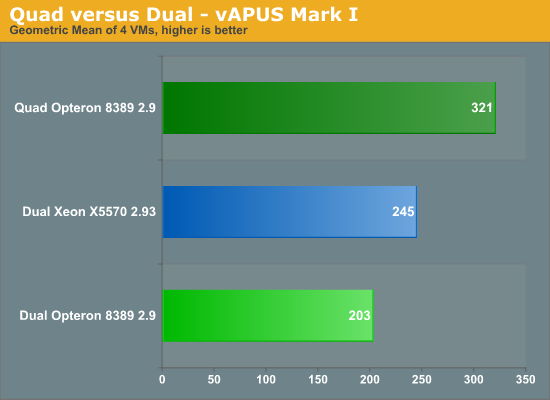
Despite the fact that we are only using 77% of the four CPUs compared to the 94-97% on Intel, the quad socket machine remains out of reach of the dual CPU systems. The quad Shanghai server outperforms the best dual socket Intel by 31% and improves performance by 58% over its dual socket sibling. We expect that once we run with two or three "tiles" (8 or 12 VMs), the quad socket machine will probably outperform the dual shanghai by -- roughly estimated -- 90%. Again, this is a completely different picture than what we see in VMmark.


 Facebook
 Twitter
 RSS
RSS


66 Comments
View All Comments
binaryguru - Monday, June 1, 2009 - link
It seems to me, x86-based virutalization software is getting more and more complicated. Not only is x86 virtualization getting more complicated, it is getting more and more difficult to get reliable performance from it.Let me explain my point.
The industry is clearly trying to do more with less hardware these days. Getting raw VM performance on commodity hardware is getting to a point where there is no predictable way to plan for an efficient VM environment.
Current VM technology is trying to simulate the flexibility and performance of mainframes. To me, this is clearly an impossible goal to achieve with the current or future x86 platform model.
All of the problems the industry is experiencing with VM consolidation does not exist on the mainframe. Running 4 'large' VMs for 'raw' performance. How about running 40 'large' VMs for 'raw' performance. Clearly, we all know that is impossible to achieve with current VM setups.
Now I'm not saying that virtuallization is a bad idea, it clearly is the ONLY solution for the future of computing. However, I think that the industry is going about it the wrong way. Server farms are becoming increasingly more difficult to manage, never mind the challenge of getting 100s of blade servers to play nice with each other while providing good processing throughput.
This problem has been solved about 20 years ago; and yet, here we are, struggling again with the "how can I get MORE from my technology investment" scenario.
In conclusion, I think we need to go back to utilizing huge monolithic computing designs; not computing clusters.
mikidutzaa2 - Friday, May 29, 2009 - link
Hello,It would be useful (if possible) to have latency numbers/response times on the tests as well because rarely we are interested in throughput on our servers. What we usually care more is how long it takes the server to respond to user actions.
What is your opinion?
JohanAnandtech - Friday, May 29, 2009 - link
I agree. I admit it is easier for us or any benchmark person to use throughput as immediately comparable (X is 10% faster than Y) and you have only one datapoint. That is why almostResponsetime however can only be understood by drawing curves relative to the current throughtput / User concurrency. So yes, we are taking this excellent suggestion into consideration. The trade off might that articles get harder to read :-).
mikidutzaa2 - Friday, May 29, 2009 - link
Looking forward to your new articles then, glad to hear :).The articles don't necessarily have to be harder to read, you could put the detailed graphs on a separate page and maybe show only one response time for a "decent"/medium user concurrency.
Also, I would find interesting (if you have time) to have the same benchmarks with 2vcpu machines, I think this is a more common setup for virtualization. Very few people I think virtualize their most critical/highly used platforms - at least that's how we do it. We need virtualization for lightly used platforms (i.e. not very many users) but we are still very much interested in response time because the users perceive latency, not throughput.
So the important question is: if you have a virtual server (as opposed to a physical one) will the users notice? If so, by how much is it slower?
Thank you.
RobAm - Tuesday, May 26, 2009 - link
It's good to see some unbiased analysis with respect to virtualization. It's also especially interesting that your workloads (which look much more like real world apps my company runs as opposed to SPECjbb, vmark, vconsolidate) shows a much more competitive landscape than vmware and Intel portray. Also, doesn't vmware prohibit benchmarking without their permission. Did they give you permission? Has VMware called offering to re-educate you? :-)Brovane - Tuesday, May 26, 2009 - link
I was hoping for a some benchmarks on the Xeon x7xxx CPU for the Quad Socket Intel boxes. We are currently have Dell R900's and we where looking at adding to our ESX cluster. We where debating between the R900 with Hex cores our Xeon x55xx series CPU's in the R710. I see the x55xx series where bench marked but nothing on the Xeon MP series unless I am missing that part of the article.JohanAnandtech - Tuesday, May 26, 2009 - link
Expect a 24-core CPU comparison soon :-).Brovane - Tuesday, May 26, 2009 - link
You also might want to a 12-core comparison also. We have found that with a 4-socket box that you usually run out of memory before you run out CPU power. With the R900 having 32-Dimm Sockets, the R900's we purchased last year have 64GB of RAM and just use 2x2.93Ghz CPU's we max memory before CPU easily in our environment. Since Vmware licensing and Data Center licensing is done per Socket we only populate 2 of the sockets with CPU's and this seems to do great for us. You basically double your licensing costs if you go with all 4 sockets occupied. Just a thought as to how sometimes virtualization is done in the real world. There is such a price premium for 8GB memory Dimm's it isn't worth it to put 256GB in one box with all 4 sockets occupied. The 4GB Dimm's did reach price parity this year so we were looking at going for 128GB of memory on our new R900's however Intel also released Hex-core so we still don't see much reason to occupy all 4 sockets.yasbane - Tuesday, May 26, 2009 - link
I know positive feedback is always appreciated for the hard work put in but it seems very rare that we see any non-microsoft benchmarks for server stuff these days on Anandtech. Is there any particular reason for this...? I don't mean to carp but I recall the days when non-microsoft technologies actually got a mention on Anandtech. Sadly, we don't seem to see that anymore :(Cheers
JohanAnandtech - Tuesday, May 26, 2009 - link
Yasbane, my first server testing articles (DB2, MySQL) were all pure Linux benches. However, we have moved on to a new kind of realworld benchmarks and it takes a while to master the new benchmarks we have introduced. Running Calling Circle and Dell DVD store posed more problems on Linux than on Windows: we have lower performance, a few weird error messages and so on. In our lab, about 50% of the servers are running linux (and odd machines is running OS-X and another Solaris :-) and we definitely would love to see some serious linux benchmarking again. But it will take time.Xen benchmarks are happening as I write this BTW.