



Intel's Core 2 Extreme QX6700: The Multi-core Era Begins
by Anand Lal Shimpi on November 2, 2006 2:14 AM EST- Posted in
- CPUs
Overclocking
When Intel's first dual core CPUs hit the market, there was a significant gap in clock speed between them and the fastest single core CPUs. The fastest dual core Pentium Extreme Edition was introduced at 3.2GHz, while you could get a 3.73GHz single core CPU for similar money. The single core Pentium 4 Extreme Edition had a 16.5% clock speed advantage, that you had to give up in order to get a second core at the high end.
Of course back then, clock speed mattered, and it was frequency that got you reasonable performance out of Intel's NetBurst architecture. You gave up much less if you looked at the AMD side of things; their fastest single core CPUs at the time ran at 2.6GHz while the fastest dual core Athlon 64 X2s ran at 2.4GHz.
With Intel's Core microarchitecture, the situation with Kentsfield vs. Conroe is much more like the Athlon 64 vs. Athlon 64 X2. At $999 you've got a dual core 2.93GHz offering or a 2.66GHz quad core offering, and at that price point the decision isn't too hard to make, especially when you take into account that you can overclock Kentsfield pretty well.
Like all other Core 2 Extreme processors, the QX6700 has a mostly unlocked clock multiplier, allowing you to easily overclock to higher frequencies. So while you can't take a Core 2 Extreme X6800 and give it more cores, you can always take a QX6700 and run it at X6800 speeds to have your cake and eat it too.
We managed to get our QX6700 sample up to 3.2GHz (12 x 266MHz) at the CPU's stock voltage of 1.35V, which isn't bad at all considering we didn't employ any exotic cooling. Bumping the core voltage up to 1.3875V we were able to gain an extra 266MHz and run at 3.46GHz.
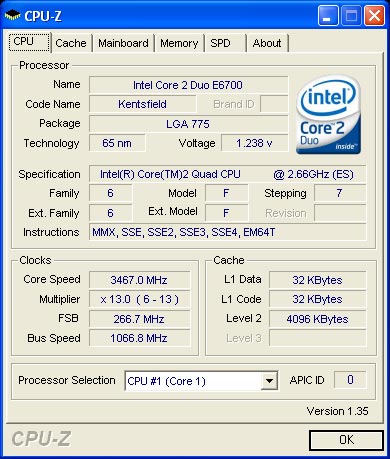
You lose some overclocking headroom given the added heat output of the extra die on the chip, not to mention that both die have to be capable of running at the overclocked speed, but overall Kentsfield doesn't look too bad as an overclocker's chip. It's not the bang for your buck that the E6300 offers, but at $999 that's not what we're expecting to begin with.


 Facebook
 Twitter
 RSS
RSS


59 Comments
View All Comments
JJWV - Tuesday, January 23, 2007 - link
I bought a QX6700 for crunching at numbers. The reasoning was simple twice the power, only one MB, disk, PSU, case...The result is disappointing, the maximum throughput I get is not twice an E6700, it is just a little more than one an half : 1,6 to be precise. The bottleneck is definitely the memory. The Northbridge cannot communicate fast enough with the memory. 5I came to this conclusion by varying multiplier, FSB...) Perhaps it would be worthwhile with the faster memory available 9200, but I am afraid even that kind of memory is to slow. The Quadcore is where Intel went over the edge with their memory architecture.
Kougar - Tuesday, November 14, 2006 - link
Any ideas on the Apache benchmarks I am seeing with a QX6700? They are appalling at best, with a QX6700 performing on par to a E6400!! A little of the same problem seems to have shown up in Office Productivity benchmarks. Any thoughts on this?in1405 - Monday, November 6, 2006 - link
<<<No article looking at a new processor release would be complete without benchmarks. However, let us preface the benchmark section by stating that the benchmarks don't tell the whole story. There are numerous benchmarks and tasks that you can run that will actually show quad core processors in a better light. A lot of people will never use the applications related to these benchmarks, so in one sense we could say that most people should already know whether or not they need quad core processing.>>>Some interesting comments here on the relevance of Benchmarks .. This looks interesting as this point of view never came up while the AMD CPUs were being glorified a few months back in this same site!! Wonder where the sudden wisdom comes from.
LTC8K6 - Sunday, November 5, 2006 - link
Why not compare dual to quad by trying to run things in the background while you do something in the foreground? Encode something and play Oblivion, for example. Would we finally be able to do anything like that with quad cores? Are we able to get good framerates in such a situation yet?Webgod - Thursday, November 2, 2006 - link
How about running http://www.driverheaven.net/photoshop/">DriverHeaven.Net's Photoshop CS2 benchmark? I think one of your standard magazine benchmarks has Photoshop 7, but the DH benchmark is newer and it's somewhat popular. Anybody can download a demo from Adobe, and run the benchmark on their own PC.coldpower27 - Thursday, November 2, 2006 - link
Check Intel's current price list here:http://www.intel.com/intel/finance/pricelist/proce...">http://www.intel.com/intel/finance/pricelist/proce...
JarredWalton - Thursday, November 2, 2006 - link
Actually just the 820 and 914 - 805 didn't get a price cut this month. But I fixed the other two, thanks. :)coldpower27 - Thursday, November 2, 2006 - link
oh yeah my bad, didn't mean to add the 805 in there.by the way, check your email please.
OddTSi - Thursday, November 2, 2006 - link
On page 7 you say "Apple's OS X and its applications have also been well threaded for quite some time..." yet the only two Apple apps in the test (Quicktime and iTunes) didn't scale AT ALL from 2 to 4 cores. I'm not trying to bash Apple here I'm just trying to point out that the facts don't seem to support your assertion. If Apple's media rendering apps - which are some of the easiest to multithread - don't scale well I doubt that the rest of their apps do.mino - Thursday, November 2, 2006 - link
Maybe cause there is a catch?You see, WinXP is not very OSX like, not to mention its apps ;)