



Capsule Review: GeChic's On-Lap 1301 Laptop Monitor
by Dustin Sklavos on January 19, 2012 2:16 AM EST- Posted in
- Laptops
- Peripherals
- LCD
- gechic
Performance and Screen Quality
The GeChic On-Lap 1301 is a 13” screen being powered off of USB, and as a result it’s not exactly going to be a big winner on any technical merits. On NewEgg, GeChic rates the 1301’s brightness at 200 nits and the contrast ratio at 500:1, and just like the big boys they cheerfully exaggerate the screen’s capabilities. Thankfully they’re honest about color quality; because it’s a TN panel it only produces 262,000 colors. Viewing angles are in the doghouse, too, but given the size and orientation the On-Lap is expected to be used in, that’s not a major strike against it.
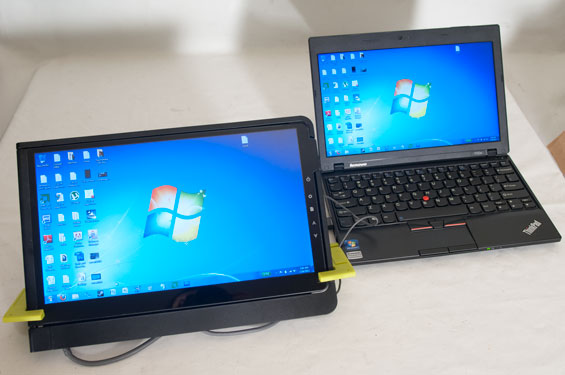
What does strike against the On-Lap 1301 is the use of a glossy finish instead of a matte. Understanding that gloss is fairly typical of consumer-oriented products, the On-Lap suffers mightily for its finish due partly because its “closed” position still leaves the screen exposed. Glossy screens show dirt far more easily than their matte counterparts. Worse still, that means the screen is left essentially unprotected. Given that pressing the control buttons on the back of the screen results in ripples in the display, it stands to reason the screen is neither well-reinforced nor well-protected, making its value as a travel accessory suddenly much more questionable. While the frame feels durable enough, I’d be concerned about the safety of the screen itself, especially when it’s retailing for $200.
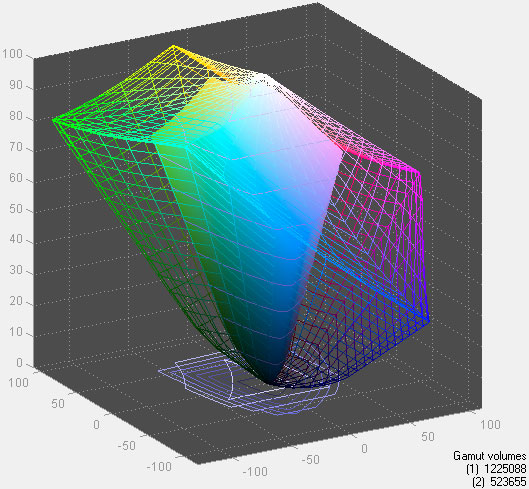
So how does it actually rate in terms of raw performance? The On-Lap 1301 sports a maximum brightness of 142 nits, but default brightness is just 94, both well shy of the rated 200 nits. With default black levels at 0.7 nits, that works out to a contrast ratio of 134:1, again well below what GeChic rates it at. Delta-E is no better at 2.53 on average, but color gamut at least is 42.7% of AdobeRGB 1998. Outside of the low brightness (a byproduct of being powered solely off USB), you could easily mistake the On-Lap for another laptop display. That’s good news for matching it up with notebooks on the market, but also speaks to the generally dire state of notebook displays. Still, we can’t complain too much since the On-Lap doesn’t actually require an external power source and can thus be used on the battery.


And how does it handle on the battery? The display is after all typically one of the most, if not the single most power hungry part of a notebook, so we tested it on the Acer TravelMate 8481T we reviewed recently using our internet battery test. The 8481T, without powering the GeChic display, is able to run for 8:41—that’s eight hours and 41 minutes, no mean feat. Plug in the display and running time drops to 5:55. That means if you use the GeChic On-Lap, you can expect your battery running time to drop by roughly a third assuming you’re using it with a similarly-sized notebook with a similar display. Honestly that doesn’t seem so bad given that you’re driving an entire second screen.


 Facebook
 Twitter
 RSS
RSS


31 Comments
View All Comments
Lonyo - Friday, January 20, 2012 - link
I know it's only a short product review, but unless I'm blind... you don't seem to have stated the resolution anywhere.Lonyo - Friday, January 20, 2012 - link
My bad, it's there hidden in the conclusion stated when mentioning standing the screen vertically.mfenn - Friday, January 20, 2012 - link
Still a lot more hidden than it should be IMHO.Dustin Sklavos - Saturday, January 21, 2012 - link
I'll cop to it, I was kind of feeling the review out and should've been more direct.Out of curiosity is there much interest in more of these bite-sized reviews of peripherals and accessories provided I can polish the presentation a bit more?
Kristian Vättö - Saturday, January 21, 2012 - link
I think we should definitely do more accessory reviews, as long as it doesn't include iPhone case reviews :-D A long article isn't always needed so in this case, I would say quantity over "quality" (quality being the length of the article, not the quality of the content).nomster - Sunday, January 22, 2012 - link
Maybe best to leave quantity meaning quantity and quality meaning quality?Otherwise by saying you prefer quality over quantity, you're actually saying you prefer quantity over quality
er...
anishannayya - Monday, January 23, 2012 - link
For the feature products, you guys should continue the always great reviews. Even if it means having to delay it for a while. I might try and read the poorly reviewed competition first, but I'll ALWAYS read the Anandtech version when it come out.For small things like this, keep cranking out these shorter reviews. Something is always better than nothing, and now I'm potentinally interested in a product that I didn't now existed.
Waiting for a revision too. I just wish Lenovo still made their awesome dual screen laptops.
retrospooty - Friday, January 20, 2012 - link
A great idea... but, 1366x768. I'll pass. That res must die.IcePhase - Friday, January 20, 2012 - link
Same, but it wont with W8 as it's the minimum resolution.I would have preferred it if they made the minimum 1280x720 though, that makes a bit more sense as that's already a standard for video. 1366 just creates stretching problems.
Dustin Sklavos - Saturday, January 21, 2012 - link
It's a 13.3" screen, the resolution for it is actually fine. Also remember this is being powered entirely off a single USB 2.0 port; raise the resolution or screen quality and you run the risk of needing too much power.