



Lenovo ThinkPad X100e: When Build Quality Matters Most
by Dustin Sklavos on September 3, 2010 6:40 PM EST
The ThinkPad X100e, On the Outside Looking In
The Congo platform in the Lenovo ThinkPad X100e seems positively ancient at this point, and popular response to our review of the MSI Wind U230 indicated as much. Nile is the new hotness and much improved in all aspects that count, so why the heck are we spending any kind of time on a notebook with outdated hardware? Because while Acer and Toshiba are happy to sell you Nile-based ultraportables in the same price brackets (and often cheaper than) Lenovo is hitting with its X100e configurations, Acer and Toshiba's notebooks aren't as solidly built.


Starting at the top, the X100e is all matte plastic; it's smooth enough to still pick up greasy fingerprints and smudges, but it feels very solid. You can order the X100e in traditional ThinkPad black or fire engine red, but the red looks atrocious even in photos. Classic ThinkPad black is the order of the day.
When you open the lid, you find the rest of the shell is made of the same black plastic, and the screen has a rarefied anti-glare matte finish instead of the glossy ones that are so common, making it much more usable in outdoor light. There's some flex to the lid as a whole, but it's not as bad as we've seen on other, larger notebooks (Clevo units are egregious offenders), and the hinges are nice and firm. There's also a webcam discreetly hidden in the bezel, above the screen.
Moving on to the body of the notebook, everything else is extremely firm. It's not quite at the level of the traditional ThinkPad-as-a-murder-weapon sturdiness, but the whole thing is also much smaller, and in a moment we'll see why it had to give up some of that rigidity. Port placement on the sides is fairly logical, although the massive blank space on the right hand side between the USB 2.0 port and Kensington lock seems like a wasted opportunity at first.
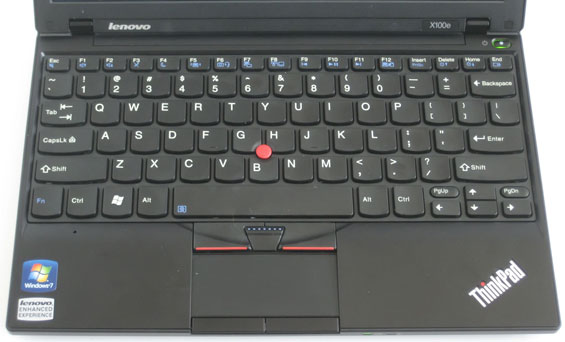
Of course, the real reason I bought the X100e is the keyboard. The chiclet-style keys may seem like heresy compared to the traditional ThinkPad keyboard, but the comfort and ease of use dispel any notions that this is anything but the best. And it really is absolutely the best keyboard you're going to find on a notebook in this size class, with near perfect travel and key depth. If you're a skeptic about chiclet-style keyboards, this is going to be the one to try before you write them off entirely. It's worth noting that while Lenovo placed the Fn key in the wrong place—outside of the Ctrl key—they were conscious enough of individual preference to allow you to actually switch the keys in BIOS. It's a small touch but a very welcome one.
In the neighborhood of the keyboard is another reason many people opt to pay the ThinkPad tax: the trackpoint placed in the center manages to be useful while not intruding on the typing experience. If the trackpoint isn't your speed, there's also an excellent touchpad recessed deep enough into the palm rest to prevent accidental misclicks and pointer movement during typing. The touchpad buttons are placed on the very bottom edge of the surface and work well, though I find I often use the buttons meant for the trackpoint despite mousing with the touchpad.
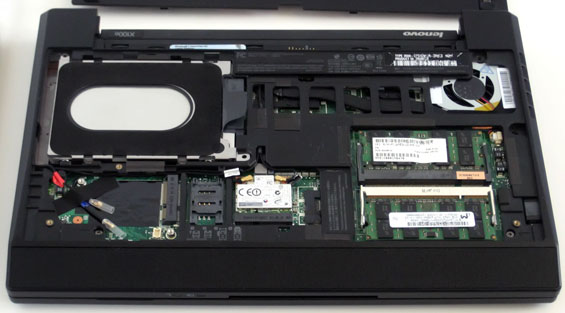
Finally, when we flip over the unit we find another welcome deviation from the norm: the entire bottom of the notebook, except for the speaker bar just under the front lip, is one large panel that can be removed. This is important: many manufacturers are extremely spare with letting you tinker at all with the insides of their notebooks. Under the panel you'll find, well, everything. You can see the cooling system for the chipset and processor at the top, the 2.5" drive bay, two slots for DDR2 RAM, the wireless half-card port, a SIM card slot for WWAN and an accompanying Mini-PCIe port for a WWAN card (complete with antenna connectors), and just under that port is even a smaller port meant for a Bluetooth daughter board (purchased separately, naturally.) Looking at the insides of the unit, at least we can see how efficiently Lenovo makes use of the limited real estate of the tiny ThinkPad. The right side is blank because the drive bay is butting up against that side of the notebook.


 Facebook
 Twitter
 RSS
RSS


24 Comments
View All Comments
yuhong - Friday, September 3, 2010 - link
I wonder when will the Nile version arrive, though.skrewler2 - Friday, September 3, 2010 - link
I've used almost exclusively Thinkpads throughout the years. Their build quality is incredible. I've dropped my T61 on tiled floor or it's fallen from server racks too many times to count, and it keeps chugging on.My only wish is that they still came with DB-9 ports.
Aellynh - Friday, September 3, 2010 - link
I still use them to this day with virtually every modern access control security system. Low speed 9600 baud DB-9 port and if you're lucky.. I mean really lucky, you MIGHT find one that has an optional network module at 10/100Mbps. Not even gigabit yet! Long live the serial port.Flunk - Monday, September 6, 2010 - link
You guys have to realize that that's a niche market, and you still can get notebooks with DB-9 ports, just not most models since the space can be more effectively used by a few USB ports or video outputs.If anything expect less serial ports in the future. At some point you're going to have to walk around with a 10 year old system to interface with those old integrated systems. They're only going to be replaced when it's impossible to interface with them at all.
hausdave - Tuesday, September 7, 2010 - link
I just use a USB-Se3rial converter. Even works with minicom in limux.The keyspan works with everything.
http://www.newegg.com/Product/Product.aspx?Item=N8...
tobrien - Friday, September 3, 2010 - link
I've got a Dell E6400 (the current-gen Latitude E6410 might be worth looking into reviewing :)) and it's got the single panel on the bottom that's also removable by undoing a single, captive screw, it's so nice!I see friends' HPs and Toshibas and Acers and see how they've still got a million screws that hold the bottom panel on. I'd be interested to know who implemented the "single screw bottom panel" idea first, not that it matters though.
But AT should consider reviewing a Dell Latitude E-series. I've owned by E6400 since it came out in 2008 and it's never broken in any way. I upgraded the HDD and RAM but that's it. I love mine!
ThomasA - Friday, September 3, 2010 - link
I've owned Thinkpads over the years and found them reliable. For the last 6 mos. I've been doing business on my Dell E6400 (bought from the Dell Outlet). Exc. value and also a solid tool.ExogenBoy - Monday, September 6, 2010 - link
A bit off-topic but are you guys kidding with the build quality comments of E6400? I've had mine for one and half years and I would be surprised if it will hold together for another half a year or so. I paid a premium price for this and it has nice features but solid is certainly not a correct word to describe this machine. Plus the Intel Matrix driver problems causing audio pops on Vista, a problem which still exists after various driver updates. Luckily their on-site support is premium at least here Northern Europe, the only thing truly premium related to this laptop in my opinion.Stuka87 - Tuesday, September 7, 2010 - link
The E6400 was a good attempt by Dell to have a notebook that looks like a business class machine (ie: A ThinkPad clone). But the quality certainly does not match a ThinkPad. And Dell has major issues with using their docking station and a pair of external monitors. We employ a lot of them here, and many have this issue.But with that said, its a huge step up compared to the previous generation Latitudes which were utter junk.
Devo2007 - Saturday, September 4, 2010 - link
About the only thing I'm not sure on is whether it makes sense to pin the improved battery life on the swap to the SSD. Moving from 1GB of RAM on Windows 7 to 4GB is bound to have at least some impact on battery life in itself, since it wouldn't be accessing the swap file as much on the HDD.Don't get me wrong, I love my SSD (Intel X18-M 80GB), but it seems the editor was focused more on SSD performance than the benefit from adding more RAM (PCMark Vantage's HDD test aside).