



Apple's iPad - The AnandTech Review
by Anand Lal Shimpi, Brian Klug & Vivek Gowri on April 7, 2010 9:39 PM EST- Posted in
- Smartphones
- Mac
- Apple
- iPad
- Mobile
It's a Tablet Running a Touch OS
At the heart, er surface, the iPad is a tablet computer. This has been tried before and usually met with very little success. The problems were three fold: hardware, form factor and UI.
What sets the iPad apart from those that came before it is that it finally has the right combination of all three. The hardware is powerful enough to run the OS quickly while maintaining good battery life, the form factor is thin and light enough to be portable and the UI is tailored to the device.
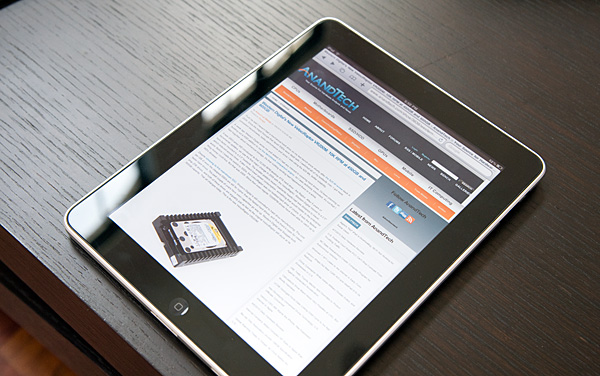
The latter is especially important. Where Microsoft has failed in the past with both its approach to smartphones and tablets is in its attempt to scale down a desktop OS. As we've seen countless times, the only way to design for a different segment is to start from the ground up. Microsoft itself learned this with the Media Center Edition UI on top of Windows.
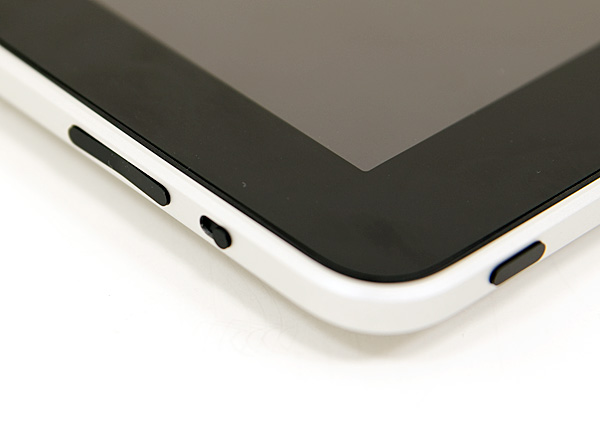
Since this isn't the 1980s, the iPad only has four physical buttons on the device. At the top you have a power/lock button, on the right you have a rotation lock switch (keeps the desktop from rotating) and volume rocker, and then at the lower part of the face of the unit there's a home button. If this seems familiar it's because this is the exact hardware layout of the iPhone, just on a larger scale.
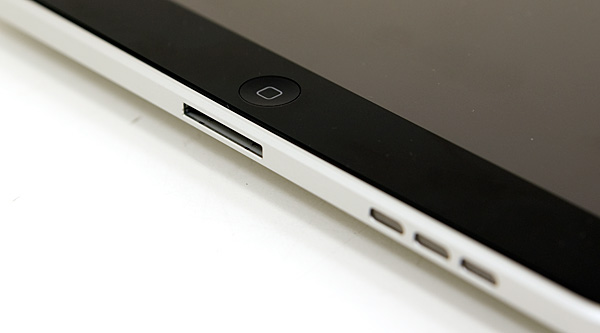
The vast majority of your interface to the iPad takes place via it's 9.7" capacitive touchscreen display.
Along the bottom edge of the iPad you'll find Apple's standard 30-pin dock connector. You can use existing iPod Touch/iPhone USB cables, however this is a much more power hungry device and thus you can't charge off of a standard USB port (more on this later).
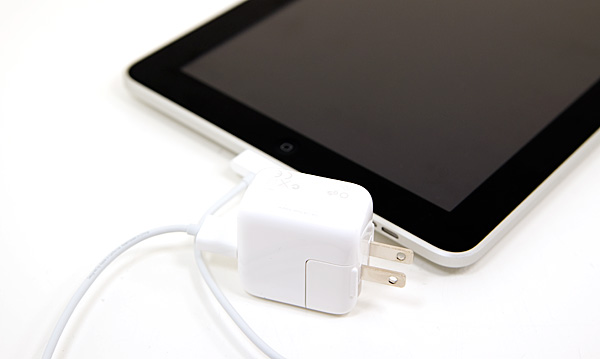
For your charging needs Apple supplies a single 10W power adapter, which looks a lot like the power adapters for the first iPhones.


 Facebook
 Twitter
 RSS
RSS


108 Comments
View All Comments
vol7ron - Wednesday, April 7, 2010 - link
There's been rumors the iPhone 4g will be talked about tomorrow by Apple. Do you have any insight into this?vol7ron
Griswold - Thursday, April 8, 2010 - link
http://en.wikipedia.org/wiki/4gvol7ron - Thursday, April 8, 2010 - link
I don't understand the point of this link?Perhaps you want to look at: http://en.wikipedia.org/wiki/IPhone
Data Network Technology and iPhone technology are not synonymous.
A5 - Thursday, April 8, 2010 - link
Unless AT&T has suddenly deployed a 4G network (or they're going to Sprint), then this new phone isn't going to be called the iPhone 4G. Also, the stuff they're announcing tomorrow are the features of iPhone OS 4.0, not new iPhone hardware.vol7ron - Thursday, April 8, 2010 - link
I'd rather not hear about the hardware at this point, but it'd be nice to say that Apple would up the clock on the 3GS (what I have). Hearing about the OS 4.0 is nice.I thought the "G" has nothing to do do with the wireless technology network. While they both stand for "generation", Apple's iPhone/OS pair will still be called the iPhone 4G, regardless if it runs on 3G Network or CDMA technology, or if the OS is upgraded afterwards; if this is confusing, think about the iPhone 2G - it runs on the 3G network and can be upgraded to OS 3.0, but it is still a iPhone 2G due to the initial hardware/OS release.
-----
The developer meeting was actually quite nice. There were a few surprises, but nothing huge - just a bunch of much-needed updates :) There will more-than-likely be a few more OS4.0 goodies come June with the official iPhone 4G release.
Internet User - Thursday, April 8, 2010 - link
That's incorrect. The naming conventions that Apple typically uses were thrown out the window. The first generation iPhone runs on the 2G EDGE network. The 3G (second gen) and 3GS (third gen) both run on the 3G network. We don't know what the fourth iteration will be called. It won't run on a 4G network, but it will be the 4G iPhone.vol7ron - Friday, April 9, 2010 - link
Perhaps you are right, but I thought I remember hearing Jobs talk about the naming that went into the iPhone.Technically, I think that what happened supports your argument, but we've all seen companies change their logical naming patterns. The first iPhone, as with any first generation, was called the "iPhone", with no suffixed 1G or 2G. It wasn't until the 3G came out (on OS 2.0), where there was question about its name. I think what was talked about was that the beta versions were considered 1G; the first retail release was considered 2G; and the second was 3G.
The 3GS is where it really breaks that argument, because the 3GS was released with 3.0, so technically it would be called the iPhone 4G. Instead they stuck with the "3G" and added the "S", which they said stands for "speed". However, those "2G" phones that were upgraded to OS 3.0, still work with the 3G network, but are still considered "iPhone" (w/o the suffix, but still unofficially: iPhone 2G).
In either case, I'm willing to say that I'm wrong, since a lot of it is vague memory. That, and the fact that this article is about the iPad and not the iPhone :) I was just a little curious about OS 4.0, but I was offered an exclusive direct link on the developers briefing, so I found everything out anyhow.
vol7ron
nilepez - Thursday, April 8, 2010 - link
I don't know about AT&T, but Verizon began testing LTE last year and is deploying LTE in some markets this year. Until Apple announces they're partnering with Verizon (or Sprint) or we see FCC submissions, I'll assume it's vaporware....and frankly, I'm not switching from my Sero plan for a phone.vol7ron - Wednesday, April 7, 2010 - link
Page 2: Since this isn't the 1980s, the iPad only has three four physical buttons on the device.I might be reading it wrong but the "three four" seemed out of place. Maybe that was supposed to be a "three or four", or perhaps you were going to come back to it?
vol7ron
vol7ron - Wednesday, April 7, 2010 - link
Page 5: "Tap it twice while you're playing music and playback controls appear, Also when..."Perhaps there should be a period where the comma is and a comma after "Also"?
BTW, not purposefully checking for errors, just looking out for ya.
vol7ron