



Windows Phone 7: The AnandTech Guide
by Brian Klug on March 21, 2010 12:00 AM EST- Posted in
- Smartphones
- Windows Phone 7
- Mobile
GPU Acceleration - Silverlight
There is a clearly defined set of transforms and optimizations developers can make to leverage the GPU on the phone through Silverlight. The Silverlight performance team is striving to add more hardware accelerated primitives, but at present, hardware acceleration is limited to:
- JPEG Decoders (PNG decoders are not implemented yet)
- Media Decoders (Video codecs, e.t.c.)
- 4 Composition Transforms
- Render Transform
- Perspective Transform
- Opacity Transform
- Rectangular Clips
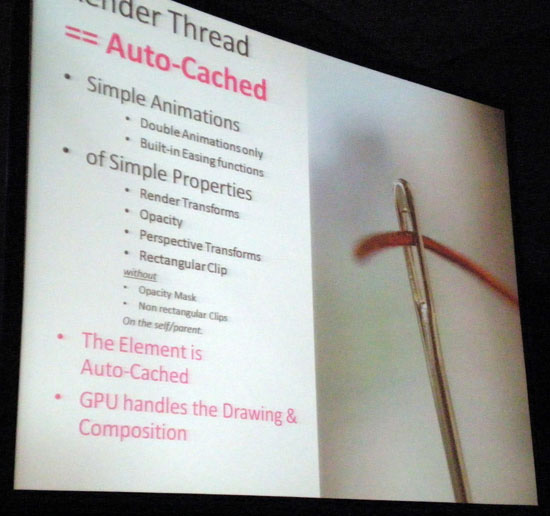
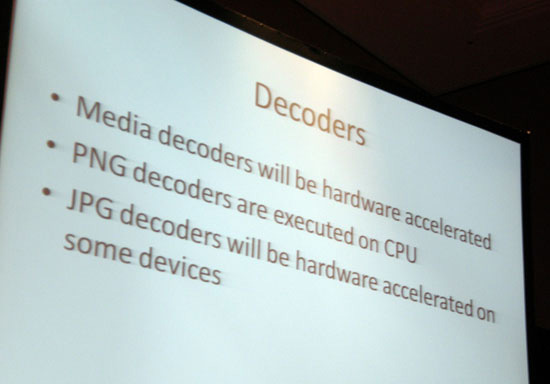
The real interesting story, however, is about pixel shaders. Though the Direct3D drivers and GPU support programmable pixel shaders, the only pixel shaders enabled and exposed to developers right now through Silverlight frameworks are blur and drop shadow shaders. These are fully hardware accelerated. Developers at present cannot write their own programmable shaders; there is no API for doing so. The Silverlight team is working hard to add additional hardware accelerated primitives, and eventually allow custom programmable pixel shaders for developers, but it likely won't be done in time for this release.
The UI thread framerate (which is essentially the device framerate we as end users care about) will be limited to 30 FPS, although the hardware is capable of in excess of 60 FPS. 30 FPS has been chosen by the WP7S team as the framerate cap for battery life concerns, and also threw in the age-old somewhat nebulous human eye response argument. Virtually all of the demos shown during MIX10 had the 30 FPS cap applied, and most if not all seemed visually smooth. There was some objection from a few developers to the 30 FPS cap, however the battery life concerns are very valid. That said, gamers are picky, and iPhone OS is capped at a faster 60 FPS - it might be worth it to sacrifice some battery if developers want that extra response.
An interesting consequence of how much the Silverlight UI is GPU accelerated, is that the emulator packaged as part of the CTP bundle at developer.windowsphone.com/ requires WDDM 1.1 for hardware acceleration on the desktop. Otherwise, everything is CPU-rendered in the emulator, resulting in some relatively laggy performance.
GPU Acceleration - XNA
Recall now that while the primary phone UI and most "normal" applications will run atop the Silverlight framework, games requiring twitchier response and wishing to leverage code reuse across PC, Xbox 360, and WP7S will run on the XNA framework. WP7S supports full hardware accelerated 3D with one exception - programmable shaders. Microsoft will eventually do so, it simply hasn't finished an API for doing so for launch. In its stead, however, XNA offers four configurable effects (which are themselves shaders) which it helps will mitigate lack of custom programmable shaders at least until it can provide a polished API. WP7S XNA developer Shawn Hargreaves blogs:
"Instead of programmable shaders, we augmented the existing BasicEffect with four new configurable effects: SkinnedEffect, EnvironmentMapEffect, DualTextureEffect, and AlphaTestEffect. These are designed to run efficiently on the mobile GPU hardware, and I think do a good job of providing enough flexibility for developers to create awesome looking games, while also meeting our goals of being able to ship a robust and well tested product on schedule."
The XNA title I demoed, "The Harvest," leverages these effects and came off looking extremely competitive as mentioned earlier. Remember the different aspect ratios and screen resolutions I was concerned about earlier?
Screen Resolutions - To Scale
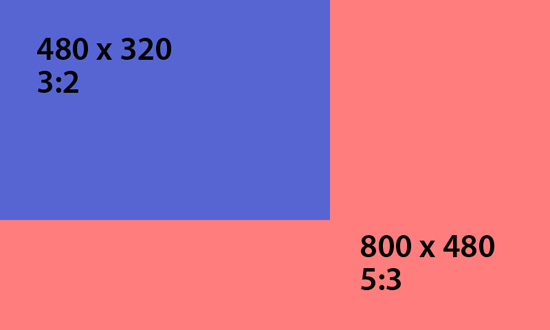
Well, the XNA tools for WP7S incorporates support for an on-GPU hardware scaler. Developers can elect to detect whichever resolution the software is running on and render appropriately, or choose one, render at it across both, and scale appropriately. Touch input is even scaled appropriately as well. As a further boon, because 800 x 480 can still be challenging for mobile hardware, developers can render under resolution and scale up to 800 x 480 as a last resort.


 Facebook
 Twitter
 RSS
RSS


55 Comments
View All Comments
Hrel - Friday, March 26, 2010 - link
Yeah, pretty sure I'll never buy any portable ANYTHING that doesn't support expandable memory. I don't need more iphones out there, thanks anyway.jconan - Tuesday, March 23, 2010 - link
Will Microsoft support Unicode in its WP7S phones? They never got around to it on the Zune. I hope they do for WP7S and hopefully in Courier. It's easier to read text the way it's meant to be read than in gibberish ascii with diacritics.MonkeyPaw - Monday, March 22, 2010 - link
Wow, all this talk about Web-capable smartphones sure makes me wish for a mobile version of Anandtech.com. :|toyotabedzrock - Monday, March 22, 2010 - link
We have heard this promise of adding features before!RandomUsername3245 - Monday, March 22, 2010 - link
The article says, "There's also of course the stigmata attached to buying a phone preloaded with a bevy of carrier-branded applications."The author should have used "stigma" rather than "stigmata". Stigmata is a Roman Catholic reference: (from dictionary.com) marks resembling the wounds of the crucified body of Christ, said to be supernaturally impressed on the bodies of certain persons, esp. nuns, tertiaries, and monastics.
CSMR - Monday, March 22, 2010 - link
Stigmata is just the plural of stigma. "Stigmas" is normally better but stigmaga is correct. So the problem with the sentence is that "is" is singluar and "stigmata" is plural.jhh - Monday, March 22, 2010 - link
Applications can't currently run in the background, but they can process push notifications. Does this mean that any application that wants to provide background processing needs to wake the phone via push notifications? If so, do those mean that the push notifications need to come through a Microsoft back-end notification server? If so, that would be another case of application lockdown. I can't see Facebook or Twitter wanting to run their traffic through Microsoft just to be able to use the notification service.ncage - Sunday, March 21, 2010 - link
Is it perfect? Nope but i still think its pretty dang good. Can't wait. I will still probably get a nexus one when it comes out tuesday but will get a wp7 near xmas. Have a BB Tour now and i hate it with a passion. If your not an email addict then i don't think you would ever like a BB. I'd get a palm pre instead if it didn't sound like they were just about to die. RIM should buy them.hessenpepper - Sunday, March 21, 2010 - link
Will the tight hardware requirements allow Microsoft to release upgrades directly to the end users or will they release in to the manufacturers/carriers? Will we be at their mercy for timely upgrades?MGSsancho - Monday, March 22, 2010 - link
Part of the reason Microsoft wants tight control over hardware is so they can focus on other stuff and not write 9000 drivers. Windows CE works on ppc, x86, arm with varying amounts of ram and configurations. It is the same strategy Apple has, only have a few select hardware platforms and focus on the user experience.