



Budget Micro-ATX P55 Faceoff: Gigabyte GA-P55M-UD2 and ASRock P55M Pro
by Gary Key on October 5, 2009 12:30 PM EST- Posted in
- Motherboards
First up is Gigabyte’s GA-P55M-UD2. You can purchase this board for around $105~$110.
Gigabyte GA-P55M-UD2 Feature Set
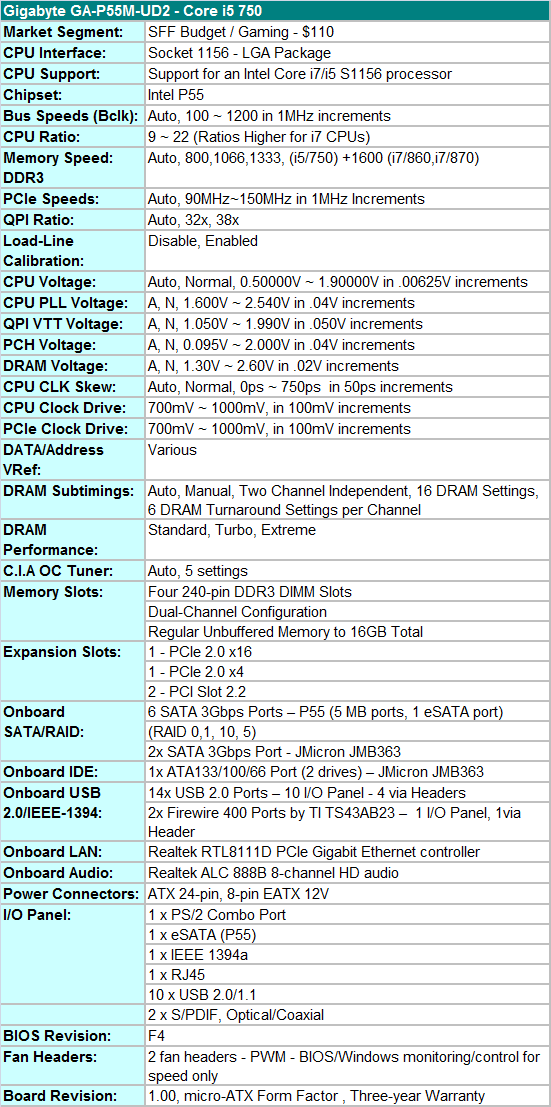
Gigabyte includes the standard array of components like the Realtek ALC888B HD audio codec, Realtek RTL8111D Gigabit LAN controller, T.I. TSB43AB23 IEEE 1394a chipset, GSATA2 (JMB363) chipset, and full support for the Core i7/i5 S1156 processor series.
Gigabyte also includes a rather sparse accessories bundle. You get the standard rear I/O panel cover along with 1 x IDE cable, 2 x SATA cables, a well-written and informative manual, and software CD. We understand the need to cut costs where possible to meet a $100 price target, but including at least one USB 2.0 and IEEE 1394a bracket for the headers would have been appreciated.
BIOS
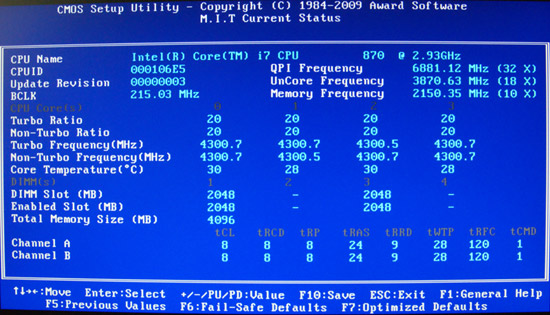
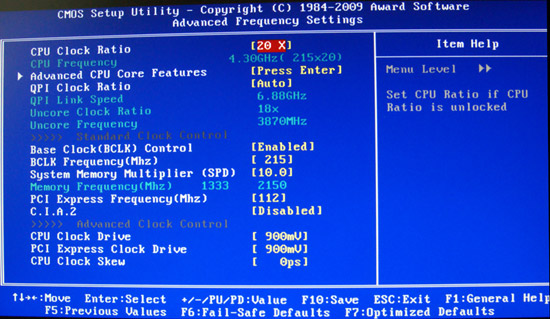
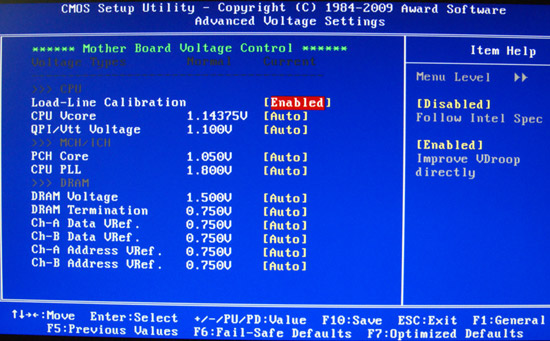
Gigabyte also includes one of the most extensive BIOS designs in an entry level micro-ATX motherboard that we have seen recently. The BIOS is setup for overclocking and includes all the basic settings: CPU multiplier, PCI-E bus, Bclk frequency, memory multipliers, and nearly every voltage setting you will need. Gigabyte includes Load Load-Line Calibration (LLC) and PCH Core (P55) voltage settings for additional overclocking duties. LLC will help to eliminate line droop on the VCore line. We still recommend having LLC disabled in most situations, but if you have to reach a certain overclock for benchmarking, then you should probably enable it. Generally, we do not need PCH voltages in our experience but it is nice to have the feature.
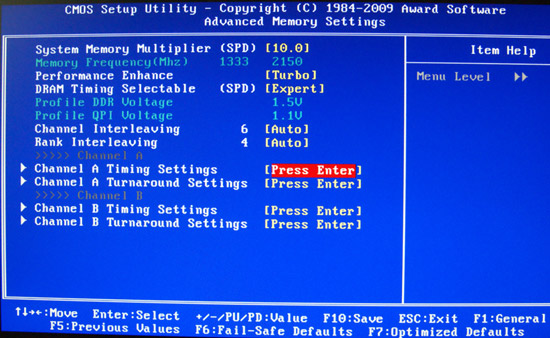
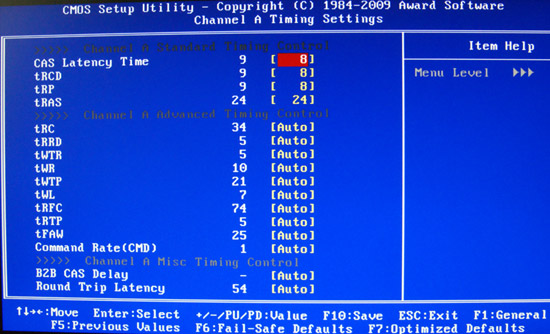
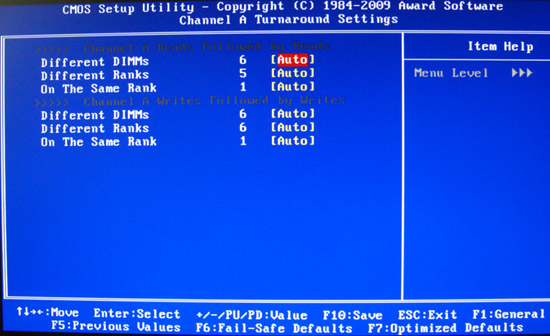
Two strengths of the BIOS are the granular voltage settings and memory timing options for an entry level board. Gigabyte allows you to tweak CPU clock skews, channel independent DRAM settings, and CPU/PCI clock drives although we found the auto settings to be just about perfect.
One last feature we would like to mention is the Q-Flash utility that is accessed via the F8 key. Q-Flash can read files directly from a USB flash drive making BIOS updating a simple and safe procedure. We tried this feature 30 times as part of our testing routine and it never failed.
We did have a couple of slight disappointments with the BIOS. In the voltage setting options, Gigabyte does not provide the base voltages that the board defaults to at startup. Our other complaint has to do with the PC Health section, as the lack of SmartFan adjustments for the lone chassis header is not available. The CPU SmartFan adjustment for the CPU is limited to Auto/Voltage/PWM without the ability to determine temperature ranges. Oh how do we miss abit’s uGuru technology. Other than that, we were impressed with the BIOS considering the entry level nature of the board.
BIOS Information
Let’s take a brief look at the BIOS. We discussed the features earlier, but a visual representation sometimes speaks louder than words.


 Facebook
 Twitter
 RSS
RSS


55 Comments
View All Comments
mfs - Friday, March 26, 2010 - link
how do you get 4 phase on the GA-P55M-UD2? looks like 6 by the photos? bit-tech says 6 too.andersbranderud - Friday, March 12, 2010 - link
Does anyone have any experiences with overclocking an i7-860 on this motherboard with 1333 mhz or 1600 mhz ram.In that case give me some more details.
Thanks!
Anders Branderud
bloganders.blogspot.com
zoggy - Thursday, February 18, 2010 - link
Was looking at picking up GA-P55M-UD2 for a HTPC, going to pair it with Core i7 860 and a ATI HD 5000 series card. Wanted to know if there was any problems with this board to do the bit-streaming of HD audio or if the UD4 would be better suited?Hrel - Friday, October 23, 2009 - link
Pictures of the Motherboard BIOS, THANK YOU SO MUCH!maomao0000 - Sunday, October 11, 2009 - link
http://www.myyshop.com">http://www.myyshop.comQuality is our Dignity; Service is our Lift.
Myyshop.com commodity is credit guarantee, you can rest assured of purchase, myyshop will
provide service for you all, welcome to myyshop.com
Air Jordan 7 Retro Size 10 Blk/Red Raptor - $34
100% Authentic Brand New in Box DS Air Jordan 7 Retro Raptor colorway
Never Worn, only been tried on the day I bought them back in 2002
$35Firm; no trades
http://www.myyshop.com/productlist.asp?id=s14">http://www.myyshop.com/productlist.asp?id=s14 (Jordan)
http://www.myyshop.com/productlist.asp?id=s29">http://www.myyshop.com/productlist.asp?id=s29 (Nike shox)
Googer - Sunday, October 11, 2009 - link
I don't see how the inclusion of something can be seen as a negative. I am sure there are a few users who still depend on a floppy drive from time to time (retro dos gamers, some drivers, and archiving old files) and it's presence has little to negative impact on the actual usability, functionality, or performance of the motherboard.As for my self, I have tried several times to remove my drive, only to have someone or myself find an unexpected need for it a few months later. So I still keep it installed but the drive it's self remains disabled in the bios until I actually need it. Having it enabled has no noticeable impact on my P4 based system.
Serveo - Friday, October 9, 2009 - link
Hi Gary,Nice review. I am planning to buy a p55 mATX board. There are some on the market but mostly they support only 16x & 4x GPU and thats a pity.
Only the Gigabyte GA-P55M-UD4 and ASUS Maximus III Gene support sli/cross at 8x mode. I would like to your review about these boards soon. The price for the GA-P55M-UD4 is available around € 130.- incl. VAT and the Maximus III Gene around € 170.- incl VAT.
Thats why I probably go for the Gigabyte due to the price an the board colors, but the board layout has some fails and according to the review at bit-tech.net the performance is not that good.
Gary when can I aspect the review about these boards? Or which of these two board would you advice?
Awnold - Wednesday, October 7, 2009 - link
Hi Gary,Great article! Looking at other user's experience w/ the Gigabyte board, I've seen a number of complaints w/ memory compatibility (e.g., Newegg's reviews). Would you mind posting the part #'s of the different memories you tested this board with?
I did see your comment that the F4 BIOS improved memory compatibility, but to my knowledge they haven't updated their qualified memory list yet.
Also, if other users on this forum have experience w/ this board, would you mind posting your memory config as well?
Thanks!
Awnold - Friday, October 9, 2009 - link
I'm mostly curious about the G.Skill memory used. Does anyone have any success (or BSODs/failures) with the following modules:F3-12800CL7D-4GBRH
F3-15000CL9D-4GBRH
F3-16000CL9D-4GBRH
haplo602 - Tuesday, October 6, 2009 - link
stop with this P55 flood and finaly review a few 785G boards !!! please please PLEASE !!!I don't care about intel, I want to build an AMD PC and your site is severely lacking in that part ...