



The SSD Relapse: Understanding and Choosing the Best SSD
by Anand Lal Shimpi on August 30, 2009 12:00 AM EST- Posted in
- Storage
A Wear Leveling Refresher: How Long Will My SSD Last?
As if everything I’ve talked about thus far wasn’t enough to deal with, there’s one more major issue that directly impacts the performance of these drives: wear leveling.
Each MLC NAND cell can be erased ~10,000 times before it stops reliably holding charge. You can switch to SLC flash and up that figure to 100,000, but your cost just went up 2x. For these drives to succeed in the consumer space and do it quickly, it must be using MLC flash.
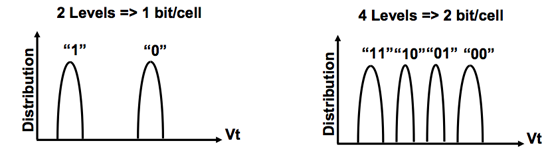
SLC (left) vs. MLC (right) flash
Ten thousand erase/write cycles isn’t much, yet SSD makers are guaranteeing their drives for anywhere from 1 - 10 years. On top of that, SSD makers across the board are calling their drives more reliable than conventional hard drives.
The only way any of this is possible is by some clever algorithms and banking on the fact that desktop users don’t do a whole lot of writing to their drives.
Think about your primary hard drive. How often do you fill it to capacity, erase and start over again? Intel estimates that even if you wrote 20GB of data to your drive per day, its X25-M would be able to last you at least 5 years. Realistically, that’s a value far higher than you’ll use consistently.
My personal desktop saw about 100GB worth of writes (whether from the OS or elsewhere) to my SSD and my data drive over the past 14 days. That’s a bit over 7GB per day of writes. Let’s do some basic math:
| My SSD | |
| NAND Flash Capacity | 256 GB |
| Formatted Capacity in the OS | 238.15 GB |
| Available Space After OS and Apps | 185.55 GB |
| Spare Area | 17.85 GB |
If I never install another application and just go about my business, my drive has 203.4GB of space to spread out those 7GB of writes per day. That means in roughly 29 days my SSD, if it wear levels perfectly, I will have written to every single available flash block on my drive. Tack on another 7 days if the drive is smart enough to move my static data around to wear level even more properly. So we’re at approximately 36 days before I exhaust one out of my ~10,000 write cycles. Multiply that out and it would take 360,000 days of using my machine the way I have been for the past two weeks for all of my NAND to wear out; once again, assuming perfect wear leveling. That’s 986 years. Your NAND flash cells will actually lose their charge well before that time comes, in about 10 years.
This assumes a perfectly wear leveled drive, but as you can already guess - that’s not exactly possible.
Write amplification ensures that while my OS may be writing 7GB per day to my drive, the drive itself is writing more than 7GB to its flash. Remember, writing to a full block will require a read-modify-write. Worst case scenario, I go to write 4KB and my SSD controller has to read 512KB, modify 4KB, write 512KB and erase a whole block. While I should’ve only taken up one write cycle for 2048 MLC NAND flash cells, I will have instead knocked off a single write cycle for 262,144 cells.
You can optimize strictly for wear leveling, but that comes at the expense of performance.


 Facebook
 Twitter
 RSS
RSS


295 Comments
View All Comments
drsethl - Monday, March 15, 2010 - link
Hi,just to add to the chorus of praise: this is a superbly informative article, thank you for all the effort, and I hope that it has paid off for you, as I'm sure it must have.
My first question is this. Is it possible to analyse a program while you're using it, to see whether it is primarily doing sequential or random writes? Since there seems to be a quite clear difference between the Intel X25m 80gb and the OCZ vertex 120gb, which are the natural entry-level drives here, where the Intel works better for random access, the vertex for sequential, it would be very useful to know which I would make best use of.
Second question: does anyone know whether lightroom in particular is based around random or sequential writes? I know that a LR catalog is always radically fragmented, which suggests presumably that it is based around random writes, but that's just an uninformed guess. It does have a cache function, which produces files in the region of 3-5mb in size--are they likely to be sequential?
Third question: with photoshop, is it specifically as a scratch disk that the intel x25m underperforms? Or does photoshop do other sequential writes, besides those to the scratch disk? I ask because if it only doesn't work as a scratch disk, then that's not a big problem--anyone using this in a PC is likely to have a decent regular HDD for data anyway, so the scratch disk can just be sent there. In fact, I've been using a vertex 120gb, with a samsung spinpoint f3 500gb on my PC, and I found that with the scratch disk on the samsung I got better retouch artists results (only by about half a second, but that's out of 14 seconds, so still fairly significant).
Thanks in advance to anyone who might be able to answer, and thanks again Anand for such an informative read.
Cheers
Seth
drsethl - Friday, July 9, 2010 - link
Hi again,just to report back, since writing the previous comment I have bought both drives, vertex and intel (the original vertex 128gb, and the intel g2 x25m). While the Intel does perform better in benchmarks, the difference in general usage is barely noticeable. Except when using lightroom 3, when the intel is considerably slower than the vertex. I'm using a canon 550d, which produces 18mpx pictures. When viewing a catalogue for the first time (without any pre-created previews), the intel takes on average about 20s to produce a full scale 1:1 preview. This is infuriating. The vertex takes about 8s. Bear in mind that i've got 4gb of 1333mhz ram, intel i7 q720 processor, ati 5470 mobility radeon graphics. So it's not the most powerful laptop in the world, but it's no slouch either. I can only conclude that when LR3 makes previews it does large sequential writes, and that the considerable performance advantage of the vertex on this metric alone suddenly becomes very important. With which in mind, I'm now going to sell the Intel and buy a vertex 2e, which will give the best of both worlds. But I'm sure there are lots of photographers out there wondering about this like I was, so hopefully this will help.
cheers,
Seth
jgstew - Friday, October 8, 2010 - link
I believe you are correct about the LR Catalog being mostly random writes, but I don't think this is a performance concern since the Catalog is likely stored in RAM for reads, and written back to the drive when changes are made that affect the Catalog, which is not happening all the time.As for the generating previews and Photoshop scratch disk, this is going to be primarily sequential since it is generating the data one at a time and writing it to disk completely. If LR was generating multiple previews for multiple photos simultaneously and writing them simultaneously, then you would have heavy fragmentation of the cache, and more random writes.
Any SSD is going to give significant performance benefit over spindle HD when it comes to random read/write/access. Sequential performance is the man concern with Photos/Video/Audio and similar data in most cases.
One thing you might consider trying is having more than one SSD, or doing this if you upgrade down the road. Have the smaller SSD with fast sequential read/write act as the cache disk for LR/Photoshop/Others and have the other SSD be the boot drive with all the OS/Apps/etc. This way other things going on in the system will not effect the cache disk performance, as well as speed up writes from boot ssd to cache disk, and back.
ogreinside - Monday, December 14, 2009 - link
After spending all weekend reading this article, 2 previous in the trilogy, and all the comments, I wanted to post my thanks for all of your hard work. I've been ignoring SSDs for a while as I wanted to see them mature first. I am in the market for a new Alienware desktop, but as the wife is letting me purchase only on our Dell charge account, I have a limited selection and budget.I was settled on everything except the disks. They are offering the Samsung 256SSD, which I believe is the Samsung PM800 drive. The cost is exactly double that of the WD VelociRaptor 300 GB. So naturally I have done a ton of research for this final choice. After exploring your results here, and reading comments, I am definitely not getting their Samsung SSD. I would love to grab an Intel G2 or OCZ Indilinx, but that means real cash now, and we simply can't do that yet. The charge account gives us room to pay it off at 12-month no-interest.
So at this point I can get a 2x WD VR in raid 0 to hold me over for a year or so when I can replace (or add) a good SSD. My problem is that I have seen my share issues with raid 0 on an ICH controller on two different Dell machines (boot issues, unsure of performance gain). In fact, using the same drives/machine, I saw better random read performance (512K) on a single drive than the ICH raid, and 4k wasn't far behind. I'm thinking I may stick to a single WD VR for now, but I really want to believe raid0 would be better.
So, back on topic, it would be nice to see the ICH raid controller explored a bit, and maybe add a raid0 WD VR configuration to your next round of tests.
(CryastalDiskMark 2.2)
Single-drive 7200 rpm g:
Sequential Read : 123.326 MB/s
Sequential Write : 114.957 MB/s
Random Read 512KB : 55.793 MB/s
Random Write 512KB : 94.408 MB/s
Random Read 4KB : 0.861 MB/s
Random Write 4KB : 1.724 MB/s
Test Size : 100 MB
Date : 2009/12/09 2:03:4
ICH raid0:
Sequential Read : 218.909 MB/s
Sequential Write : 175.]347 MB/s
Random Read 512KB : 51.884 MB/s
Random Write 512KB : 135.466 MB/s
Random Read 4KB : 1.001 MB/s
Random Write 4KB : 2.868 MB/s
Test Size : 100 MB
Date : 2009/12/08 21:45:20
marraco - Friday, August 13, 2010 - link
Thumbs up for the ICH10 petition. It's the most common RAID controller on i7.Also, I would like to see different models of SSD in RAID (For example one intel raided with one Indilinx).
I suspect that performance with SSD scales much better that with older technologies. So I want to know if makes sense to buy a single SSD, and wait for prices to get cheaper at the time of upgrade. The problem is that as prices get cheaper, old SSD models are no more available.
aaphid - Friday, November 27, 2009 - link
OK, I'm still slightly confused. It seems that running the wipe/trim utility will keep the ssd in top condition but it won't run on a Mac. So are these going to be a poor decision for use in a Mac?ekerazha - Monday, October 26, 2009 - link
Anand,it's strange to see your
"Is Intel still my overall recommendation? Of course. The random write performance is simply too good to give up and it's only in very specific cases that the 80MB/s sequential write speed hurts you."
of the last review, is now a
"The write speed improvement that the Intel firmware brings to 160GB drives is nice but ultimately highlights a bigger issue: Intel's write speed is unacceptable in today's market."
ekerazha - Monday, October 26, 2009 - link
Ops wrong articlemohsh86 - Tuesday, October 13, 2009 - link
am 23 years old computer engineer..this is the most awesome informative article ever read !
Pehu - Tuesday, October 13, 2009 - link
First of all, thanks for the article. It was superb and led to my first SSD purchase last week. Installed the intel G2 yesterday and windows 7 (64 bit) with 8 G of RAM. A smooth ride I have to say :)Now, there is one question I have been trying to find an answer:
Should I put the windows page file (swap) to the SSD disk or to another normal HD?
Generally the swap should be behind other controller than your OS disk, to speed things up. However, SSD disks are so fast that there is a temptation to put the swap on OS disk. Also, one consideration is the disk age, does it preserve it longer if swap is moved away from SSD.
Also what I am lacking is some general info about how to maximise the disk age without too much loss of speed, in one guru3d article instructions were given as:
* Drive indexing disabled. (useless for SSD anyway, because access times are so low).
* Prefetch disabled.
* Superfetch disabled
* Defrag disabled.
Any comments and/or suggestions for windows 7 on that?
Thanks.