



Apple's iPhone: The Future is Here
by Anand Lal Shimpi on July 2, 2007 6:13 PM EST- Posted in
- Smartphones
- Mobile
An Ode to the Screen
While I was writing this review, Derek Wilson, our resident GPU guru gave me a call to chat about his upcoming DirectX 10 performance piece. Inevitably he snuck in some questions about the iPhone, but the thing he wanted to know the most was "is the screen as good as it looks in the commercials?"
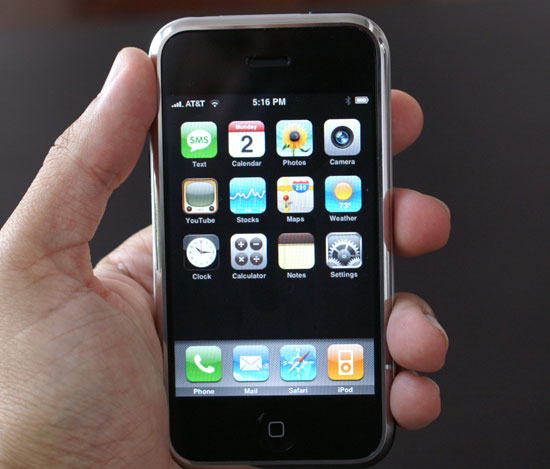
It looks that good
The answer is unequivocally yes. In fact, in taking pictures for this article I had to redo a number of shots because the camera would pick out details in the LCD display that simply weren't visible to the naked eye. Capturing the beauty of the screen is really a tough job, but it really does look just as good in person as it does in Apple's own commercials/videos.
The screen also gets every bit as nasty as you'd expect it to, given that the iPhone works by rubbing your fingers all over it. The unexpected part of it all is that with the backlight on, you can't tell that smudges from three different people are all over the 3.5" screen. The only time you really notice how disgusting the screen has gotten is when the device is asleep, unfortunately it'll take more than just a wipe of the cleaning cloth to get all the grease off of it. Apple recommends turning the unit off and using a slightly damp cloth, while avoiding all harsh cleaners/abrasives.
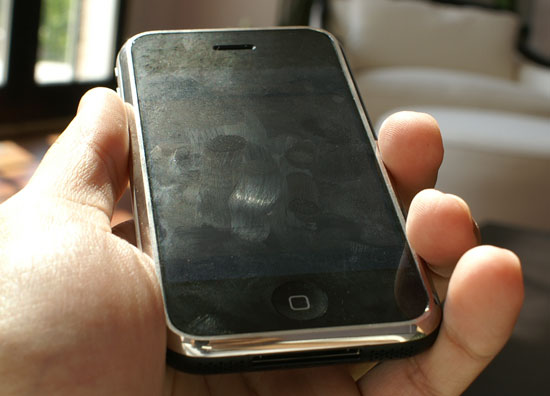
Uh, ew?
At the same time, the device doesn't feel like a fragile jewel, it feels like what a modern day smartphone should feel like. It feels like something straight out of Star Trek. Videos cropped up over the weekend showing all the things you could do to the iPhone without scratching the screen, and honestly when using it you get the impression that you'd really have to try to damage this thing.
By default the iPhone's brightness is adjusted by an ambient light sensor similar to what's in Apple's MacBook Pro line. Indoors the display is absolutely beautiful, but obviously things change once you head outdoors. Outside the display isn't nearly as bad as the Samsung Blackjack, but it gets more difficult to see. Thankfully it's still usable, despite being washed out.


 Facebook
 Twitter
 RSS
RSS


85 Comments
View All Comments
icruise - Monday, July 16, 2007 - link
Excellent review that (surprisingly, given that this is a very tech-oriented site) "got" what the iPhone is about. It may not be the perfect cell phone, but it's certainly an amazing one, and the first really fresh take on the concept that we've seen in a long long time.One quibble, however. The review states that Yahoo charges $3 a month for push email support. Yahoo does in fact provide free IMAP push email to anyone using a Yahoo Mail account on the iPhone. However, there appears to be some issues involved in the implementation and I couldn't find any mention of using push email with Yahoo in the Apple documentation, which may be why the reviewer didn't realize this.
It seems that if you have any other email accounts active on the iPhone, push email doesn't work reliably. It may take quite a while (many minutes) to show up. I tested this on my iPhone and when I had my Yahoo Mail account as the only active account, messages sent to it showed up pretty much instantaneously. When I enabled the other accounts, that changed, whether I had mail checking set to "manual" or a special interval. So in short, I think the iPhone's push capability is there, but they haven't quite ironed out the bugs. Hopefully they will do this soon with a software update, and also enable push email for .Mac mail as well.
AnnonymousCoward - Saturday, July 7, 2007 - link
How bout horizontal/landscape mode for the keyboard? With all this talk about fingers not being small enough for crammed keys, I'm blown away this wasn't addressed. Based on the aspect ratio of the keyboard in front of me, and the aspect ratio of the iphone, I don't see why you'd possibly want to type in portrait mode.ViperV990 - Friday, July 6, 2007 - link
I'm curious if meebo.com (a web-based multi-protocol IM) works on the iPhone. Can anyone please give this a try and report back?Icehawk - Monday, July 9, 2007 - link
Great article, I really hadn't read or watched too much on the iPhone so it was nice to see it all laid out clearly.Sadly the phone, like my Tivo S3, is missing some very basic features (voice activation?!) and has some weird ergonomic misses.
However I think this is a big deal, if the interface is as much of advance overall as it sounds that is big. IMO the next major advance computing (and these MFDs by extension) is the interface - we are still using pretty much the same paradigms as 20 years ago.
Calista - Friday, July 6, 2007 - link
Hi Anand!I would like to know how you judge the value of the iphone. We fully understand that you find it an awesome device but it's no denial that it's also a fairly expensive and $600 will buy you both a normal feature phone (2MP cam and the rest) and a well-working internet-tablet like the Nokia N800 - which by the way support up to 16 GB of memory, carry a screen with higher resolution than the Iphone and support Skype. It's another device to carry for sure, but only another 200 grams and it can be left safely in your home when doing things more ..action-packed than sipping coffee at Starbucks.
Quite frankly, I would feel fairly uncomfortable carrying a $600 device in my pants all the time.
Justin Case - Friday, July 6, 2007 - link
I'm sure you realise there's an obvious joke lurking in that last sentence... ;-)Justin Case - Thursday, July 5, 2007 - link
Any chance of a comparison with the Qtek 9000 or Nokia's N700...?2ManyOptions - Thursday, July 5, 2007 - link
Why the hate? Its not something which you can totally reject or totally throw like trash ! It does look good when compared to it's competitors.The price tag for the iPhone is an individual's concern. If he/she thinks spending 700$ on iPhone is cool, so be it, i wouldn't lose anything !! Does that mean the person who bought an iPhone is stupid?? I wudn't agree with that, its his money n his idea of fun n spending.
I would like to buy something like an iPhone but not unless its below 250$ or something like that...And maybe something new, something better than iPhone will pop up by then.
Good marketing by Apple though.
Koing - Wednesday, July 4, 2007 - link
to pick the 4GB instead of the 8GB version! :PaGoGo - Wednesday, July 4, 2007 - link
http://www.unwiredview.com/2007/07/04/htc-omni-pic...">HTC OmniIf Steve was holding this phone a million idiot will be standing in line from now till October :p