



Apple's MacBook Pro: Using it as a Mac and a PC
by Anand Lal Shimpi on April 13, 2006 12:00 AM EST- Posted in
- Mac
The Most Powerful Apple Notebook Ever
The heart and soul of the MacBook Pro is the Intel Core Duo processor, which is available in 1.83GHz, 2.0GHz and 2.16GHz flavors in the notebook. Although it is the same Core Duo processor used in PC notebooks, Apple has refrained from using Intel's model number system to avoid confusion within their user base. Later this year Intel will introduce a 2.33GHz Core Duo processor, which will most likely replace or augment the 2.16GHz part at the high end of Apple's offerings. Of course by the end of this year, Intel will be shipping Merom, the mobile version of Conroe, and it is backwards compatible with currently shipping Core Duo platforms. While the currently shipping MacBook Pros should be compatible with future Merom chips, the Core Duo processor is actually soldered onto the motherboard and is socketless; that means there's no removing, replacing or upgrading your CPU.
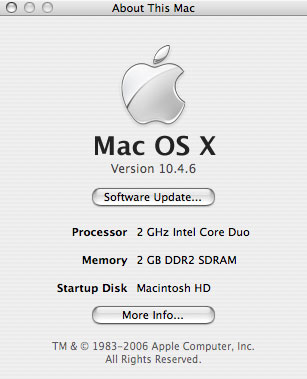
I am disappointed to say that battery life really hasn't been improved over my old PowerBook G4. General usage still leaves me with less than 3 hours of battery life, which is disappointing since Core Duo is supposed to be the CPU to bring us to the 5 hour marker.
The MacBook Pro features Intel's 945 Express chipset, but opts for a faster external graphics solution rather than rely on Intel's integrated graphics. Being based on the 945 of course means that it features a dual channel DDR2-667 memory controller, but in order to take advantage of that you have to populate both SO-DIMM slots on the MacBook Pro. There is no performance benefit however to enabling dual channel mode; remember that the Core Duo only features a 64-bit wide 667MHz FSB, and without integrated graphics a single 64-bit DDR2-667 channel can offer enough bandwidth to saturate that bus. If the future MacBooks (non-pro) do ship with integrated graphics, you may want to install memory in pairs as dual channel will matter there.
To confirm that dual channel does nothing I ran a couple of tests with a single 1GB DDR2-667 SO-DIMM vs. 2 x 512MB DDR2-667 SO-DIMMs:
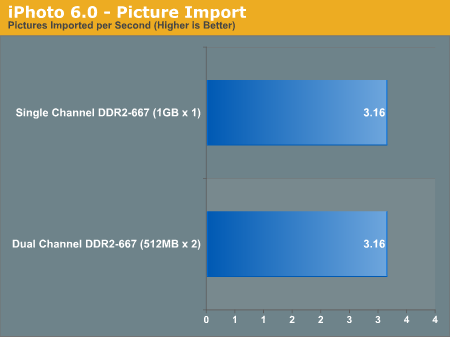
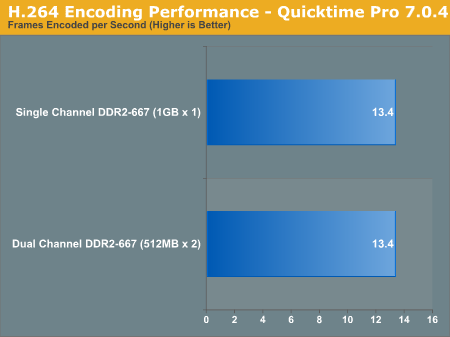
The results are what they should be: there's no benefit to enabling dual channel mode on the MacBook Pros.
A very unfortunate limitation of the MacBook Pro is its 2GB memory size, meaning that at best you can install two 1GB DDR2-667 SO-DIMMs in this system and that's all. It's unfortunate because OS X does an extremely good job of taking advantage of additional memory. When I started using OS X I initially hated the idea that closing all the windows of an application wouldn't actually close the application itself. However the more I used OS X, the more I realized that I didn't want to close the applications I used a lot; I wanted their windows out of the way but I wanted the ability to switch to them without waiting on the hard drive to load up that program again.
Leaving just about every application I use open all the time and not having to worry about my system getting slow over time was a bit of a new experience for me, but it was a welcome one. However, getting addicted to leaving everything open all of the time also made me want and appreciate what the PC user in me would consider to be a ridiculous amount of memory. While anything above 2GB would generally go unused on my PC, I've found that on my desktop Mac around 4GB ends up being the sweet spot. Needless to say, a 2GB memory limitation on the MacBook Pro is a bit of a disappointment. Admittedly, I haven't actually tried sticking 4GB in there to see if it is an actual limitation or a guideline to avoid installing memory modules that are physically too big for the unit.
As always, if you want more memory your best bet is to not order it from Apple. The 1.83GHz MacBook Pro comes with 512MB of DDR2-667 standard, and to upgrade it to 1GB Apple asks for an additional $100. If you want a single 1GB DIMM instead, you pay Apple $200. The most ridiculous upgrade price is the $500 cost for 2 x 1GB modules. The same applies to the 2.0GHz MacBook Pro; stock it ships with 1GB of memory, but adding a second 1GB stick tacks on an additional $300 to the cost of the notebook.
We went to Crucial and found MacBook Pro compatible memory for close to half the cost of Apple's upgrades. A 512MB stick will run you $77 at Crucial, but the real steal (compared to Apple's pricing) is a 1GB stick that will cost $162. For the cost of a 1GB upgrade to the MacBook Pro 2.0GHz you can almost get a pair of 1GB sticks from Crucial. The choice is pretty simple.
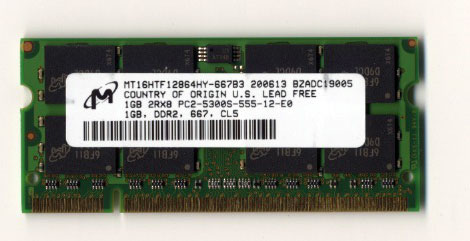
Of course we went the Crucial route and the memory worked perfectly.


 Facebook
 Twitter
 RSS
RSS


52 Comments
View All Comments
Sengir - Saturday, July 22, 2006 - link
I'm mainly a PC guy, but while working on Apple notebooks at a Notebook Depot, I've become interested in the Mac OS. Previously I had little to no exposure to it.I will say this. Apple has made alot of improvement with the Macbook/Pro in terms of repairing. Alot easier to get to the motherboard, hard drive, memory or anything.
Unfortunately they didn't redesign for the heat of the CPUs, the ventilation just doesn't seem adequate and as a result, overheating is common.
There are other issues with the hardware, but none I can really go into. I believe people buy Macs for the OS and not the hardware. Since some of the design/materials are cheaper than an HP notebook, for more cost. If I buy a Mac, it will probably be a mini, due to cost. The Macbooks are very nice, but have several flaws that need to be addressed.
redison - Tuesday, September 5, 2006 - link
"I've become interested in the Mac OS ..... believe people buy Macs for the OS and not the hardware"Right on, and check out the Leopard ( OS X 10.5 )Preview on Apples website, even better if you have the time see Jobs Kenote
phillock - Sunday, January 28, 2018 - link
I've also bought a Macbook one week ago, and I also had a keyboard issue... My 'e' button wasnt working sometimes... When i lifted the key off the keyboard i could see the plastic under the key was kind of broken: there was a little crack in it. https://tinyurl.com I went back to the apple shop, and because I only had the laptop for like 2 days they just gave me a complete new one.../y83723wwphillock - Sunday, January 28, 2018 - link
I'm most interested in a smaller model though, so I have to wait regardless. I suspect the smallest model may get a 13" 1280x800 widescreen too, considering that as of the Aperture 1.1 update, Apple https://tinyurl.com/y83723ww has arbitrarily (and very annoyingly) removed support for my 1024x768 iBook G4 12" 1.33 GHz, and is saying that a minimum 1280x780 screen is required, even though no such laptop is available yet from Apple.hasapi - Monday, April 17, 2006 - link
Excellent reading - I just received my 2GHz MBP - and its just fantastic in every way. My only gripe which was noted in the article is the battery life of just over 2.5hrs!, its probably unrealistic but my old PB was getting 3.5hrs - maybe a new third party battery might help but would have been nice to see upwards of 5hrs imo?Eug - Sunday, April 16, 2006 - link
I agree. Moreover, Boot Camp and Parallels' Workstation both will be improved by then, and Apple's pro line of laptops may just have Blu-ray drives as well available as an option. Even if we don't get Blu-ray drives by the time Merom is incorporated into MacBook Pros, in the very least we'll have 8X DVD-R support as well as dual-layer support.
I'm most interested in a smaller model though, so I have to wait regardless. I suspect the smallest model may get a 13" 1280x800 widescreen too, considering that as of the Aperture 1.1 update, Apple has arbitrarily (and very annoyingly) removed support for my 1024x768 iBook G4 12" 1.33 GHz, and is saying that a minimum 1280x780 screen is required, even though no such laptop is available yet from Apple.
tekkstore - Monday, April 17, 2006 - link
http://www.tekkstore.com">tekkstore.comgamehack - Saturday, April 15, 2006 - link
Hi there,I have a question to any owners of a MacBook Pro - Is the keyboard suitable for heavy use? I planning to get a MBP and use it as my main dev machine so I would typing quite a lot.
Kind regards,
gamehack
bertd - Tuesday, April 18, 2006 - link
in my opinion, the keyboard is one of the best keyboards i've ever used on a laptop... and i code a lot of html, php and css so i use it a lot toobertd - Saturday, April 15, 2006 - link
Anand:great review!
I've also bought a Macbook one week ago, and I also had a keyboard issue... My 'e' button wasnt working sometimes... When i lifted the key off the keyboard i could see the plastic under the key was kind of broken: there was a little crack in it. I went back to the apple shop, and because I only had the laptop for like 2 days they just gave me a complete new one...
I've also experienced the 'heat' problems.. the first macbook i had was an 'earlier' version of the macbook : the serial number was W8611*****... With the new one, the one they have given me to replace the one with the broken 'e' key, the serial number started with w8612****, and I've read that macbooks starting with these numbers in their serial should be newer revisions...
The heat problem is not as bad as with the first one, but still the bottom gets kind off hotter than with any other laptop i've ever had...